To automate SOC 2 evidence collection from laptops, run an agent that checks every device’s encryption, firewall, screen lock, patches and software all day. Each failure becomes a ticket with one owner, and the fix is recorded along with a second check that confirms it. Your evidence becomes a running record of how controls worked, not screenshots gathered the week before the audit.
What evidence do SOC 2 and ISO 27001 auditors ask IT for?
Auditors want proof that your controls exist and that they actually worked. For IT, that mostly means records about devices, access, changes and logs.
The two frameworks get there in different ways:
- SOC 2 is an attestation report under criteria set by the AICPA (Microsoft’s SOC 2 overview explains the background). A Type 2 report tests controls over a period of time, typically 3 to 12 months, not on a single day.
- ISO/IEC 27001 is the international standard for information security management systems. Its 2022 edition cut the Annex A controls from 114 to 93, grouped into organisational, people, physical and technological themes.
From IT, auditors usually ask for these things:
- A list of devices, each with a named owner.
- Proof that those devices are encrypted, patched and protected.
- Records of who has access, plus proof that access is reviewed and removed when people leave.
- Change records showing approval before anything goes live.
- Logs that nobody could have changed after the fact.
Which controls can be proven straight from laptop checks?
Endpoint controls are the easiest to prove from device data, because an agent can read the setting directly. You don’t have to ask someone to take a screenshot.
ISO 27001 Annex A 8.1 asks you to protect information stored on, processed by, or reachable through user endpoint devices such as laptops. On the SOC 2 side, endpoint and software evidence supports CC6.1–CC6.3 for logical access and CC6.8 for preventing and detecting unauthorised software.
| Control area | Framework link | What a laptop check can show |
|---|---|---|
| Endpoint security | ISO 27001 A.8.1; SOC 2 CC6 | Disk encryption, firewall, screen lock |
| Unauthorised software | SOC 2 CC6.8 | Blocked apps, risky browser extensions, unapproved AI tools |
| Vulnerability management | ISO 27001 technical vulnerabilities | Overdue OS updates; installed apps matched to known critical and high vulnerabilities |
| Asset inventory | ISO 27001 inventory of assets | Every device and seat with an owner |
| Offboarding | SOC 2 logical access | Devices collected and seats reclaimed before the ticket closes |
The ilane device agent runs 42 checks on Mac, Windows and Linux laptops. They cover encryption, firewall, screen lock, updates, blocked apps and vulnerable software. Each failing check opens one ticket for one owner. The ticket closes when the device’s next report comes back clean. You can switch any check off or exempt a single device. Every employee can read the published list of what the agent checks and what it never collects.
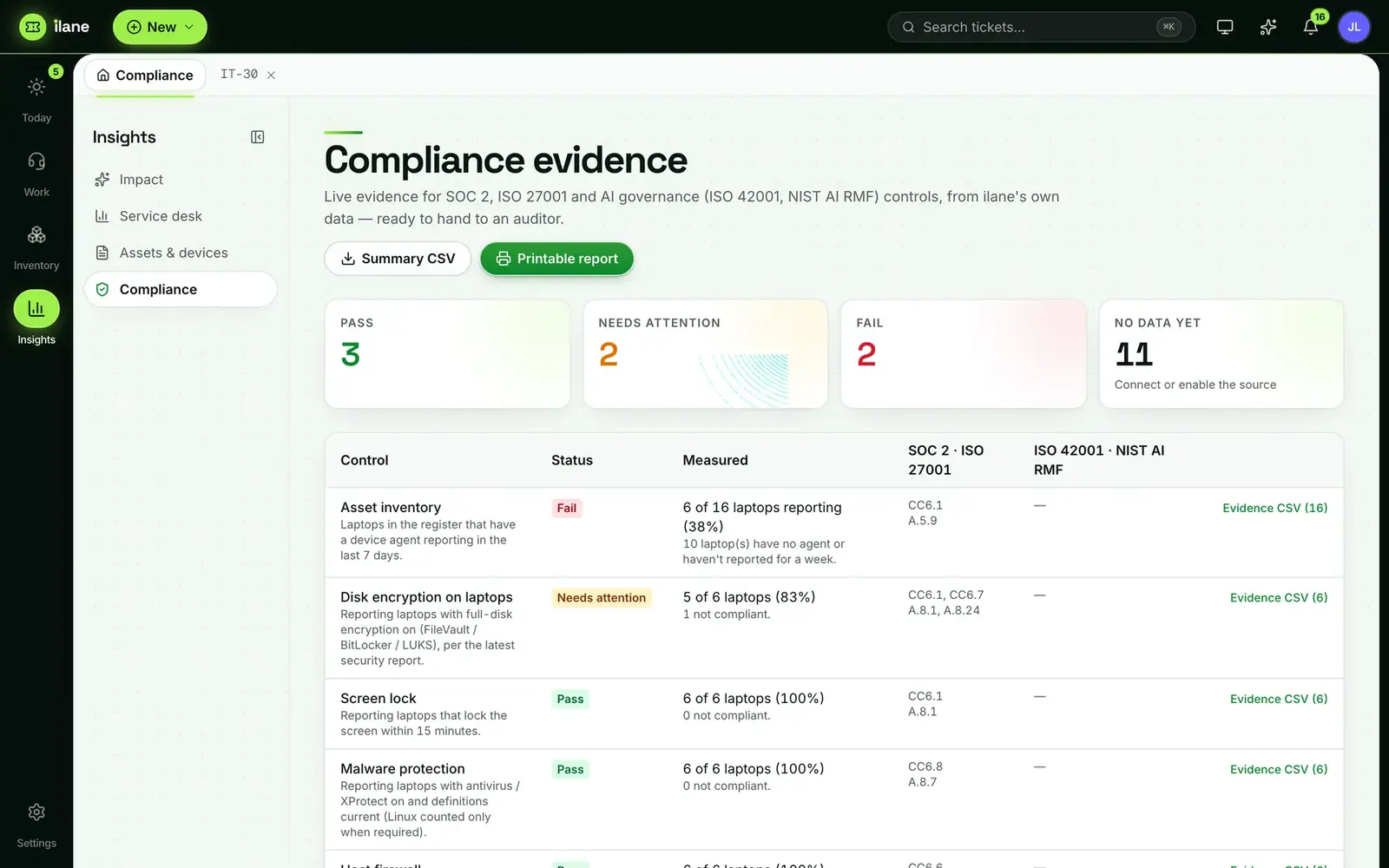
ilane Compliance & insights maps these readings to SOC 2 and ISO 27001. Under SOC 2, it covers endpoint security, logical access, change management and vulnerability management. Under ISO 27001, it covers the Annex A controls ilane can see: asset inventory, access rights, endpoint devices and technical vulnerabilities. Each control is calculated from real data and linked to the records behind it.
How do tickets and change records count as evidence?
Tickets count as evidence when they show who asked for a change, who approved it, what was done and when. Auditors test that same chain.
SOC 2 CC8.1 expects changes to infrastructure, data and software to be authorised, designed, tested, approved and implemented through a controlled process. A ticket can show all of that, but only if it’s linked to the device and the person. If not, someone has to connect them by hand at audit time.
In ilane, tickets, devices, people and services live in one database. That means each record already includes:
- The device and its owner, so access and offboarding evidence lines up with the asset register.
- Approvals. Changes to a system show a confirm card and wait for a person to say yes. Serious actions, like wiping a laptop, need a second approver.
- Fix steps. Before you approve a fix, you see the steps it may run. Afterwards, you see the steps it did run, and you can export them for your audit.
- Recurring reviews. Every quarter, a ticket opens for access reviews with the list already filled in. Admins, department heads and API keys come up for review too.
Why does point-in-time screenshot evidence fall short?
A screenshot shows one laptop at one moment. A Type 2 audit asks whether the control worked across the whole period.
Screenshot evidence has three gaps:
- Coverage. Someone captures 20 laptops and the other 180 go unchecked. If an auditor’s sample lands on a device nobody looked at, you have an exception.
- Time. A laptop that was encrypted in March tells you nothing about July. Settings drift when people reinstall, swap hardware or turn things off.
- Trust. A screenshot can be cropped, reused or taken from the wrong machine. It doesn’t prove where it came from.
Continuous checks close all three gaps. Every device reports all day, failures and their fixes come with timestamps, and the evidence comes from the same system that ran the check.
How do you show that problems were actually fixed, not just logged?
Write down in advance what “fixed” means. Then let the system re-check the device itself before the ticket can close.
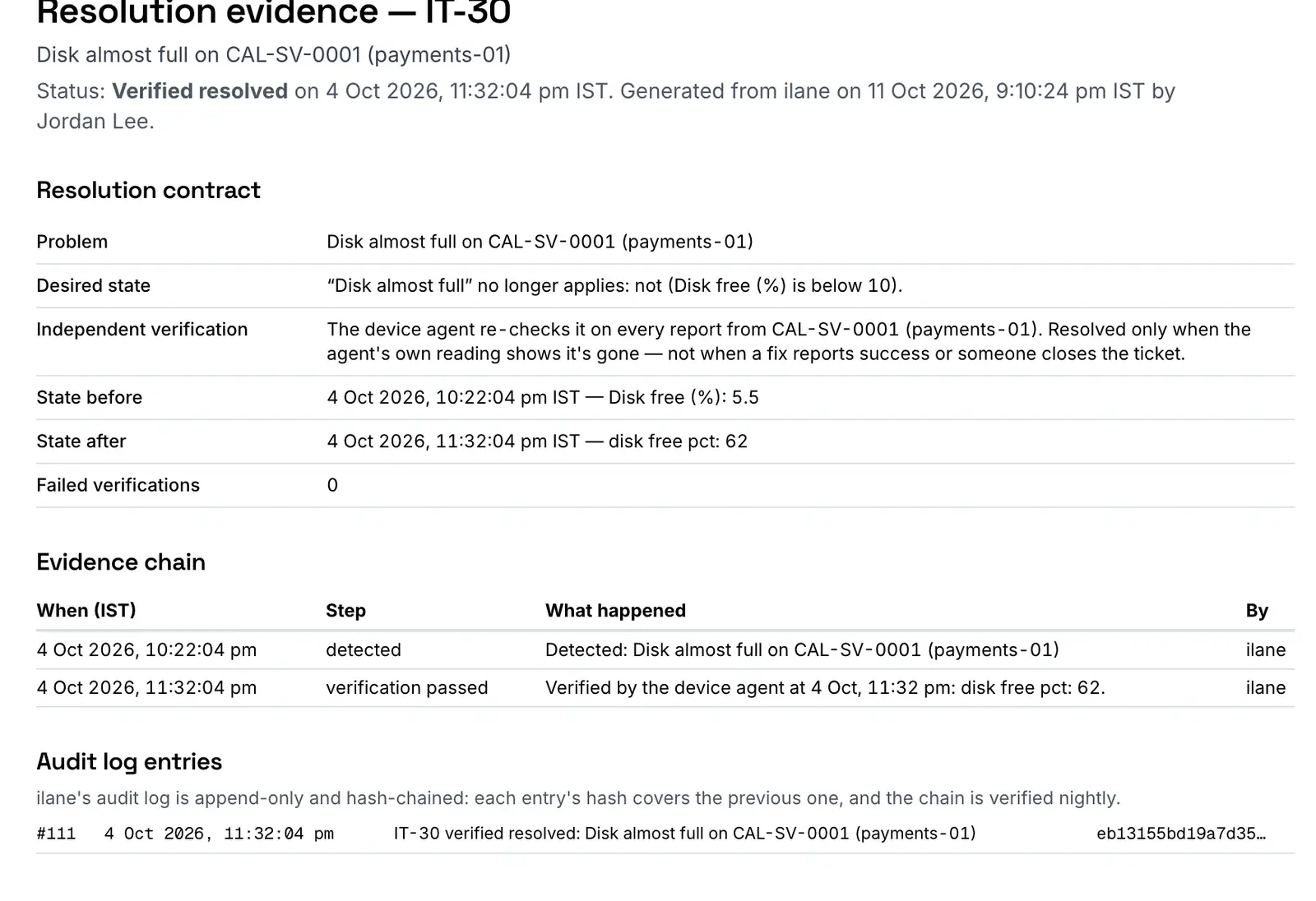
In most help desks, a ticket closes when someone clicks a button. That proves somebody said it was fixed, not that it was. ilane’s verified resolution puts every problem through five stages:
- Found. A check spots the problem, such as a laptop with its firewall off.
- Owned. The problem gets one owner and one clock. Related alerts are grouped into one incident.
- Fixed. Safe fixes you’ve switched on run by themselves. Riskier ones wait for one click from IT.
- Checked. ilane takes its own fresh reading of the device. A fix that reports success doesn’t count, and neither does a person clicking resolve.
- Proven. The ticket closes with an evidence record. If the check fails, the same ticket reopens.

The evidence record holds the definition of “fixed”, the before and after readings, every step taken, who approved it, and the matching audit log entries. When a fix is verified, the related control score goes up by itself. You can print the record for each ticket or export it as CSV.
How do you keep an audit trail that can’t be quietly edited?
Use a log where each entry is chained to the one before it, so changing any record breaks the chain and can be detected.
Auditors check that logs are protected from tampering under ISO 27001 Annex A 8.15. A log that an admin can edit is weak evidence.
The ilane audit log works like this:
- Each entry carries a fingerprint of the entry before it. If anyone changes an entry, every fingerprint after it stops matching.
- A nightly check confirms the chain is intact, or shows exactly where it broke.
- Entries can’t be updated or deleted through the app or directly in the database.
- Entries are kept for at least a year.
- It records sign-ins, refused sign-ins, sign-outs and timeouts, admin changes, data exports, access-review decisions, approvals, every fix step and every verified fix.
What should you still prepare by hand?
Anything that doesn’t come from devices, tickets or fixes still needs people to write and own it.
- The system description (SOC 2). The AICPA publishes description criteria for describing your system in a SOC 2 report. Management writes this with the auditor.
- Policies and risk assessment. These include information security, acceptable use and incident response policies, plus your risk register and the reasons behind which controls you apply.
- People controls. Background checks, security training records and signed agreements usually sit in HR systems.
- Vendor and physical security. Supplier reviews, contracts and office access are mostly outside what a laptop agent can see.
- Exceptions. For any device you’ve exempted from a check, write down why and who agreed to it.
Automation removes the chasing and the screenshots. Judgement about scope, risk and policy is still up to you.
Conclusion
Laptop evidence holds up best when it’s continuous and checked by the system itself. Check every device all day and give every failure an owner. Close tickets only after a fresh reading confirms the fix, and keep everything in a log nobody can edit. You’ll then have a record that covers the whole audit period, and audit prep turns into reviewing reports instead of building them.
See it on your own laptop: Book a demo →. We’ll fix one problem together and watch ilane check that it’s really fixed.
Frequently asked questions
Can continuous evidence replace the auditor?
No. A CPA firm still issues the SOC 2 report, and an accredited body still certifies ISO 27001. Continuous evidence makes their sampling easier to answer, because every device and fix already has a record. It doesn’t replace their testing or your policies.
Do employees need to be told that an agent checks their laptop?
Often, yes, depending on where you operate. Under ilane’s terms, the customer is responsible for telling employees about device monitoring where the law requires it. ilane publishes the full list of what the agent checks and what it never collects, and every employee can read it.
Can we keep compliance data on our own infrastructure?
Yes. You can self-host ilane on your own server with Docker Compose, and nothing leaves your network unless you connect it. There’s also a dedicated hosted option, where your data is kept apart from every other customer.
Does ilane cover AI governance frameworks as well?
Yes. Alongside SOC 2 and ISO 27001, ilane Compliance & insights maps controls to ISO 42001 and the NIST AI RMF, using the AI tools, MCP servers and models found on your laptops and servers.
How much does it cost?
Pricing is quoted for each team, based on how many laptops, desktops and servers run the ilane agent. Book a demo to get a quote. You can also start with a pilot on one team.