ilane / Service desk
The service desk that
already knows the answer.
One place for IT, HR, Finance and Ops. Requests arrive with the person’s laptop, seats and history attached — and most answers are found before a ticket is even filed.
Five ways in
Ask however you like.
It all lands in one lane.
People don’t have to learn a form. Whichever door they use, the request arrives in the right team’s queue with the same owner rules and the same clock.
Answers while they type.
As someone describes the problem, ilane searches the knowledge base and suggests the article that already solves it. Many tickets never need to be filed.
- Suggestions from your own articles
- “Did this help?” feedback on every article
- Known outages shown before they submit
This might already solve it
Ready-made requests.
A request catalog with short forms for the things people ask for all the time. One submission can create work for several teams at once.
- Employee onboarding and offboarding
- Hardware and software requests with approvals
- Each team sees only its own tasks
Just ask in plain words.
The assistant answers from your knowledge base and the person’s own devices, and files a ticket for them when it can’t solve it. It uses your AI key — or switch it off entirely.
- Cites the article it used, or says it doesn’t know
- Files tickets in the right team for them
- Optional — every other door keeps working
Email still works.
Send a message to your support address and it becomes a ticket in the right team. Senders from your domain are invited automatically, so they can follow along.
- Routed to the team you choose
- Never creates the same ticket twice
- Updates and the CSAT question come back by email
Shared mailbox not receiving vendor invoices
Hi team — since Tuesday nothing from our vendors reaches finance@. Can you check?
Or straight from your tools.
A REST API with keys you control, scoped to a team. Create tickets on behalf of a person, attach files, read status — from any internal app or script.
- Bearer keys, scoped per team
- Raise tickets as a named requester
- CSV and JSON exports
curl -X POST https://acme.ilane.io/api/v1/tickets \
  -H "Authorization: Bearer ••••••••" \
  -d '{
    "title": "Badge reader offline, floor 3",
    "requester_email": "[email protected]",
    "priority": "HIGH"
  }'

→ 201 Created
{ "key": "OPS-4", "status": "OPEN", "team": "Ops" }
Context, attached
No more “which laptop is it?”
Because ilane already knows every person, device and seat, a ticket arrives with what an agent would normally spend ten minutes asking for.
VPN reconnect loop on HQ Wi-Fi after lunch
Raised by Alex Morgan · Design · via portal
- The deviceModel, OS, owner and when it last checked in.
- Its healthThe same checks the agent runs all day.
- What they useSoftware seats, so access requests are one click.
- The historyEarlier tickets from this person on this topic.
- What’s going onOutages that probably explain it — so you reply once.
The queue
A queue that sorts itself before you do.
SLA clocks run in business hours. Tickets about to breach rise to the top on their own; anything waiting on the requester pauses its clock.
- Saved views, filters and bulk actions
- Peek a ticket without leaving the list
- ⌘K to jump to anything
- Merge duplicates, canned replies, @mentions
Every team
Not just IT. Every team
that answers requests.
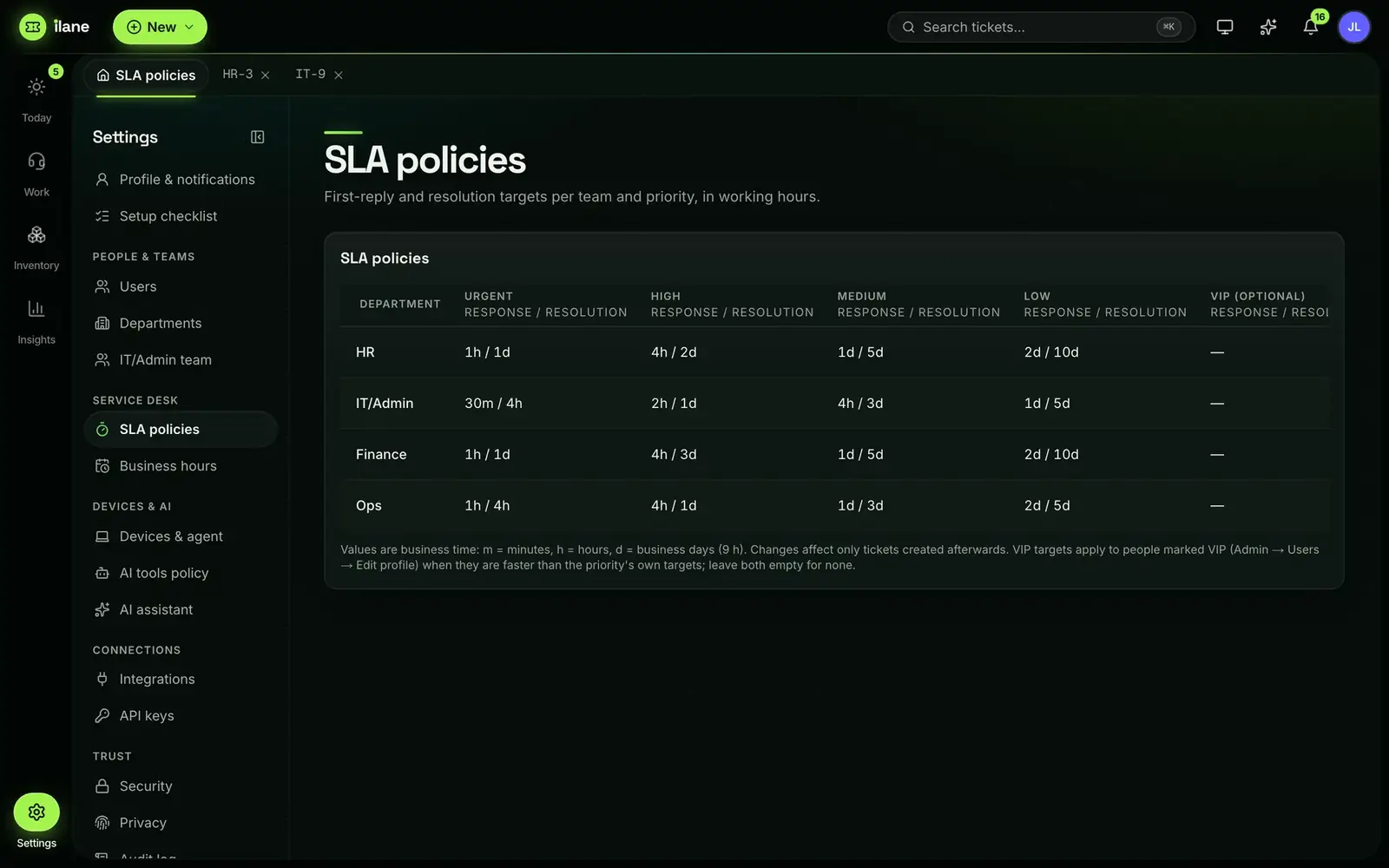
Each team gets its own queue, categories, SLAs, canned replies and on-call rota — and nobody has to buy a second tool.
Categories
Urgent SLA
Right now
Business-hour SLAs
Clocks that know it’s Friday evening.
Targets are counted in your working hours, with holidays and VIP targets. Try it — the clocks below use IT/Admin’s real targets and a 9:30–18:30, Monday-to-Friday week.
Onboarding in one form
One request. Four teams.
Nobody chasing anybody.
HR fills in one form for a new joiner. ilane splits it into tasks for each team, tracks them under one parent — and closes the parent when the last task is done.
Approvals
Sign-off without the email chain.
Requests that need a yes wait for it — up to three steps, in order. Nobody can approve their own request, and work starts only once every approver has said yes.
- Department heads and admins approve from one list
- Away? Approvals reroute to your delegate
- Every decision is on the ticket’s history
Answers before tickets
The best ticket is the one
nobody has to file.
Service status
When something is broken for many people, one master ticket tracks it. Everyone else taps “I’m affected” instead of filing a duplicate — and all of them get the fix notice.
Articles owned by each team, edited in place, with a thumbs up or down on every page. Turn any resolved ticket into a draft article in one click.
Scheduled changes can show on the status page, so people know before they’re surprised.
Workflows
Draw the routine once.
ilane does it every time.
A visual builder for “when this happens, do that” — with branches, waits and approvals. Admins build for everyone; department heads build for their own team.
How it’s going
Know how the desk is doing —
without building a report.
Your request IT-24 was resolved.
How did we do?
One tap, straight from the email. No login.
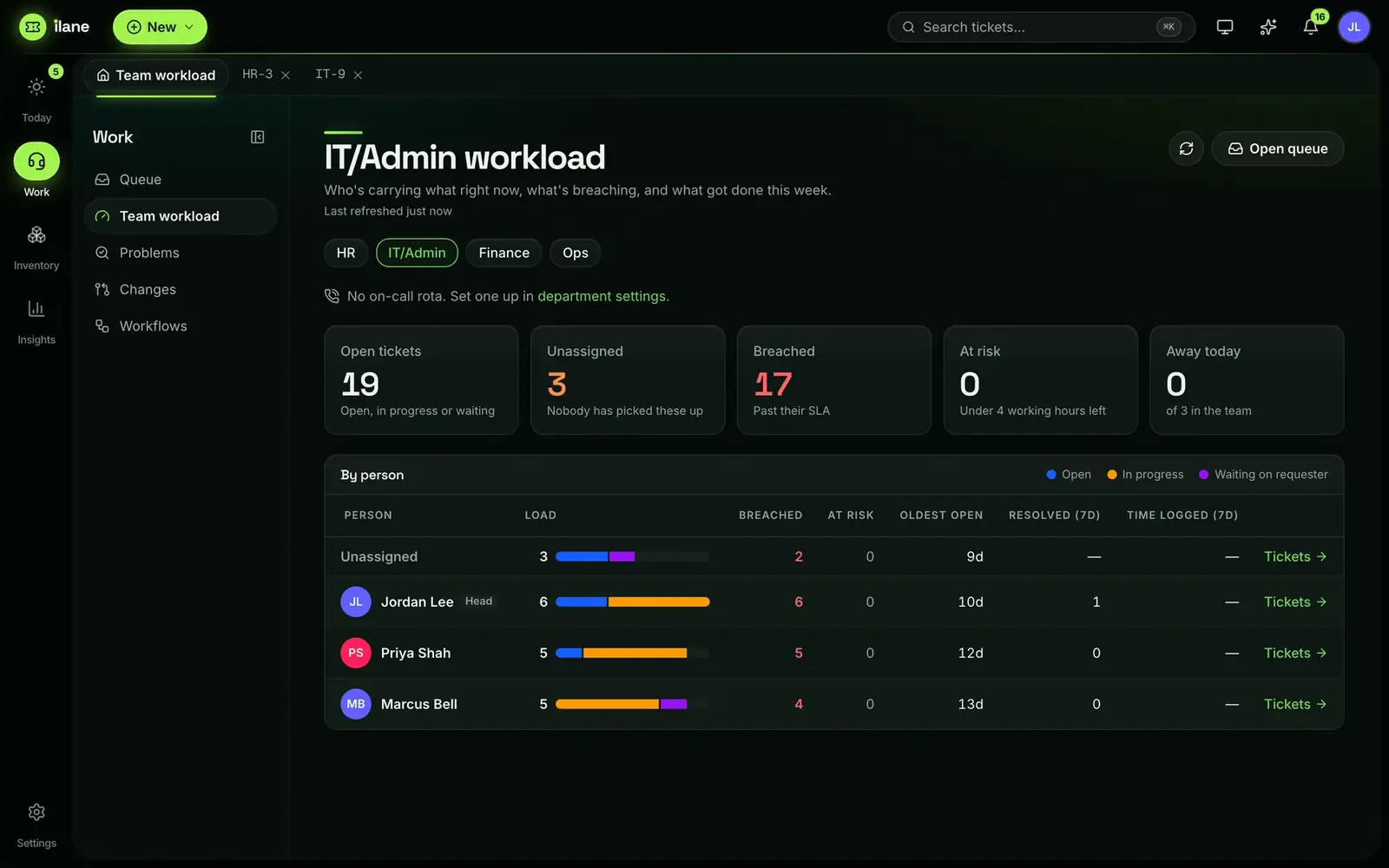
Reports
Volumes, response and resolution times, SLA compliance, reopen rate, CSAT per agent.
Weekly digest
A Monday-morning summary in every head’s inbox.
Time tracking
Log time on tickets; see it by tag and team.
CSV on everything
Tickets and reports export in one click.
And the details agents notice.
Questions
Before you switch.
Can HR and Finance really use this, or is it an IT tool?
Each team gets its own queue, categories, SLAs, approvals and canned replies. HR, Finance and Ops use the same desk with their own settings — and people raising requests see one portal.
Do we need AI turned on?
No. The portal, catalog, email, knowledge-base suggestions, SLAs and workflows all work without AI. The assistant is optional and uses your own AI key.
How do people sign in?
With your company’s Google or Microsoft account, locked to your domain. Nobody needs a separate password.
Does it replace our helpdesk or sit next to it?
It replaces it — and, if you want, the asset tracker, endpoint console and evidence spreadsheets too. That’s where the savings come from.
30 minutes, your own requests
Bring your ten most common tickets.
We’ll set them up live — categories, SLAs, a catalog form and one workflow — and show you how many of them ilane would have answered before they were filed.