Automated IT remediation means software fixes a known problem, such as a disabled firewall or a full disk, without waiting for a person, then checks that the problem is gone. Safe candidates are small, reversible, pre-approved fixes. Anything destructive, broad or hard to undo should need a human yes, and no ticket should close until a re-check passes.
What does automated IT remediation actually mean?
Automated remediation is a loop with three parts: a check finds a problem, a named fix runs, and the same check then confirms the problem is gone.
Each part matters:
- Detection. A check against a policy fails. For example, the firewall is off, the disk is 94% full or OS updates are overdue.
- Action. A specific, pre-defined fix runs. That means “turn on the firewall”, not “run whatever script someone wrote last year”.
- Verification. The system is read again, separately from the fix, and the result decides whether the ticket closes.
Many teams stop after step 2. Without step 3 you have automated attempts, not automated fixes.
Google’s SRE team describes this end state in its guidance on eliminating toil: detection and remediation are automated, so nobody has to run the script by hand. In ITIL terms, a fix that runs on its own is close to a standard change. That’s a change that is low-risk, repeatable and authorised in advance, so it doesn’t need approval each time it runs.
Which fixes are safe to run without a person?
A fix is safe to run on its own when it puts one machine back to a policy you’ve already agreed, is easy to undo, loses no data, and can be confirmed by a check.
Use these five tests. A fix should pass all of them before it runs unattended:
- It restores a known state. The target is written down in your policy (screen lock after 5 minutes, firewall on). It doesn’t create something new.
- It affects one machine. If it goes wrong, one laptop or one container is affected, not a whole service.
- It can be undone. If it turns out to be wrong, you can switch it back in seconds.
- It destroys no data. No user files, databases or accounts are deleted.
- A check can confirm it. A setting or number shows whether it worked.
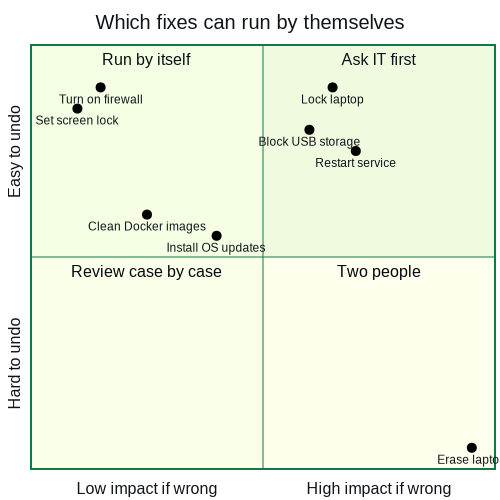
Fixes that usually pass: turning the firewall on, setting the screen lock, turning on disk encryption (once recovery keys are stored centrally), and clearing unused container images when a server disk fills up. OS updates usually pass on laptops. They need more care on servers. NIST’s patch management guide, SP 800-40 Rev. 4, treats patching as planned preventive maintenance. Put a server that takes payments on a maintenance window, not on “whenever the check fails”.
Which actions should always need approval?
Any action that deletes data, locks someone out, changes privileges or touches a shared production service should wait for a person to say yes.
| Tier | When it applies | Examples |
|---|---|---|
| Runs by itself | Passes all five tests above | Firewall on, screen lock, unused image cleanup |
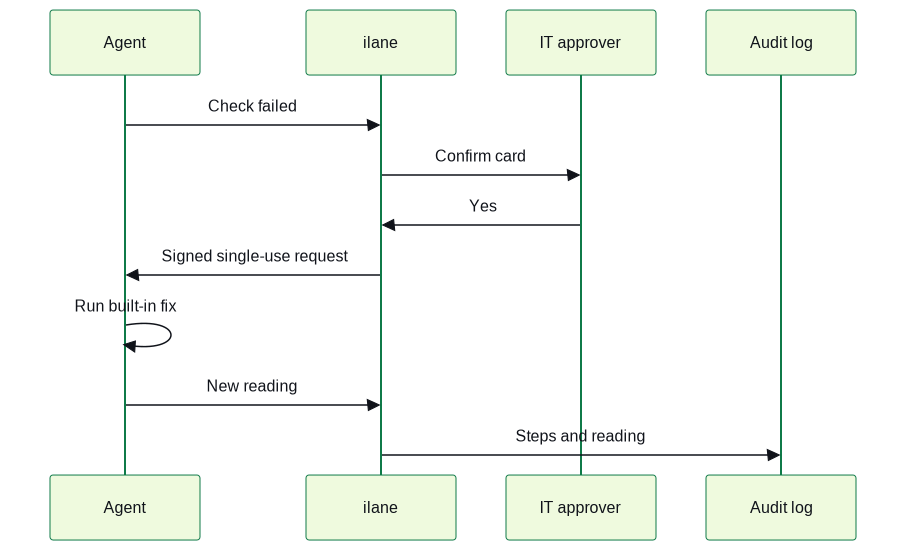
| One approval | Changes a system people are using, or could interrupt work | Restarting a service, blocking USB storage, locking a lost laptop, installing or removing an app |
| Two people | Can’t be undone, or gives someone wide access | Erasing a laptop, granting admin rights |
| Never | Can’t be reviewed in advance | Arbitrary shell commands “just this once” |
The two-person tier has a long history in security standards. NIST SP 800-53 includes dual authorisation (AC-3(2)) for privileged commands, also called two-person control. One admin, or one stolen admin account, can’t wipe a laptop alone.
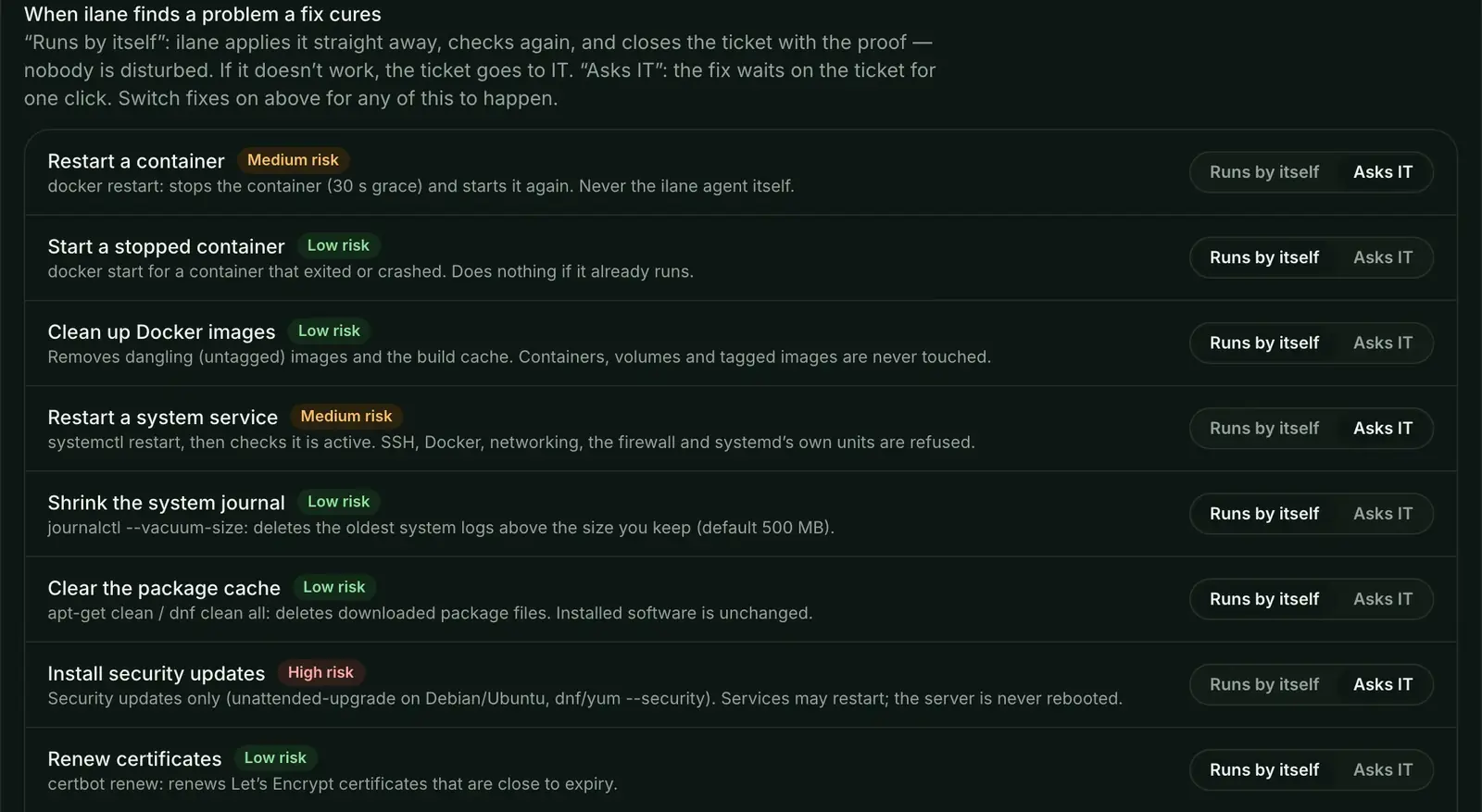
At ilane we built the approval chain around these tiers. Every fix starts switched off for every company. An admin turns each one on, and your policy decides whether it runs by itself or asks IT. Anything that changes a system shows a confirm card first, and serious actions such as wiping a laptop need a second approver. Admin rights are granted for 15 minutes and then removed automatically. ilane only ever names a built-in fix. It never sends shell commands. Each request is signed, short-lived and single-use, and each server keeps its own list of fixes it accepts.
How does a re-check decide that a fix worked?
A re-check reads the system again, separately from the fix, and compares the result with a definition of “fixed” that was written before the fix ran.
Three rules make a re-check reliable:
- Define “fixed” first. Write it as something measurable, such as “firewall reports on” or “disk usage under the threshold”. “The script finished” doesn’t count.
- Use the check that raised the problem. If a posture check found the firewall off, the same check has to see it on.
- Ignore the fix’s own report. A script can exit cleanly and change nothing. Only a fresh reading should close the ticket.
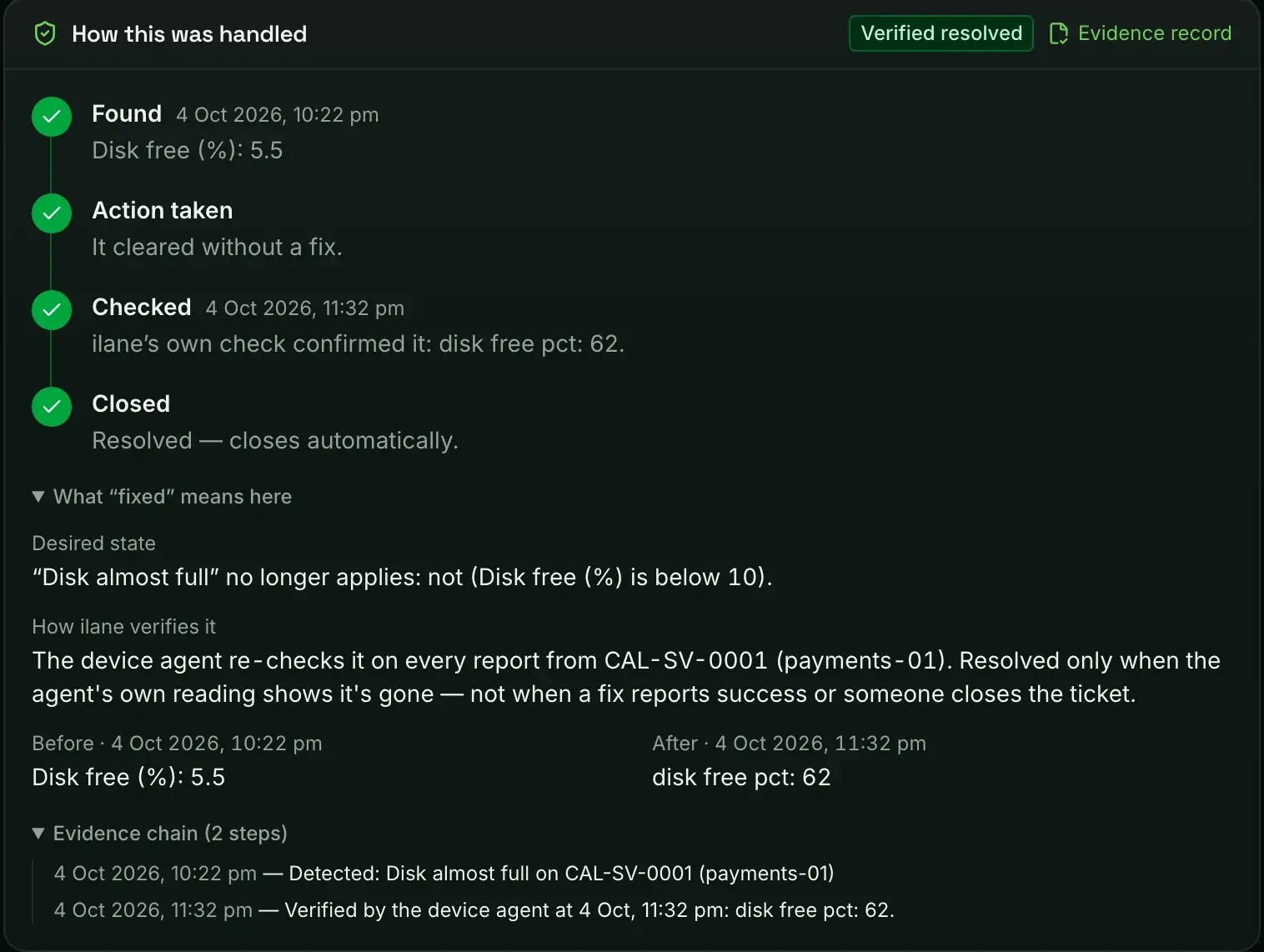
In ilane, every ticket raised by a check carries a contract for what “fixed” means. The device check that opened the ticket closes it when the next report is clean. On a server, a full disk can be cleared by a safe fix, and the ticket closes automatically only after the new reading shows the disk back to 21% free. How verified resolution works covers the full loop.
What happens when the check fails?
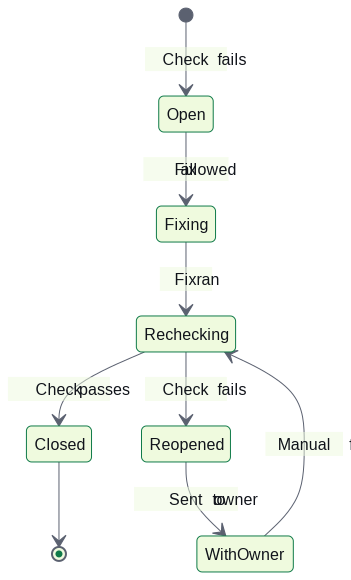
When the re-check fails, the same ticket should reopen with the failed reading attached and go to the person who owns it.
Keeping the same ticket matters. A new ticket hides the history and makes the problem look new. Reopening shows the owner what was tried, what ran and what the system reported afterwards.
A failed check also tells you something. Usually the fix treated a symptom: the disk filled up again because a log is growing, or the setting reverted because another tool or a user changed it back. Don’t let the automation retry forever. Hand it to a person after one failed attempt and let them find the cause. Once a person has fixed it by hand, the same check confirms it before the ticket closes.
How do I start with a small set of automated fixes?
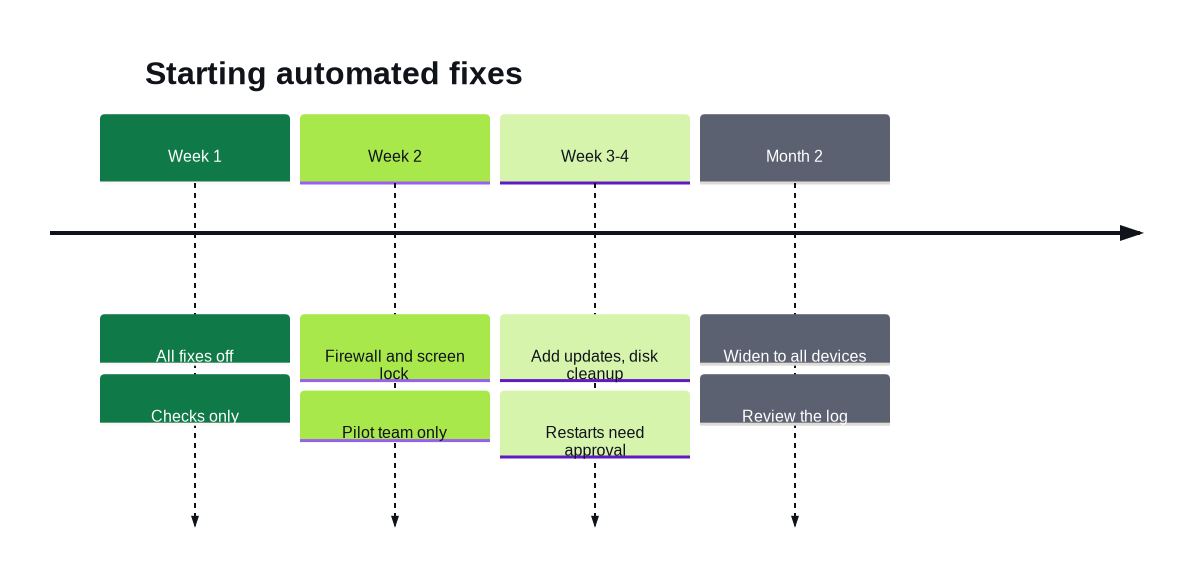
Start with every fix switched off. Turn on two or three low-risk device fixes for one pilot team, and widen only after their re-checks keep passing.
A practical order:
- Run checks only. For a week, look at what fails and how often. That shows you where automation would save the most time.
- Pick the safest fixes. Firewall and screen lock pass all five tests and rarely interrupt anyone.
- Limit to a pilot group. One team’s laptops, including IT’s own.
- Set approval for the rest. Restarts, app installs and server changes ask IT first.
- Widen gradually. Add updates and disk cleanup next, and turn off or exempt any check that keeps failing for a known reason.
In ilane, each fix is set to “Runs by itself” or “Asks IT”, and any check can be switched off or exempted for a single device. You can also start with a pilot on one team’s laptops and servers and keep the setup when you move to a full plan.
How do I audit what the automation did?
Every automated action should leave a record of what triggered it, who allowed it, the steps that ran and the reading afterwards, kept in a log nobody can quietly edit.
The standard to aim for is NIST SP 800-53 AU-9: protect audit information and audit logging tools from unauthorised access, change and deletion. A log that an admin can edit doesn’t prove anything about what the automation did.
When you review, check that you can answer these questions for any closed ticket:
- Which check raised it, and what reading did it show?
- Was the fix set to run by itself, or who approved it?
- What steps ran, exactly?
- What did the re-check read, and when?
ilane keeps these records automatically. Before you approve a fix you see the steps it may run, and afterwards you see the steps it did run, exportable for an audit. Every log entry carries a fingerprint of the one before it, a nightly check confirms the chain is intact, and entries are kept for at least a year. The app and the database can’t update or delete them. When a fix is verified, ilane saves an evidence record with the contract, the before and after readings, every step and who approved it. That record feeds the compliance controls auditors ask about for SOC 2 and ISO 27001.
Conclusion
Automated remediation is safe when you limit it in two ways. Only small, reversible fixes that restore an agreed policy run on their own, and nothing closes until an independent re-check passes. Destructive or privileged actions wait for one or two people. Every step goes into a log you can show an auditor. Start with checks only, switch on a few fixes for one team, and widen as the re-checks keep passing.
To see a fix run, get re-checked and close with evidence on real data, book a 30-minute ilane demo.
Frequently asked questions
Is it safe to install OS updates automatically?
On laptops, usually yes, as long as updates are re-checked afterwards and users get a reasonable restart window. On servers, especially ones that run customer-facing services, schedule updates in a maintenance window or require approval. NIST’s patch guidance treats patching as planned preventive maintenance, not instant reaction.
Should AI decide which fixes run?
No. AI can explain a problem and suggest a fix, but fixed rules and named approvers should decide what runs. In ilane, AI never decides: rules control what runs, and they work even with AI switched off.
How is automated remediation different from running scripts remotely?
A remote script runs whatever it contains and reports its own success. Automated remediation runs a pre-defined fix for a specific failed check, then reads the system again to confirm the result. The verification step and the pre-approved scope are what make it safe to run without a person.
Do automatically verified fixes count as audit evidence?
They can, if the record shows the trigger, the approval or policy that allowed the fix, the steps that ran and the reading afterwards, all in a log that can’t be edited. In ilane, each verified fix saves that evidence record and updates the matching SOC 2 or ISO 27001 control.
What should I automate first?
Start with fixes that put a single laptop back to policy and can be undone instantly, such as turning the firewall on or setting the screen lock. Run them for one pilot team, watch the re-check results for a couple of weeks, then add updates and server disk cleanup.