IT service desk software is the single place where employees ask IT for help and where IT tracks, prioritises and resolves that work. For a 50–1,000 person company, choose one that takes requests through several channels, enforces business-hour SLAs and approvals, links each ticket to the device and person behind it, and proves fixes before closing.
The rest of this guide is a checklist you can use for any vendor. It doesn’t rank products. It sets criteria, because the right tool depends on how many people you support, who works the queue and how much proof your auditors want.
What is IT service desk software, and how is it different from a help desk?
Service desk software handles both incidents and service requests from one point of contact. A help desk usually handles only things that are broken.
ITIL 4 describes the purpose of the service desk practice as being “to capture demand for incident resolution and service requests”, acting as the single point of contact for all users. In practice:
- A help desk is a queue of break-fix tickets: “my laptop won’t connect”, “Outlook crashed”.
- A service desk adds a request catalogue, approvals, SLAs, a knowledge base and links to assets, problems and changes. It also covers non-IT requests like onboarding, access and equipment.
Companies usually outgrow a help desk somewhere between 50 and 200 people. Onboarding requests need manager approval, HR and Finance want their own queues, and an auditor asks how you know laptops were encrypted all year.
Which features does a 50–1,000 person company actually need?
You need a short, specific list: several ways to raise requests, a catalogue with approvals, business-hour SLAs, a knowledge base, workflows for routine work and honest reporting. Anything else is secondary.
| Feature | Why it matters at this size | What to check |
|---|---|---|
| Multiple intake channels | People will email, chat and use a portal whatever you tell them | Portal, email, chat or assistant, and an API all land in one queue |
| Request catalogue + approvals | Access and purchases need a manager’s yes | Multi-step approvals, approval by email or chat |
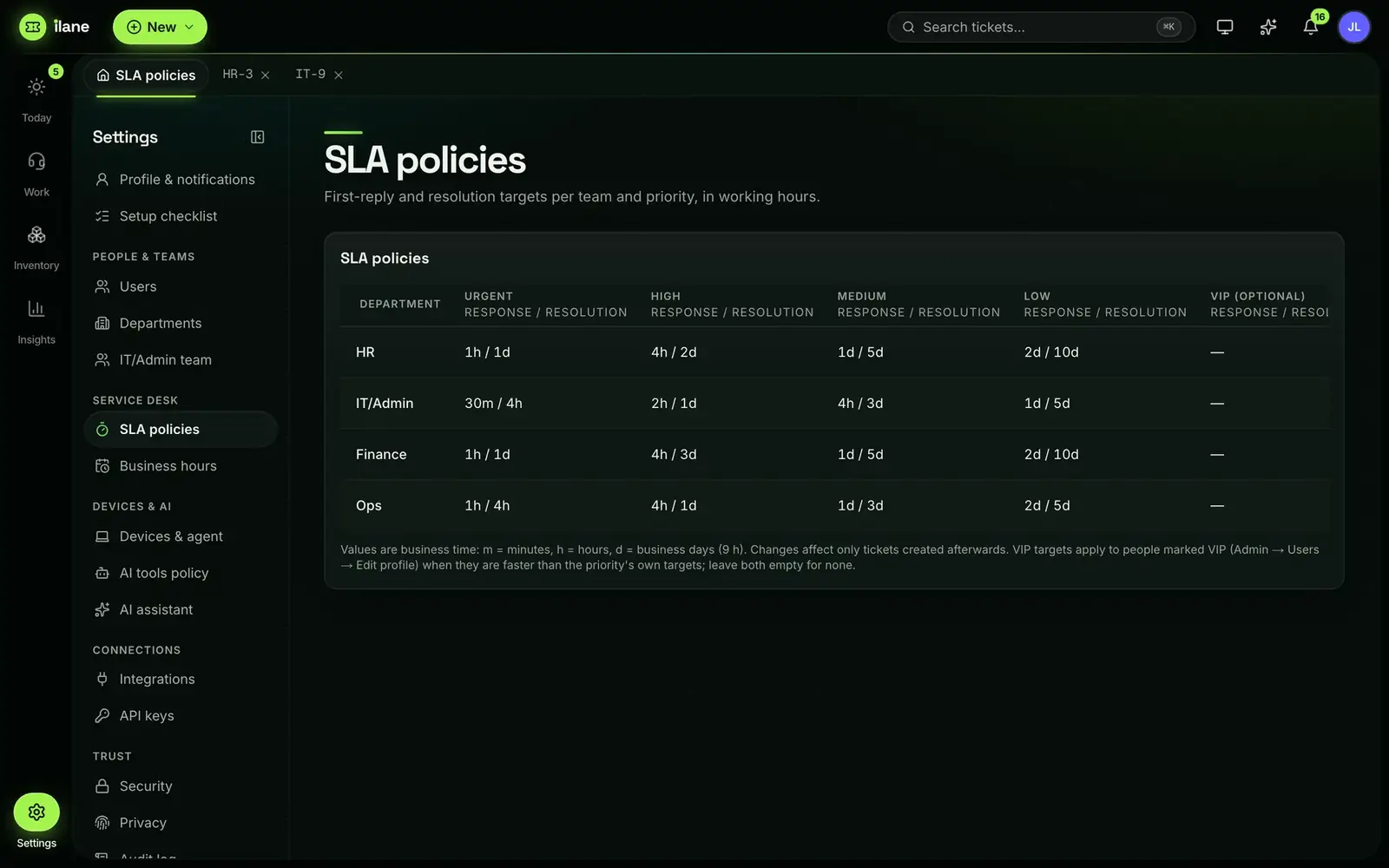
| Business-hour SLAs | A Friday 6 p.m. ticket shouldn’t breach by Saturday | SLAs per team and priority, with calendars and pauses |
| Knowledge base | Answers before tickets cut repeat questions | Articles suggested while the person types |
| Workflows | Onboarding and offboarding are the same 20 steps every time | One form that creates every task |
| Multi-team queues | HR, Finance and Ops will want the same tool | Separate queues, shared portal |
| Reporting | Leadership asks for numbers | Response and resolution times, SLA compliance, reopen rate, CSAT |
Full change management and a formal CMDB can come later, as long as the tool can grow into them without a migration.
For reference, ilane’s service desk gives IT, HR, Finance and Ops one desk with five ways in (portal, catalogue, assistant, email and API). It also includes business-hour SLAs, approvals, onboarding in one form and answers before tickets.
Should tickets know the device, the person and the service behind them?
Yes. A ticket that arrives with its context skips the first round of questions, and it shows you how many people a problem affects before you start work.
Without that context, most tickets start the same way: “Which laptop are you on? What OS version? Is it the VPN or the app?” Every round costs time. Here’s what good context looks like when a ticket arrives:
- Device: model, OS, last check-in, encryption, firewall and patch status
- Person: team, manager, software seats they hold
- Service: which business service the problem touches and who else depends on it
There’s a difference between integrated and one database. Many suites sync data between a help desk, an asset tracker and an endpoint console. Sync jobs fail quietly, and records drift apart. In ilane, the ticket, the laptop and the service are rows that point at each other, so there’s nothing to sync. Our comparison with typical IT suites explains why that matters.
Context also helps with noise. ilane groups related alerts into one incident and puts the likely cause first, using rules rather than AI. That way three alerts become one ticket with one owner, not three people chasing the same fault.
How do you tell if a ticket was really fixed or just closed?
Only by checking the original condition again after the fix. A reopen rate shows you the failures people notice, not the ones that come back quietly.
Most teams track ticket reopen rate, meaning reopened tickets divided by resolved tickets. A common benchmark is under 10%. The metric has a blind spot, though. If a full disk fills up again next week and someone opens a new ticket, the reopen rate stays clean and the history is lost.
When you look at any tool, ask whether it can:
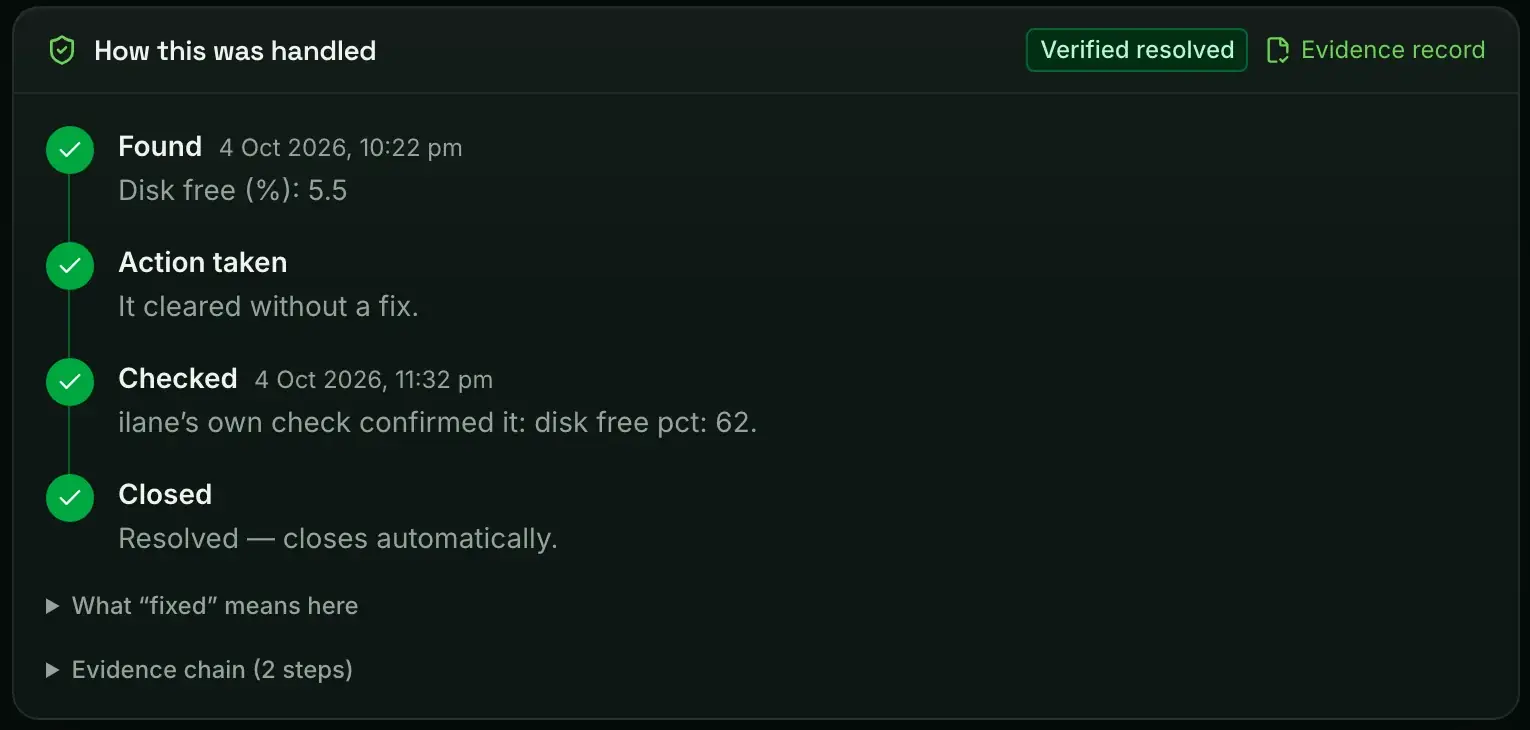
- Write down what “fixed” means before work starts, as a measurable state (“disk below 80% used”, “firewall on”).
- Check that state again by itself, not rely on an agent clicking Resolve.
- Reopen the same ticket if the check fails.
- Keep a before-and-after record you can hand to an auditor.
This is how ilane’s verified resolution works for problems its checks can see. Every ticket raised by a check carries a contract saying what “fixed” means and how ilane will verify it. A fix that reports success doesn’t count, and neither does a person clicking Resolve. Only ilane’s own next reading counts.

Are free and open-source IT help desk tools worth it for a small business?
They can be, if someone on your team has time to run them. The licence is free, but hosting, upgrades, backups, security patches and integrations aren’t.
Deskpro suggests running a total cost of ownership comparison over two to three years, and counting hosting, maintenance and internal IT time alongside the zero-dollar licence. One estimate, cited by Hay, puts self-hosted open source at about €222 a month once server costs, maintenance and admin time are included.
Add these hidden costs to your spreadsheet:
- A server, plus storage and backups you’ve tested by restoring
- Staff hours for upgrades and security patches
- Plugins or custom code for SLAs, approvals or SSO
- A separate asset tracker, endpoint tool and evidence process, plus the work of keeping them in step
Open-source tools work best when you need ticketing only, have a technical admin and support a small team. They get harder as soon as you need device data, an asset register and audit evidence, because each of those becomes another tool to run.
Cloud or self-hosted: where should your service desk run?
Choose cloud if you want the least maintenance. Choose self-hosted if customer contracts, data residency rules or your own network policy require ticket and device data to stay on your infrastructure. Either way, check that the vendor offers both without cutting features.
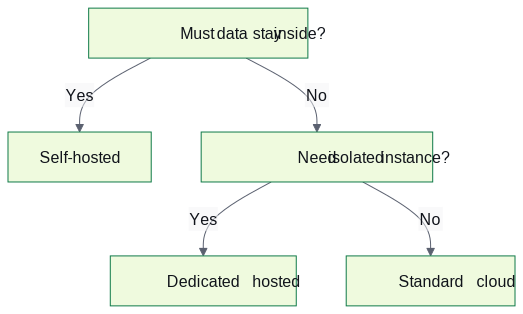
Work through the decision in order. First, does the data have to stay inside your network? If it does, self-host. If it doesn’t, ask whether you need your data kept apart from other customers. If you do, choose a dedicated hosted instance. Otherwise, standard cloud is fine.
Whichever you choose, check:
- Feature parity: is the self-hosted edition the same product, or an older, cut-down one?
- Exit: can you export everything, at any time, in a usable format?
- AI data flow: where do ticket contents go if AI features are on, and can you switch AI off?
ilane runs either way at the same price. The dedicated hosted option gives you your own instance, with updates and backups handled for you. The self-hosted option runs on Docker Compose with nightly database backups built in, and nothing leaves your network unless you connect it. AI features use your own key, or you can switch them off.
How should service desk pricing work (per agent or per device)?
Per-agent pricing suits a small, stable IT team that only does ticketing. Per-device pricing is easier to predict once HR, Finance and Ops work tickets too, or once device management comes in the same product.
Published per-agent prices range from about $7 to $150 per agent per month. The list price is rarely the bill. One analysis found that AI add-ons, seat cliffs and forced tier upgrades take a $14–25 entry price to $40–100 per agent in practice.
Ask every vendor:
- Who counts as an agent? Do approvers, HR staff and occasional users count?
- Which features are top tier only (problems, changes, service maps)?
- Is AI a paid add-on?
- Are asset tracking and device management separate products?
- What happens to the price after the introductory period, and at twice your headcount?
ilane quotes for each team, based on how many laptops, desktops and servers run its agent. Book a demo to get a quote.
What should you test in a trial or demo before you commit?
Test your own workflows on your own data, not the vendor’s script.
- Raise one ticket through every channel and check that each one lands in the right queue.
- Build your real onboarding request with its approvals. Time how long it takes.
- Set a business-hour SLA and check how it pauses, warns and records breaches.
- Open a ticket from your own laptop and look at what context arrives with it.
- Break something on purpose. Turn off the firewall on a test laptop, “fix” it, then turn it off again. Does the tool notice, or does the ticket stay closed?
- Try to edit the audit log as an admin. You shouldn’t be able to.
- Export all your data and open the file.
- Ask for a written quote at your current size and at twice your size.
Test 5 tells you the most, because it shows the difference between a ticket that was closed and a problem that’s actually gone.
Conclusion
The best IT service desk software for a growing company is the one that passes your checklist: a few channels in, approvals and business-hour SLAs, tickets that know the device and the person, fixes that are checked rather than assumed, a hosting model that fits your data rules, and pricing that stays predictable as you grow. Score every vendor against the same criteria and the same eight tests.
If you’d like to run those tests on ilane, the demo is a 30-minute call. We fix one thing together, on a demo company or one of your laptops, and watch ilane check that it’s really fixed. Book a demo →
Frequently asked questions
Can HR, Finance and Ops use the same service desk as IT?
Yes, and it’s often simpler for employees, who get one portal instead of several. ITIL treats the service desk as the single point of contact for all users, not just IT. Check that each team can have its own queue, SLAs and approvers without seeing other teams’ tickets. ilane’s service desk is built as one desk for IT, HR, Finance and Ops.
What’s the difference between ITSM and service desk software?
IT service management (ITSM) is the wider set of practices for running IT services. ITIL 4 alone describes 34 of them, from incident management to change enablement. Service desk software is the tool for one of those practices: capturing and resolving incidents and requests. Many products add problem, change and asset management on top.
Which service desk metrics should a 50–1,000 person company track?
Start with first response time, resolution time, SLA compliance, reopen rate and CSAT. They show whether people get help quickly and whether it sticks. Remember that reopen rate misses problems that return as new tickets. If your tool can check fixes itself, also track how many problems it verified as actually resolved.
Do we need a CMDB before buying service desk software?
No. Many growing companies never maintain a separate CMDB by hand. A tool with a device agent and cloud connections can build the inventory as it goes, so tickets link to real devices and services from the first day. Start with an accurate asset register and add service mapping when you need it.
How do we switch service desk tools without disrupting support?
Run the new tool alongside the old one for a single team first. Route that team’s email and portal requests to it and compare results before moving everyone. Export open tickets and knowledge articles from the old tool, and check the new vendor’s import options. ilane offers a pilot on your own laptops and servers that moves to a full plan without starting over.