The right remote desktop support tool for an internal IT team does five things. It covers every laptop you run (Mac, Windows and Linux). It asks the employee to approve each attended session and keeps unattended access to machines nobody sits at. It logs every session against a ticket. And it costs less than the tools and time it replaces. The brand matters less than these checks.
This guide is for IT managers and founders at 50–1,000 person companies who are comparing options. It doesn’t pick a winner. It sets out the criteria, the questions to ask vendors and a simple way to trial a tool before you roll it out.
What is the difference between remote desktop and remote IT support tools?
Remote desktop tools let you work on your own computer from somewhere else. Remote support tools let IT see and control someone else’s computer to fix a problem.
The difference affects your choice:
- Remote desktop (remote access) assumes the person connecting owns the machine. Microsoft describes its own Remote Desktop as giving you access to all of your apps, files and network resources as if you were sitting at the PC. That suits an admin working on their own workstation. It’s far too much access for a helpdesk call.
- Remote support assumes there’s a second person at the laptop who has a problem. A good tool shows them who is connecting and why, lets them say no, and ties the session to the request that started it.
Most internal IT teams need remote support for laptops and something closer to remote access for servers. Look for one tool that handles both, with different rules for each.
Do built-in tools like Windows Remote Desktop and macOS Screen Sharing cover IT support?
Partly. Built-in tools work for occasional help on one platform, but they weren’t designed for an IT team supporting a mixed fleet.
| Built-in tool | What it does well | Where it falls short for IT support |
|---|---|---|
| Windows Remote Desktop | Full sessions on Windows machines | Windows Home editions can’t act as Remote Desktop hosts. It takes over the session instead of sharing it |
| Quick Assist | Attended help between two people | Microsoft itself suggests organisations that use it within one tenant consider switching to Intune Remote Help for stronger security and enterprise controls |
| macOS Screen Sharing | Viewing and controlling Macs | Built for computers on your network. Apple points to Apple Remote Desktop, a separate App Store purchase, for helping remote users and reporting |
None of these connects to your ticket queue. None covers Linux laptops alongside Mac and Windows. And each keeps its own logs, or none at all. If your engineers run Linux and your finance team runs Windows, you end up running several tools and still have no single record of who connected to what.
Which features matter most when choosing a remote support tool?
The features that matter most are platform coverage, control over consent, ticket integration, session records and how the tool is installed.
Use this checklist when you talk to vendors:
- Platform coverage. Mac, Windows and Linux from the same console, with the same controls. Ask whether Linux support is a full peer or “view only”.
- Attended and unattended modes. These should be separate, with unattended access limited to machines you choose.
- Visible consent. The person sees a prompt with the technician’s name and the reason, and nothing is shared until they accept.
- Starting from a ticket. IT should never have to read out a session code or ask “what’s your ID?”.
- Session records. Who connected, to which device, when, for which request, and when access ended.
- No new software on every laptop. If you already run a device agent, a tool that rides on it means one less thing to deploy, patch and explain.
- Where sessions pass through. Find out whether traffic goes through a vendor relay or stays in infrastructure you control.
- Speed. How many seconds pass between the click and the prompt appearing on the laptop?
Should the person always approve a session, or do you need unattended access?
On laptops, the person should approve every session. Unattended access is for servers and shared machines nobody sits at.
Many tools make unattended access easy to switch on fleet-wide. Treat that as a risk, not a convenience. Unattended access does have legitimate uses: Microsoft’s Intune Remote Help, for example, describes an unattended session as one where an authorised helper controls a managed device with no one taking part on the other end. That’s useful for a build server at 2 a.m. On an employee’s laptop, it means someone could watch their screen without them knowing.
A simple rule to write into your IT policy:
- Employee laptops: attended only, with approval every time and no standing exceptions.
- Servers and kiosks: unattended allowed only where the owner has agreed, and only on devices named in a list.
- Command-line work on servers: use recorded shells rather than full desktop sessions where possible.
When you evaluate a tool, ask whether it can enforce this split technically or only through policy documents.
How should remote sessions connect to tickets, devices and the audit log?
Every session should start from a ticket, open on the right device automatically and leave a record on that ticket when it ends.
This is the point where most standalone tools fall short. If the remote tool has no link to your service desk, each session takes extra manual steps: find the device, send a code, copy notes back into the ticket. Later, nobody can say which session fixed which problem.
Here is how it works in ilane Remote help:
- IT clicks Remote help on the ticket. ilane already knows which laptop belongs to the request, so there are no session codes.
- A prompt on the person’s own screen says who is asking and why. If they decline, nothing is shared.
- The session is logged on the ticket. When it ends, the access link is gone.
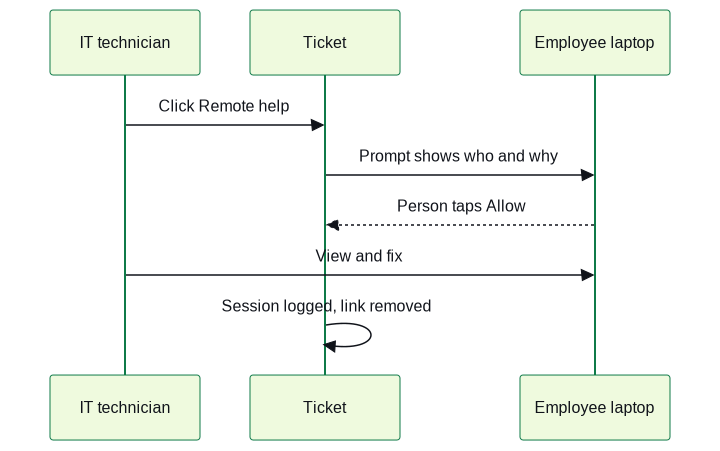
Remote help uses the same ilane agent that’s already on every Mac, Windows and Linux machine, so there’s nothing extra to install. The remote service is open source and runs next to your own ilane, which means sessions don’t pass through a third party. Each link works for one device and only for the person who asked. Unattended access exists only on servers you choose.
The session is one part of the record. Because ilane’s device checks and tickets share one database, the ticket also shows the laptop’s health. Under ilane’s security model, approvals and fix steps go into a tamper-evident audit log.
Are free remote desktop support tools safe for company laptops?
Free tools can work, but on company laptops they add risks most IT teams underestimate: tools nobody approved, no central logs, and software that attackers already know how to abuse.
The concern is well documented:
- CISA, the NSA and MS-ISAC published a joint advisory on malicious use of legitimate remote monitoring and management software. It describes attackers impersonating well-known support brands to get victims to start a session.
- Infosecurity Magazine reported that the advisory found attackers using portable versions of remote software to get local user access without an install.
- The FBI warns that tech support scammers ask victims to install free remote desktop software. The FBI’s 2024 IC3 report puts reported tech support fraud losses at about $1.46 billion for that year.
There’s a lesson here beyond any single product. If employees are used to installing whatever remote tool someone sends them, they’re easy targets for a scammer posing as IT. One approved tool, started from a ticket, with a named technician on the prompt, gives people a clear rule: “IT never asks you to install anything to share your screen.” Then block or flag other remote tools on company laptops.
What should remote support cost for a 50–1,000 person company?
Remote support should cost less than the separate tools, licences and admin time it replaces. Work out the full cost, not just the licence line.
Common pricing models include per technician, per concurrent session, per endpoint and bundled. To compare them fairly, list:
- Licences: technicians, concurrent sessions and endpoints, plus any unattended add-on.
- Platform gaps: Windows Pro upgrades if you rely on Remote Desktop hosting, or a separate Mac tool.
- Deployment: another agent to package, update and explain to employees.
- Admin time: copying session notes into tickets and pulling logs for an audit.
In ilane, remote help is part of the same product as the service desk, device checks and asset tracking, and you can run it dedicated hosted or self-hosted. Pricing is quoted for each team, based on how many laptops, desktops and servers run the ilane agent. Book a demo to get a quote.
How do you trial a remote support tool before rolling it out?
Run a two-to-four-week pilot with one team, on real tickets, across every operating system you support. Score the tool against your written criteria, not against how polished the demo looked.

Things to test on purpose:
- Mixed platforms. Include at least one Mac, one Windows and one Linux laptop if your fleet has them.
- The decline path. Ask a pilot user to decline a session, and confirm nothing is shared.
- Unattended limits. Try to open an unattended session on a laptop. It should fail.
- Time to connect. Measure the time from clicking in the ticket to seeing the screen.
- The record. A week later, try to answer “who connected to this laptop, and why?” using only the tool. Time how long it takes.
- Employee reaction. Ask the pilot team whether the prompt was clear and whether they trusted it.
Choosing with confidence
You don’t need the remote desktop tool with the longest feature list. You need one that works on every laptop you run, makes approval the default, limits unattended access to the machines that need it, and leaves a clear record on the ticket. Price it against everything it replaces, then prove it in a short pilot with real users.
If you’d like to see this working, the ilane demo is a 30-minute call. We enrol your laptop, open a ticket and request a session, so you see exactly what your people will see. Book a demo →
Frequently asked questions
Can IT see an employee’s screen without them knowing?
With a well-chosen tool, no. On laptops, every session should need the person to approve it on their own screen. In ilane Remote help, the person taps Allow every time, and unattended access is limited to servers whose owner has allowed it.
Do we need a separate remote support tool if we already have device management?
Not necessarily. If your device agent can start screen-sharing sessions, a second tool adds deployment work and splits your records. ilane Remote help runs on the same agent already on each Mac, Windows and Linux machine, so there’s nothing extra to install.
Is Quick Assist enough for a small IT team?
It can cover occasional attended help on Windows and macOS. But it doesn’t connect to your tickets or support Linux, and Microsoft suggests organisations consider Intune Remote Help for stronger security controls. Once you support a mixed fleet and need records for audits, the gaps start to matter.
Should remote sessions be recorded on video?
That depends on your policy and local privacy law, so check with whoever owns data protection at your company. At minimum, keep a record of who connected, to which device, when and for which ticket. Recorded shells are a good middle ground for server work.
How long should a remote support pilot last?
Two to four weeks with one team is usually enough. That’s long enough to see real tickets across every operating system, test the decline path and check whether you can answer audit-style questions from the session records.