To enforce macOS updates without locking people out, publish a deadline for each update and let people pick their own time to install before it. Force the restart only after the deadline passes, and warn people first. In practice, test the update on a pilot group first. Then use Apple’s built-in update deadlines, and give every Mac that’s still behind a ticket with one named owner.
How do I enforce macOS updates without locking people out?
Keep three decisions apart: when each update is offered, when it must be installed, and what happens to Macs that miss the date.
Apple now handles all three through declarative device management. Your device management tool no longer sends an “install now” command. Instead, it declares the macOS version a Mac should reach and leaves the device to get there. A deadline is set with Apple’s softwareupdate.enforcement.specific declaration. The older MDM update commands were deprecated in macOS 26, so any setup that still relies on them needs moving now.
Most lockouts come from a few avoidable mistakes:
- No warning. The restart arrives in the middle of a call because notifications were switched off.
- Credentials at restart. On Apple silicon Macs, your management tool has to escrow a bootstrap token so that enforced updates can install without someone entering a password.
- One deadline for everything. A major macOS upgrade and a small security patch get the same date.
- No plan for Macs that miss the deadline. They just sit there until someone notices them in a report.
If you fix those four, you can enforce updates firmly without anyone being caught off guard.
What update deadline should I set for Macs?
For routine macOS security updates, 14 days from release is a sound default. Use a few days for actively exploited flaws, and up to 90 days for major upgrades.
These numbers line up with outside guidance:
- Apple’s limits. You can defer updates for 1 to 90 days, with separate settings for major upgrades and minor updates. An enforced deadline overrides any deferral.
- NIST’s approach. NIST SP 800-40 Rev. 4 recommends phased rollouts for routine patching. A small group gets the patch first as a canary, and installation is forced once the grace period ends.
- CISA’s benchmark. CISA’s BOD 22-01 gave US federal agencies two weeks to fix newer known exploited vulnerabilities. The page is now marked revoked, but two weeks is still a useful yardstick.
- Real exploits happen. In August 2025, Apple disclosed an actively exploited flaw affecting macOS versions before 15.6. In a case like that, two weeks is too long.
| Update type | Pilot group gets it | Everyone else offered | Deadline |
|---|---|---|---|
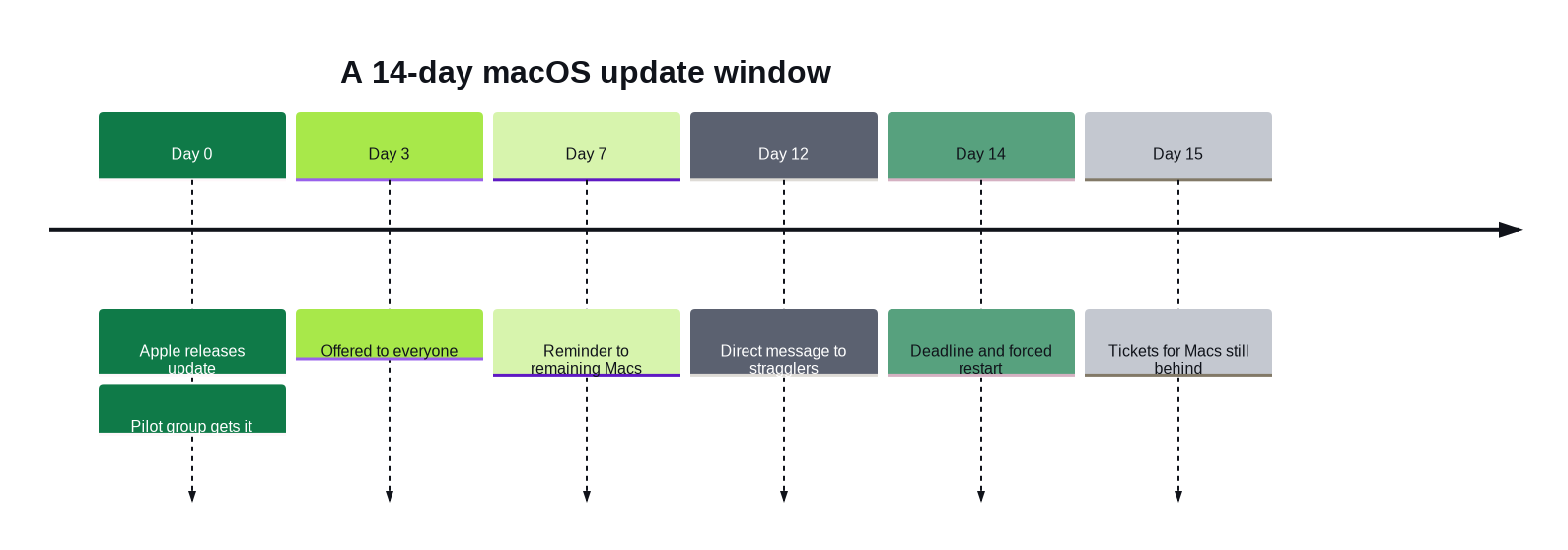
| Routine security update | Day 0 | Day 3 | Day 14 |
| Actively exploited flaw | Day 0 | Day 0–1 | Day 2–5 |
| Major macOS upgrade | When IT has tested key apps | Up to day 90 | After app owners sign off |
Pick a pilot group of 5–10% of your Macs, and include at least one person from each team whose apps could break.
Which updates can be pushed silently and which need the user?
Downloads and most app updates can run in the background. A macOS install that needs a restart should involve the person, either because they choose a time or because they’ve been clearly warned before the deadline.
What each kind of update needs:
- macOS updates and upgrades need a restart. Once an update is enforced, the Mac ignores its other update settings and may install early if it’s idle. That’s fine overnight but not during a demo.
- Notifications should stay on. If you switch them off, the Mac only shows the alert one hour before the deadline and the restart countdown. That’s how people end up losing unsaved work.
- Background Security Improvements in Apple’s newer releases can also be enforced, outside of any deferral you’ve set.
- Third-party apps such as browsers and chat clients can usually update without anyone noticing. Push these silently and keep the user prompts for the restart.
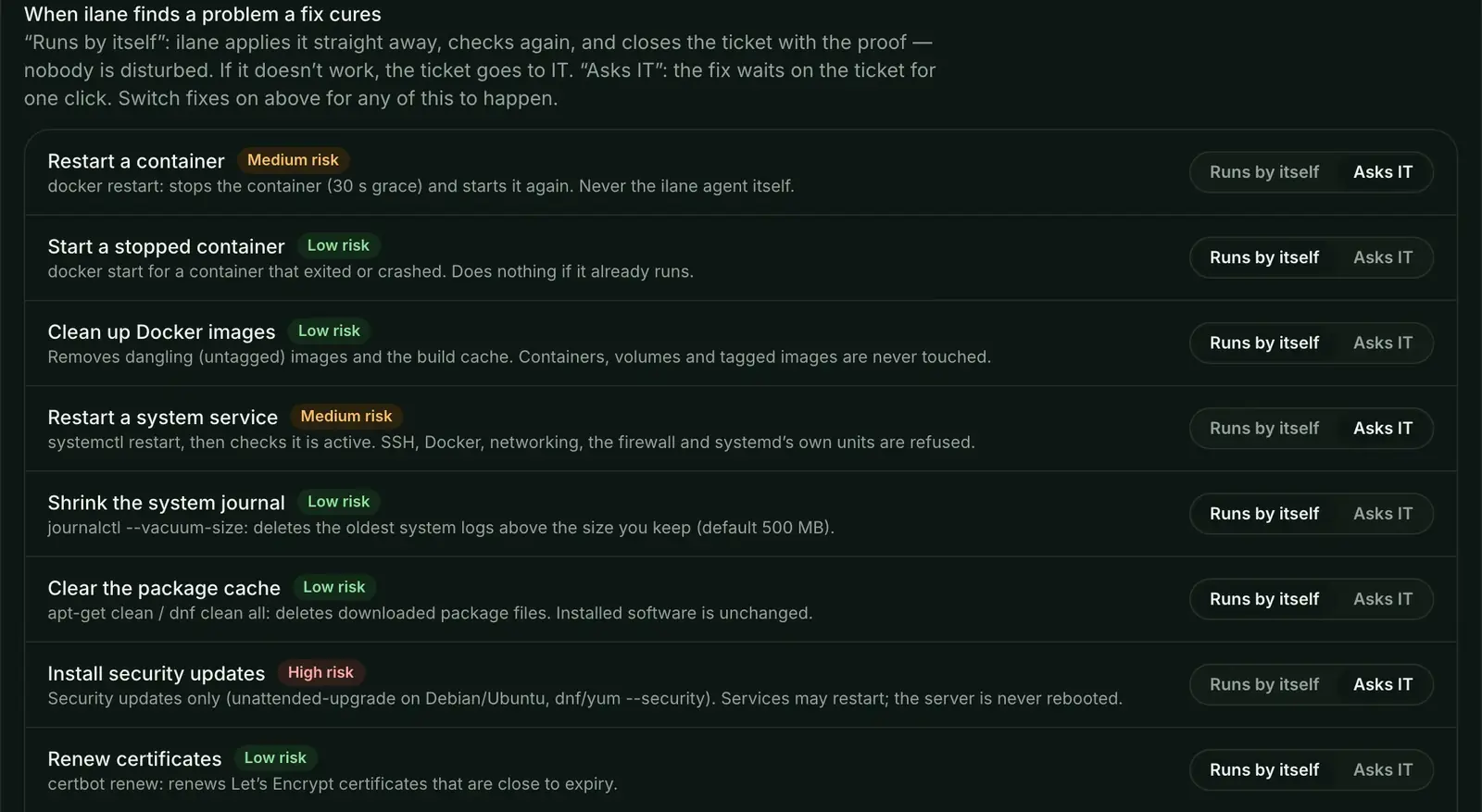
ilane’s device checks flag Macs with overdue system updates. “Install updates” and “Update an app” are among the fixes you can switch on. Every fix starts switched off, and for each one you decide whether it runs by itself or asks IT first.
How do I handle people who keep deferring updates?
Set a hard limit on how long people can defer, keep the deadline visible, and turn each missed deadline into a ticket with one owner, not another all-staff email.
Most people who keep putting off an update aren’t refusing it. They’re busy, and a restart feels risky. A clear escalation path takes care of most of them:
- Offer the update with the deadline in the message. People can plan around “by Friday 14:00”. They can’t plan around “soon”.
- Remind on day 7, and only on Macs that are still behind.
- Send a direct message 48 hours before the deadline to each person still behind. Offer to help them pick a time.
- Let the deadline do its job. The forced restart runs, with the countdown shown on screen.
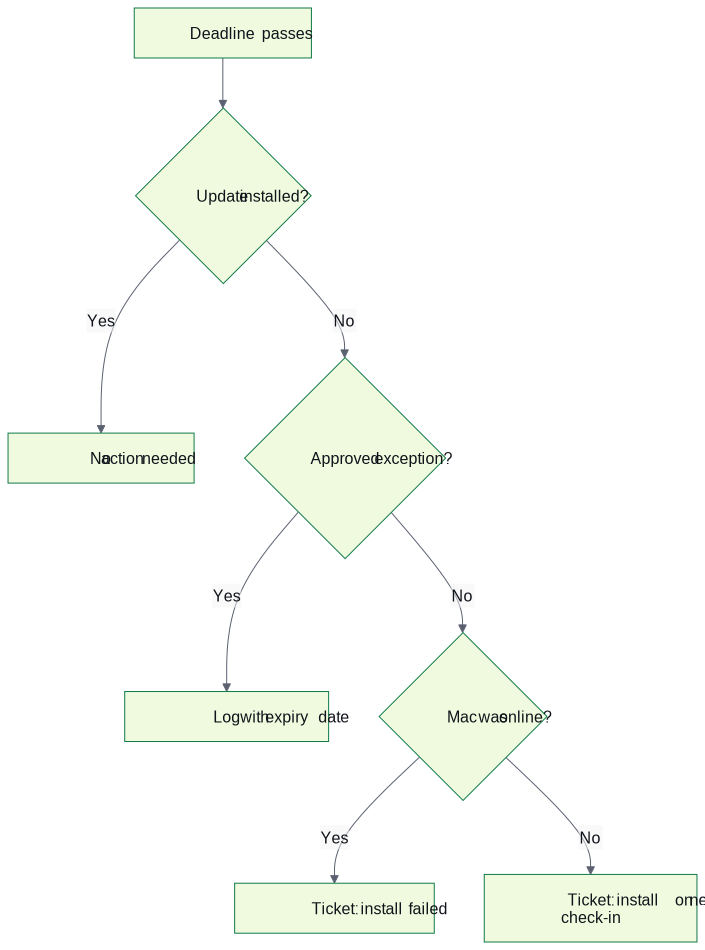
- Open a ticket for any Mac still behind the day after. These are usually laptops that were closed or offline at the deadline, so the install never ran.
Some Macs really can’t update yet. One example is a lab machine running an app the vendor hasn’t certified. Record it as an exception with an expiry date, not as a silent skip. NIST says exceptions should be tracked closely and reviewed regularly.
How do I confirm an update actually installed before closing the ticket?
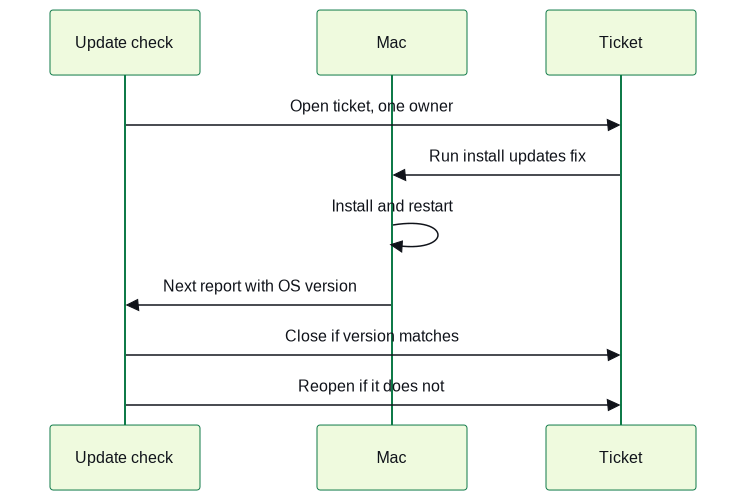
After the restart, read the macOS version back from the Mac and compare it with the target version. Close the ticket only if they match.
If your tool shows a command as “sent” or “acknowledged”, that only proves the Mac received it, not that the update installed. Apple’s status reports give you a better signal. The softwareupdate.install-state value moves through waiting, downloading and installing, and ends at failed or at none, which means nothing is pending and the last update succeeded. Even then, the strongest proof is a fresh reading of the OS version taken after the reboot.
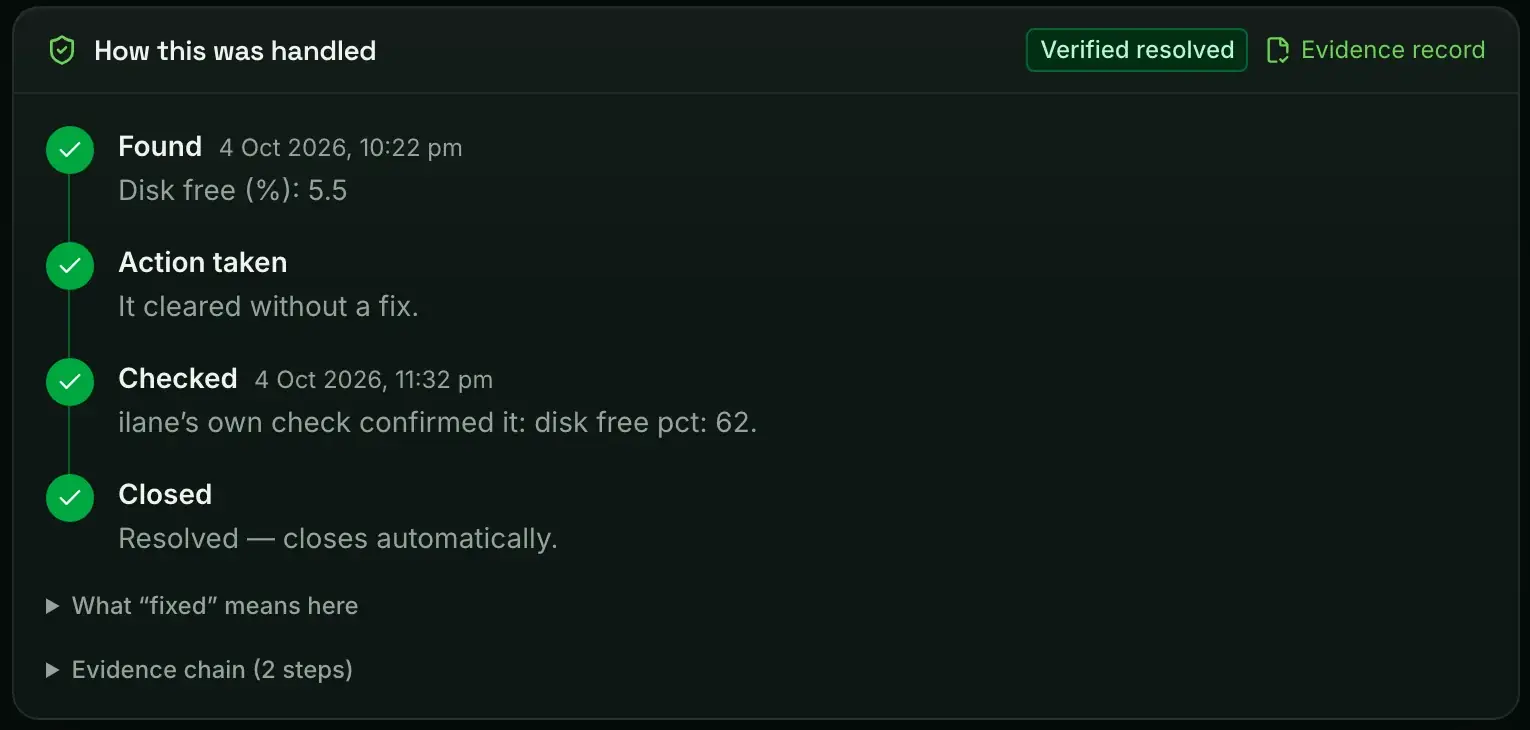
This is how ilane’s verified resolution works. Each ticket raised by a check states up front what “fixed” means, in this case that the Mac is on the target version. A check opens one ticket for one owner, and the ticket closes only when the Mac’s next report is clean. If the reading doesn’t match, the same ticket reopens. ilane records the steps a fix may run before you approve it and the steps it actually ran afterwards. You can export that record for an audit.
What should I do when an update fails on a Mac?
Keep the same ticket open, use the device’s own data to find out why the install failed, fix that cause, and let the re-check decide when the ticket closes. Don’t quietly push the deadline back.
A practical order to work through:
- Confirm the failure. Check that the install state is
failed, not justwaitingon a Mac that has been asleep. - Check the usual blockers. Not enough free disk space, a low battery or no power, the lid closed at the deadline, or a missing bootstrap token on an Apple silicon Mac.
- Retry once after clearing the blocker, and let the check confirm the result.
- Look at the screen with the person. With ilane Remote help, IT can only see the screen after the person taps Allow on their own laptop.
- Treat repeated failures as a hardware question. If a Mac can’t run the target version, plan a replacement and log a dated exception until it arrives. ilane also flags worn batteries and failing disks, which helps you plan those replacements.
Keeping one ticket per Mac matters. If the same problem is spread across three tickets, nobody can tell how long that Mac has really been exposed.
Conclusion
Enforcing macOS updates fairly takes a short pilot, a published deadline, notifications left on, a token so restarts don’t ask for credentials, and one ticket for each Mac that misses the deadline. Then close each ticket only after the Mac reports the target version. If people can see the deadline, they can plan around it, and the deadline doesn’t need to be extended.
To see an overdue-update check run, fix and verify on a real Mac, book a demo.
Frequently asked questions
Can I stop users from installing a major macOS upgrade before we’ve tested it?
Yes, on supervised Macs. Apple lets you defer major upgrades separately from minor updates, for 1 to 90 days. Use that time to test your key apps, then set a deadline once the app owners have signed off.
Do Macs need to be supervised to enforce update deadlines?
Apple’s deferral settings need supervision. The enforcement keys work on Macs enrolled through either Device Enrollment or Automated Device Enrollment. Check which enrollment method each Mac used before relying on deadlines across the fleet.
What happens if a Mac is closed or offline at the deadline?
The update can’t install while the Mac is offline, so it will be behind the morning after. That Mac should get a ticket with an owner, and a re-check when it next checks in should confirm the update ran.
Should personal (BYOD) Macs follow the same deadline?
You usually can’t force installs on personal Macs in the same way. A more realistic approach is to make an up-to-date OS a condition for reaching company apps, and to keep the same deadline so the rule is the same for everyone.
How many people should be in the pilot group?
Around 5–10% of your Macs is a workable start. Include at least one person from each team that relies on specialist apps, so any compatibility problems show up before the wider rollout.