A GDPR compliance checklist for endpoints turns the regulation’s security duty into checks you can prove on every laptop and server. Those checks are full-disk encryption, screen lock, current patches, a firewall, controlled USB storage, remote lock and erase, a named owner for each device, clean offboarding, and a dated record of every fix. The sections below cover each one.
This is practical IT guidance, not legal advice. Check your own obligations with your data protection officer or counsel.
What does GDPR actually require from laptops and servers?
GDPR doesn’t name specific laptop settings. It requires security measures that fit the risk, and it requires you to show that they work.
The core duty is Article 32. It asks controllers and processors to put in place “appropriate technical and organisational measures,” weighing the state of the art, the cost and the risk to people. It lists examples:
- pseudonymisation and encryption of personal data
- the ongoing confidentiality, integrity, availability and resilience of systems
- the ability to restore access to data in a timely way after an incident
- a process for regularly testing whether the measures work
Article 32 also says to weigh the risks that processing presents, in particular accidental or unlawful loss, alteration, unauthorised disclosure of or access to personal data. On endpoints, that mostly means a stolen laptop, an unpatched server or an unlocked screen.
Two principles from Article 5 sit behind this. Integrity and confidentiality means processing with appropriate security. Accountability means the controller must be able to demonstrate compliance. The second one turns a list of settings into a checklist that needs evidence.
Which endpoint controls belong on a GDPR checklist?
The baseline is encryption, screen lock, patches, a firewall and USB storage control. Check each one continuously on every device, not once at setup.
The UK regulator’s guidance on encryption and data storage says full-disk encryption greatly reduces the chance of unauthorised processing if a laptop is lost or stolen. It names BitLocker on Windows and FileVault on macOS, and warns that full-disk encryption may not be on by default. The same guidance says encryption depends on the user’s password. Its example is a stolen laptop with the password written on paper in the same bag, which makes the encryption useless.
| Control | What “passing” looks like | Evidence to keep |
|---|---|---|
| Full-disk encryption | FileVault, BitLocker or Linux disk encryption on; recovery key stored centrally | Per-device status over time |
| Screen lock | Auto-lock at the timeout your policy sets | Current setting per device |
| OS and app patches | No updates overdue beyond your patch window | Overdue list and when each update was installed |
| Firewall | On for every laptop and server | Status history |
| USB storage | Blocked where personal data is handled, or allowed only by exception | Policy plus exception list |
| Servers | Patched, no databases or admin panels open to the internet | Findings and fix records |
| Lost-device controls | Remote lock and erase available and tested | Test record |
Screen lock matters because full-disk encryption mainly protects a laptop that is switched off. An unlocked laptop in a café is already decrypted.
In ilane, a light agent on each Mac, Windows and Linux laptop runs posture checks, including encryption, firewall, overdue updates and screen lock. Each failed check opens one ticket for one owner. You can switch on fixes such as turn on encryption, turn on firewall, set screen lock, install updates and block USB storage. Fixes you switch on run by themselves, and the rest wait for IT. The devices page lists the checks and fixes.
How do you know where personal data lives?
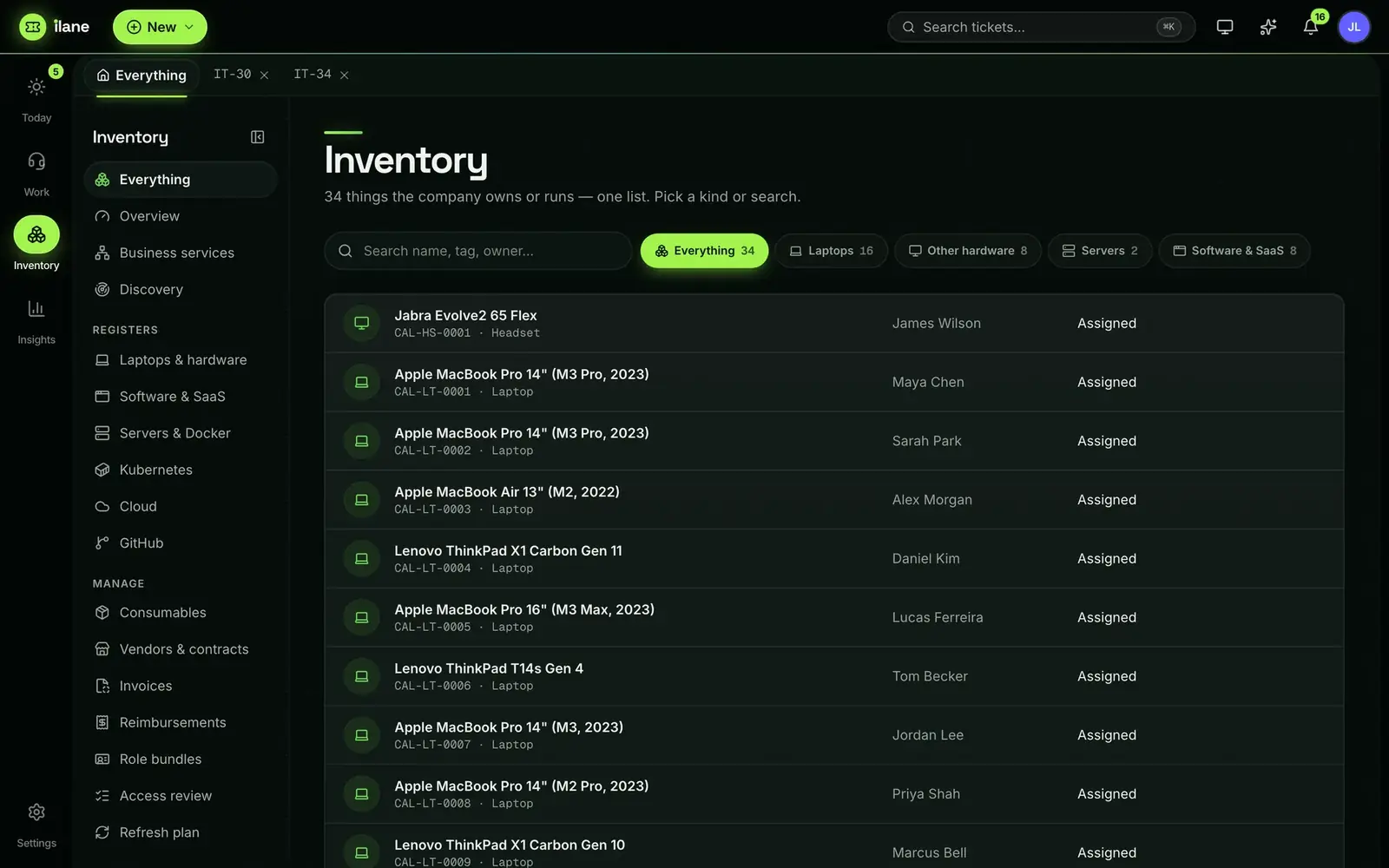
Start with an asset register that names an owner for every laptop, server and cloud account. You can’t secure or report on a device you don’t know exists.
Your data protection documentation describes what personal data you process. The register tells you which machines it sits on. The minimum for each device is the owner, serial number, operating system, encryption status and last check-in. For servers and cloud resources, add the service each one runs and who is responsible for it.
The register is only useful if it stays current. In ilane’s assets and licences register, devices report in through the agent, and tickets keep owners up to date. When IT hands over a laptop, the person confirms it in ilane, so ownership is recorded rather than guessed. If a laptop’s hardware no longer matches the register, ilane opens a ticket. Read-only cloud connections list the resources you run, and owners come from your resource tags.
What should happen when a laptop holding personal data is lost or stolen?
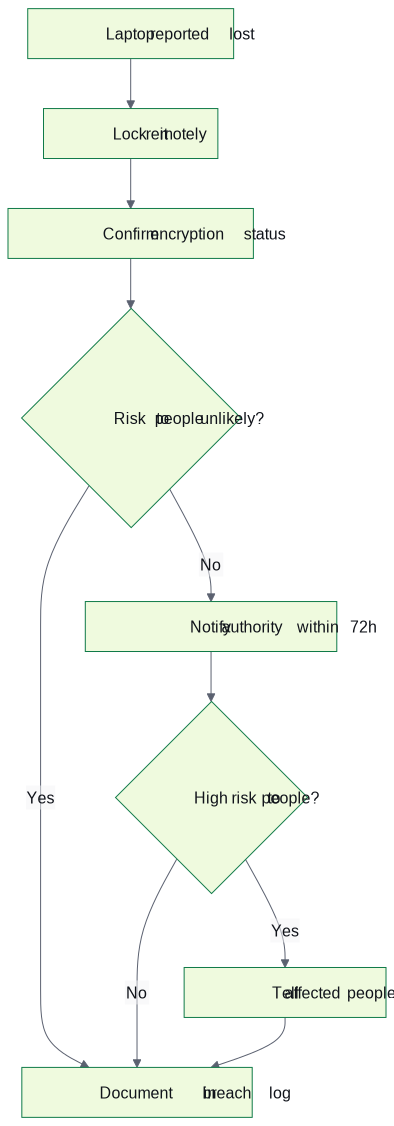
Lock the laptop right away, confirm whether it was encrypted, assess the risk to the people whose data was on it, and decide on notification within the legal deadline.
The deadlines are strict. Under Article 33, you must notify the supervisory authority without undue delay and, where feasible, within 72 hours of becoming aware of a breach. The exception is a breach that is unlikely to result in a risk to people. You must also document every breach, including those you don’t report. Under Article 34, you must tell affected people about a high-risk breach. You don’t have to if measures such as encryption made the data unintelligible to anyone not authorised to see it.
That makes the encryption status at the moment of loss very important, and you need a record of it, not a guess.
On the tooling side, ilane needs one approval to lock a lost laptop. Erasing it needs a second person, so one admin can’t wipe a device alone. Both actions go into the audit log, which gives your breach record a timestamped trail.
How do you close the GDPR gaps when someone leaves the company?
Treat offboarding as one ticket that stays open until every account, device and seat is confirmed back. Closing it when someone ticks a box isn’t enough.
A leaver checklist for endpoints:
- Remove sign-in in your identity provider on the last day.
- Recover the laptop and match it to the handover record in the register.
- Erase the laptop before reissuing it, so the next person doesn’t inherit the previous owner’s data.
- Reclaim software seats, including AI tools that may hold uploaded files or prompts.
- Review server and cloud access the person held, including keys and admin rights.
In ilane, onboarding and offboarding run from request catalog forms. Offboarding completion and AI vendor access on leaving are tracked as controls. Admins, department heads and API keys come up for review each quarter as a ticket.
What evidence shows your endpoint controls worked all year, not just on audit day?
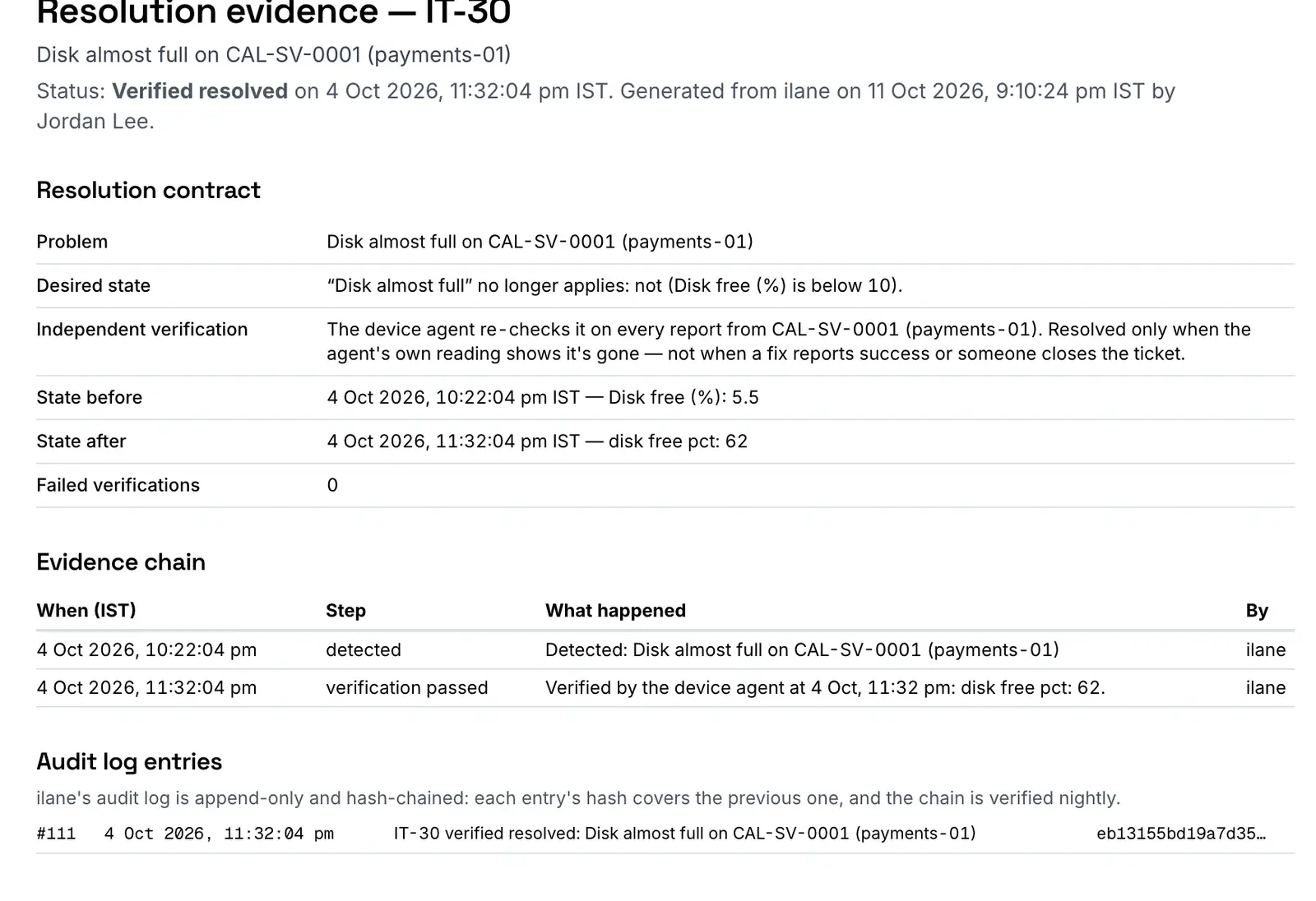
Keep a system-generated, timestamped record of each check: when it failed, who owned it, what was done and when the next reading showed it fixed. Screenshots taken the week before an audit don’t show this.
This is where accountability and Article 32’s “regularly testing” duty meet. A green dashboard today proves nothing about March. A dated history of each failed check and how it was resolved does.
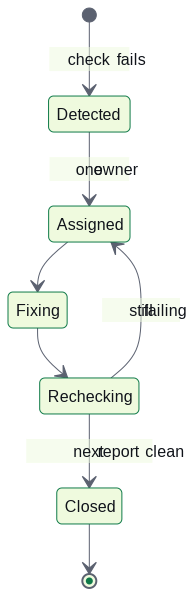
ilane closes a check-raised ticket only when its own next reading confirms the fix. If the check still fails, the ticket reopens instead of closing. How verified resolution works covers the details. Each verified fix saves an evidence record with:
- what “fixed” meant
- the before and after readings
- every step that ran
- who approved it
The audit log is tamper-evident. Each entry carries a fingerprint of the one before, so any edit breaks the chain, and a nightly check reports where. Entries are kept for at least a year, and you can export evidence as CSV. ilane maps its controls to SOC 2, ISO 27001, ISO 42001 and NIST AI RMF, not to GDPR. You link these records to your own GDPR documentation.
How do you monitor employee devices without creating a GDPR problem of your own?
Collect only the device data you need for security, tell employees exactly what that is, and stay away from content and behaviour tracking.
Device telemetry about a named employee is personal data too. The Article 29 Working Party’s Opinion 2/2017 on data processing at work makes four points that apply here:
- Processing at work must be a proportionate response to the employer’s risks.
- Consent is rarely a valid legal basis, because employees often can’t refuse freely.
- Employees should receive effective information about the monitoring that takes place.
- Policies should be clear and easy to find. The opinion recommends involving a representative group of employees in writing and reviewing them, as covered in this version of the text.
In practice:
- Check settings, not content. Whether encryption is on is a security fact. File contents and browsing history are not needed to answer it.
- Publish the list of what the agent collects. Make it readable by every employee, not just IT.
- Switch off what you don’t need.
- Ask before viewing a screen. Get the person’s permission for every remote session.
ilane publishes exactly what its device agent collects, and every employee can see the list. The agent never collects:
- keystrokes, screenshots or the clipboard
- browsing history or file contents
- location, the camera or the microphone
- messages or email
- time spent in apps or Wi-Fi network names
- AI prompts
- passwords, tokens or keys
Each company can switch whole areas of collection off. For remote help, the person taps Allow on their own screen for every session. Unattended access exists only on servers you choose. If you’d rather keep this data on your own infrastructure, ilane can run self-hosted on your own server.
How can you keep this checklist running continuously in a small IT team?
Automate detection and verification, and keep people’s time for decisions: approving risky fixes, handling exceptions and reviewing access.
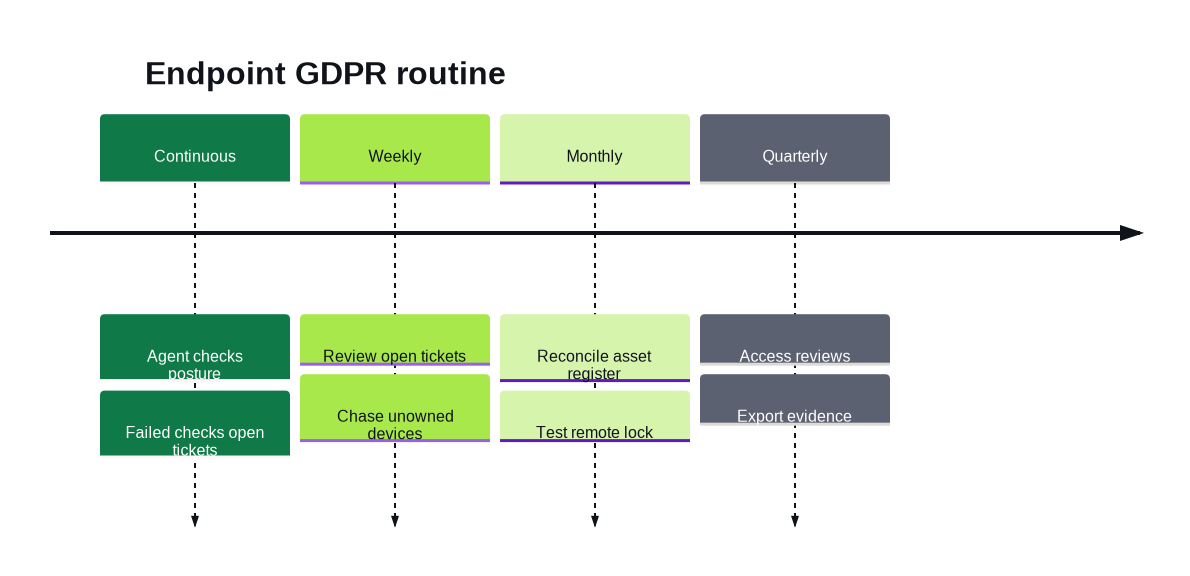
A few rules make this manageable for one or two people:
- One owner per finding. A failed check without an owner is still open in practice.
- Safe fixes run on their own. Turning on a firewall or setting a screen lock rarely needs a meeting.
- Serious actions need two people. Erasing a device and similar actions get a second approver.
- Test the controls. Lock a test laptop each month so you know lock works before you need it. That is also the regular testing Article 32 asks for.
Conclusion
GDPR’s endpoint duty comes down to two things: secure the devices that hold personal data in proportion to the risk, and be able to prove it. Encrypt and lock every laptop, keep servers patched and closed to the internet, give every device an owner, close offboarding properly, and keep dated evidence of each fix. Monitor devices only as far as security requires, and tell employees exactly what you collect.
To see this running on real devices, book a demo. It’s a 30-minute call where we fix one thing together and watch ilane confirm it’s really fixed.
Frequently asked questions
Does GDPR require full-disk encryption on every laptop?
GDPR doesn’t mandate a specific technology, but Article 32 names encryption as an example of an appropriate measure, and Article 34 can remove the need to tell affected people about a breach if the data was unintelligible to unauthorised parties. For laptops that hold personal data, full-disk encryption is the expected baseline. Confirm your specific position with your DPO.
Is a lost encrypted laptop still a personal data breach?
A lost device can still count as a breach, so record it in your internal breach log either way. Whether you must notify the supervisory authority depends on whether the loss is likely to result in a risk to people, and encryption with a protected key weighs heavily in that assessment. Notification to the authority is due within 72 hours where feasible if risk is likely.
How long should we keep evidence of endpoint security checks?
GDPR doesn’t set a single retention period for security evidence, so agree one with your DPO that covers your audit cycles and breach investigations. In ilane, audit log entries are kept for at least a year and can’t be edited or deleted through the app or the database.
Can we monitor personal (BYOD) devices used for work under GDPR?
Monitoring personal devices raises the bar on proportionality, because they hold far more private data. A common approach is to check only security posture before allowing access to work apps, rather than monitoring the device itself. Explain clearly to employees what is checked and why.
Does ilane provide GDPR certification or a GDPR control mapping?
No. ilane maps its live controls to SOC 2, ISO 27001, ISO 42001 and NIST AI RMF. Its device checks, verified fix records and tamper-evident audit log can support your GDPR security documentation, but you map them to GDPR yourself.