If your company has no dedicated IT team, look for an IT operations platform that does five things. It should cover the help desk, device management, assets and cloud in one place. It should keep one shared record of people, devices and services. It should check that a fix worked before it closes a ticket. You should control where it is hosted and how it uses AI. And its contract should be easy to leave. The checklist below works for any vendor, ilane included.
What does an IT operations platform include?
An IT operations platform is one product that takes requests, watches company devices and systems, tracks what you own, and records how each problem was fixed.
Most platforms bundle some mix of these parts:
- Service desk: requests, incidents, approvals, SLAs and a self-service catalog.
- Device management: checks for encryption, firewall, patches and screen lock, plus the ability to lock and erase a laptop.
- Server and cloud monitoring: disk, uptime, containers, cloud settings and code repositories.
- Asset and licence tracking: hardware, software seats, renewals and contracts.
- Remote help: viewing or controlling a screen to fix a problem.
- Compliance evidence: records an auditor can check against SOC 2 or ISO 27001.
The difference between platforms isn’t usually the feature list. It’s whether these parts share the same data, and whether the product can tell a fixed problem apart from a closed ticket.
Who is an IT operations platform for when there is no dedicated IT team?
It’s for a founder, ops lead or IT generalist at a company of roughly 150–300 people who looks after IT as one job among several and can’t keep five consoles in their head.
At that size you already have the problems of a much larger company: laptops on three operating systems, SaaS seats that pile up, new starters and leavers every week, and customers sending security questionnaires. The CIS Critical Security Controls say every organisation should start with Implementation Group 1, which CIS calls “essential cyber hygiene”. SANS notes that IG1 is aimed at organisations with limited IT and security expertise. A platform should make that baseline easy to reach without hiring.
A single platform fits better when:
- The same person handles tickets, laptops and SaaS seats.
- You keep switching tabs to answer “whose laptop is this, and what does it run?”
- Audits or customer questionnaires keep asking you for the same evidence.
Separate tools may still fit when:
- You already run a good device management tool that you trust and only need a help desk.
- One area needs deep specialist features that an all-in-one product doesn’t match.
- A parent company requires its own tools.
Which coverage should you require: service desk, devices, assets, cloud?
At minimum, require a service desk, device checks on every operating system you use, a hardware and software register, and read-only visibility of your servers and cloud accounts.
Coverage matters because you can’t secure what you haven’t counted. CIS Control 1 asks organisations to actively inventory, track and correct all enterprise assets: end-user devices, network devices, IoT devices and servers.
| Area | Minimum to require | Question to ask the vendor |
|---|---|---|
| Service desk | Email and portal intake, approvals, business-hour SLAs | Can HR and Finance use the same desk with their own queues? |
| Devices | Agent on Mac, Windows and Linux; encryption, firewall and patch checks | What happens when a check fails? Who is told? |
| Lost laptops | Lock and erase from the console | Does erasing a laptop need a second approver? |
| Assets | Hardware and software register with owners | Does the register update itself, or does someone maintain a spreadsheet? |
| Licences | Last-used dates, renewal reminders | Can it flag seats nobody has opened in 60+ days? |
| Servers and cloud | Disk, uptime, cloud settings, code-repo checks | Are cloud connections read-only? |
How should the tools share data about people, devices and services?
Each ticket should already know the person, their device, their software seats and the business service involved, without a sync job between separate products.
Offboarding shows why this matters. With separate tools, one departure turns into a chain of manual handoffs. Each handoff is a chance to miss a laptop or a paid seat.
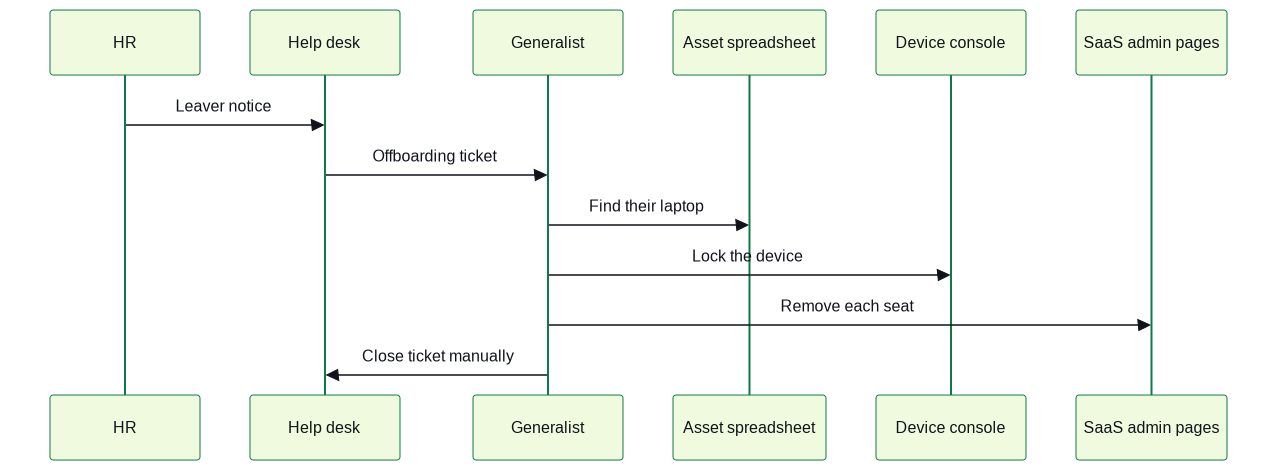
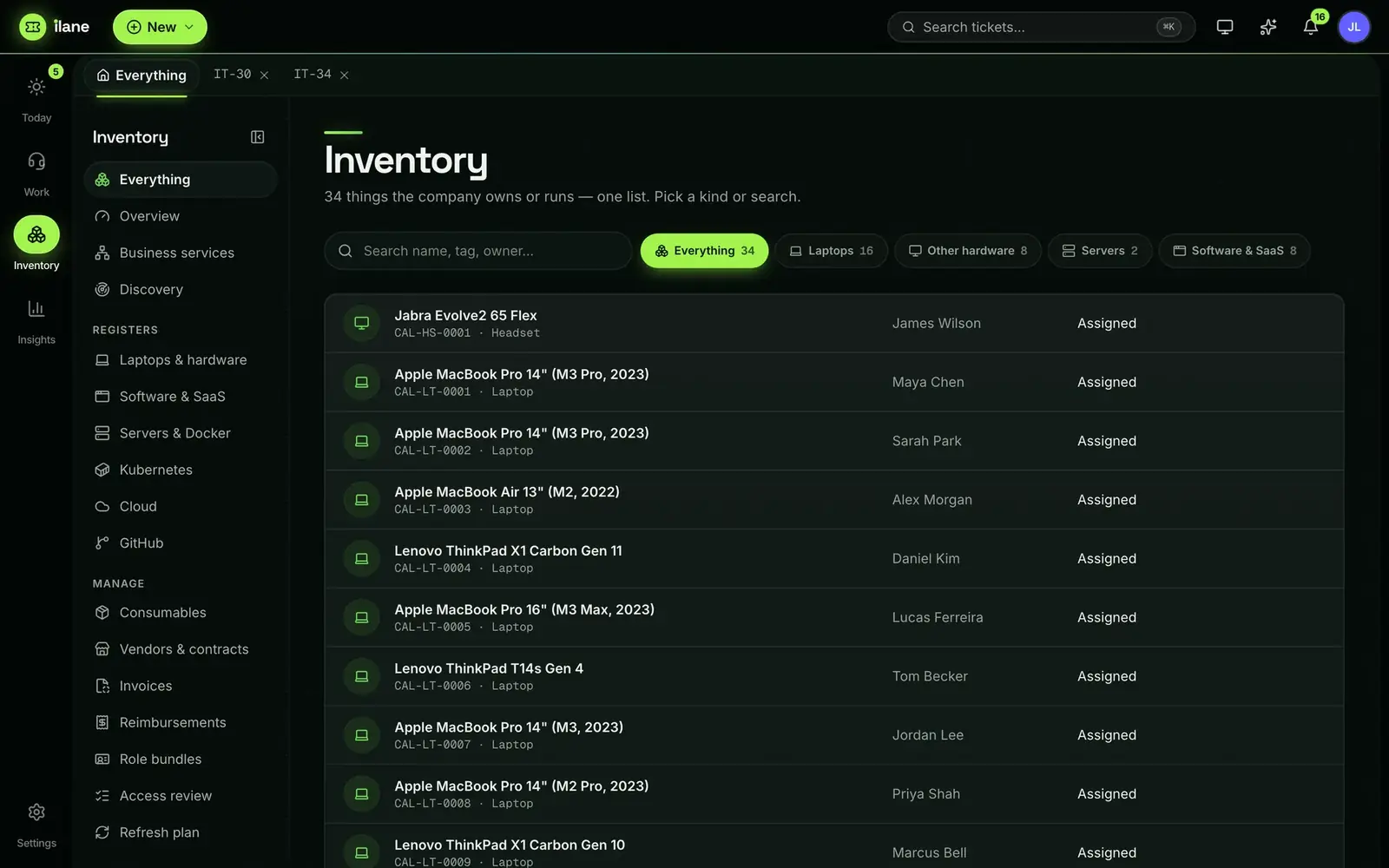
When you evaluate, ask the vendor to open one ticket and show the device’s health, the person’s seats and the affected service on the same screen. “Integrated” can mean two databases joined by a nightly sync. That’s different from one data model, and the difference shows up when records drift apart.
ilane is built on one database. The comparison page describes the ticket, the laptop and the service as records that point at each other, with nothing to sync. The asset register is kept current by the device agent, by tickets, and by employees confirming the devices they’ve been handed.
How do you check that a platform closes tickets only when fixes are real?
Ask the vendor to break something on a test laptop, then watch whether the platform checks the result itself before it closes the ticket, and reopens the ticket if the fix didn’t hold.
Most help desks close a ticket when someone clicks “resolved”. With no IT staff, nobody goes back to check. Test these points:
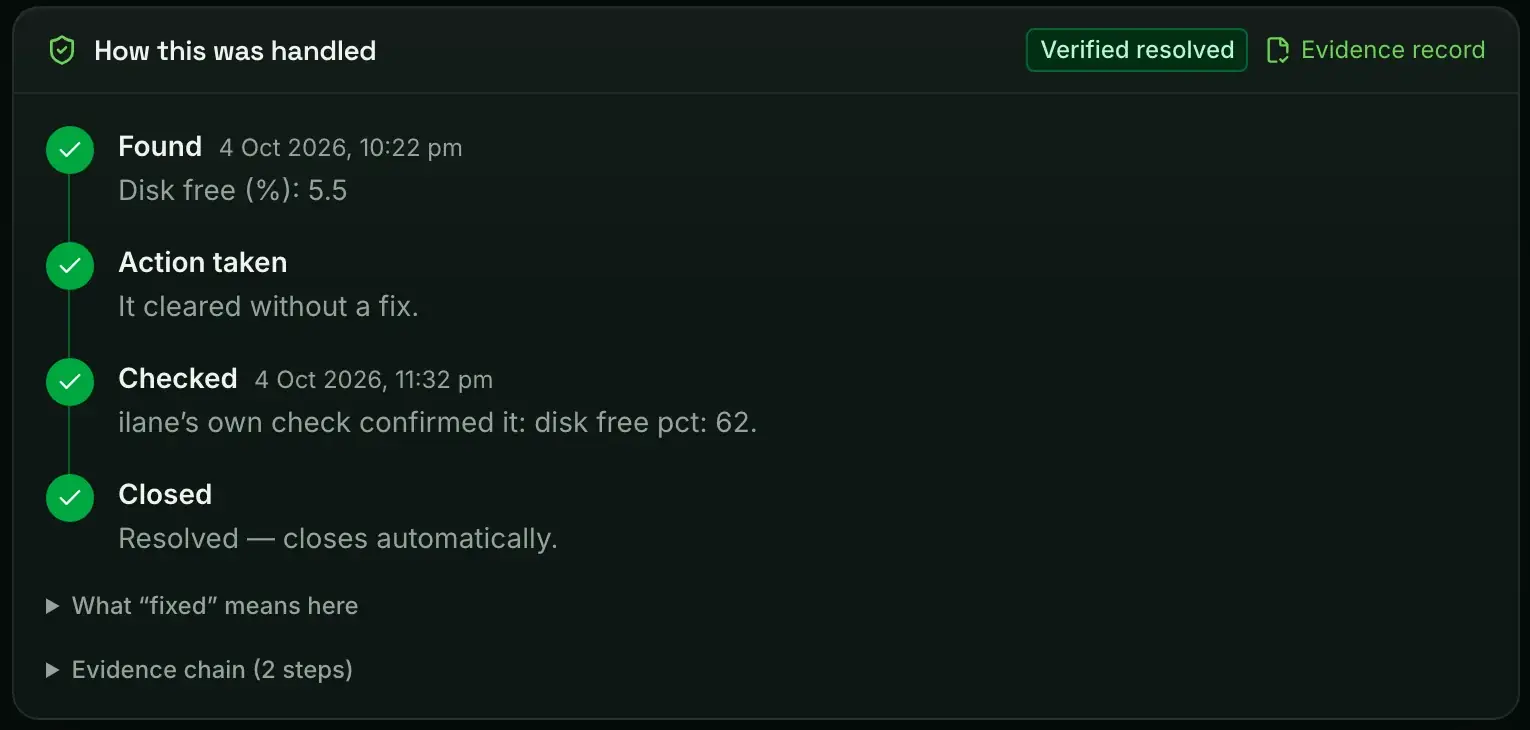
- “Fixed” is defined up front. For example, “disk encryption on” or “disk above 20% free”, not “technician says done”.
- The re-check is independent. The platform takes a new reading from the device or server instead of trusting the person or script that applied the fix.
- Failure reopens the same ticket, with its history kept, rather than creating a duplicate.
- Automatic fixes are limited. Small, reversible fixes can run on their own. Destructive ones wait for a person.
- There is evidence. You get a record of what ran, who approved it, and the readings before and after.
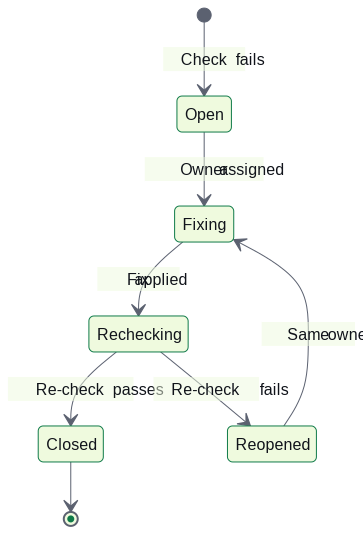
This is how ilane is designed. Its verified resolution process finds a problem, gives it one owner, runs only the fixes you’ve allowed, checks the fix with its own reading, and then either closes the ticket with evidence or reopens it. Related alerts are grouped into one incident, with the likely cause shown first.
What should you ask about hosting, data control and AI features?
Ask where the data lives, what the device agent collects, whether you need to open firewall ports, and whether the product still works with AI switched off.
Hosting and data
- Can you self-host, or get a dedicated instance, or is it shared cloud only?
- Does the agent need inbound firewall ports, or does it connect out over HTTPS?
- Is there a published list of what the agent collects, and what it never collects, that employees can read?
- Is the audit log tamper-evident, and how long are entries kept?
AI features
- Can you bring your own AI provider key, or turn AI off entirely?
- Does AI decide what runs, or do fixed rules decide with AI only making suggestions?
- Is AI included in the price or sold as a paid add-on?
For reference, here are ilane’s answers. Its FAQ says it runs self-hosted with Docker Compose or as a dedicated hosted instance. It needs no open firewall ports and works with AI switched off. Its security page says AI can explain and suggest but never decides what runs. Every automatic fix starts switched off, and erasing a laptop needs two people.
How do you compare pricing and contract terms without surprises?
Work out every quote as a yearly cost per managed device, including every module you need, then read the renewal, notice and data-export clauses before you sign.
Pricing
- Turn per-technician, per-employee and per-device prices into one yearly cost per device.
- List which features sit in higher tiers. Problem management, service maps and AI are common upsells.
- Check whether servers cost the same as laptops.
Contract terms
- Renewal notice: how many days before renewal you must cancel. Put the date in your calendar.
- Price caps: the most the price can rise at renewal.
- Seat or device true-ups: how extra devices are billed partway through the term.
- Data export: what format you get, how soon, and whether it costs anything.
- Subprocessors and security: the 2025 Verizon DBIR found third-party involvement in breaches doubled to 30%, so ask for the vendor’s security documents.
Don’t rely on regulation to catch auto-renewals for you. The FTC’s “click-to-cancel” Negative Option Rule was vacated by the Eighth Circuit in July 2025, and business contracts depend on their own terms anyway.
ilane quotes each team based on how many laptops, desktops and servers run its agent, and offers a pilot on one team where you keep your setup when you move to a full plan.
What does a fair 30-day evaluation look like?
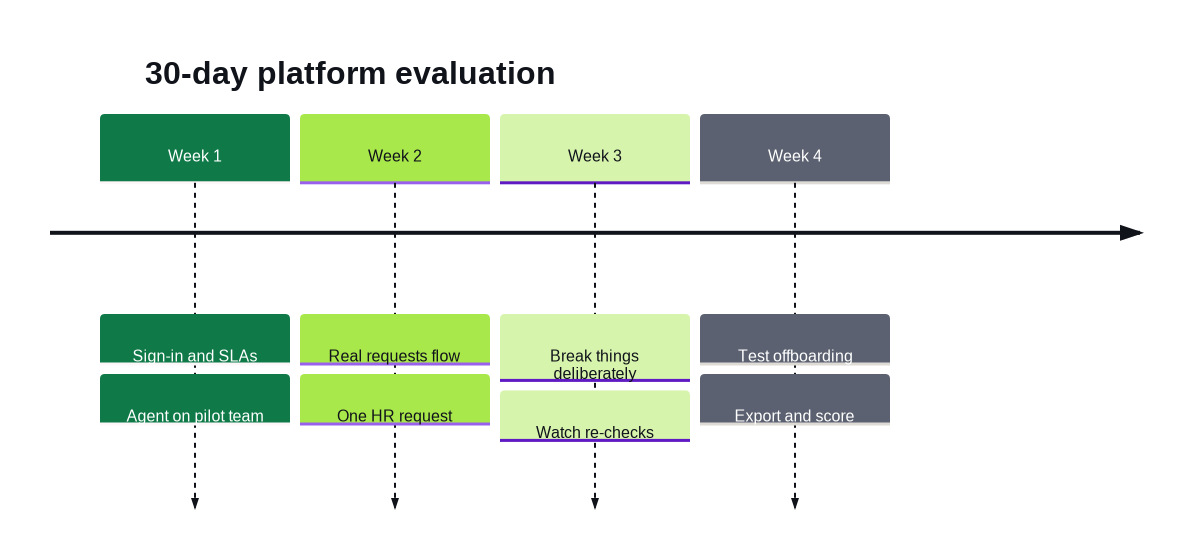
A fair evaluation runs on your own devices and real requests for about four weeks, includes problems you cause on purpose, and finishes with a scored comparison and a test data export.
- Week 1: set up sign-in, departments, email-to-ticket and SLAs, then install the agent on one team’s laptops and one server.
- Week 2: send that team’s real requests through the desk, including at least one HR or Finance request.
- Week 3: break things on purpose. Turn off a firewall, fill a disk, leave a seat unused. See which issues the platform catches, fixes and re-checks.
- Week 4: run a full offboarding, export your data, then score each vendor against the checklist.
Score each vendor on the same criteria: coverage, shared data, verified fixes, hosting and data control, AI controls, and contract terms. If a vendor can’t show a re-check or a data export during the trial, count that as a fail rather than a promise.
Conclusion
With no IT staff, the checklist comes down to five questions. Does it cover everything you run? Does every ticket know the person and the device? Does it prove a fix before closing the ticket? Can you control hosting and AI? Can you leave cleanly? Ask every vendor the same questions and test them on your own devices.
If you’d like to run that test on ilane, book a demo. It’s a 30-minute call where we fix one real problem together and watch ilane check that the fix worked.
Frequently asked questions
Can a company with 200 employees run IT without hiring an IT person?
Often, yes, for routine work like requests, laptop settings, patching and licence tracking, as long as the platform automates checks and closes the loop itself. You’ll still want someone who owns IT decisions, even part-time, plus outside help for projects such as network changes. The platform cuts down the legwork. It doesn’t remove the need for decisions.
Is an all-in-one IT platform less capable than specialist tools?
In some areas it can be, especially for very large or highly specialised setups. For a company of 150–300 people, shared data and fewer consoles usually matter more than the deepest feature set in any one area. Test the areas you depend on most during the trial instead of assuming either way.
What is verified resolution in IT ticketing?
It means a ticket closes only after the system takes a new, independent reading that shows the problem is gone, such as encryption now on or disk space recovered. If the re-check fails, the same ticket reopens with its history. That stops tickets from being marked done when nothing was actually fixed.
Should device management and the help desk come from the same vendor?
They don’t have to. But when they share one data model, every ticket already shows the device and its health, and offboarding can confirm that each device and seat has come back. If you keep them separate, check how often they sync and what happens when their records disagree.
How long should an IT platform evaluation take?
About 30 days is enough to set it up, run real requests, deliberately break a few things and test offboarding and data export. Shorter trials tend to show only the demo path. Use the same scorecard for every vendor so you can compare them fairly.