ITAM (IT asset management) tracks what your company owns: every laptop, server and software seat, who holds it, what it costs and when it renews or gets retired. ITSM (IT service management) runs the work people ask IT to do, meaning requests, incidents and changes, each with an SLA. In short, ITAM answers “what and who”, and ITSM answers “what’s wrong and when will it be fixed”.
What is the difference between ITAM and ITSM?
ITAM manages things across their whole life, while ITSM manages the work done on those things and for the people who use them.
The two disciplines have separate definitions. In ITIL 4, the asset management practice exists to “plan and manage the full lifecycle of all IT assets”, which covers cost, risk and decisions about buying, reusing and disposing of them. ITIL 4 defines service management more broadly, as “a set of specialised organisational capabilities for enabling value for customers in the form of services”. ITAM also has its own standard. ISO/IEC 19770-1:2017 sets out requirements for an IT asset management system and applies to organisations of every size.
ITIL v3 had asset and configuration management in one process. ITIL 4 split it into two practices: IT asset management and service configuration management. Tools went the same way, which is one reason the two disciplines often sit in different products.
| ITAM | ITSM | |
|---|---|---|
| Core record | The asset (laptop, server, seat, contract) | The ticket (request, incident, change) |
| Time horizon | Years, from purchase to disposal | Hours or days, from open to close |
| Main question | What do we own, who has it, what does it cost? | What’s broken or needed, and when is it done? |
| Usually involves | IT, finance, procurement | Service desk, IT ops, HR, finance and ops teams |
| Good looks like | Every asset has an owner, no idle seats, renewals decided early | SLAs met, fixes hold, few reopened tickets |
| Failure looks like | Laptops nobody can find, paying for unused seats | Lost requests, breached SLAs, the same issue twice |
Which questions does ITAM answer, and which does ITSM answer?
ITAM answers questions about inventory, ownership and money. ITSM answers questions about work, speed and outcomes.
ITAM questions
- Which laptops do we own, and who has each one right now?
- Which software seats haven’t been opened in months?
- Which contracts renew next quarter, and when is the notice date?
- Which devices are out of warranty, or running an unsupported OS?
- What did a leaver have, and has all of it come back?
ITSM questions
- What has been asked of IT, and who owns each request?
- Which tickets are about to breach their SLA?
- Which alerts are really one incident with one cause?
- Who approved this change, and did it work?
- Did the fix actually hold, or did the problem come back?
Some questions need both sides. A plain location tracker isn’t enough. NIST SP 1800-5 points out that a physical asset system can tell you where a computer is, but not “What operating systems are our laptops running?” NIST also lists reducing help desk response times among the benefits of good asset management. That benefit only appears if the help desk can actually see the asset data.
Where do the two overlap, and where do they conflict?
They overlap at every point where an asset changes hands or breaks. They conflict when the register and the ticket queue disagree about the same laptop.
Where they overlap
- Joiners, movers, leavers: an onboarding request (ITSM) gives out a laptop and seats (ITAM). An offboarding request has to get them all back.
- Device faults: a broken-screen ticket needs the asset record to check the owner, model and warranty.
- Licence requests: someone asks for a seat. Is there a free one in the pool, or does it need buying and approving?
- Lost devices: the lock request is a ticket, and the outcome changes the asset’s status.
- Audits: CIS Control 1 asks you to actively inventory, track and correct all enterprise assets, including end-user devices, servers and cloud. Auditors then ask for the tickets that show each correction happened.
Where they conflict
- Speed vs accuracy: a technician swaps a laptop to close a ticket fast, and the register still shows the old serial number.
- Different owners: finance trusts the asset list and the service desk trusts the queue, so neither side corrects the other.
- Copied data drifts: if the ticket stores its own copy of the device details, each copy is right only on the day it was made.
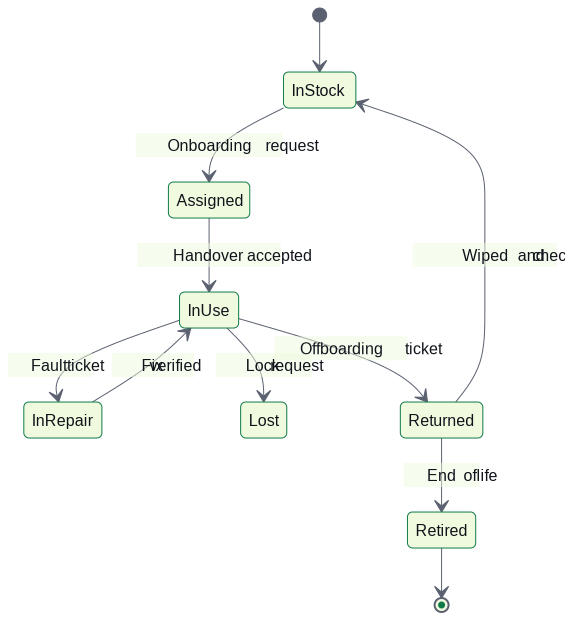
Most of these overlaps and conflicts happen at a few moments in a single laptop’s life:
Do small companies need both, or one tool that covers both?
Small companies need both disciplines. Between 50 and 1,000 people, one tool that keeps assets and tickets in the same record usually works better than two tools kept in sync.
At this size, the same small team usually runs the service desk and the asset list. Two tools mean two logins and two versions of each laptop, plus a sync job or spreadsheet export that someone has to keep an eye on. That’s how the conflicts above happen. In a typical IT suite, the hardware and software register is a separate product or add-on, not part of the service desk.
ilane takes a different approach. The assets and licences register and the service desk run on one database. The ticket, the laptop and the service are rows that point at each other, so nothing needs syncing and nothing can drift. Devices report in through the agent, tickets keep owners up to date, and people confirm the devices they’ve been given.
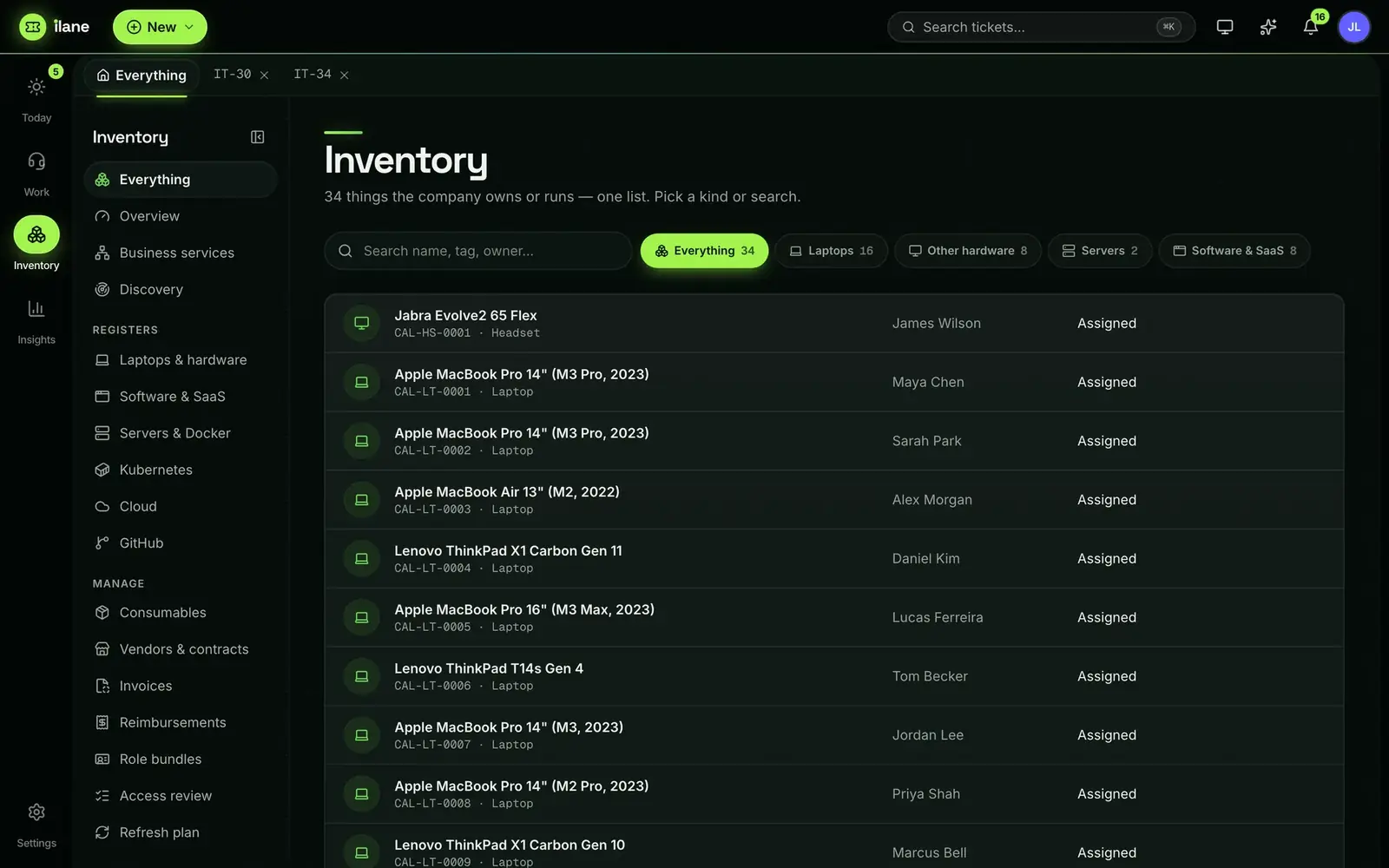
How should a laptop record link to a ticket in practice?
The ticket should point at the live asset record rather than copy it, and what happens on the ticket should be recorded in the asset’s history.
Here’s how to set that up in any tool, and how ilane handles each step:
- Attach the device when the request comes in. Don’t make the technician ask “which laptop?” In ilane, every request arrives with the device attached, whether it came through the portal, catalog, assistant, email or API.
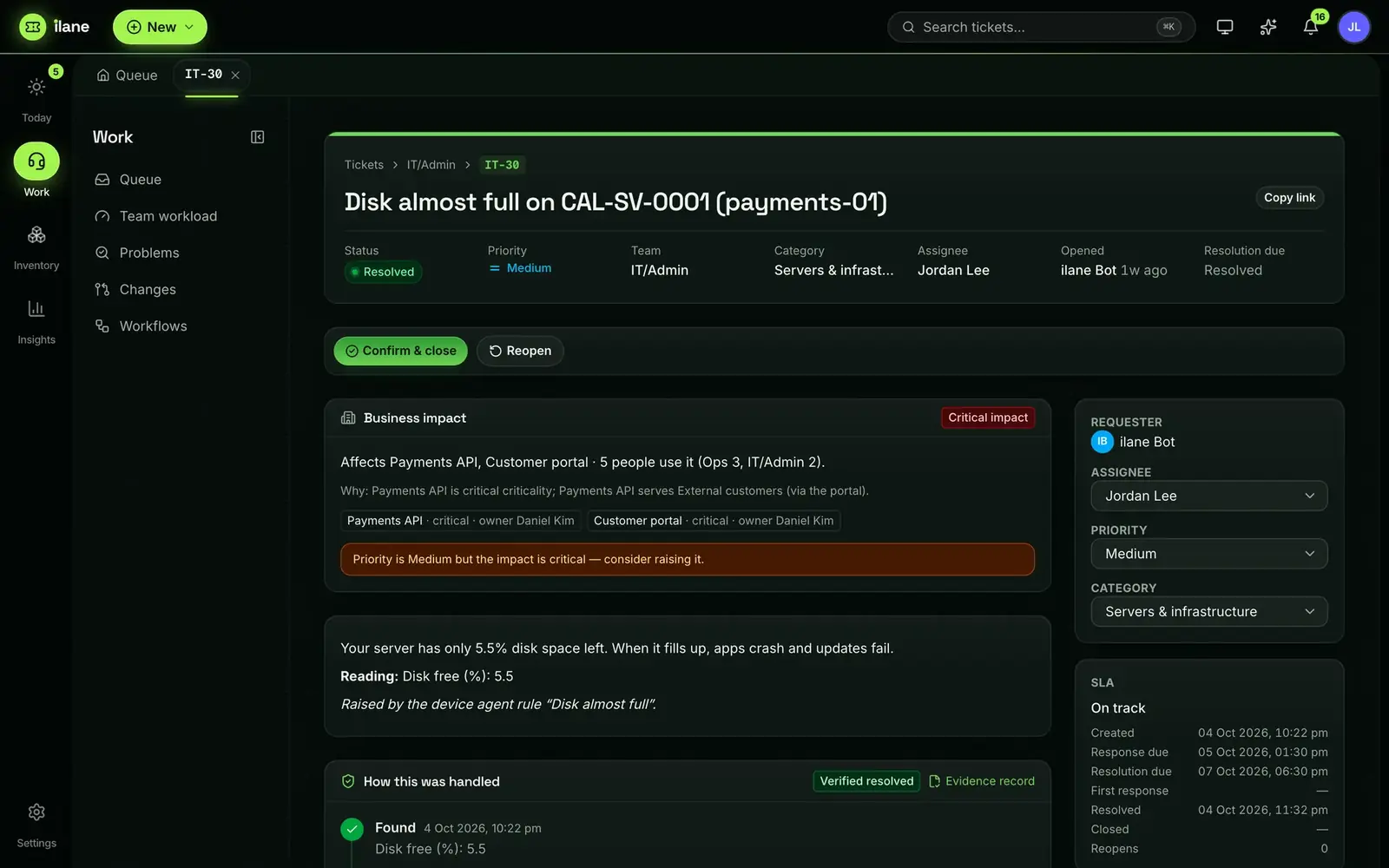
- Show context on the ticket. That means owner, model, health and the person’s software seats. A technician shouldn’t have to open a second tool to check them.
- Let checks raise tickets, too. When an agent check fails, for example encryption is off or updates are overdue, it should open one ticket with the device and person already attached.
- Record handovers on the asset. When IT hands over a laptop, the person confirms it in ilane, and the handover is saved in the asset’s history.
- Flag when the register and the device disagree. In ilane, a laptop whose parts no longer match the register opens a ticket.
- Close only on proof. A check-raised ticket closes when the next report from the device is clean. If it isn’t clean, the ticket stays open.
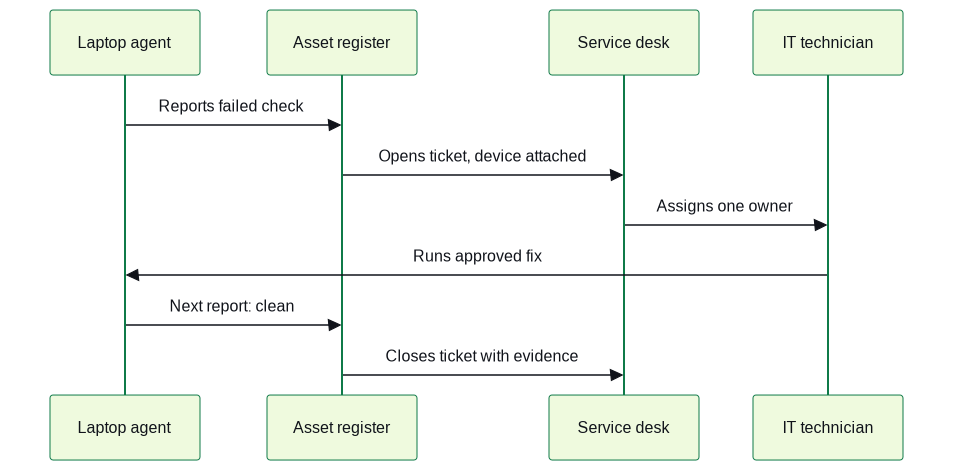
That last step is what verified resolution means in ilane. The ticket records what “fixed” means, what was done and the reading after the fix. Asset data and service work come together on one record.
How do I choose between ITAM-first and ITSM-first tooling?
Start with whichever problem costs you most today. Then check that the tool also covers the other side in the same record, so you don’t have to buy a second product later.
Go ITSM-first if:
- requests come in through email and chat, and some get lost
- you can’t tell which tickets are about to breach their SLA
- the same incident keeps coming back after it was “closed”
Go ITAM-first if:
- an audit is coming and you can’t produce an owner for every device
- software spend keeps rising and nobody knows which seats are used
- leavers walk out with laptops or keep access to paid apps
Whichever you start with, test these on a trial:
- Does a new ticket show the device and its owner without anyone typing them in?
- If you swap a laptop on a ticket, does the register update?
- Does an offboarding ticket check that every seat and device came back before it closes?
- Does the tool re-check a fix, or does “closed” just mean someone clicked a button?
- How is it priced: per technician, per module or per device? ilane quotes per laptop, desktop and server running its agent.

A short pilot on one team, with that team’s real laptops and requests, will tell you more than a feature list. ilane supports this: you can start with one team and keep everything you set up when you move to a full plan.
Conclusion
ITAM and ITSM do different jobs. ITAM knows what you own and who has it. ITSM gets the work done and tracks how quickly. The trouble starts where they meet: handovers, faults, leavers and audits, especially when each side keeps its own copy of the same laptop. For a team of 50 to 1,000 people, the fix is usually one record shared by both. A ticket should already know the device, and the device’s history should show every ticket.
If you’d like to see assets and tickets on one database with real data, book a demo. It’s a 30-minute call where we fix one thing together and watch ilane check that it’s really fixed.
Frequently asked questions
Is a CMDB the same as ITAM?
No. ITAM tracks assets as things you own, with costs, owners, contracts and disposal. A CMDB tracks configuration items and how they relate to each other. In ITIL 4, the CMDB sits inside service configuration management, not inside ITAM. The two often share data, but they answer different questions.
Is software asset management (SAM) part of ITAM?
Yes. SAM covers software licences and seats, and it’s a subset of ITAM. The ISO standard shows this history: ISO/IEC 19770-1:2012 covered SAM processes, and the 2017 edition replaced it with requirements for managing all IT assets.
Can a spreadsheet handle ITAM for a small company?
For a few dozen laptops, maybe, but only if someone updates it after every handover, swap and departure. Spreadsheets break down because nothing updates them automatically. They also can’t tell you whether a seat is used or whether a laptop’s parts still match the record. A register fed by a device agent and by tickets stays current without that manual work.
Who should own ITAM in a 50–1,000 person company?
Usually IT owns the register day to day, and finance or procurement own contracts and spend. In practice it works best when the people holding the devices help keep it accurate. In ilane, employees confirm handovers themselves, so ownership isn’t left to guesswork.