When a company laptop is lost or stolen, first get the facts from the employee: when and where they last had it. Then lock it remotely and end its sign-ins within the first hour. Check whether the disk was encrypted. Erase the laptop only after a second person approves. Record every action on one ticket, and decide whether the loss counts as a reportable data breach.
What is the first step when a laptop goes missing?
Start with one ticket. Then lock the laptop and cut its access before you spend any time looking for it.
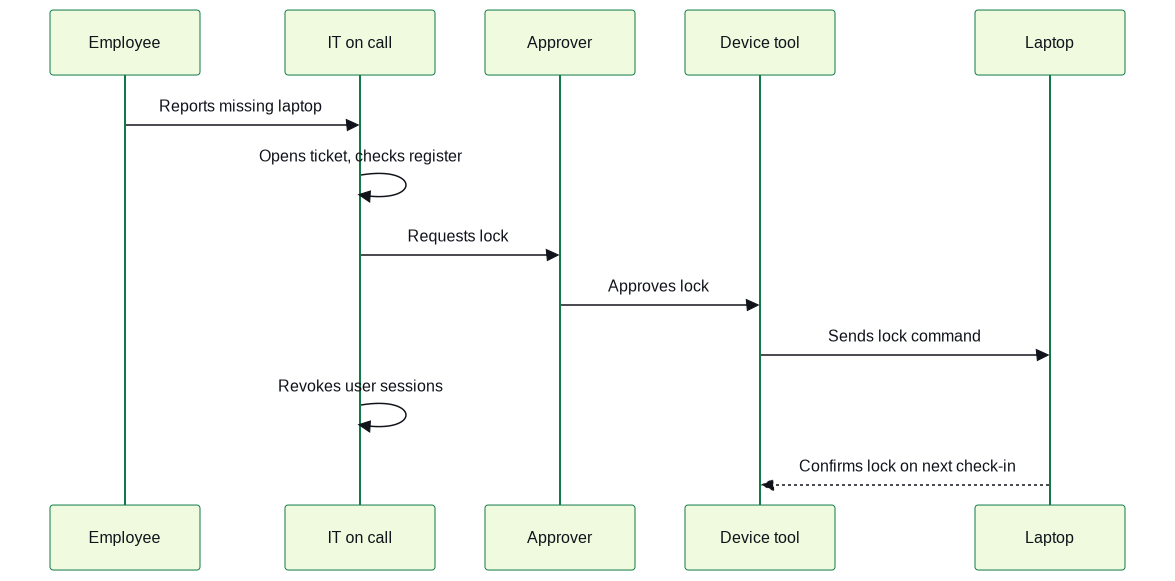
The first hour usually goes like this:
- Open one ticket as soon as the loss is reported. Record when the employee last saw the laptop, where, and whether it was on, asleep or shut down.
- Identify the device from your asset register: model, serial number, owner and when it last checked in.
- Lock it remotely. A lock can be undone if the laptop turns up in a taxi or at home.
- Sign the user out everywhere. Revoke sessions in your identity provider and email, so a browser that’s already signed in stops working.
- Check encryption status as of the laptop’s last check-in. This one fact drives most of the decisions that follow.
- Name an owner and a time to decide whether to erase.
Mainstream device tools are built for this. Microsoft’s own Intune documentation names a lost or stolen device as the main reason to lock or wipe one remotely.
Who should be allowed to lock a lost laptop, and who should approve an erase?
Any IT agent on call should be able to lock a laptop after one approval. An erase should always need two people, because it can’t be undone.
Agree on the roles before anything goes missing:
- Lock: one approver, such as the IT lead or the on-call agent. Speed matters more than caution here, because a lock is reversible.
- Erase: two people. One requests it and a second person approves it, for example the IT lead plus the head of security or the data owner.
- Backups: name a stand-in for each approver. Laptops go missing on bank holidays too.
ilane’s Devices & laptops product works this way. Locking a lost laptop takes one approval, and erasing it needs a second person, so one admin can’t wipe a laptop alone. Each step goes into a tamper-evident audit log. No one can edit that log through the app or the database, and entries are kept for at least a year.
When is a lock enough, and when should IT wipe the device?
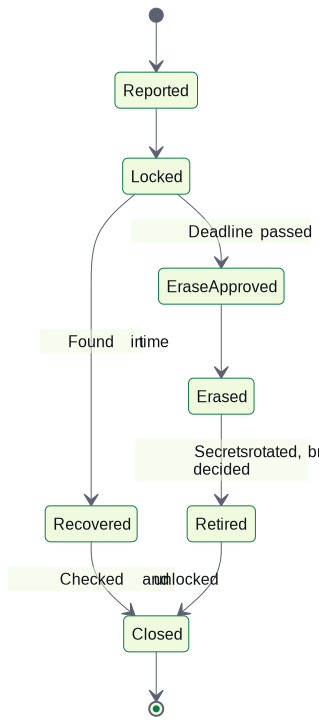
A lock is enough when the laptop is probably misplaced and the disk is encrypted. Wipe it when theft is confirmed, the laptop stays missing past your deadline, or you can’t prove it was encrypted.
Think about this before you choose: erasing is permanent. Intune’s wipe action resets the device to factory settings and removes all personal and company data, apps and configuration. Once you erase, there is nothing left to investigate on that laptop.
Also, a remote command only reaches a laptop that comes back online. Apple says a remote erase on an offline device starts the next time it connects to a network. A thief who keeps the laptop offline never receives your command. That is why encryption, not the wipe, is your real protection.
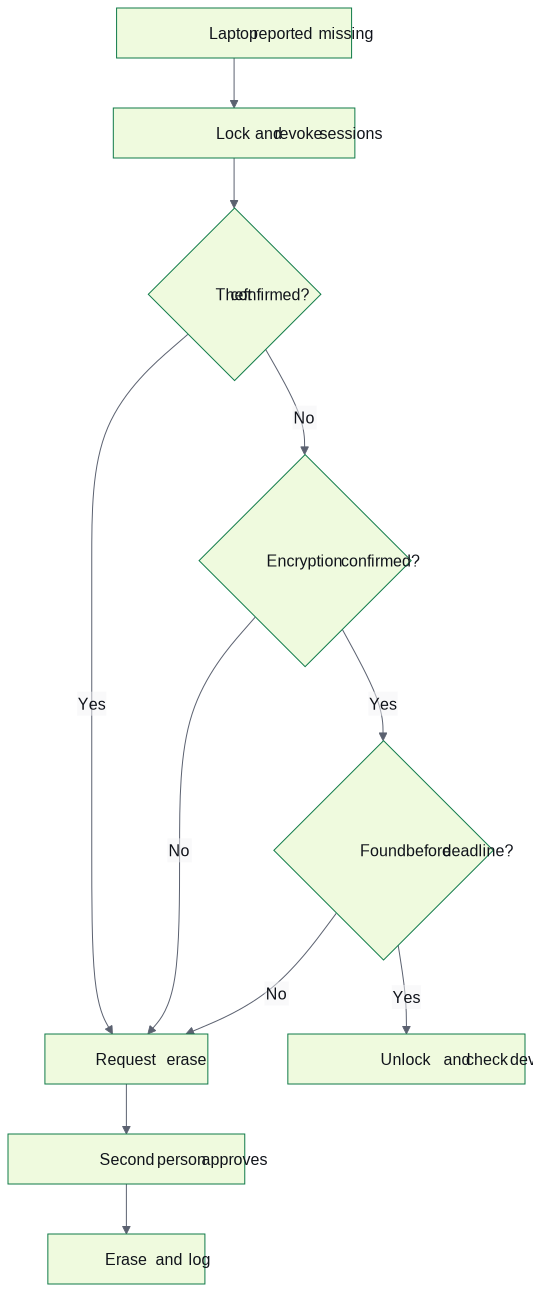
A practical deadline for “found” is 24 to 72 hours. Choose yours based on how fast you would need to make a breach decision (see below).
What should the ticket record: time, owner, device and actions taken?
The ticket should rebuild the whole event: who had the laptop, what was on it, what you did, when, and who approved each step.
| Field | Example | Why it matters |
|---|---|---|
| Reported at, by whom | 14:05, by the employee via chat | Starts your notification clock |
| Last seen | 08:30, on a train | Helps decide between lost and stolen |
| Owner and device | Assigned employee, model, serial | Ties the loss to the asset record |
| Encryption at last check-in | Disk encrypted, checked 4 min before | Main evidence for the breach decision |
| Data on the device | Customer exports, source code | Shows how big the risk is |
| Actions and approvers | Lock 14:20 (A. approved); erase 16:00 (A. + B.) | Shows control and timing |
| Sessions revoked | Identity provider, email, VPN or app access | Proves access was cut |
| External references | Police report number, insurer claim | Needed for recovery and insurance |
| Breach decision | Not reportable: encrypted, keys not on device | Required record either way |
The last row is not optional in the EU and UK. GDPR Article 33 requires controllers to document every personal data breach, including the facts, its effects and the remedial action taken, even breaches they decide not to report.
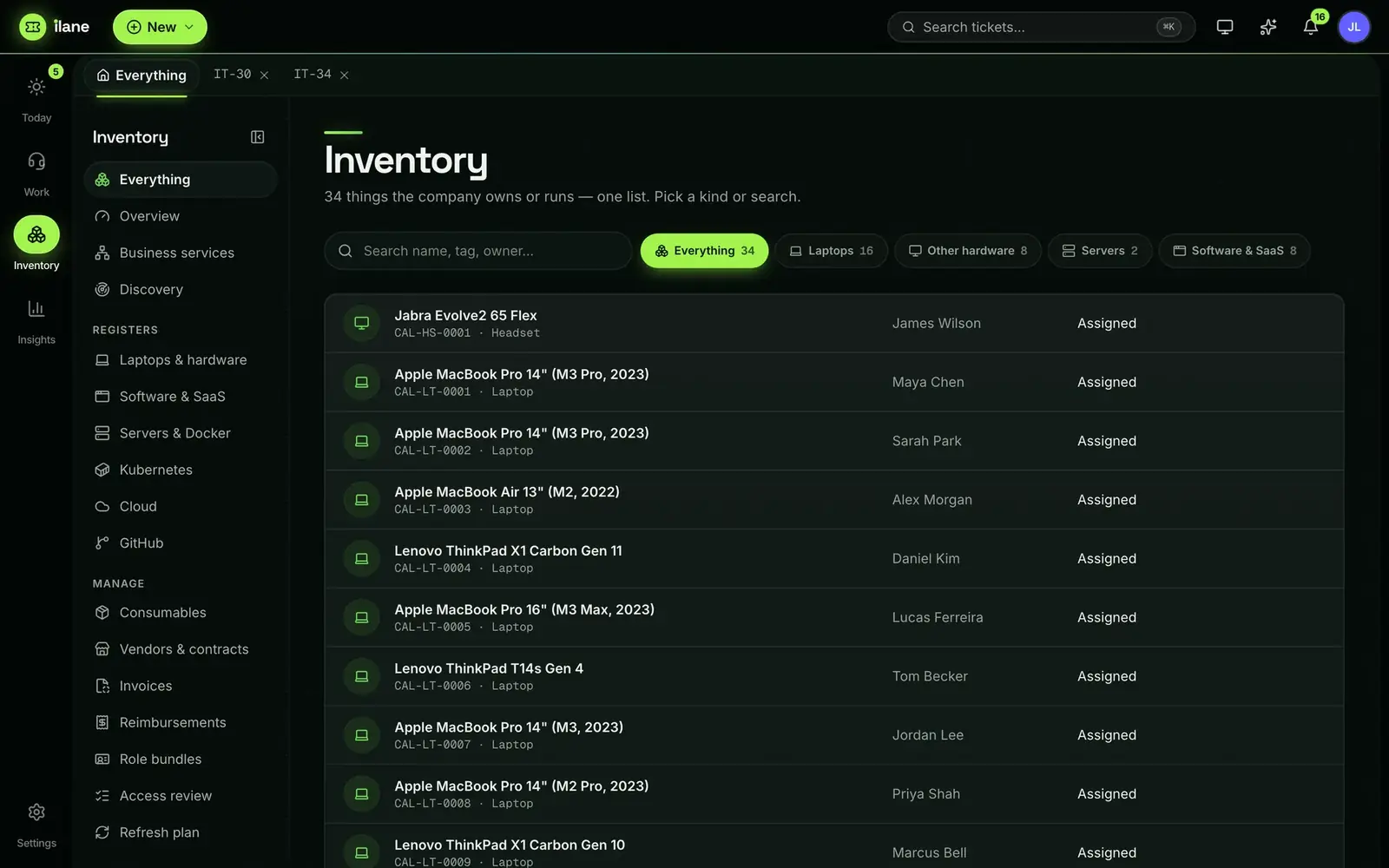
In ilane, the ticket already shows the device and the person. The asset register holds owners, serial numbers and the history of handovers people accepted. That means you don’t have to go looking for a spreadsheet during the first hour.
How do I handle a laptop that was never found or was stolen with data on it?
Erase it, cut every credential it held, take it out of service in the register, and make a documented breach decision on time.
- Approve the erase once your deadline passes or theft is confirmed.
- Rotate local secrets: SSH keys, API tokens, saved browser passwords and any VPN or device certificates that lived on the laptop.
- Remove device trust, so the laptop can’t reach internal apps even if someone gets past the lock.
- Mark the asset lost or stolen in the register, attach the police report, and issue a replacement through a normal request.
- Make the breach decision. Under GDPR, you must notify your supervisory authority within 72 hours of becoming aware unless the breach is unlikely to put people at risk. You must tell the affected people when the risk is high, but Article 34 drops that duty if the data was unintelligible to outsiders, for example because it was encrypted.
The UK regulator gives a cautionary example. In one ICO case study, IT wiped a lost laptop remotely and the company first decided not to report it. Then it learned the laptop wasn’t encrypted. It had no way of knowing whether anyone had read the data, so it reported the breach to the ICO and to the people affected. Wiping a laptop doesn’t change what someone may have already read.
Which laptop settings reduce the damage before a loss happens?
Full-disk encryption matters more than anything else. A short screen lock, current patches and limited local data come next.
NIST SP 800-46 Rev. 2 names encrypting the device’s storage as a primary way to reduce the risk from a lost or stolen device, and remote wipe through device management as a second layer. Set these up in advance:
- Full-disk encryption on every laptop (FileVault, BitLocker or LUKS), with recovery keys held by IT and never stored on the laptop.
- Screen lock after a few minutes, with a password required on wake.
- OS and app updates kept current, so an unlocked laptop is harder to break into.
- USB storage blocked where people don’t need it, and no permanent local admin rights.
- Company data in managed cloud storage instead of local folders, so an erase loses little.
- Apple Activation Lock on Macs. Apple says it keeps deterring reactivation even after a remote erase.
- App access tied to device health. With Private access, internal apps open only from a person’s own laptop, while they’re signed in and the laptop passes your checks.
ilane’s device agent runs posture checks on every Mac, Windows and Linux laptop throughout the day, including encryption, firewall, screen lock and updates. You can switch on fixes such as turning on encryption, setting the screen lock, blocking USB storage and granting temporary admin. If a laptop drifts off policy, it gets a ticket, and the ticket closes when the next report comes back clean. When a laptop goes missing, its last check-in shows its encryption status.
How do I test the lost laptop process before I need it?
Run a drill on a spare laptop at least twice a year. Time each step and check that the ticket would satisfy an auditor.
- Report it the way an employee would, through chat, email or the portal, outside office hours if you can.
- Time from report to lock, and from lock to the laptop confirming it on its next check-in.
- Test the erase approval with the main second approver unavailable, so the backup has to step in.
- Take the laptop offline and confirm the lock or erase runs when it reconnects.
- Unlock the laptop using the recovery steps you would use if an employee found theirs.
- Review the ticket against the table above, and walk through the breach decision with whoever owns data protection.
Write down the gaps, fix them, and update the plan. Tell employees exactly where to report a missing laptop and remind them that reporting fast is never a problem.
Conclusion
A lost laptop is a decision problem, not a technical one: lock it fast, cut its access, check encryption, erase with two approvals and record everything on one ticket. If you agree on those rules now, the first hour is just following them.
If you want to see one-approval lock, two-person erase and logged steps on a real laptop, book a demo.
Frequently asked questions
Should employees report a lost laptop even if they think it will turn up?
Yes. Ask them to report within minutes, not after a day of searching. A lock can be undone, so locking a laptop that turns up later costs nothing. Waiting can cost you hours of your breach notification window.
Can IT erase a laptop that is switched off or offline?
Not straight away. Remote lock and erase commands wait until the laptop connects to a network again. That’s why full-disk encryption, not the erase, protects a laptop that a thief keeps offline.
Is a lost encrypted laptop still a GDPR data breach?
Losing a device with personal data on it is still a breach, and you should log it. If the disk was strongly encrypted and the key wasn’t with the device, the risk to people is usually low. That often means you don’t have to notify the regulator or the people affected. Record your reasoning on the ticket.
What should happen if a lost laptop is found after it was erased?
Treat it as a fresh device. Check it for tampering, re-enrol it, reinstall the agent and confirm its posture checks pass before giving it back. Update the asset record so its history shows the loss, the erase and the return.
Who should own the lost laptop process in a small company?
Usually the IT manager owns the process, with a named second approver for erases. That second approver is often a founder, the head of security or whoever handles data protection. What matters is that both roles and their backups are written down before a laptop goes missing.