Yes, one MDM can manage Mac, Windows and Linux laptops. To do it properly, it has to run the same security checks on each system and fix drift instead of only raising alerts. It should lock and erase lost laptops only with approval, and treat a fix as done only when the device’s next report confirms it. Test all four on your own mixed fleet before you buy.
Can one MDM really manage Mac, Windows and Linux equally well?
One tool can cover all three, but you have to check “equally well” on each OS yourself rather than trust a feature grid.
Each platform has its own management plumbing. Apple’s declarative device management lets you define the state a device should be in, and the device tries to reach and keep that state on its own. Windows uses configuration service providers (CSPs), which MDM tools use to read and set device settings. A cross-platform product sits on top of different mechanisms, so its depth often varies by OS.
Most growing companies run a mix. In Stack Overflow’s 2025 Developer Survey, Windows (49.5%), macOS (32.9%) and Ubuntu (27.7%) were all widely used by professional developers. If you employ engineers, you’ll probably have all three.
Questions to put to every vendor on your shortlist:
- One policy or three? Can you set a policy once and have it apply to every OS, or do you build it three times?
- Same check names, same results? A “firewall on” check should mean the same thing on a MacBook and a ThinkPad.
- Is Linux a full product? Ask whether Linux laptops get the same checks and fixes, or only an inventory listing.
- One agent or several? Every extra agent is something else to deploy, update and explain to employees.
Which security checks should work the same on every operating system?
Disk encryption, firewall, OS updates, screen lock and browser extensions should be reported the same way on every OS. They’re the baseline auditors and attackers both look at first.
The CIS Critical Security Controls are a good neutral reference. Safeguard 4.1 asks for a documented secure configuration process for end-user devices and servers, 4.5 for a host-based firewall on end-user devices, and 4.10 for automatic lockout after failed sign-in attempts on portable devices.
| Check | macOS | Windows | Linux | What to test |
|---|---|---|---|---|
| Disk encryption | FileVault | BitLocker | LUKS | Turn it off on a test device. How fast is it flagged? |
| Firewall | Application firewall | Windows Defender Firewall | ufw / firewalld | Disable it. Does the same check fail on all three? |
| OS updates | Software Update | Windows Update | Package manager | Leave a device two updates behind. Is it named as overdue? |
| Screen lock | Lock timeout | Lock timeout | Desktop lock setting | Set it to “never”. Is that a failure everywhere? |
| Browser extensions | Per browser | Per browser | Per browser | Install a risky extension. Is it listed for review? |
ilane’s device agent runs 42 checks out of the box on Mac, Windows and Linux laptops. Each check opens one ticket for one owner, and you can switch any check off or exempt a device. Beyond the baseline it flags worn batteries and failing disks, installed apps with known critical or high vulnerabilities, paid apps installed without a licence, and AI tools on the laptop.
How should a cross-platform MDM handle fixes, not just alerts?
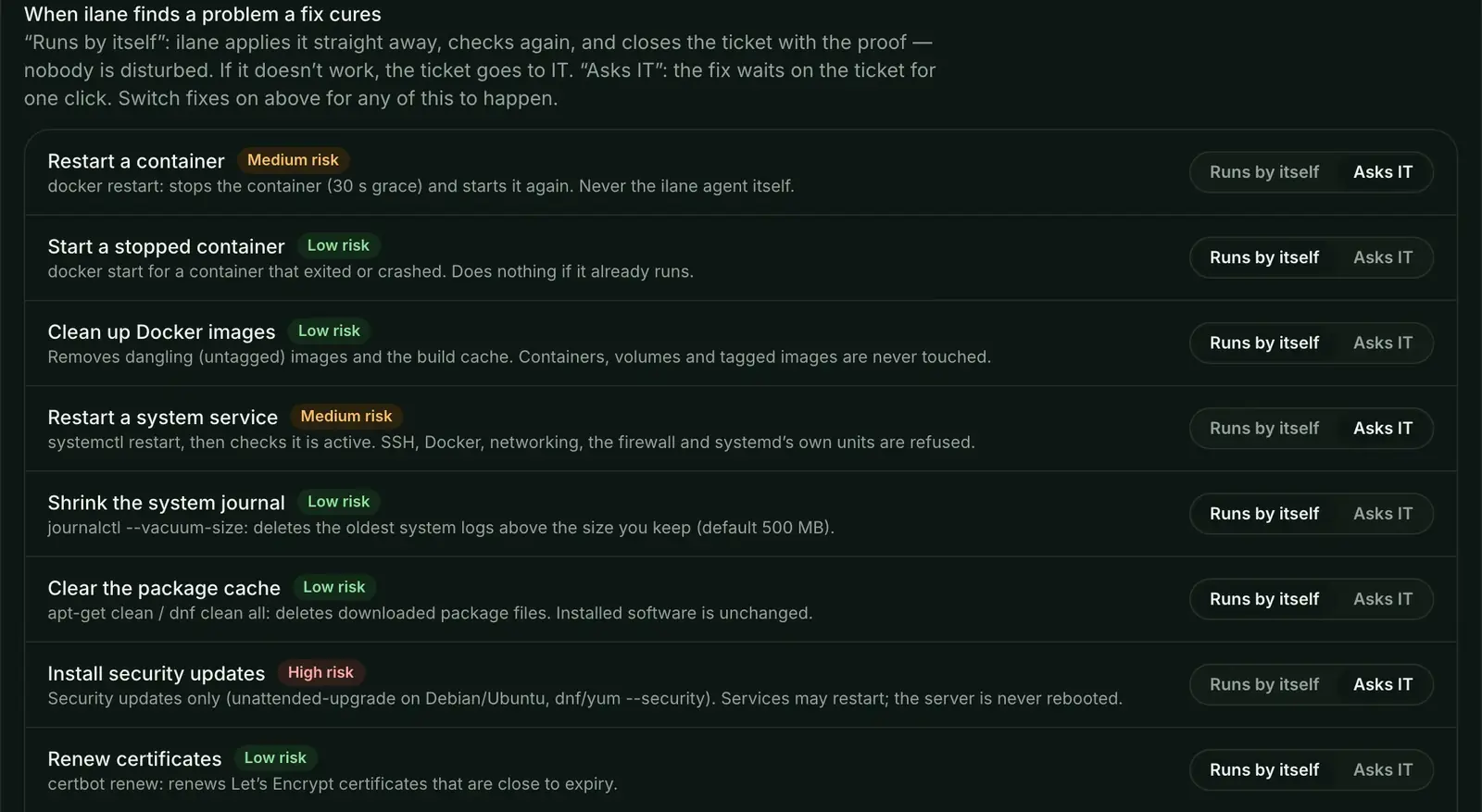
It should let you decide, fix by fix, which corrections run on their own and which wait for a person. That choice should cover every OS.
An MDM that only alerts gives you a longer to-do list. When you compare how tools handle fixes, check these points:
- Fixes start switched off. You turn on automation one fix at a time and nothing happens on day one.
- You choose per fix. For example, turning the firewall on can run by itself while installing updates waits for IT.
- Built-in actions, not arbitrary scripts. A named fix like “turn on encryption” is easier to review and approve than a shell command.
- Every step is recorded. You should see what a fix may run before you approve it, and what it actually ran afterwards.
- Admin rights are temporary. If someone needs admin to install something, the rights should expire automatically.
In ilane, the fixes you can switch on include turning on encryption and the firewall, setting a screen lock, installing updates, installing, removing or updating an app, blocking USB storage, and granting temporary admin. The fixes you switch on run by themselves, and the rest wait for IT. According to ilane’s security design, fixes start off for every company, ilane runs only built-in fixes and never sends shell commands, and temporary admin rights are taken back after 15 minutes.
What should happen when a Mac or Windows laptop is lost?
Locking a lost laptop should take one approval. Erasing it should need a second person, and both actions should be logged.
CIS Safeguard 4.11 calls for remote wipe capability on portable end-user devices when a device is lost or stolen, or when someone leaves the company. On Apple hardware, the details depend on the model. Apple’s deployment guide says a device management service triggers Erase All Content and Settings on Macs with Apple silicon or the T2 chip, running macOS 12.0.1 or later. When the conditions aren’t met, the Mac falls back to an older erase method. Ask each vendor how they handle older Macs.
Erasing a device can’t be undone, so one admin shouldn’t be able to do it alone. In ilane, locking a lost laptop takes one approval, and erasing it needs a second person.

Do you also need Linux and server coverage in the same tool?
If your engineers use Linux or you run your own servers, cover them in the same tool. If you don’t, you’re back to two consoles and two places where a problem can go unowned.
Laptops and servers share a lot: patches, disk space, open ports, encryption, and software with known vulnerabilities. Splitting them across tools means separate inventories and separate ticket queues, and no single view when a laptop problem and a server problem turn out to be related.
ilane uses the same light agent on servers, whether they run in the cloud, on a VPS or on-prem. It has installers for Docker and Kubernetes, and read-only connections to cloud accounts and code repositories. Server problems become tickets in the same queue as laptop problems.
How do you know a non-compliant laptop was actually fixed?
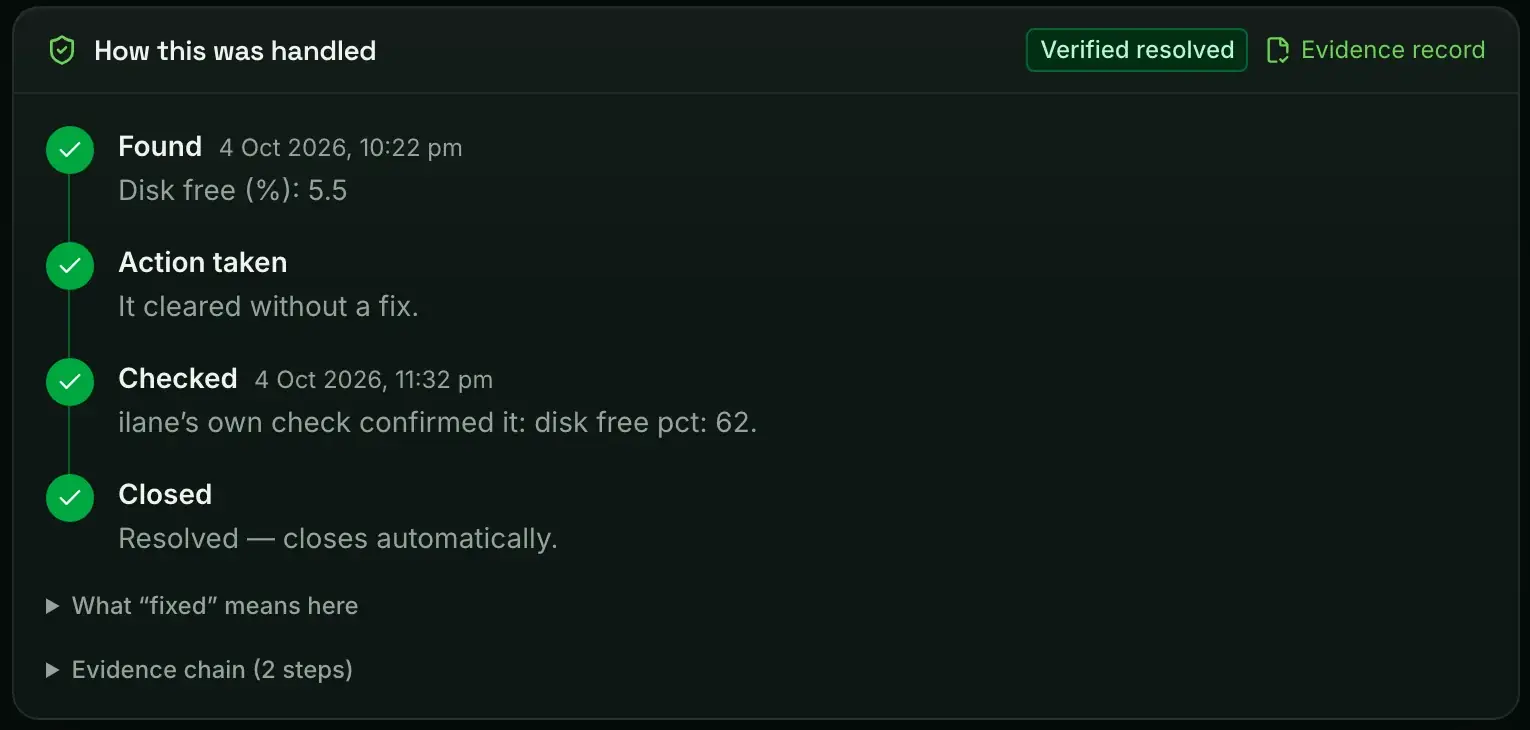
A laptop is fixed only when its next check-in reports the setting as compliant. A fix script reporting success doesn’t prove it, and neither does someone clicking “resolve”.
This is the criterion buyers check least. Many tools record that a command was sent. Few confirm the device actually changed state. A laptop that “had encryption turned on” but never restarted to finish the job will look fixed in the console and fail the audit.
Here’s the verification flow to look for:

ilane calls this verified resolution. Every ticket raised by a check includes a short contract that defines what “fixed” means. Only ilane’s own next reading of the device counts as proof. If the check fails again, the same ticket reopens, so the history stays together. A closed ticket leaves a printable evidence record with the before and after readings, every step taken, and the matching entries from a hash-chained audit log that is verified nightly.
What should cross-platform MDM cost for a startup or growing company?
Compare the total cost per device across every OS and server, including the add-ons you’d actually need, not the headline price of the cheapest tier.
When you collect quotes, ask:
- Per device or per user? Engineers with a laptop and a test machine change the maths.
- Do Linux and servers cost extra? Some pricing covers only Mac and Windows endpoints.
- What’s in the base tier? Patching, remote help, compliance reports and AI features are often sold separately.
- What do you pay as you grow? Get the price at today’s headcount and at roughly double it.
For comparison, ilane quotes for each team, based on how many laptops, desktops and servers run its agent; book a demo to get a quote. The AI assistant uses your own AI key, or you can switch AI off.
How do you trial an MDM on your own mixed fleet before buying?
Enrol a small, deliberately awkward sample of each OS, break settings on purpose, and score how each tool finds, fixes and proves the result.
- Pick the hard devices. Choose two or three of each OS, including your oldest Mac, a Windows laptop with a non-standard build, and a developer’s Linux machine.
- Tell people what the agent collects. Share the vendor’s list of what the agent reads before installing. If the vendor can’t give you one, note that.
- Break five things. Turn off encryption, the firewall and screen lock, skip an OS update, and install a risky browser extension.
- Time each step. Record how long each problem takes to be detected, whether it gets one named owner, how long the fix takes, and whether the fix was confirmed by a fresh device report.
- Run the lost-laptop drill. Lock and erase a spare device and check who had to approve each action.
- Export the evidence. Pull the records an auditor would ask for and see whether they make sense without someone explaining them.
- Score every OS separately. A tool that gets full marks on Mac and half on Linux isn’t truly cross-platform.
Choosing one MDM for every OS
A cross-platform MDM is only as good as its weakest OS. Shortlist tools that run the same checks everywhere, let you choose which fixes run automatically, require two people for an erase, and close tickets only on a fresh device report. Then test those claims on your own laptops, not a vendor’s demo fleet.
See it on your own laptop: Book a demo. In 30 minutes we can enrol one of your laptops, fix one problem together, and show you ilane checking that the fix is real.
Frequently asked questions
Is MDM the same as endpoint management?
The terms overlap. MDM traditionally means pushing configuration and commands such as lock and wipe to devices. Endpoint management usually also covers patching, software inventory, vulnerability checks and support. For a mixed laptop fleet, look for a tool that does both from one agent and one console.
Will employees notice an MDM agent on their laptop?
A well-built agent shouldn’t slow the laptop or show pop-ups. What employees do notice is not knowing what is collected. ilane publishes the full list of what its agent checks to every employee, and each company can switch whole areas of collection off.
Does cross-platform MDM help with SOC 2 or ISO 27001?
Yes. Device encryption, firewall, patching and screen lock are endpoint controls that auditors routinely ask about. The difference is whether you collect screenshots before the audit or have continuous records showing each control held through the period and each failure was fixed. ilane maps its device checks to SOC 2 and ISO 27001 controls and keeps an evidence record for every verified fix.
How many devices should we include in an MDM trial?
Two or three of each operating system is usually enough, as long as they include your hardest cases: an older Mac, a non-standard Windows build and a developer’s Linux laptop. Include one spare device so you can test lock and erase safely. ilane offers a pilot on one team’s real laptops and servers, and you keep that setup if you move to a full plan.
Can IT see employees’ screens through an MDM?
It depends on the tool, so ask directly. In ilane, remote help on a laptop starts only after the person taps Allow on their own screen, every time, and each session is logged on the ticket. Unattended access is limited to servers whose owner has allowed it.