Use RDP when you need a full Windows desktop and SSH when you need a command line on a Linux server or network device. RDP sends a remote screen. SSH sends text commands over an encrypted channel. Neither is a good fit for helping someone at their own laptop. For that, use a remote help tool that asks the person for permission first.
Updated
 Watch the film · 3:29
What is the difference between RDP and SSH?
RDP gives you a remote graphical desktop, while SSH gives you an encrypted remote shell.
Remote Desktop Protocol is a proprietary Microsoft protocol. It gives a user a graphical interface to another computer, and the server listens on TCP and UDP port 3389 by default. SSH is an open IETF standard. RFC 4251 describes it as “a protocol for secure remote login and other secure network services over an insecure network.”
| RDP | SSH | |
|---|---|---|
| What you get | A full Windows desktop session | A command line, plus file transfer and tunnels |
| Standard | Proprietary (Microsoft) | Open IETF standard (RFC 4251 family) |
| Typical targets | Windows servers, terminal servers, VDI | Linux servers, network gear, cloud instances |
| Bandwidth | Heavier: it streams pixels | Light: it sends text |
| Scripting | Hard: it’s built around a person clicking | Easy: built for scripts and automation |
| Login record on the host | Windows logon events | sshd authentication logs |
The two protocols overlap more than they used to. OpenSSH has been a Windows feature on demand since Windows 10 build 1809 and Windows Server 2019. On Windows Server 2025 it comes installed but switched off. So “Windows means RDP” no longer holds, especially for scripted admin work.
When is RDP the right choice, and when is SSH?
Pick by the task, not the operating system: use RDP when the work needs a GUI and SSH when it can be done as commands.
RDP fits when:
- An admin tool on a Windows server only works through its GUI (some management consoles and vendor tools).
- You run terminal servers or virtual desktops that people are meant to work in all day.
- An application has to be used on the server itself and has no command-line or API option.
SSH fits when:
- You administer Linux servers, containers or network devices.
- You need to script a task, run it on many machines, or plug it into automation.
- You need secure file transfer or a tunnel to one internal port.
- Bandwidth is poor. A shell stays usable on links where a remote desktop would lag.
One more option: if a person is sitting at the device, you may not want either protocol, as the next section explains.
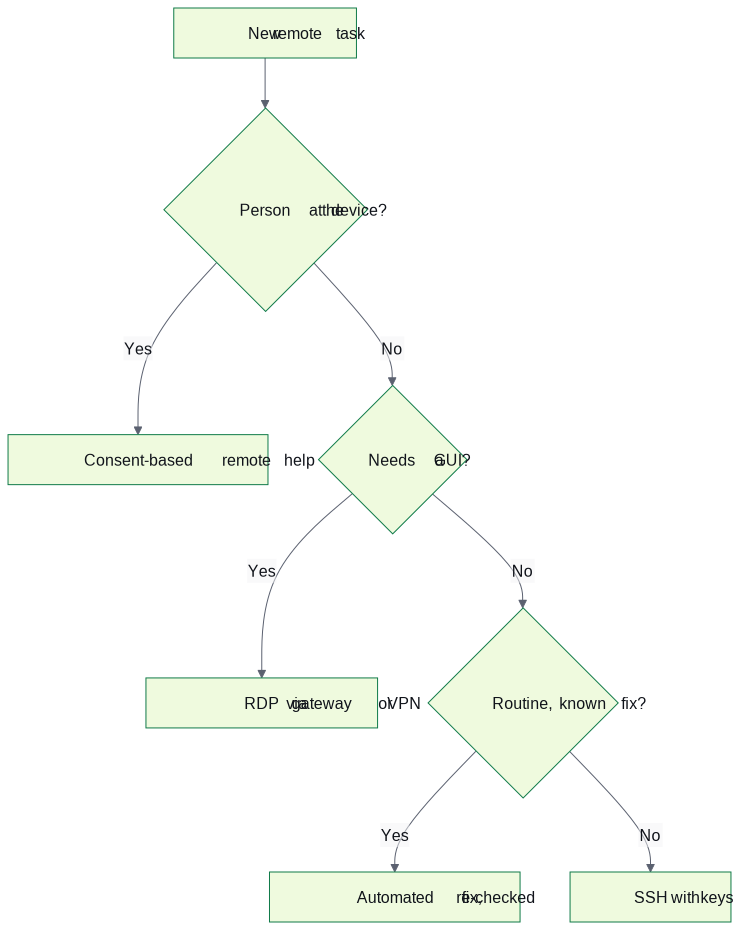
Which protocol fits helping a user on a Windows laptop?
Usually neither. To help someone at their laptop, you need to see the same screen they see, with their permission. RDP isn’t designed for that.
RDP to a workstation has three practical problems for support:
- It starts a separate login. On Windows client editions, an incoming RDP connection takes over the session, so the user can’t watch you fix the problem.
- It needs the laptop to accept inbound connections. That means opening a listener on every laptop, which is exactly the exposure attackers look for.
- It doesn’t ask the user anything. Anyone holding valid credentials can connect, and the employee isn’t asked for consent first.
SSH is even less suited, because most support problems are visual: “my second monitor isn’t detected,” “this dialog won’t go away.” You need a screen-sharing session that the user starts or approves and that’s tied to the ticket.
How do I secure RDP and SSH access for admins?
Keep both protocols off the public internet, require strong authentication, and give each admin only the access they need, for only as long as they need it.
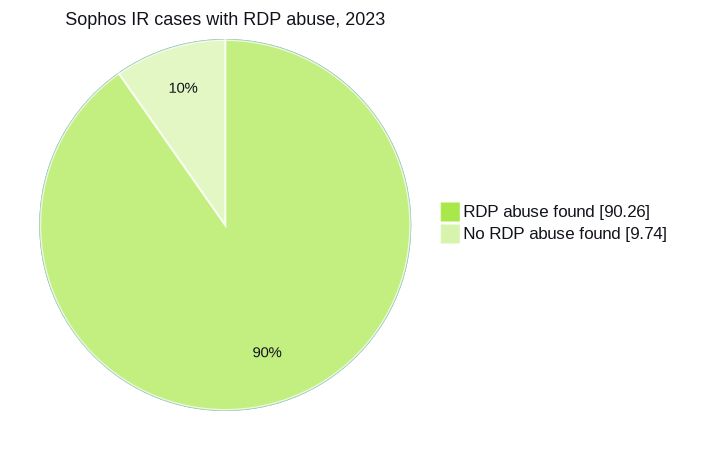
RDP is a heavily targeted entry point. Sophos’s Active Adversary Report for 1H 2024 found evidence of RDP abuse in 90.26% of the incidents its response team handled in 2023. It also counted roughly 4 million RDP systems exposed on the internet at publication time.
RDP controls:
- No direct exposure. CISA’s guidance on restricting RDP says that where RDP is needed, it should be reached through a secure VPN after MFA, or through a zero-trust remote access gateway.
- Authenticate before the session starts. Turn on Network Level Authentication so the server checks credentials before it builds a desktop.
- Limit who can log in. Add only named admin accounts to the Remote Desktop group, and use separate admin accounts rather than daily ones.
- Follow a written baseline. The Center for Internet Security has published an RDP guide based on the CIS Controls.
SSH controls:
- Keys, not passwords. Turn off password login and root login on servers.
- Treat keys as access rights. NIST’s IR 7966 covers the weak points in SSH user-key management. It recommends planned provisioning, linking key management to ticketing or change tracking, and auditing SSH connections. Keys that nobody owns are the SSH version of a shared password.
- Remove access when people leave. Offboarding should delete keys from servers and revoke accounts. Disabling a mailbox isn’t enough.
For both:
- Make admin rights temporary. ilane can grant temporary admin for 15 minutes and then take it back automatically, with the grant logged. Admins, department heads and API keys come up for review every quarter as a ticket. See Security & trust.
- Find the exposure before attackers do. On servers and cloud, ilane flags databases and admin panels that are open to the internet. Through VPS provider connections it also catches servers with no firewall and risky ports open to the world.
- Log in to servers less often. Many SSH sessions exist to do routine chores: clear disk space, restart a service. In ilane, safe fixes like these run without anyone logging in. ilane names a built-in fix and never sends shell commands. Each server keeps its own allow-list, and serious actions need two people.
- Give staff internal apps without a network-level VPN. ilane Private Access lets people reach internal apps only from their own laptop, signed in, while it passes your device checks. Nothing joins your network.
Where does consent-based remote help fit alongside them?
Consent-based remote help covers the gap RDP and SSH leave: live support on an employee’s laptop that only starts after the person approves it, and that’s recorded against a ticket.
Think of it as three lanes: SSH for Linux servers, RDP through a gateway for Windows servers that need a GUI, and remote help with consent for people’s laptops. Unattended access belongs only on servers nobody sits at.
In ilane’s Remote help, a session runs like this:
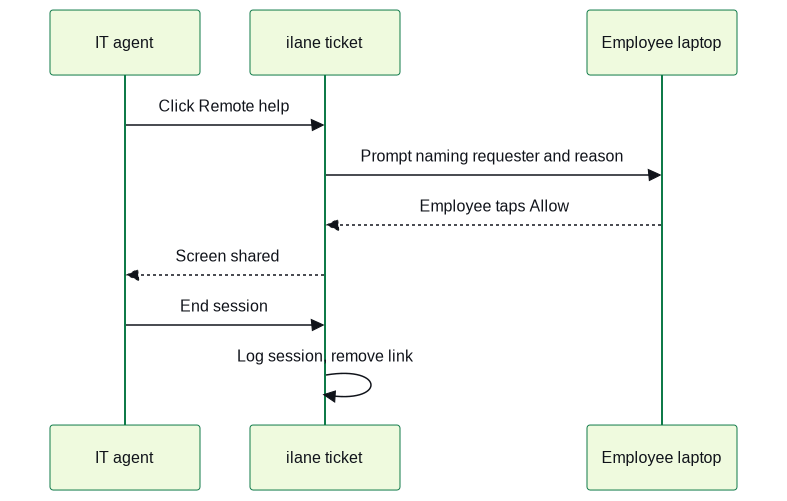
Some details that matter for security reviews:
- No session codes. The session starts from the ticket, and ilane already knows which laptop it belongs to.
- Allow every time. The prompt says who is asking and why. If the person declines, nothing is shared.
- The link dies when the session ends. It works on one device, only for the person who asked.
- Unattended access only where you choose it, meaning servers nobody sits at.
- No third party in the middle. The remote service is open source and runs next to your own ilane, so sessions don’t pass through someone else’s infrastructure.
- It works on Mac, Windows and Linux, using the same agent that’s already on each machine.
How should session logs be kept for an audit?
Keep a record of every remote session that answers who, what, when, why and with whose approval. Store it centrally, where it can’t be quietly edited.
What each session record should hold:
- Who connected, using a named account rather than a shared one.
- Which device or server they connected to.
- Start and end times.
- Why: the ticket or change it belongs to.
- Consent or approval: the user’s Allow, or the approver for admin access.
- What changed, and whether the fix worked.
Where the raw events come from:
- Windows: event 4624 with logon type 10 (RemoteInteractive) means someone logged on remotely through Terminal Services or Remote Desktop.
- Linux: sshd authentication logs record which account and key were used.
How to keep them:
- Copy logs off the host. NIST’s SP 800-92 notes that to meet retention requirements you may need copies kept longer than the original log sources can hold them. An attacker with admin rights can also wipe a local log.
- Make tampering visible. A log that admins can edit won’t convince an auditor.
- Link sessions to tickets. “Who was on this server on 12 March, and why?” should be answerable in one place.
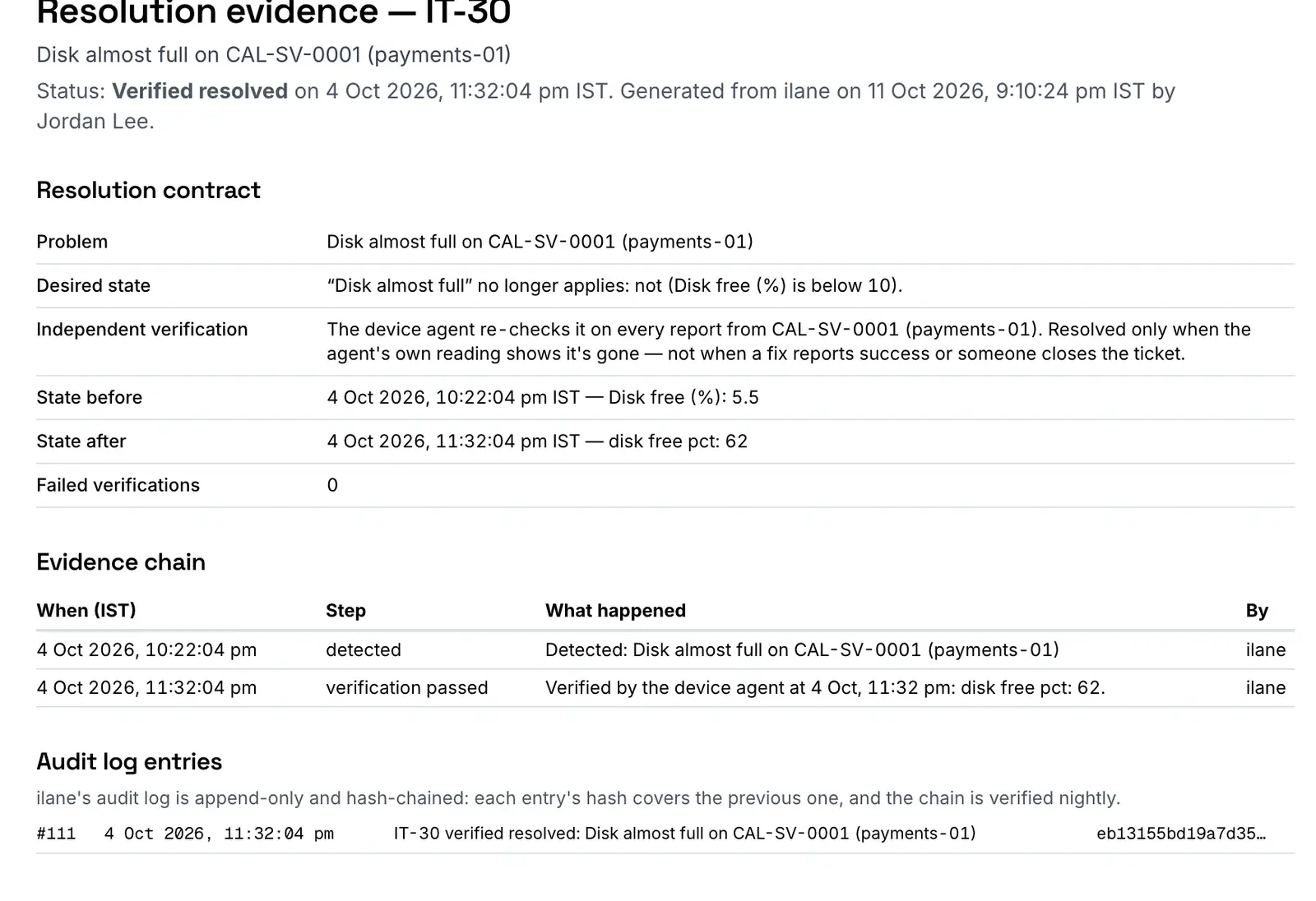
In ilane, every remote session is logged on its ticket. The audit log is tamper-evident: each entry carries a fingerprint of the one before it, and a nightly check reports exactly where the chain breaks if anything was changed. Entries are kept for at least a year and can’t be updated or deleted through the app or the database. When a fix is verified, ilane saves the evidence record and maps it to SOC 2 and ISO 27001 controls.
Conclusion
RDP and SSH aren’t competing for the same job. Use SSH for Linux servers and automation, and RDP through a gateway for Windows systems that need a GUI. Neither belongs on the open internet. For people’s laptops, use remote help that asks the user every time and logs each session against a ticket. Do fewer manual logins by letting routine fixes run themselves and be checked. Then keep one tamper-evident record that shows auditors who connected, why and with whose consent.
See consent-based remote help and server fixes on real data: Book a demo.
Frequently asked questions
Is SSH more secure than RDP?
Neither is safe or unsafe by itself. How you deploy it matters more. RDP gets abused more often in practice: Sophos found RDP abuse in about nine out of ten of its 2023 incident response cases. SSH with key-only login, no root login and managed keys gives you less to defend than a remote desktop that’s reachable from the internet.
Can I use SSH to manage Windows servers?
Yes. OpenSSH has been available on Windows as a feature on demand since Windows 10 build 1809 and Windows Server 2019, and Windows Server 2025 ships with it installed but switched off. It works well for PowerShell and scripted admin work. You’ll still need RDP or a GUI tool for tasks that only exist in a graphical console.
Should RDP ever be open to the internet?
No. CISA’s guidance says that where RDP is needed, it should be reached through a secure VPN after multi-factor authentication, or through a zero-trust remote access gateway. Check your firewall and cloud security groups regularly for 3389 open to the world.
Does consent-based remote help work on servers nobody sits at?
A server has nobody there to tap Allow, so consent prompts don’t work for it. In ilane, unattended access is available only on servers you specifically choose. Every laptop session still needs the person’s approval.
How long should remote session logs be kept?
NIST SP 800-92 doesn’t set a single retention period. It depends on your legal, contractual and audit requirements, and you may need to keep copies longer than the original systems can. ilane keeps audit log entries for at least a year, and they can’t be edited or deleted through the app or the database.