Self-hosted IT service management software runs your service desk, asset register and device management on servers you control, instead of a vendor’s shared cloud. You choose where data lives, when upgrades happen and who can reach it. In exchange, you take on patching, backups and uptime, so test those duties before you commit.
What does self-hosted IT service management actually mean?
It means the application and its database run on infrastructure your team operates: a rack in your office, a VPS or your own cloud account. The alternative is a vendor’s multi-tenant service.
In practice there are three deployment models, and vendors often blur them:
| Multi-tenant SaaS | Dedicated hosted | Self-hosted | |
|---|---|---|---|
| Where the app runs | Vendor’s shared cloud | A single instance the vendor runs for you | Your server, VPS or cloud account |
| Who patches the server | Vendor | Vendor | You |
| Who decides upgrade timing | Vendor | Usually agreed with the vendor | You |
| Who can reach the database | Vendor staff, under contract | Vendor staff, under contract | Your team, plus anyone you let in |
| Your upkeep | Lowest | Low | Highest |
Most modern self-hosted tools ship as containers. With Docker Compose, you can define all of your containers and their configurations in a single YAML file. That makes installing the app and moving it to another server much simpler than with older on-prem installers.
Self-hosted rarely means fully offline. Staff still sign in through an identity provider, tickets still arrive by email, and AI features still call a model provider. Before you choose, map which of those connections stay in place.
ilane works this way. According to its FAQ, it runs self-hosted with Docker Compose on your own server, or dedicated hosted as your own instance run by the vendor. People sign in with their company Google or Microsoft account in both cases.
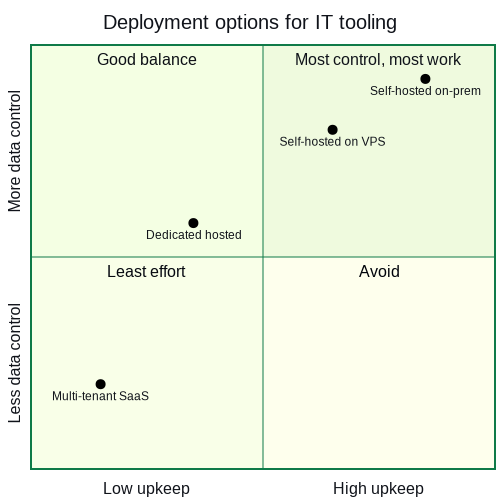
Multi-tenant SaaS asks the least of you and gives you the least say. A dedicated hosted instance isolates your data and leaves upkeep with the vendor. Self-hosting on a VPS or on-prem gives you the most control, and every extra point of control is work your team now owns.
Which parts of IT operations usually need to stay on your own servers?
Keep the data that identifies people and maps your infrastructure on your own servers. Notifications and sign-in can usually stay where they are.
These usually belong on your own servers:
- Ticket history. Once HR and Finance use the same desk, tickets hold salaries, leave requests and bank details.
- The asset register. It records who holds which laptop, plus serial numbers and warranty dates.
- Device posture results. These show which laptops are unencrypted or unpatched, which is exactly what an attacker wants to know.
- The service map and connection settings for your cloud and code accounts.
- The audit log. It is the record of who approved what.
These can usually stay outside: your identity provider, chat notifications, and AI calls if you decide to keep them on.
If you are subject to GDPR, location alone doesn’t settle the question. Ireland’s Data Protection Commission says transfers to third countries must be done in full compliance with Chapter V of the GDPR. The EDPB’s recommendations on supplementary measures also say that remote access from a third country to data held in the EEA counts as a transfer. So a server in Frankfurt doesn’t help much if vendor support staff in another country can log into it. Ask who can reach your instance, from where, and on whose approval.
What should I check on hosting, updates and data location before choosing?
Check three things: what the stack needs to run, how upgrades and security fixes reach you, and every place data goes outside your server.
- Runtime. Find out whether it runs on Docker Compose, Kubernetes or a native installer, which database it uses, and the minimum CPU, RAM and disk. Ask for the sizing guide in writing.
- Inbound network access. Every port you open on the server is one more thing to defend. ilane needs no open firewall ports: the agent, the Kubernetes collector and the Private access connectors all connect out over HTTPS.
- Upgrades and rollback. Ask how often releases ship, whether database migrations run automatically, and how you roll back a bad upgrade.
- Security fix speed. As a benchmark, CISA’s Binding Operational Directive 22-01 gives US federal agencies a 14-day window to fix high-severity flaws in its Known Exploited Vulnerabilities catalog. Ask whether the vendor can get a fix to you, and you can install it, within that window.
- Outbound connections. List every external service the app calls: sign-in, email, chat, AI, licence checks and telemetry. Each one is a data flow you must document.
- Backups and restore. Find out who backs up the database and the uploaded files, then run a restore yourself before you go live.
- Audit log integrity. In ilane’s audit log, every entry carries a fingerprint of the one before it, and entries are kept for at least a year.
- What the agent collects. A published list lets you answer employees and works councils with specifics. ilane publishes what the device agent reads and never collects, for example keystrokes, screenshots, browsing history and file contents.
How do self-hosted device management and service desk tools differ from cloud-only suites?
The main difference is less about features and more about how many separate systems you end up running, and whether their data is linked.
A cloud suite often sells the help desk, asset tracker and endpoint console as separate products. Self-hosting that kind of stack means one server per product, each with its own patching, backups and sync jobs between them.
When you compare options, ask:
- How many servers will I run? A self-hosted ticketing tool plus a separate self-hosted device tool means two upgrade schedules and two backup jobs.
- Is it one database or several that sync? If tickets and devices sit in separate systems, a ticket only knows about the laptop if a sync job copied that data across.
- Is self-hosting the full product or a cut-down edition? Some vendors keep certain features cloud-only.
- Can the desk confirm a fix? A desk that can’t see the device can only close a ticket when someone clicks “resolved”.
On ilane’s comparison page, the service desk, asset register, device agent, cloud findings and compliance evidence all sit in one product with one database, and running it on your own server is listed as an option.
What does running the agent on-prem or in Docker change for servers and laptops?
The agent’s checks stay the same. What changes is where it reports and which network paths you must allow.
Servers. ilane installs on Linux servers (Ubuntu, Debian, Fedora, RHEL) either as a system service or as a Docker container. The server setup guide covers both, plus uptime checks. Kubernetes clusters report through a read-only CronJob in push mode, so the cluster needs no inbound access.
Laptops. Mac, Windows and Linux laptops run the same agent. Remote staff need to reach your self-hosted server from home, so plan how you’ll expose its HTTPS endpoint safely before rollout. Laptops on the road still have to report in.
Fixes. This is where self-hosting matters most, because a fix changes a machine you own. In ilane, fixes start off for every company until an admin switches them on. Each server keeps its own allow-list, and ilane only names a built-in fix: it never sends shell commands.
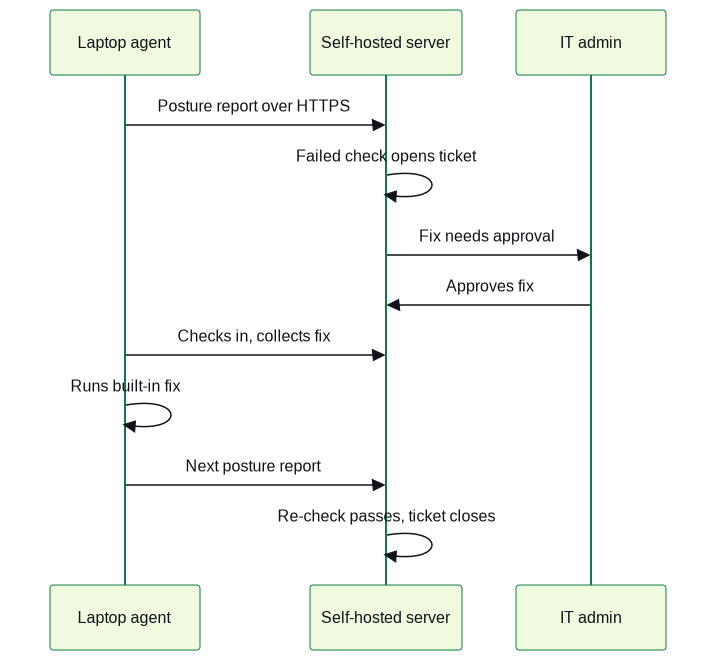
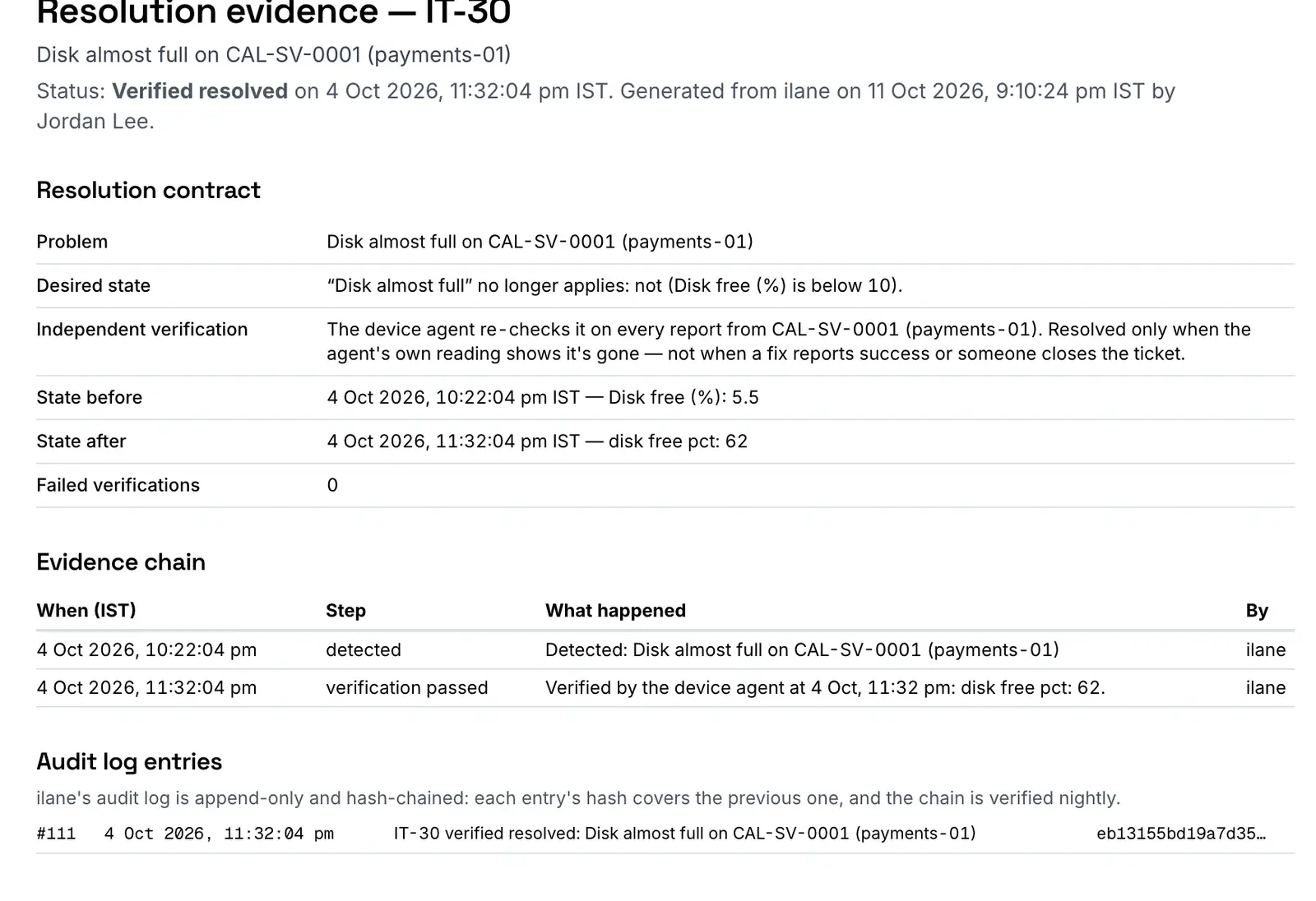
Each step starts with the agent calling out, so the server never has to reach into the laptop. The ticket closes only after the next report shows the check passing. If the re-check fails, the ticket stays open.
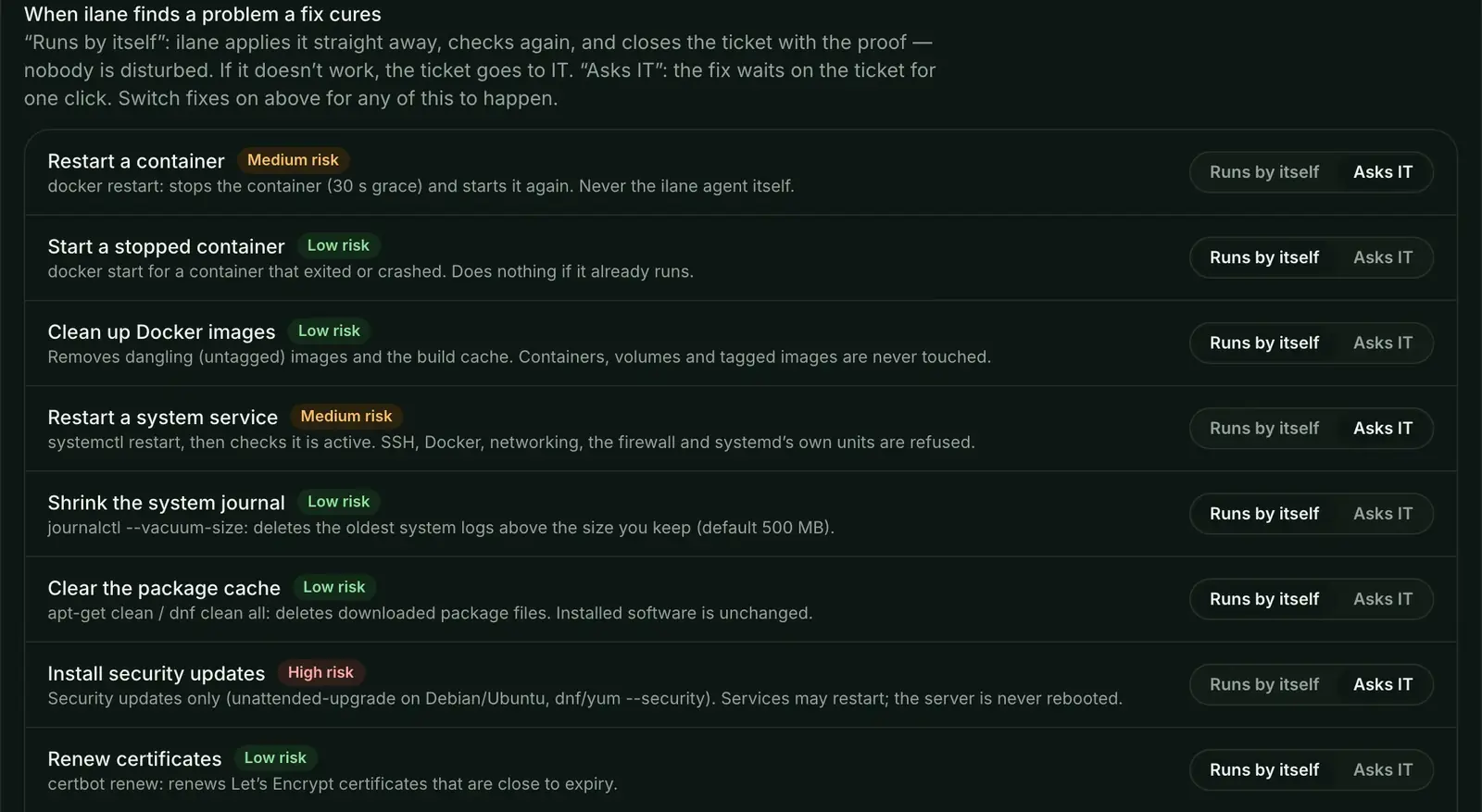
What are the trade-offs: upkeep, upgrades, AI features and support?
You gain control over data and timing. You lose convenience, because the server’s patching, backups and uptime become your team’s job.
- Upkeep. You now patch the operating system, Docker, the database and TLS certificates. NIST’s SP 800-40 Rev. 4 is titled Guide to Enterprise Patch Management Planning: Preventive Maintenance for Technology. Treat your ITSM server the same way, and monitor it from somewhere other than itself.
- Upgrades. You choose when to upgrade, but skipped releases pile up. Set a monthly upgrade slot and stick to it.
- AI features. AI that drafts replies or triages tickets sends content to a model provider, wherever the app is hosted. ilane lets you bring your own AI key or switch AI off, and the rules that decide which fixes run work with AI switched off.
- Support. Vendor engineers can’t see your instance unless you grant them access, which protects your data and slows troubleshooting. Agree the access process, including where support staff are based, before you need it.
- Cost. Licence price is only part of the cost. Add server spend and a few hours of admin time each month. ilane quotes each team based on how many laptops, desktops and servers run the agent.
How do I run a two-week pilot on my own infrastructure?
Install on a test server, enrol one team, run real tickets for two weeks, and test the upgrade and the restore before you sign.
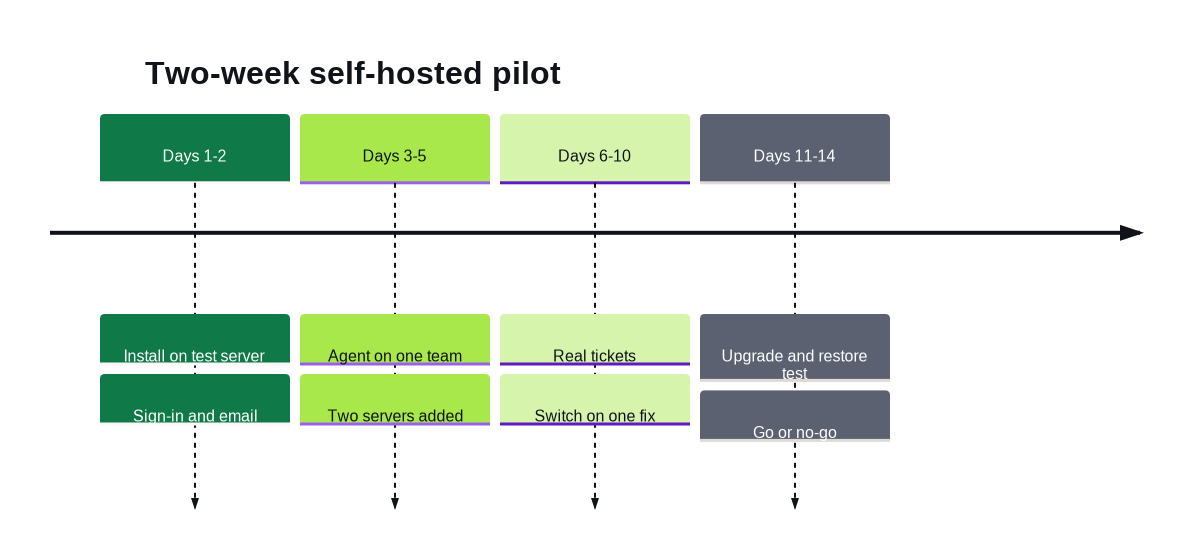
Use these pass criteria:
| Test | Pass if |
|---|---|
| Install | Running from the vendor’s docs in one working day |
| Network | No inbound ports opened; outbound calls match the list you made |
| Agent | Laptops report from home and office; no slowdown complaints |
| Fix | One approved fix runs, and the ticket closes only after the re-check |
| Upgrade | Upgrade to the next release with no lost data; rollback documented |
| Restore | A backup restored to a clean server, with tickets and assets intact |
| Evidence | You can export what ran, who approved it and the before-and-after |
ilane’s FAQ says most teams set up the essentials in an afternoon. It also says you can start with a pilot on one team using your own laptops and servers, and keep everything you set up when you move to a full plan.
Conclusion
Self-hosting IT service management makes sense when data location and control over access outweigh the extra upkeep. Before choosing, check three things: what leaves your server, how security fixes reach you, and whether a restore actually works. Then run a two-week pilot with real tickets, one approved fix, and an upgrade and restore test.
To see ilane running on your own infrastructure, book a demo. It’s a 30-minute call where we fix one thing on one of your laptops and watch ilane check that the fix worked.
Frequently asked questions
Is self-hosted IT service management more secure than SaaS?
Not automatically. Self-hosting gives you control over where data lives and who can reach it, but you also take on patching, backups and monitoring. If your team patches slowly, a well-run vendor service may be the safer choice.
Does self-hosting make us GDPR compliant?
No. It can reduce international transfers, but the EDPB treats remote access to EEA data from a third country as a transfer. That includes vendor support logins, AI provider calls and anything else that leaves your server.
Can laptops outside the office report to a self-hosted server?
Yes, if the server’s HTTPS endpoint is reachable from the internet or through your chosen gateway. ilane’s agent connects out over HTTPS, so laptops need no inbound ports. You do need a plan for how the server itself is exposed.
What is the difference between dedicated hosted and self-hosted?
A dedicated hosted instance is a single-customer deployment that the vendor runs and patches. With self-hosting, you run it on your own server and handle upgrades and backups. ilane offers both options.
Can I use AI features in a self-hosted setup?
Usually yes, but AI features send relevant content to a model provider, so the data leaves your server. ilane lets you bring your own AI key or switch AI off, and its rules for running fixes work with AI switched off.