A service desk for HR and finance requests is a single place where employees raise IT, HR, finance and operations requests, through the same portal or email. Each request goes to the right department, with its own owners, approvals and business-hour SLAs. It replaces scattered inboxes and spreadsheets without making HR or finance work the way IT does.
The idea has a name. Enterprise service management means applying IT service management practices (catalogs, workflows, self-service, knowledge bases and SLAs) to teams such as HR, finance, payroll and procurement. This guide covers how to set it up at a 50–1,000 person company: departments, SLAs, approvals, and where a shared desk is different from an IT-only help desk.
Why do HR and finance requests end up in email and spreadsheets?
They end up there because IT usually buys, configures and pays for the help desk, so other teams fall back on the tools they already have.
At a growing company this shows up in familiar ways:
- No owner. A request sent to hr@ goes to five people. Each assumes someone else has it.
- No clock. Nobody knows a reimbursement query has waited six days until the employee chases it.
- No status. Employees ask “any update?” because they can’t see where their request is.
- No trail. Approvals sit in someone’s inbox, and finding them for an audit takes hours.
- Onboarding is spread over four lists. HR, IT, finance and the hiring manager each track their part separately.
That last point matters. Gallup reports that only 12% of employees strongly agree their organisation does a great job of onboarding new staff. When onboarding is split across four lists, the gaps fall on the new hire.
What should a single request desk cover beyond IT?
It should cover any repeatable request that has a requester, an owner and a clear finished state, whichever team does the work.
A request type belongs on the desk if:
- It comes up more than a few times a month.
- One team can own it from start to finish.
- “Done” can be stated plainly, for example “letter sent” or “card limit raised”.
- Someone needs to approve it, or someone needs to see that it was approved.
Keep one line clear. The desk is the way in, not the system of record. Payroll changes are still made in the payroll system and purchase orders in your finance system. The desk records who asked, who approved, who did it and when.
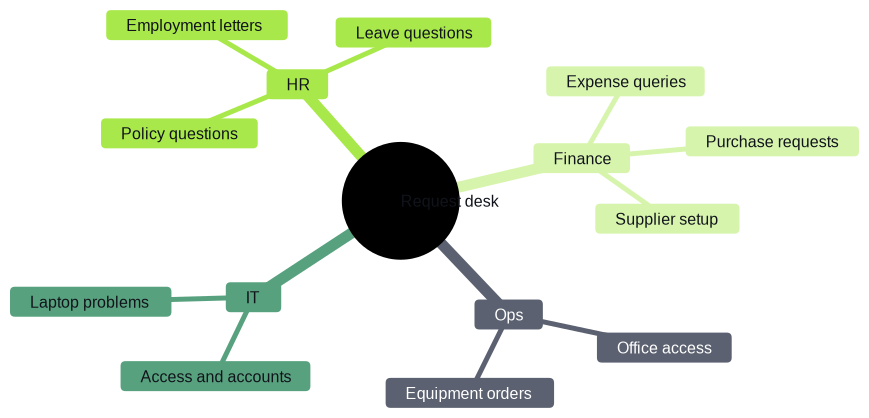
How do departments, heads and categories map to each team?
Each team becomes a department with its own members, a head who owns the queue, and categories that sort its requests.
| Department | Typical head | Example categories | What to watch |
|---|---|---|---|
| IT | IT manager | Access, hardware, software | Keep existing IT categories as they are |
| HR | Head of People | Letters, leave, policy, onboarding | Sensitive cases need limited visibility |
| Finance | Finance controller | Expenses, purchases, suppliers | The requester can’t also be the approver |
| Ops | Office or ops lead | Facilities, equipment, travel | Often covers more than one office |
HR needs extra care. A sick-leave or adjustment request can include health information, which is special category data under GDPR Article 9. The UK ICO sets out the specific conditions under which that data can be processed. Before you go live, check who can read HR tickets, and keep sensitive categories to HR agents only.
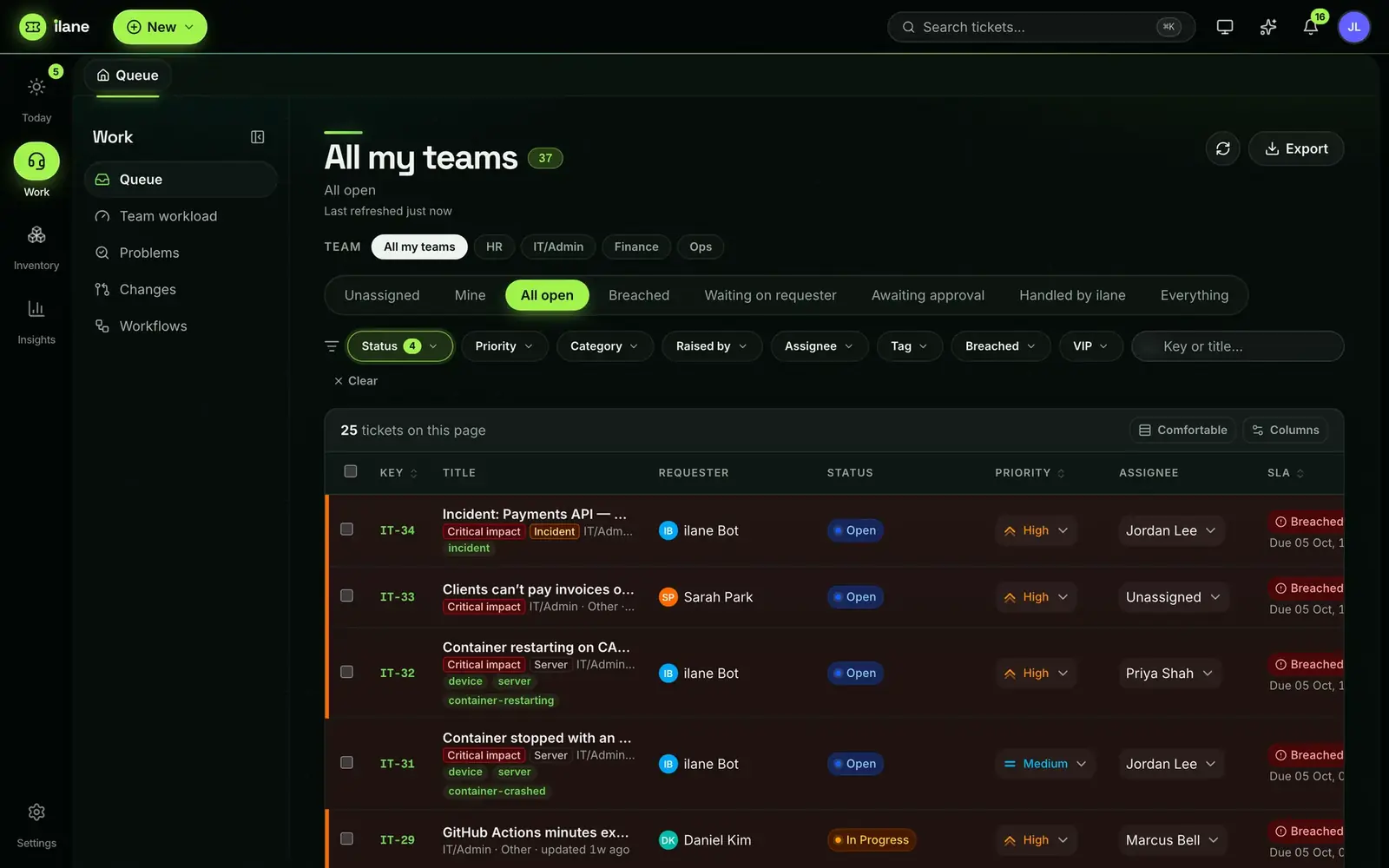
In ilane you set up departments, heads and categories for IT, HR, Finance and Ops, along with on-call, business hours and holidays. People sign in with their company Google or Microsoft account and get one of four roles: employee, agent, head or admin. You can import many people at once from a CSV that includes departments and managers, so approval routing knows who reports to whom from the start.
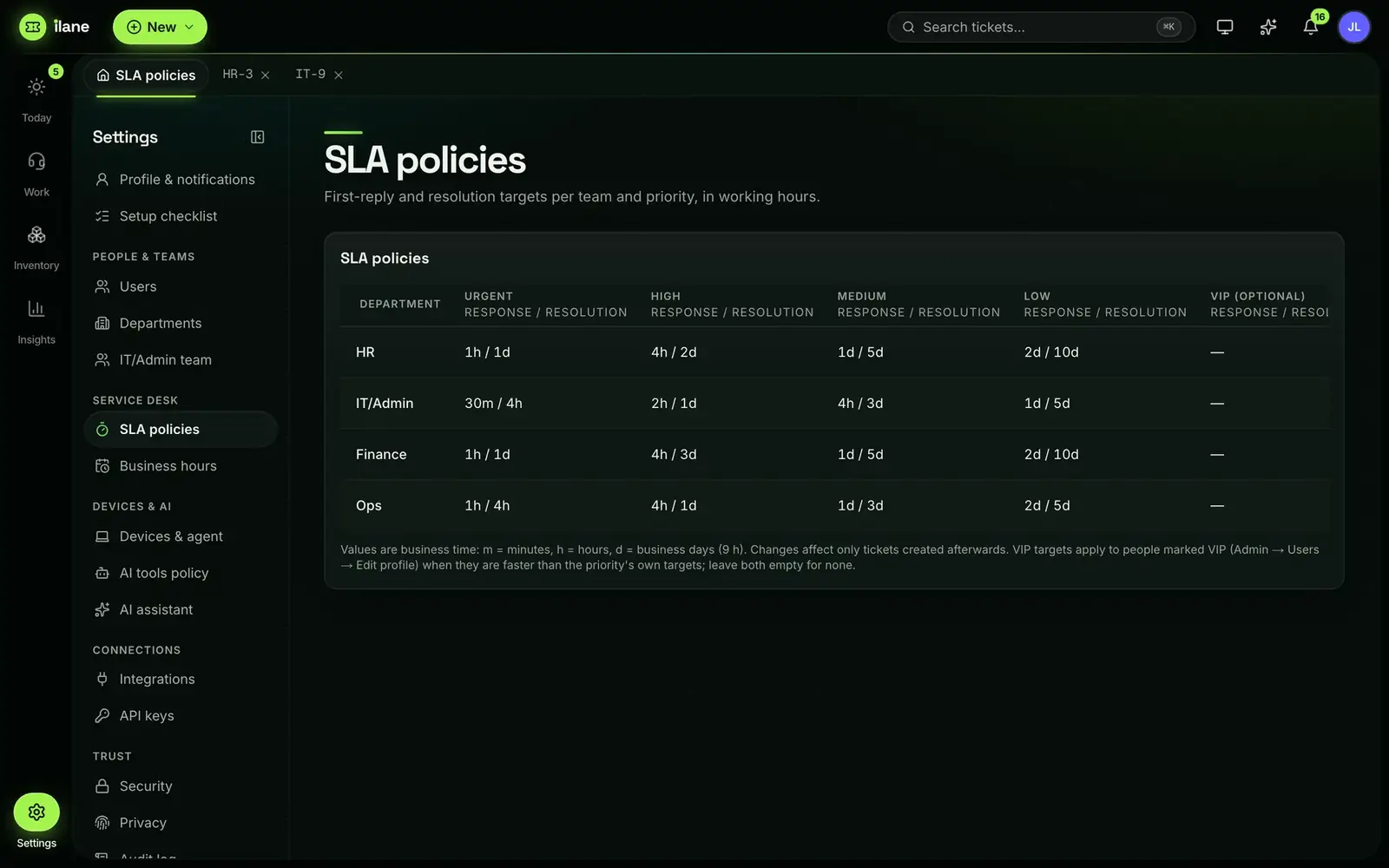
Which requests need approvals, and who should approve them?
Request approval for anything that spends money, changes someone’s access, or changes a pay or employment record. Don’t add approval to questions or information requests.
Choose the approver by what the request puts at risk:
- Line manager: equipment, software seats, training budget. The manager knows whether the person needs it.
- Department head: spend above a set amount, new suppliers, exceptions to policy.
- A named person: the finance controller for payment changes, or the head of people for salary letters.
Finance approvals should follow segregation of duties. Columbia University’s internal controls guidance says the person who requests a purchase should not be the one who approves it. Where duties can’t be separated, it calls for a detailed supervisory review instead. Small teams run into this often, so plan for it when you design each form.
ilane’s request catalog supports up to three approval steps per form. Each step can go to the requester’s manager, a department head or a named person.
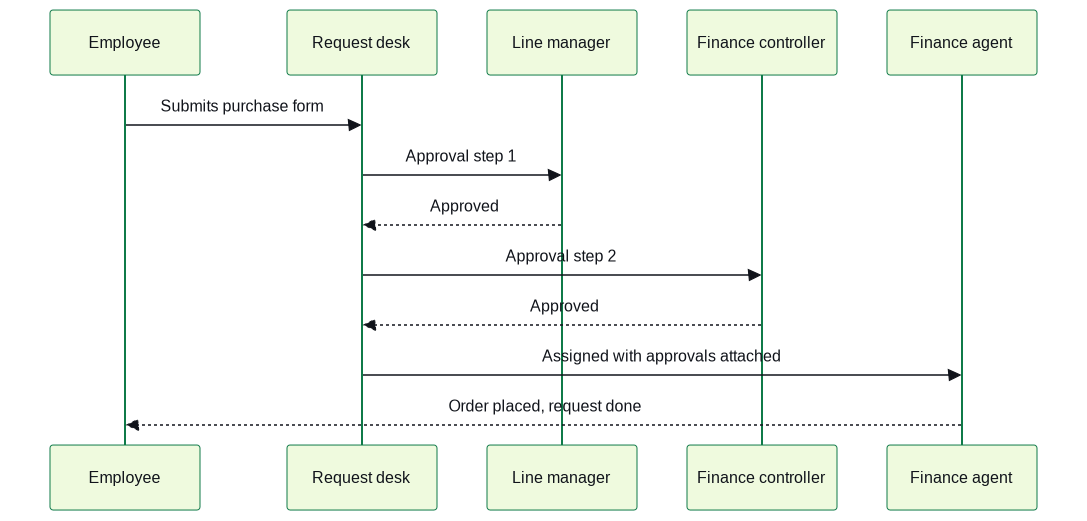
How do business-hour SLAs work across different teams?
Each department gets its own working hours, holidays and response and resolution targets for each priority. The SLA clock runs only during that department’s working hours.
This is where a shared desk differs most from an IT-only desk. IT may run an on-call rota, while payroll works 9 to 5 and the Ops team sits in another time zone. If every team shared one clock, HR would breach its targets every weekend.
A worked example: finance works 09:00–17:00, Monday to Friday, and has a 4-business-hour first response target. A request raised at 16:00 on Friday uses one hour on Friday. The remaining three hours run from 09:00 on Monday, so a reply is due by 12:00 Monday, not 20:00 on Friday.
Some starting points to adjust after a month of real data:
- Urgent (payroll error, locked out on payday): respond within 1 business hour.
- Normal (expense query, letter request): respond within 1 business day.
- Low (policy question): respond within 2 business days.
Each department sets its own targets in ilane, and agents see an SLA timer on every request. Service desk reports show response and resolution times, SLA compliance, reopen rate and CSAT for each agent.
How do onboarding and offboarding requests run from one form?
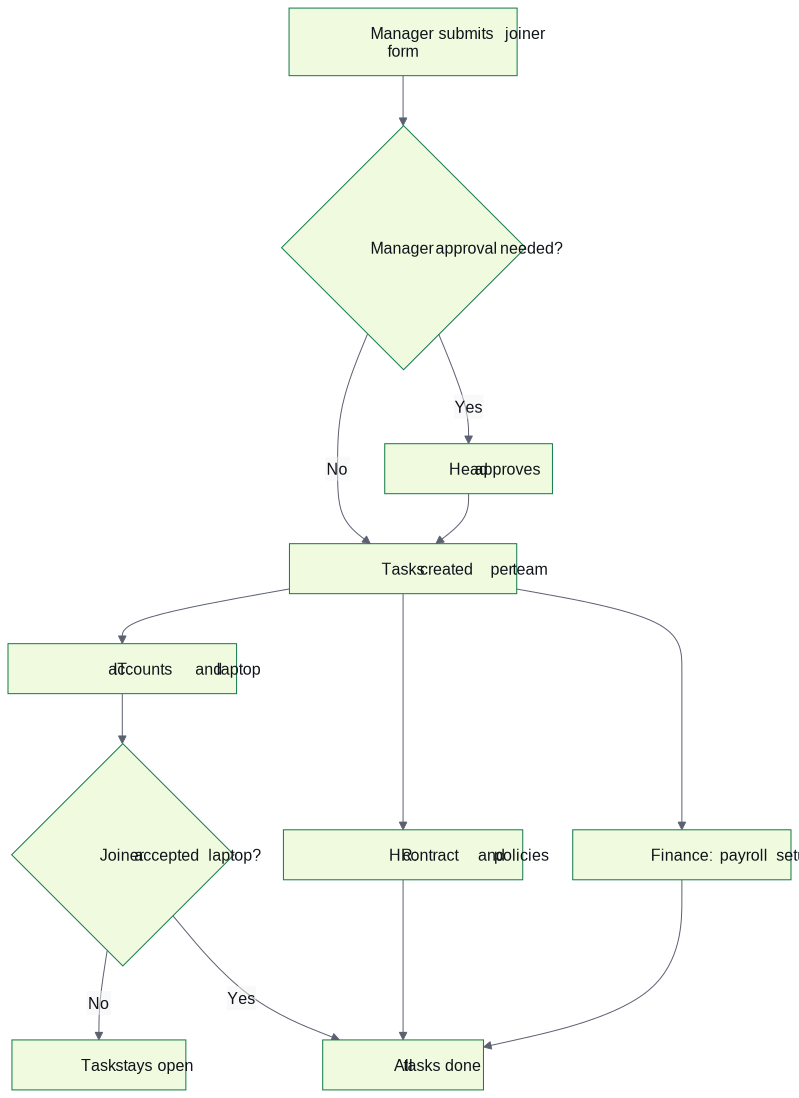
The manager or HR submits one form. That form creates a task for every team involved (accounts, laptop, payroll setup, access), and the request closes only when every task is done.
A good joiner form asks once for the start date, role, manager and location. Everything else comes from that. Offboarding works in reverse, and the stakes are higher. ISO 27001 Annex A 5.18 expects access rights to be granted, changed and revoked in line with your access control policy. A leaver checklist kept in someone’s inbox is hard to show an auditor.
In ilane, catalog forms can include onboarding and offboarding tasks. Bundles by job role decide which software seats a new joiner gets. When IT hands over a laptop, the new joiner confirms it in ilane, and the onboarding task ticks itself off. When someone leaves, the offboarding request stays open until every seat and device has been returned.
How do I roll out a multi-team desk without disrupting IT?
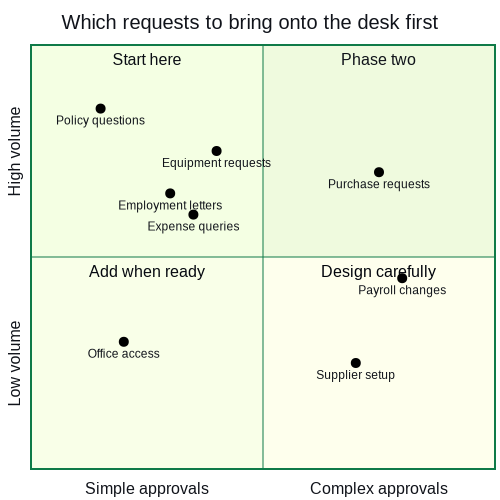
Leave IT’s queue as it is. Add one department at a time, starting with the request types that come up often and need simple approvals.
- Don’t move IT’s setup. Its categories, SLAs and views stay the same. New departments sit alongside it.
- Point the team’s shared mailbox at the desk. In ilane, an IMAP mailbox turns each new email into a ticket, replies become comments, and outgoing mail is sent from your own domain. Employees keep emailing the address they already know.
- Start with the simple requests. Frequent, low-complexity requests such as policy questions and letters show results in the first week. Purchase requests and payroll changes need approval design, so add them second.
- Write the knowledge articles first. ilane suggests relevant articles while someone types a request, so the questions HR answers every week can be handled before they become tickets.
- Review after four weeks. Look at request volume, SLA compliance and CSAT for each department before adding the next one.
If you’re evaluating tools, ilane offers a pilot on one team, and everything you set up carries over to a full plan. Most teams set up the essentials (sign-in, people, departments, email, SLAs and the request catalog) in an afternoon.
Conclusion
A shared desk works when each team keeps its own way of working: its own departments, heads, working hours and approvers, all reached through one front door. Start with IT as it is, add HR’s frequent requests next, design finance approvals around segregation of duties, and run onboarding and offboarding from one form that closes only when every task is done.
To see how ilane’s service desk handles IT, HR, Finance and Ops in one queue, book a demo.
Frequently asked questions
Should HR use a dedicated HR case management tool instead of a shared service desk?
A dedicated HR tool makes sense when HR runs large shared-services operations with complex case types. At 50–1,000 people, most HR requests are letters, leave questions and onboarding, which a shared desk with HR-only categories handles well. A shared desk also means employees use one portal for everything, and onboarding tasks for IT and HR sit in the same request.
Can sensitive HR cases stay private on a desk that IT also uses?
They should, and you should test it before going live. Set up HR as its own department, keep sensitive categories such as health or grievances to HR agents, and check what another department’s agent can see. Health information is special category data under GDPR, so treat visibility as a requirement, not a preference.
Do service desk approvals replace purchase approvals in our finance system?
Usually not. The desk records the request and who approved it, and the purchase order is still created in your finance system. The desk adds a clear, timestamped trail of who asked and who approved, which is useful when auditors check segregation of duties.
How many SLA policies do we need for HR and finance?
Start with three priorities per department (urgent, normal and low), each with a response and a resolution target measured in that department’s working hours. Review them after a month of real data, then tighten or relax targets based on actual volume.
How is ilane priced if we add HR and finance teams?
ilane quotes for each company based on how many laptops, desktops and servers run the ilane agent. For a quote that fits your setup, book a demo and bring your current tool costs.