To track unused software licences, give every paid seat a named holder and a last-used date. Flag seats that have sat idle past a set threshold (60 days is a sensible default), check with the holder, then reclaim or downgrade the seat. Connect the same list to renewal notice dates and offboarding so seats come back before you pay for them again.
How much software spend usually sits in unused seats?
Close to half of all paid seats go unused in a typical month, according to the largest benchmarks.
- Zylo’s 2026 SaaS Management Index found that organisations use just 54% of their SaaS licences on average. The average organisation in its data wastes $19.8M a year. That dollar figure comes mostly from large enterprises, but the ratio is the part that matters for you.
- In Flexera’s 2026 State of ITAM survey, 43% of respondents said SaaS wasted spend went up over the past year. Only 66% said they could see their SaaS estate.
You can estimate your own exposure quickly. For each of your five most expensive apps, multiply idle seats × price per seat × 12. If you can’t fill in the “idle seats” column, the next section is your starting point.
How do you find SaaS seats nobody has opened in months?
Build one list that shows who holds each seat and when they last used it, then sort by last use.
- List every paid app. Pull them from three places: invoices and card statements (finance), your identity provider (apps people sign in to) and the software installed on laptops. Each source catches apps the other two miss.
- Record the seat model. Some apps use a shared pool (10 seats for anyone in design). Others are per-person subscriptions. Note the price, the renewal date and the owner of the contract.
- Attach a holder to every seat. Match each seat to a person’s work email. A seat without a holder is the first one to question.
- Add last activity. Most SaaS admin consoles show a last-login or last-active date for each user. Copy it in, or connect it.
- Flag and sort. List seats past your threshold, plus any seat still held by someone who has left.

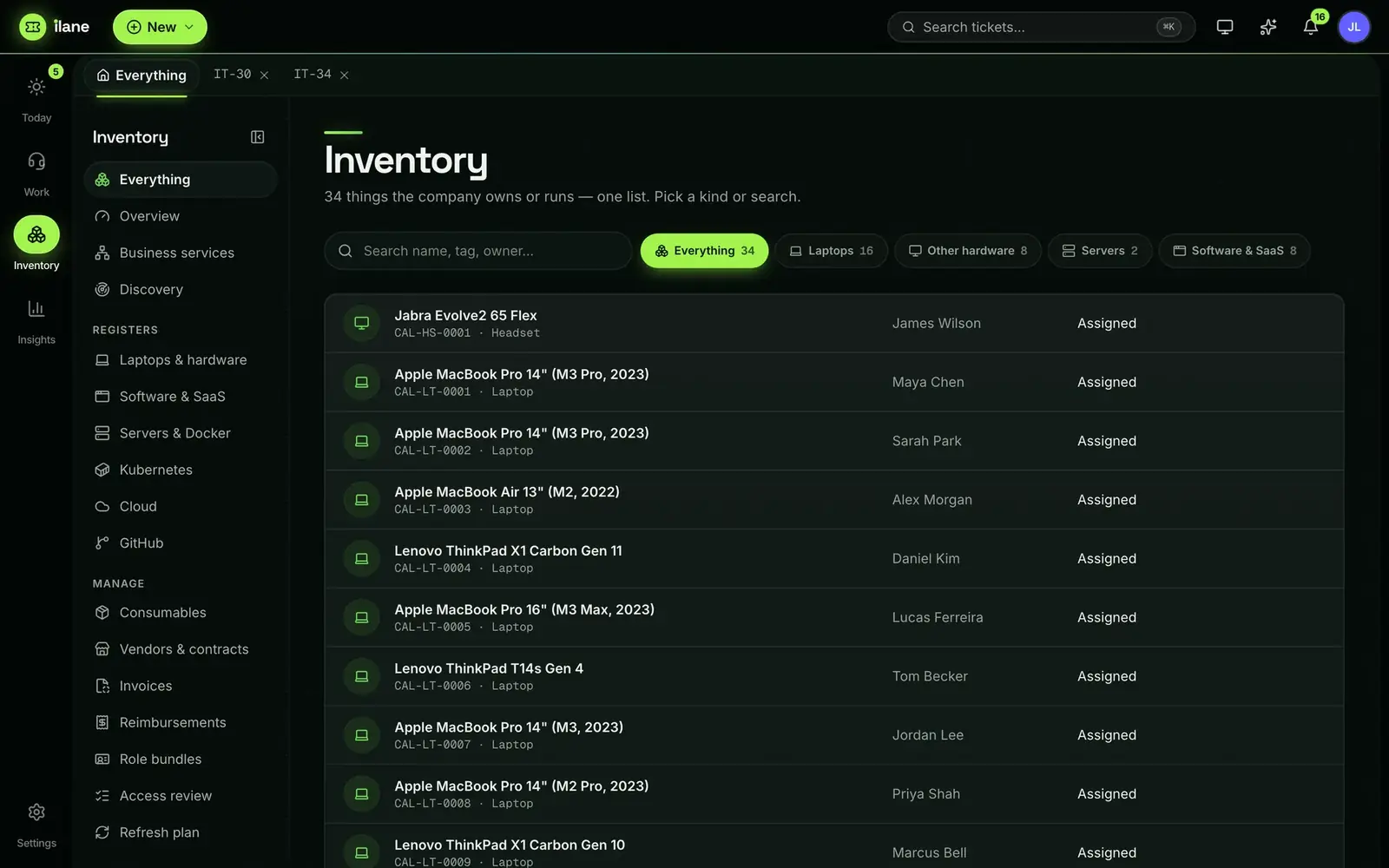
In ilane’s assets and licences register, software sits next to hardware. It covers shared seat pools and per-person subscriptions, and shows who holds each seat and when it renews. ilane lists the seats nobody has opened in months. You can also upload invoices: ilane suggests the devices and software it finds, and a person reviews them before anything goes into the register. Duplicates are caught first.
What is a sensible inactivity threshold before reclaiming a seat?
Use 60 days by default. Go shorter for expensive seats and longer for tools people only need now and then.
Some reference points:
- Zylo’s benchmark counts a licence as unused if nobody touched it within a 30-day window. That’s useful for measuring waste, but too short for taking seats away.
- CIS Controls v8 Safeguard 5.3 recommends disabling dormant accounts after 45 days of inactivity. That’s a security rule rather than a cost rule. Still, an account idle for 45 days is a risk as well as a cost.
| Seat type | Suggested threshold | Why |
|---|---|---|
| Expensive per-person seats (design, CAD, analytics) | 30–45 days | Each idle month costs the most |
| Everyday collaboration tools (video, docs, chat) | 60 days | Most people use them weekly, so 60 days idle is a clear signal |
| Periodic tools (quarter-end finance, annual planning) | 90–120 days | Use follows the calendar, not the week |
| Shared pool seats | 60 days | A freed seat goes back to the pool, so reclaiming it costs nothing |
Reclaiming should take steps, not happen as a surprise:
- Tell the holder their seat will be removed in five working days unless they say they need it.
- Where the vendor allows it, downgrade to a free or view-only tier instead of deleting the account, so the person’s files stay.
- Record the change on the seat’s history, along with who approved it.
ilane flags seats that haven’t been used for 60 days or more and lets you take each one back in one step.
How do you catch paid apps installed without a licence?
Compare what’s installed on each laptop with the seats in your register. A paid app with no matching seat needs a ticket.
When a paid app turns up without a seat, it’s usually one of three things:
- Unlicensed use. A trial that ran out, a shared key or a cracked copy. This is a compliance problem, not just a cost problem.
- A purchase you don’t know about. Someone paid on a personal or team card. Zylo’s 2024 research highlighted security risks from employee-expensed apps, on top of the spend.
- A legitimate free tier. Write it down so it stops showing up as a finding.
Here’s how to run the check:
- Get installed-software lists from every laptop. Use a device agent or MDM report, not a survey.
- Mark which apps are paid.
- Join each paid app to the register by user. Any app without a seat goes to an owner to resolve: buy a seat, remove the app or record it as a free tier.
ilane’s device agent runs this check on Mac, Windows and Linux laptops. When someone has installed a paid app nobody bought a licence for, ilane names it on a ticket.
How do you stop renewals and notice dates sneaking up on you?
Track the notice date as well as the renewal date. Raise a ticket early enough that you can still change the seat count.
Many annual SaaS contracts renew automatically, and the deadline to cancel or reduce seats often falls weeks before the renewal itself. If your reminder is set for the renewal date, it’s already too late to act.
For each contract, record:
- Renewal date, and whether it renews automatically
- Notice period, and the notice deadline worked out from it
- Contract owner (the person who decides)
- Seats bought compared with seats used in the last 60 days
Set the reminder for 30 days before the notice deadline, not the renewal date. Attach the usage figures to the reminder, so the decision is “renew 40 seats or 32?” and not “renew or not?”
In ilane, vendor contracts carry their notice dates, and renewals come with a reminder ticket raised early enough to decide.
How should offboarding make sure every seat comes back?
Make seat recovery a task that blocks the offboarding ticket from closing, not a line on a checklist that someone can tick past.
CIS Safeguard 6.2 asks organisations to revoke access by disabling accounts immediately on termination, rights revocation or role change. In practice that takes time: one survey found IT teams spend an average of 5 hours per departing employee removing cloud and SaaS access, and 69% use three or more sources to find all of it. When nobody has the full list in one place, seats get missed.
A leaver flow that works:
- HR’s leave date opens the offboarding ticket.
- The ticket fills itself with every seat and device the person holds, taken from the register.
- Each seat is either reclaimed into the pool or transferred, along with its data, to a named colleague.
- Devices are collected and checked in.
- The ticket can’t close while any seat or device is still assigned.
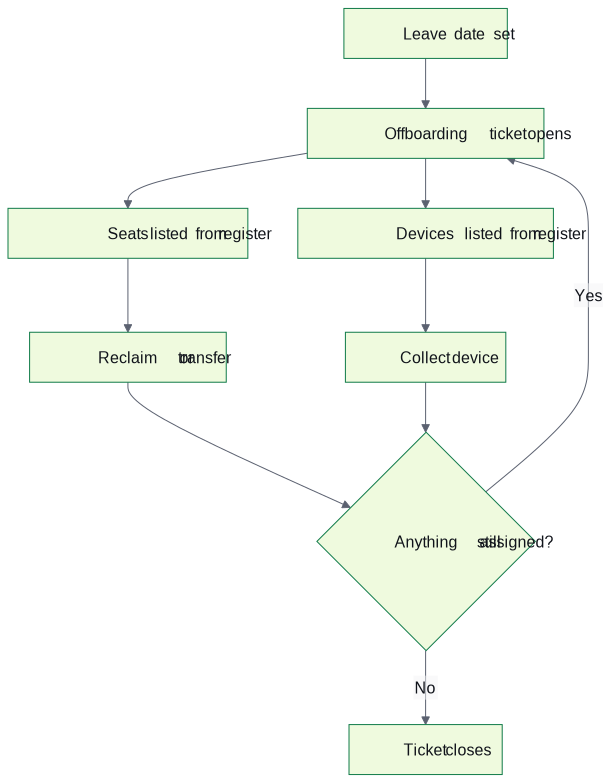
ilane works this way. Bundles by job role decide which seats a new joiner gets. When someone leaves, the offboarding ticket can’t close until every device is collected and every seat is returned. Removing access to AI vendors is part of offboarding too. Each quarter, ilane also raises an access-review ticket listing who holds which software. That catches seats that drifted when people changed roles.
Spreadsheet or register: where should licence data live?
A spreadsheet works while one person tracks a handful of apps. Once the data comes from several sources, or an auditor asks who owns each asset, move to a register that updates itself.
| Spreadsheet | Live register | |
|---|---|---|
| Who keeps it current | One person, by hand | Devices, tickets and handovers update it |
| Last-used data | Pasted in occasionally | Shown next to each seat |
| Leavers | Someone has to remember | Offboarding ticket lists their seats |
| Renewals | Calendar reminder, if someone set one | Ticket raised before the notice date |
| Audit evidence | Rebuilt before each audit | Asset ownership measured continuously |
The audit point matters if you’re working towards SOC 2 or ISO 27001. ilane’s compliance view maps its asset inventory control (“every device and seat has an owner”) to ISO 27001 and links each figure to the records behind it.
Conclusion
To stop paying for unused seats, you need one list of who holds what and when they last used it. Pick an inactivity threshold you can defend and reclaim seats in steps. Check installed apps against the seats you’ve bought. Act on notice dates, not renewal dates. And don’t let an offboarding ticket close while a seat is still assigned. Run those checks every month, plus once before each renewal, and the surprises stop.
To see unused seats, renewal tickets and seat recovery at offboarding working on real data, book a demo.
Frequently asked questions
How often should we review software licence usage?
Look at idle seats once a month, and do a full review about 30 days before each contract’s notice deadline. Monthly checks catch seats that drift as people change roles. The pre-renewal review lets you cut the seat count before you’re locked in for another term.
Should we delete or downgrade a reclaimed seat?
Downgrade where the vendor offers a free or view-only tier. The person keeps access to their files and you stop paying for the full seat. Delete accounts only after their data has been moved to a colleague or archived.
What if someone needs a tool only a few times a year?
Give periodic tools a longer threshold, such as 90–120 days, or keep a small shared pool that people borrow from when they need it. A shared pool usually costs less than per-person seats for occasional users.
Does reclaiming licences matter for security as well as cost?
Yes. Idle and leftover accounts are a known risk, which is why CIS Controls v8 recommends disabling dormant accounts after 45 days of inactivity and revoking access as soon as someone leaves. Reclaiming a seat also removes that access.
How do we find SaaS apps that IT never bought?
Check three sources: card statements and expense reports, the apps people sign in to through your identity provider, and the software installed on laptops. Anything paid that isn’t in your register needs an owner to decide whether to buy it properly, remove it or record it as a free tier.