Verifying an IT ticket means deciding up front what “fixed” looks like, then having a system measure that state again after the fix. The ticket closes only if the new reading passes. A technician clicking “resolved” doesn’t prove anything, and neither does a script that reports success. If the re-check fails, the same ticket reopens.
This guide covers why tickets come back, which problems a tool can re-check by itself, where a person still has to approve, and how to show that the approach is working. Examples come from how ilane’s verified resolution works. The same rules apply whatever tool you use.
Why do so many IT tickets get reopened?
Most service desks close a ticket when someone says the problem is fixed, and nobody checks.
That leaves room for a few common failures:
- The fix treated a symptom. Someone clears a full disk, but the log rotation that filled it is still broken.
- The fix didn’t take. A patch fails or rolls back, or a policy setting gets overwritten at the next sync.
- Nobody tested. The agent writes “should be fixed now,” and the user never replies.
- The problem comes back as a new ticket. The reopen count never goes up and the history is lost, so the repeat looks like fresh work.
ITIL-style practice separates resolved from closed for this reason. One practitioner guide warns that you need to verify with the user that everything’s actually working before closing. Benchmarks make the cost visible. A reopen rate below 5% is generally considered strong for an IT help desk. Another guide says a rate that stays above 10%, especially after adding an automated resolver, suggests tickets are being closed too early.
What does ‘verified resolution’ mean for an IT ticket?
Verified resolution means a ticket closes only when a check, defined before the work starts, reads the system again and confirms the desired state.
It has three parts:
- A contract. Write down the desired state and how it will be measured: “FileVault on,” “disk above 15% free,” “no critical patches overdue.” Do this before anyone touches the system.
- A before reading. Record the failing state that raised the ticket.
- An after reading from an independent source. The check reads the system again on its own. The fix script’s exit code doesn’t count, and neither does the technician’s opinion.
This is how ilane works. Each ticket raised by a check carries a contract saying what “fixed” means and how ilane will verify it. A fix that reports success doesn’t count, and neither does a person clicking resolve. Only ilane’s own next reading does. The homepage shows an example: IT-30 verified fixed, disk back to 21% free, closed automatically.

Which problems can a tool check by itself after a fix?
A tool can verify any problem whose fixed state can be read from a machine or an API, such as a setting, a number, a version or a status.
| Problem | What “fixed” looks like | What can re-check it |
|---|---|---|
| Laptop disk encryption off | Encryption reported on | Device agent |
| OS updates overdue | No overdue updates | Device agent |
| Server disk nearly full | Free space above threshold | Server agent |
| Container crash-looping | Pods running and healthy | Kubernetes report |
| TLS certificate expiring | New expiry date beyond warning window | Read-only cloud connection |
| SSH open to the internet | Security group rule removed | Read-only cloud connection |
| Repo members without 2FA | All members have 2FA | Code-repo connection |
| “Outlook feels slow” | Person says it works | The requester |
Patching is the classic case where “applied” and “fixed” differ. NIST frames enterprise patching as preventive maintenance for technology. Machines that were offline during a rollout, or that rolled an update back, only show up if something re-measures them afterwards.
The last row matters. Many requests (“I can’t find the shared drive,” “how do I set up my signature?”) have no machine-readable fixed state. For those, the requester confirming it works is the check. Keep the ticket open until they confirm, or until a stated timeout passes.
On laptops, the ilane agent runs 42 checks on Mac, Windows and Linux, including encryption, firewall, screen lock, updates and browser extensions. Each check opens one ticket for one owner and closes it when the next report is clean. The same agent watches server disk, patches and containers. Read-only connections cover cloud accounts, Kubernetes and code repositories.
Which fixes are safe to automate, and which need a person’s approval?
Automate fixes that are low-risk, narrow and easy to reverse. Require a person’s yes for anything that changes a running system, and two people for anything destructive.
Judge each fix on these criteria:
- Blast radius: does it touch one laptop or a production server?
- Reversibility: can you undo it in minutes?
- Data loss: could it delete anything you can’t recover?
- User disruption: will it restart something someone is working in?
- Frequency: does it come up weekly? Routine, repeated fixes are the best candidates to automate.
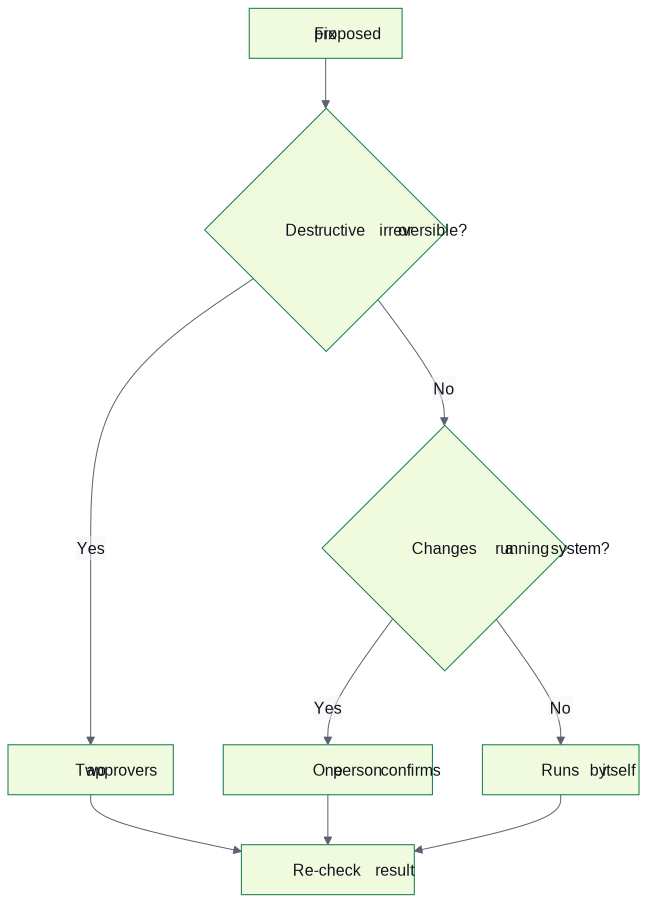
Whichever path a fix takes, it still goes through the same re-check. Automation decides who does the work. It doesn’t decide whether the work counts.
ilane’s security model puts this in layers:
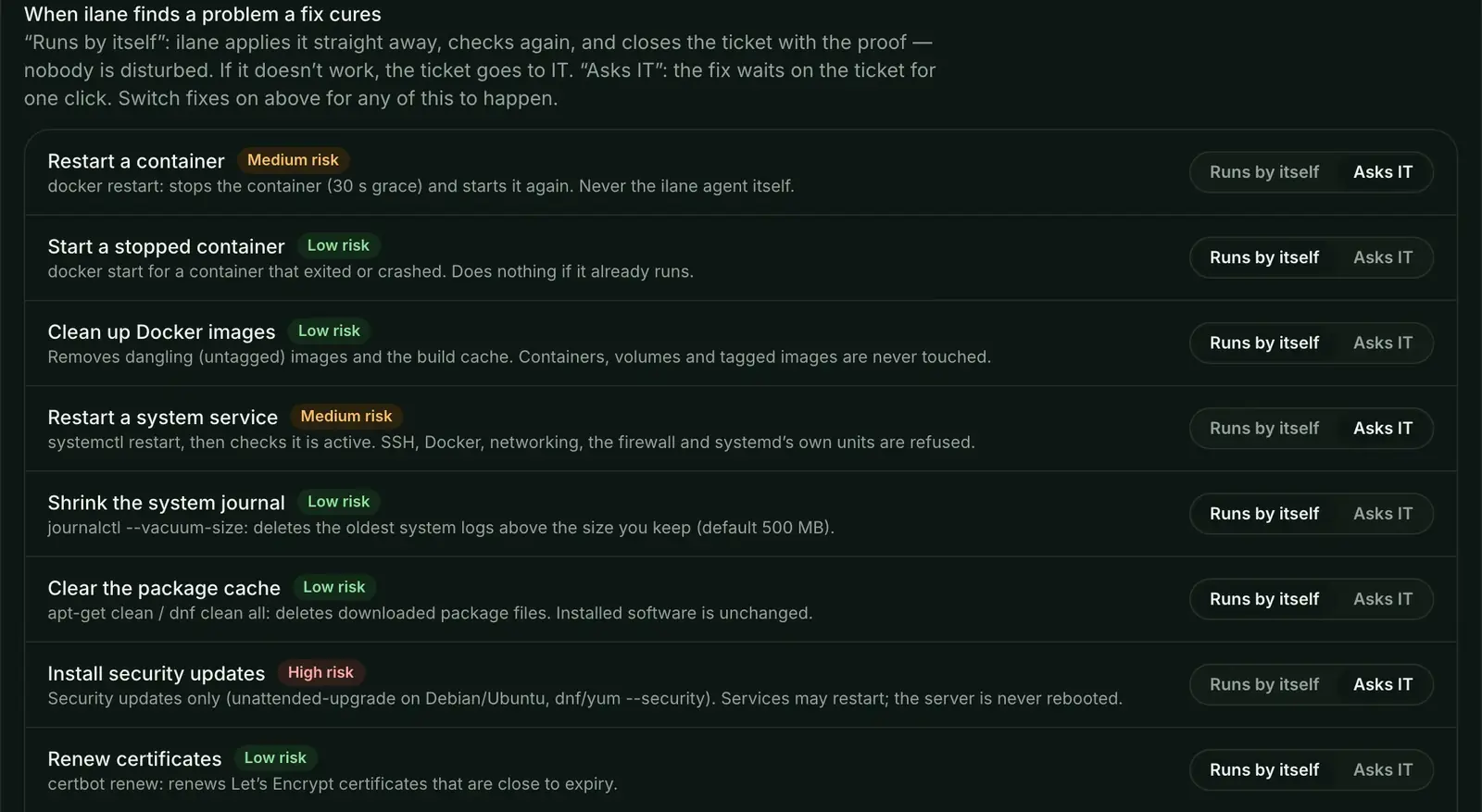
- Every fix starts switched off for every company. An admin turns it on and sets it to “runs by itself” or “asks IT.”
- The security page uses these examples: cleaning up Docker images is low risk, restarting a system service is medium, and wiping a lost laptop is serious. Wiping needs a second approver.
- ilane runs only named, built-in fixes and never sends shell commands. Each server has its own allow-list of fixes it will accept.
- Requests are signed, short-lived and single-use, so they can’t be replayed later.
- Temporary admin rights last 15 minutes and are then removed automatically.
- AI can explain and suggest, but rules decide what runs, and those rules work with AI switched off.
How do you record evidence that a fix worked?
Save the contract, the before and after readings, every step that ran and who approved it, in a log that nobody can quietly edit.
A useful evidence record answers five questions:
- What was wrong, and when was it found?
- What did “fixed” mean, and how was it measured?
- What exactly ran, and who approved it?
- What did the re-check read afterwards?
- Can anyone prove the record hasn’t been changed?
In ilane, a ticket closes itself with an evidence record you can print or hand to an auditor. It includes the contract, the before and after readings, every step, and the matching entries from a hash-chained audit log. Each log entry carries a fingerprint of the one before it, and a nightly check reports exactly where the chain breaks if anything was altered. Entries are kept for at least a year, and nobody can update or delete them through the app or the database. You can also see the steps a fix may run before you approve it, and the steps it did run afterwards.
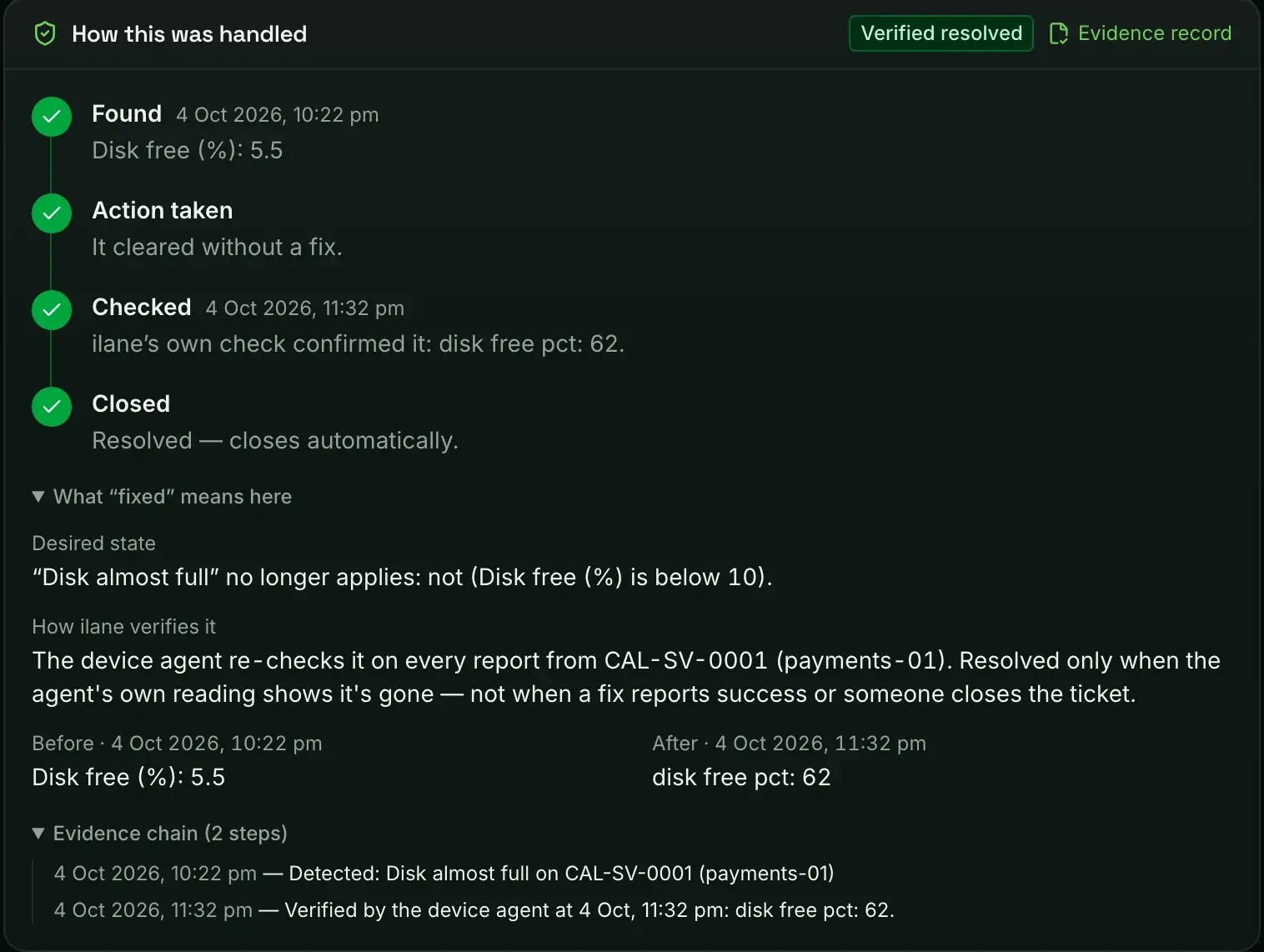
This record also serves as audit evidence. When ilane proves a fix, the matching control on the compliance page moves up and the evidence is saved. You don’t need to gather screenshots the week before a SOC 2 or ISO 27001 audit.
What should happen when the check fails after a fix?
The same ticket should reopen with the failed reading attached, the same owner and its full history. Don’t open a new ticket.
Steps that work:
- Reopen, don’t duplicate. A new ticket hides the repeat and resets the clock.
- Attach the failed reading. The owner should see “disk still at 93%,” not just “check failed.”
- Hand over after one failed automatic attempt. If a fix ran and the check still fails, send it to a person instead of retrying in a loop.
- Look for a shared cause. If several alerts fail together, group them into one incident and start with the earliest, lowest-level one.
- Open a problem record for repeats. A check that fails on the same asset again and again points to a root cause the fix isn’t reaching.
ilane follows this pattern. If the verification fails, the same ticket reopens. Related alerts are grouped into one incident by rules, not AI. The problem that started lowest and earliest is flagged as the likely cause, and the whole incident goes to one owner. Problems ilane can fix are handled quietly. People hear only about the ones it can’t finish.
How do you measure whether verification is reducing repeat tickets?
Record a baseline before you switch verification on. Then track reopen rate, repeat problems on the same asset, and how many check-raised tickets pass verification the first time.
Track these metrics:
- Reopen rate. This is your headline number. Below 5% is a common target.
- Repeat-problem rate. Count the same check failing on the same device or server within 30 days, including repeats that arrived as new tickets. Reopen rate alone misses those.
- First-pass verification rate. The share of fixes whose first re-check passes. A low rate on one fix type shows which automations or runbooks you shouldn’t trust.
- Fix-to-verified time. How long a ticket sits between “fix applied” and “proven.”
- Tickets closed without a person. This shows how much routine work verification has taken off the team.
Take four to eight weeks of data before the change so the comparison holds up. In ilane, the Impact view shows what ilane fixed on its own, how many alerts it grouped together and how fast people resolved the rest. Service desk reports include reopen rate and CSAT per agent, and repeat incidents are linked to their root causes.
Conclusion
A ticket counts as fixed when an independent check says so, not when someone clicks a button. To get there:
- Define “fixed” before the work starts.
- Re-measure after the fix and close only on a passing reading.
- Automate only the low-risk fixes and keep people approving the rest.
- Save the evidence where nobody can edit it.
- When a check fails, reopen the same ticket.
To see this on your own systems, book a 30-minute call. We’ll fix one thing together and watch ilane check that it’s really fixed. Book a demo →
Frequently asked questions
Does verified resolution replace asking the user if the problem is fixed?
Not for every ticket. Machine-checkable problems, such as encryption, disk space, patches or container health, can be verified by re-reading the system. Requests like “my app feels slow” or how-to questions still need the requester to confirm, or to let a stated timeout pass, before the ticket closes.
How soon after a fix should the re-check run?
Run it at the next reading of the system, once the change has had time to take effect. A disk clean-up can be checked almost immediately. A patch may need a restart and a fresh report from the device first. ilane closes a check-raised ticket when the next clean report from its own agent or connection comes in.
What if an automated fix keeps failing verification?
Treat repeated failures as a signal, not something to retry. Send the ticket to a person after a failed attempt and look for a shared root cause across related alerts. If the same check fails on that asset again, open a problem record. In ilane, the same ticket reopens with its history, so the repeat stays visible.
Can verified fixes count as SOC 2 or ISO 27001 evidence?
Yes, if the record shows the control’s intended state, the before and after readings, what ran, who approved it, and a log that can’t be quietly edited. ilane saves this as an evidence record for each ticket and maps verified fixes to the matching SOC 2 and ISO 27001 controls on its compliance page.
Is it safe to let a tool fix servers automatically?
It can be, if automation is limited to narrow, reversible, low-risk fixes and everything else needs approval. ilane starts with every fix switched off. Each fix runs by itself or asks IT, as you choose, and serious actions need two people. Each server accepts only the built-in fixes on its own allow-list, never arbitrary shell commands.