Zero trust network access (ZTNA) is a way of letting people reach internal applications without putting them on your network. Each request is checked against who the person is and the state of the device they’re using. Access is then granted to one named app at a time, never to the whole network behind it.
This guide is for IT managers and founders who keep hearing the term and want to know what it means before they buy anything. We build ilane Private Access, so the mechanics below come from how this kind of access actually works.
What is zero trust network access (ZTNA), in plain terms?
ZTNA puts an access boundary around each internal app, where older setups put one boundary around the office network.
Gartner, which named the category, defines ZTNA as “products and services that create an identity and context-based, logical-access boundary” around a user and an internally hosted app or set of apps. The same definition adds that the apps are hidden from discovery, and that a trust broker limits access to named people. That limit cuts down how far an attacker can move once inside the network.
In everyday terms, ZTNA rests on three ideas:
- Identity: the person signs in as themselves, through your company identity provider.
- Context: the system looks at the device as well as the password. Is it a company laptop, and is it healthy right now?
- Per-app access: a yes opens one app, such as the finance dashboard, the staging admin panel or the internal wiki. It doesn’t open a route into everything else.
How does ZTNA work, step by step?
A broker sits between the person and the app and decides each request on identity, device and policy before any connection is made.
- The person asks for an app. They open a bookmark or a portal link, just like any web app.
- Identity is confirmed. The broker sends them to your identity provider, which handles single sign-on and multi-factor authentication.
- The device is checked. The broker asks whether this laptop is known, assigned to this person and currently meeting policy: disk encryption on, firewall on, updates current.
- Policy decides. It’s this person, on this device, for this app. Nothing broader is allowed.
- One connection is made. The broker connects the person to that single app. The app itself isn’t exposed to the internet.
- Access stays conditional. If the laptop falls out of policy, access stops until it’s fixed.
This follows NIST’s zero trust guidance. NIST SP 800-207 treats authentication and authorisation of both the user and the device as separate steps that happen before a session to a resource is set up.
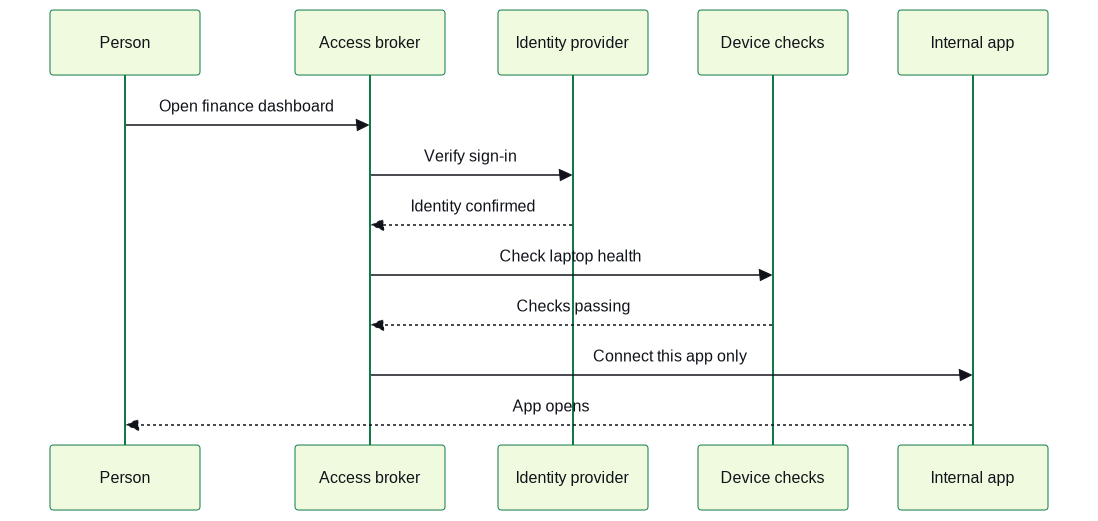
In ilane, people open internal apps only from their own laptop, signed in as themselves, and only while that laptop passes your checks. Nothing joins your network.
Why does checking the device, not just the login, matter?
A stolen password or session token works from any machine in the world. A device check means a working login isn’t enough on its own.
Credential abuse is still the most common way attackers get in. The 2025 Verizon Data Breach Investigations Report puts it at 22% of breaches, ahead of vulnerability exploitation at 20%. If your app only asks “is the password right?”, a leaked credential opens the door. If it also asks “is this the laptop we issued to Priya, and is it encrypted and patched?”, the attacker needs her laptop as well.
A useful device check usually covers:
- Ownership: the device is in your register and assigned to the person signing in.
- Encryption: the disk is encrypted, so a lost laptop doesn’t mean lost data.
- Firewall and screen lock: both on, to your policy.
- Updates: no overdue OS patches past your grace period.
- Freshness: the device reported in recently. A health report from last week doesn’t tell you its state today.
That last point is where many setups fall short. The device check is only as good as the data behind it. In ilane, a light agent on every Mac, Windows and Linux laptop runs 42 posture checks throughout the day. Access decisions and IT’s own view of the fleet come from the same live data.
How is ZTNA different from zero trust and zero trust architecture?
Zero trust is the principle, zero trust architecture is the overall design, and ZTNA is one product type that applies the principle to app access.
- Zero trust is the idea that location earns no trust. NIST says an enterprise must assume no implicit trust and keep evaluating risk. The focus moves from protecting network segments to protecting resources.
- Zero trust architecture (ZTA) is how you apply that principle across the organisation. CISA’s Zero Trust Maturity Model lays it out as five pillars plus three cross-cutting capabilities. The pillars are Identity, Devices, Networks, Applications and Workloads, and Data.
- ZTNA covers part of that design: identity, device and network checks for access to applications. It doesn’t classify your data or secure your SaaS tenants.
No single product delivers zero trust. NIST’s National Cybersecurity Center of Excellence showed this when it built 19 sample zero trust implementations with industry partners for SP 1800-35. Each one combined several components.
ZTNA vs SASE vs network access control: what’s the difference?
ZTNA controls access to apps from anywhere. SASE is a cloud bundle of networking and security services that usually includes ZTNA. Network access control (NAC) decides which devices may join your office network.
Gartner introduced SASE in 2019 to describe the convergence of wide-area networking and network security delivered from the cloud. NAC is older and works at the point where a device plugs into the office LAN or Wi-Fi.
| ZTNA | SASE | Network access control | |
|---|---|---|---|
| What it controls | Access to specific internal apps | Network traffic and security for users and branches | Which devices join the local network |
| Where it applies | Anywhere the person works | Anywhere, through cloud points of presence | Inside the office |
| Unit of access | One app | Traffic flows and destinations | The whole network segment |
| Typical fit at 50–1,000 people | Remote or hybrid teams with a handful of internal apps | Multi-site companies replacing branch networking | Offices with many unmanaged or shared devices |
If your people mostly work from laptops, your apps are in the cloud or on a few servers, and you have no branch network to rebuild, you probably need ZTNA, not a full SASE programme.
How does ZTNA improve security compared with a VPN?
A VPN puts the device on your network. ZTNA connects one person, on one checked device, to one app.
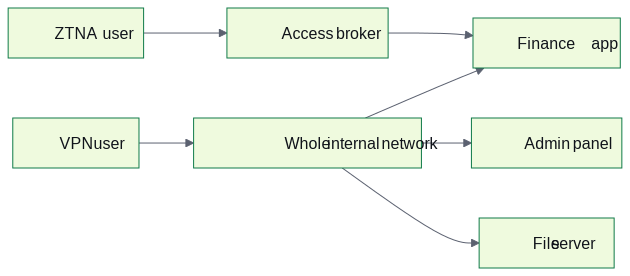
That difference matters for three reasons:
- Smaller blast radius. A compromised VPN account can scan and reach whatever the network allows. A compromised ZTNA session reaches only the apps that person was allowed, from their own device.
- Less exposed infrastructure. VPN gateways sit on the internet and attackers know it. The 2025 Verizon DBIR found exploitation of edge devices and VPNs rose from 3% to 22% of vulnerability exploitation, roughly eightfold. Only 54% of those vulnerabilities were fully remediated, with a median of 32 days to do so.
- Device health in the decision. Most VPNs ask for credentials once. ZTNA keeps checking the device state.
Replacing the VPN is the main reason companies look at ZTNA: Gartner reports that organisations identify VPN replacement as their primary motivation. If that’s your goal, our guide on replacing a VPN one app at a time covers the rollout order in detail.
How do you start implementing ZTNA in a growing company?
Get identity and device inventory right first, then put two or three low-risk apps behind ZTNA and expand from there.
- Use one identity provider, with MFA for everyone. ZTNA can’t be stronger than the sign-in it trusts.
- Know every laptop and who has it. Device checks depend on an accurate register. An unknown laptop should get no access at all.
- Write a short device policy. Start with encryption, firewall, screen lock and OS updates. Add more checks once these hold across the fleet.
- List your internal apps and who uses each one. Most 50–1,000 person companies find a manageable list: admin panels, dashboards, wikis, staging environments.
- Start with two or three apps that have a small, known user group. Run them through ZTNA alongside the existing route, then remove the old route.
- Decide what happens when a laptop fails a check. Block access, tell the person why, and make the fix easy, or people will look for workarounds.
- Keep a record. Make sure allowed and refused access is logged, because auditors and incident reviews will ask for it. ilane writes sign-ins, refused sign-ins, admin changes and approvals into a tamper-evident audit log that’s checked nightly.
You don’t need to jump to full maturity at once. CISA’s model moves through traditional, initial, advanced and optimal stages, so small steps count as progress.
Conclusion
ZTNA replaces “you’re on the network, so you’re trusted” with three questions asked on every request: who is this, is their device healthy, and which single app do they need? For a growing company, the hard part is usually keeping accurate data on identities and devices, not the access product itself. Get that data right and ZTNA becomes a policy decision, not an infrastructure project.
If you’d like to see per-app access tied to live laptop checks, book a demo. It’s a 30-minute call, with no slides.
Frequently asked questions
Is ZTNA the same as a VPN replacement?
Replacing a VPN is the most common reason companies adopt ZTNA, but the two aren’t the same thing. A VPN joins a device to your network, while ZTNA grants access to one app at a time after checking identity and device health. Many teams run both for a while and move apps across gradually.
Does ZTNA need software installed on each laptop?
Some ZTNA access works through a browser alone. But checking device health needs something on the device that can report its state, such as encryption, firewall and patch level. In ilane, the same light agent that runs the laptop posture checks provides that signal, so nothing extra has to be installed.
Can a 50-person company implement ZTNA without a security team?
Yes, if the basics are in place: one identity provider with MFA, a current list of laptops and owners, and a short device policy. Start with two or three internal apps used by a small group, then expand. The work is mostly deciding who should reach what.
What happens if a laptop fails a device check?
With device-aware ZTNA, the laptop loses access to protected apps until it meets policy again. In ilane, internal apps open only while the person’s laptop passes your checks. Failing checks show up as tickets for IT, so the fix is tracked.
Does ZTNA help with SOC 2 or ISO 27001?
It can supply evidence auditors commonly ask for: who accessed which systems, from which devices, and whether those devices met policy. ZTNA doesn’t make you compliant on its own. You still need the logs and device records kept over the whole audit period.