To automate employee onboarding and offboarding, tie every step to one request. A role-based bundle decides the laptop, software seats and access a joiner gets. The new hire confirms the device they received, and a leaver’s request takes all of it back. Software does the routine work, and people approve the exceptions: extra spend, admin rights and wiping a device.
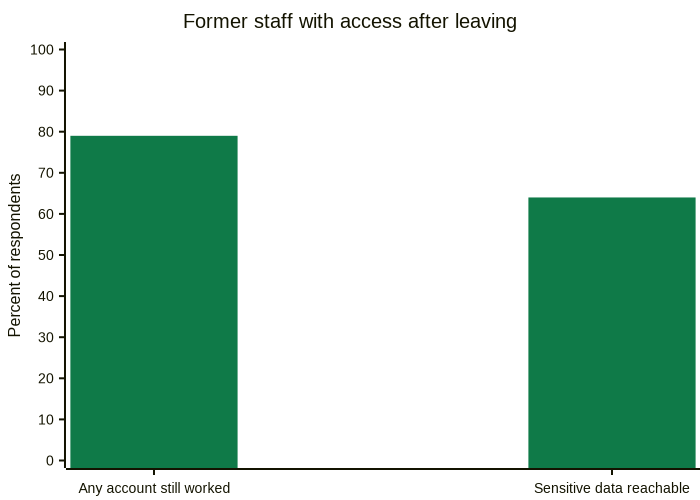
Doing it by hand fails most often when people leave. In Sagiss’s 2026 survey of 1,000 former employees, 79% said at least one work account or access point kept working after their last day. 64% said they could still see or reach sensitive company information.
What should happen on day one, and which steps usually get missed?
On day one, a new hire should have a working, encrypted laptop, a company sign-in and the seats their role needs, and nothing more. The steps that get missed are usually the ones nobody clearly owns.
| Day-one item | Usually owned by | Why it slips |
|---|---|---|
| Laptop ordered, enrolled, encrypted | IT | Ordered late. Security settings checked after the person is already working |
| Company account (Google or Microsoft) | IT, triggered by HR | The start date reaches IT through a chat message, or doesn’t reach it at all |
| Software seats for the role | IT and team lead | Requested one app at a time over the first week |
| Monitor, dock, headset | IT or office | Not on the original request |
| Internal apps | IT | Broad network access granted “for now” |
| Device recorded against the person | IT | The spreadsheet is updated later, or never |
The fix is structural. Open one onboarding request as soon as HR confirms a start date, and give every item above an owner and a due date inside it. In ilane, the service desk handles onboarding in one form. The request catalog supports onboarding and offboarding tasks with up to three approval steps, so the whole checklist lives in one ticket instead of five chat threads.
How do role-based bundles decide which laptop, seats and apps a joiner gets?
A bundle is a saved list for each job role: laptop model, software seats, accessories and app access. The joiner request copies the list from the role, so nothing depends on someone remembering it.
To build them:
- Start with the roles that cover most hires. For a growing company that is usually engineering, sales, operations and finance. Don’t create a bundle for every job title.
- List four things for each role: hardware, paid seats, free or shared tools, and internal apps.
- Keep exceptions out of the bundle. A designer’s second monitor or an extra AI tool seat should be a separate catalog request with its own approval.
- Review bundles when contracts renew. A seat in a bundle gets bought for every new hire in that role, so review it with the same care as the contract.
In ilane, bundles by job role decide which seats a new joiner gets. The same register shows who holds each seat and when it renews. When someone installs a paid app that nobody bought a licence for, ilane flags it. That’s often how you find out a bundle is missing something people actually use.
How do I make a new hire confirm the laptop they received?
Ask the new hire to accept the device in the system when it’s handed over. That way the ownership record comes from the person holding the laptop, not from IT’s spreadsheet.
A good handover record includes the asset tag, serial number, accessories handed over, the date, and the person’s own confirmation. If someone says “that’s not my serial number,” you’ve caught a mix-up on day one rather than at the leaver audit.
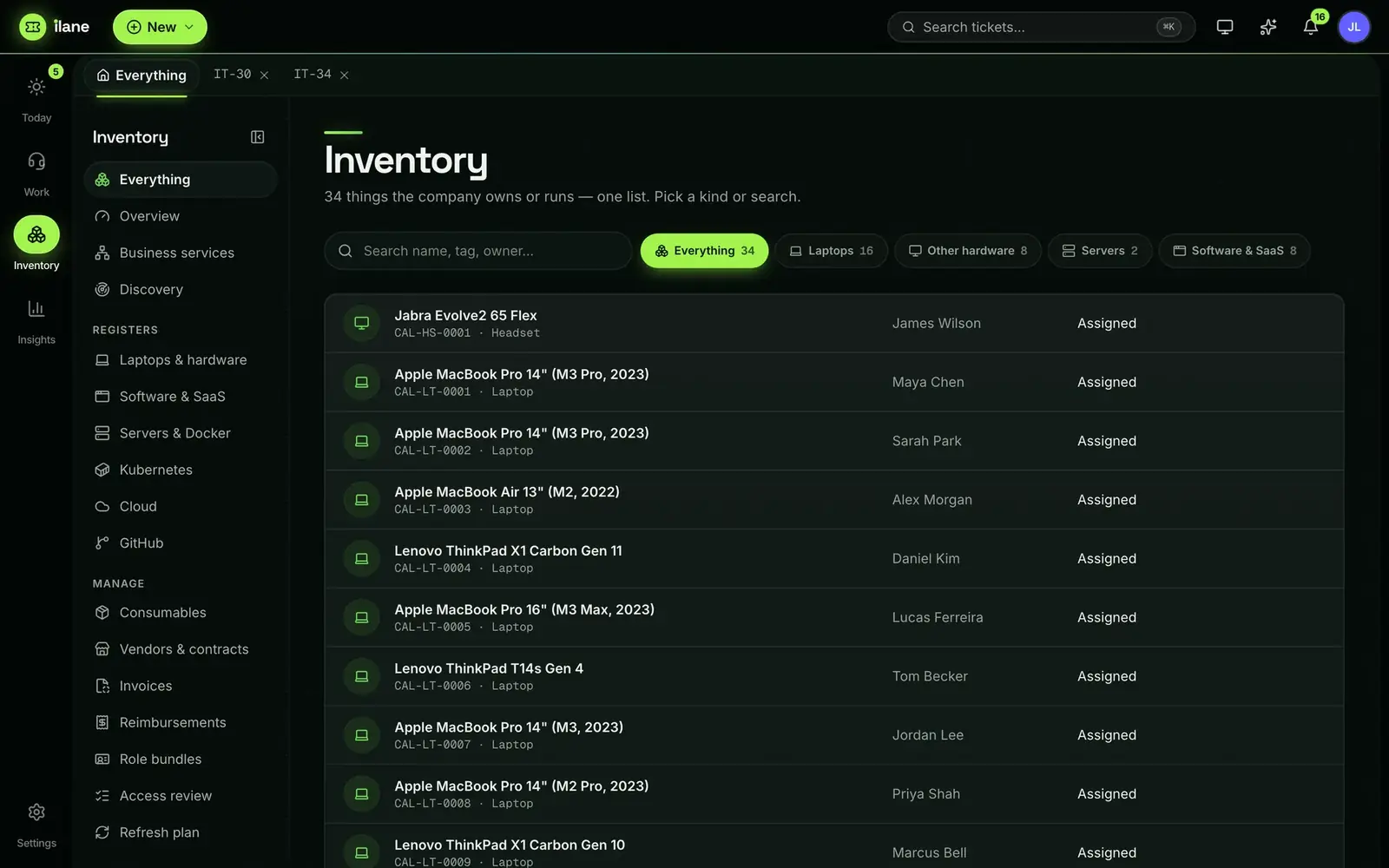
In ilane, IT issues the device straight from the onboarding request and the person confirms it in ilane. When they accept, the onboarding task ticks itself off, and the handover is saved to the asset’s history. Employees can see all their own equipment in one place.
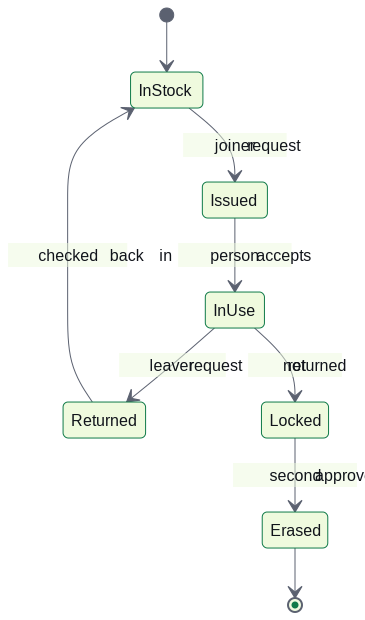
Over a laptop’s life, the record follows a simple path. It goes from stock, to issued, to accepted, and back to stock when the person leaves. If a leaver doesn’t return it, you lock it. In ilane, locking takes one approval and erasing needs a second person.
What should be automated and what needs a manager’s approval?
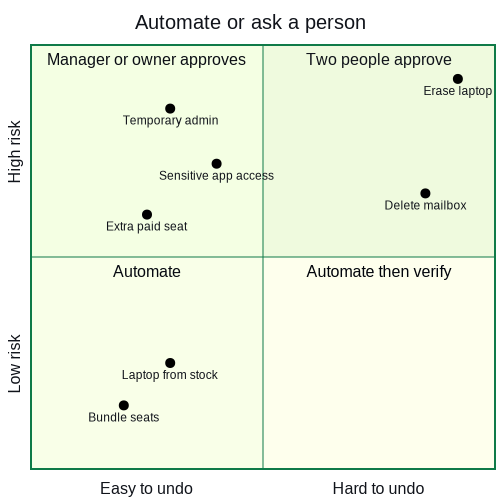
Automate anything that is standard for the role, easy to undo and already approved through the bundle. Send anything that adds cost, raises privileges or destroys data to a person.
Safe to automate:
- Creating the joiner or leaver request from HR’s date
- Assigning the bundle’s seats and issuing a laptop from stock
- Reminders to the new hire, their manager and IT
- Recording handovers and returns against the asset
Needs a person:
- A paid seat outside the bundle: the manager or department head approves the cost
- Access to a sensitive system: the system’s named owner approves
- Admin rights: temporary only. In ilane, temporary admin lasts 15 minutes and is then removed automatically and logged
- Deleting a leaver’s mailbox or files: do this later under your retention policy, never as an automatic last-day step
- Erasing a laptop: two people. In ilane, one admin can’t erase a device alone
ilane’s approvals can go to a manager, a department head or a named person. Under ilane’s security model, rules decide what runs, and AI can only explain and suggest.
How do I take back laptops, seats and access on the last day?
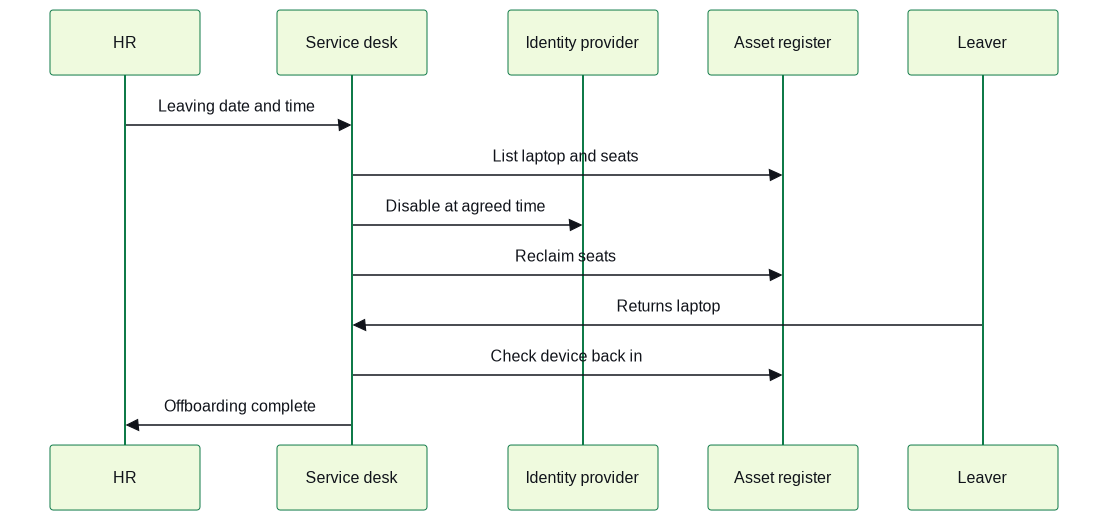
Open the leaver request as soon as you know the leaving date. Cut access at an agreed time on the last day, and collect the hardware against the same request.
Published guidance is clear about the essentials. NIST SP 800-53 control PS-4 asks organisations to disable system access within a defined time, revoke credentials, and retrieve company property. Its PS-4(2) enhancement notes that automated mechanisms can disable access quickly and thoroughly. For involuntary departures, CISA’s guidance says to tell IT the date and time of the separation meeting in advance and to remove remote access.
A last-day sequence that works:
- Disable the identity provider account at the agreed time. This also ends sign-in to every app that uses it.
- Remove remote and internal-app access. With ilane’s private access, people reach internal apps only from their own signed-in laptop while it passes your checks, so there’s no VPN account left behind.
- Reclaim seats listed against the person in the register, including AI tools. ilane’s compliance controls treat removing AI vendor access as part of offboarding.
- Collect the laptop and accessories and check them back into stock. If they aren’t returned, lock the laptop.
- Deactivate the person in ilane and reassign their open tickets.
Things will still slip through, such as a seat bought on a personal card or a tool added mid-year. A second net catches them. ilane flags seats unused for 60 days or more and lets you reclaim them in one step. Our guide to finding unused software licences covers that process.
How do I keep a record of each handover for audits?
Keep the request, the approvals, the accepted handover and the return on the asset’s own history. That way an auditor can pick any leaver and see what was taken back, and when.
Auditors test this directly. ISO 27001 Annex A 5.11 requires staff and external parties to return company assets when their employment or contract ends. For SOC 2 CC6.2, user credentials must be removed once access is no longer authorised. Expect the auditor to choose several leavers and ask for:
- The leaving date and the time access was disabled
- The list of assets and seats held, and proof each was returned or reclaimed
- Who approved any exceptions
- Quarterly access reviews showing nobody was missed
In ilane, every handover is saved to the asset’s history. Approvals, access-review decisions and data exports go into a tamper-evident audit log, kept for at least a year. On the compliance page, “offboarding completed” and “every device and seat has an owner” are measured live, and evidence CSVs are available whenever an auditor asks.
What does a working onboarding and offboarding workflow look like for a 200-person company?
A 200-person company can run joiners and leavers through two catalog forms, a few role bundles and one set of rules. IT only steps in for approvals and hardware. Here is an example setup:
Setup (once)
- Four bundles: engineering, sales, operations, finance. Each has a laptop model, seats and internal apps.
- A joiner form HR fills in with name, role, manager and start date, and a leaver form with the leaving date and time.
- Approval rules: extra seats go to the manager, sensitive systems go to their owner, and erasing a laptop needs two admins.
Joiner
- HR submits the form when the offer is signed. The bundle fills in the tasks.
- IT issues a laptop from stock and installs the agent. In ilane, employees can also install the agent themselves.
- On day one, the person accepts the laptop and the onboarding task closes.
Leaver
- HR submits the leaving date. IT disables sign-in at the agreed hour, seats return to the pool, and the laptop is checked back in or locked.
- The request closes only when every task is done. The record then stays on each asset’s history.
Every quarter
- Review who has which software, and reclaim seats that have been idle for 60 days or more.
Conclusion
Automated onboarding isn’t about removing people from the process. It removes the memory work: what this role needs, who has which laptop, which seats a leaver held. Bundles decide what a joiner gets. Accepted handovers record who holds what. A leaver request reverses it all at an agreed time, and approvals cover the few decisions that need a person.
To see a joiner and leaver run end to end on real data, book a demo.
Frequently asked questions
How early should IT start onboarding before a new hire’s first day?
Start as soon as HR confirms the start date, not the week before. You need enough time to order or allocate a laptop, enrol it and check its security settings. Starting the request from the signed offer gives IT a firm deadline instead of a last-minute message.
Do contractors need the same offboarding steps as employees?
Yes. ISO 27001 Annex A 5.11 covers external parties as well as staff, so contractors should return assets and lose access when their contract ends. Give contractors their own smaller bundle and a firm end date on the request, so the leaver steps start automatically.
What if a leaver doesn’t return their laptop?
Lock it first so nobody can use it or get at company data, then follow up through the leaver request. In ilane, locking takes one approval and erasing needs a second person, so no single admin can wipe a device alone. Both steps are recorded in the audit log.
How should we handle someone changing roles internally?
Treat it as leaving the old bundle and joining the new one. Remove seats and app access the new role doesn’t need, add what it does, and record any hardware swap as a handover the person accepts. Without this step, people who change roles end up with access from every job they’ve held.
How do we catch seats and access that offboarding missed?
Run a quarterly access review of who holds which software, and flag seats nobody has used for 60 days or more. In ilane, idle seats can be reclaimed in one step, and access reviews come up as a ticket each quarter. That catches tools that were bought or added outside the bundles.