To build an IT asset register from invoices, sort every invoice line into one of three groups: hardware units, software seats or consumables. Give each hardware unit its own record keyed by serial number. Check every line against what you already hold, have one named person approve it, and attach the invoice to every record it creates.
Why do asset registers go wrong when they start from invoices?
An invoice records a purchase, not an asset. It shows what was bought, but not which serial number arrived, who has the device, or whether the same purchase is already on another document.
These are the usual causes of a bad register:
- Quantities instead of units. “Laptop ×2” is one invoice line but two assets, each with its own serial number, owner and warranty.
- One purchase, several documents. The quote, order confirmation, delivery note and invoice all list the same laptops. If you import more than one of them, you count the laptops twice.
- Recurring bills. A monthly SaaS invoice lists the same seats every month. Importing each one as new seats inflates your licence count.
- Mixed lines. A laptop, four USB-C hubs, an extended warranty and shipping can all sit on one page. Each one belongs somewhere different.
- No user. The invoice names the company that bought the item, not the person who uses it.
Security frameworks expect much more than an invoice provides. CIS Safeguard 1.1 asks for the hardware address, machine name, asset owner and department of every asset. ISO 27001 Annex A 5.9 is usually read as requiring a named individual as owner for laptops, cloud accounts and software licences. Use the invoice to start a record, then fill in the serial number and owner yourself.
Which invoice lines are hardware, software seats or consumables?
Sort each line by how you will track it, not by its price:
- Hardware: anything with a serial number that you’d want back when someone leaves.
- Software seat: anything billed per user or per term.
- Consumable: a low-cost item you count rather than track one by one.
- Not an asset: shipping, setup fees and tax. Treat these as cost data.
| Invoice line | Register type | One record per… | Fields to capture |
|---|---|---|---|
| Laptop, desktop, server, monitor, phone | Hardware | Physical unit | Serial, model, unit cost, warranty end, owner or “in stock” |
| SaaS plan, licence, subscription | Software seat | Seat pool or per-person subscription | Product, plan, quantity, term start/end, price per seat |
| Hubs, adapters, keyboards, headsets | Consumable | Stock item | Count, reorder level |
| Extended warranty, support plan | Not a new asset | Attach to the device | Coverage end date |
| Shipping, setup fees, tax, discounts | Not an asset | Nothing | Add to cost, or leave out |
Some practical rules:
- Split bundles. A “laptop + dock” bundle becomes one hardware record and one consumable or hardware record, depending on how you track docks.
- Expand quantities. “×2” becomes two hardware records. Until the serials are known, mark each record as waiting for its serial number.
- Choose once, then stick to it. If monitors are hardware for you, they are hardware on every invoice. Consistency matters more than which rule you pick.
How do I avoid counting the same laptop or seat twice?
Give every record a unique key and check each proposed line against those keys before you add it:
- Hardware: the serial number.
- Software: vendor, product, plan and term.
- The import itself: supplier, invoice number and line number.
Work through the checks in this order:
- Has this invoice been imported before? Search by supplier and invoice number. If yes, stop.
- Is this a quote, order confirmation or delivery note? Import only the final invoice. Keep the other documents as attachments if you want them.
- Does the serial number already exist? If a device reported in before its invoice was processed, merge the invoice data (cost, supplier, warranty) into the existing record instead of creating a new one.
- Is this software line a renewal or new seats? If the product and plan already exist, update the term and quantity on the existing seat pool.
- Is it a credit note or replacement unit? Adjust or retire the original record. Don’t add a second one.
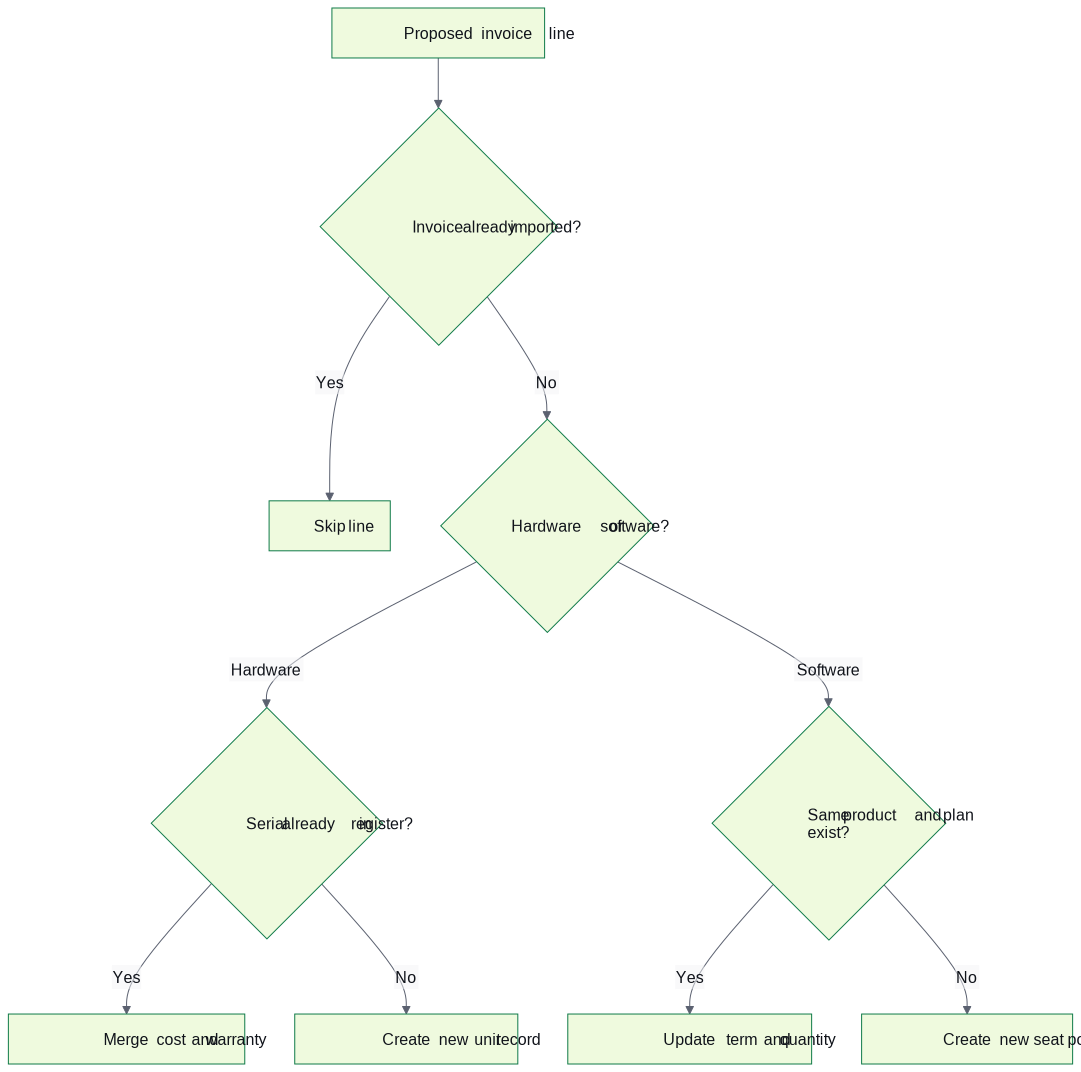
Step 3 is where a register fed by a device agent has an advantage. In ilane Assets & licences, devices report in on their own, and duplicates are caught before they reach the register. A laptop the agent already knows about is matched rather than created a second time.
Who should review each line before it goes into the register?
One named person in IT should approve every line before it is added. Finance should confirm the costs, and the person who received the delivery should confirm what actually arrived.
The reviewer checks each proposed line for:
- Type: hardware, software seat or consumable, following your table.
- Quantity: matches what was delivered, not just what was ordered.
- Serial numbers: captured, or the record is marked as waiting for one.
- Cost: unit cost and currency, with tax and discounts handled the same way every time.
- Dates: warranty end for hardware, term end for software.
- Owner: a named person, or “in stock” until the device is handed over.
Every line ends in one of three states: applied, merged into an existing record, or rejected. Nothing reaches the register without a decision. An applied hardware record then moves on through stock and handover.
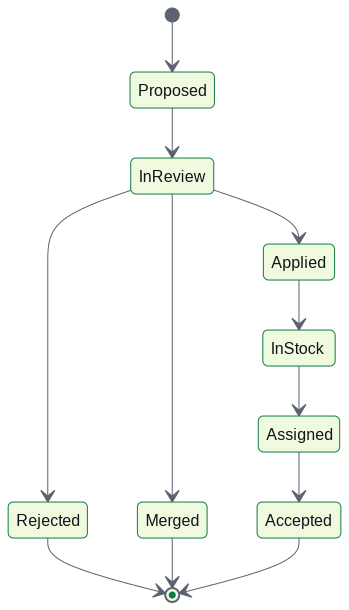
In ilane, you can upload invoices one at a time or twenty at once. ilane proposes the devices and software it finds, including hardware and software from the same invoice. A person reviews each proposal, then applies it in one click. Extraction uses your own AI key. Without one, you can add assets by hand or by CSV, as described in the hardware and software registers guide.
The last step, Accepted, matters. When IT hands over a laptop, the employee confirms it in ilane, so the owner on the record is something the person agreed to rather than a guess.
How do I link an invoice to the asset record for audits?
Store the invoice file once. Then copy its supplier, invoice number, line number, date and unit cost onto every asset record it created. That way, any record leads back to the purchase, and any invoice leads forward to its assets.
The minimum purchase fields on each asset record are:
- Supplier name
- Invoice number and line number
- Invoice date
- Unit cost and currency
- A link to the stored invoice file
Auditors and frameworks also ask for information about how the asset is used, which the invoice can’t supply:
- CIS Safeguard 2.1 requires the software inventory to record the title, publisher, initial install or use date and business purpose of each entry. It also asks you to review the inventory at least twice a year.
- NIST CSF 2.0 lists maintained hardware inventories as outcome ID.AM-01 and maintained inventories of software, services and systems as ID.AM-02.
The audit trail is complete when you can follow one device from the supplier’s invoice to the person using it:
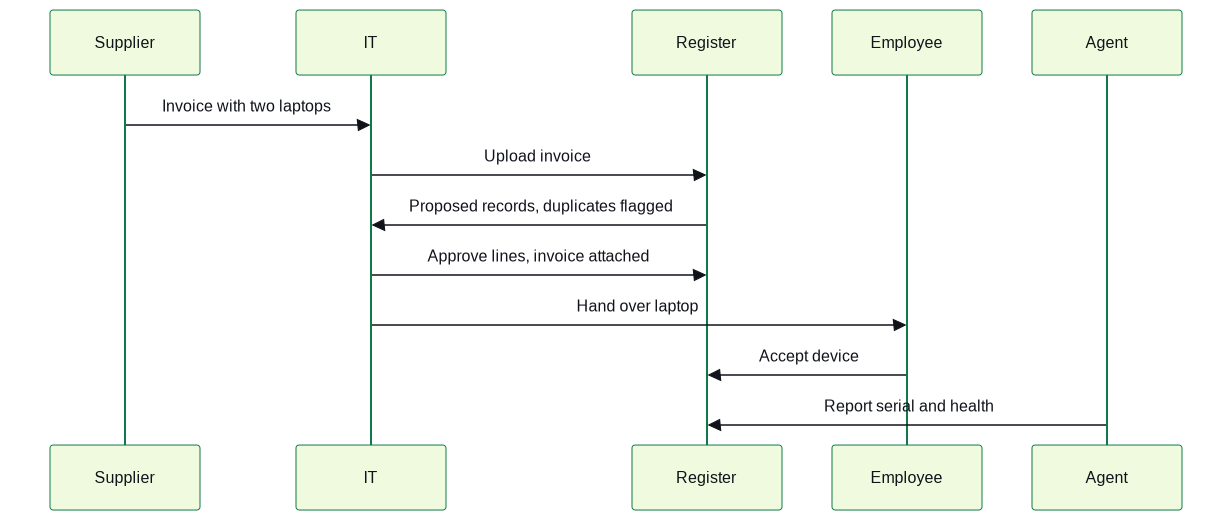
In ilane, each handover is recorded on the asset’s history. The compliance view maps the register to ISO 27001’s inventory of assets control and checks that every device and seat has an owner. That evidence comes from live data, so you don’t rebuild it before each audit.
How should I handle renewals and licence terms from the same invoice?
Take the term from the software line and record five things on the seat pool:
- Term start date
- Term end date
- Quantity
- Price per seat
- Notice deadline
Then set a reminder for well before the notice deadline. Once the renewal date arrives, it’s usually too late to cut seats.
- Annual and monthly plans need different handling. An annual line sets a renewal date. A monthly line confirms the seat count each month and should update the pool, not add to it.
- Get the notice period from the contract, not the invoice. Invoices rarely state notice periods or auto-renew clauses. Add them to the contract record by hand.
- Record who holds each seat. A pool of ten seats with no names attached can’t be reviewed before renewal.
- Check usage before you renew. Seats nobody has opened in months are the first to cut. See how to find and reclaim unused SaaS licences for a step-by-step method.
ilane keeps contracts with their notice dates and opens a reminder ticket before each renewal, early enough to decide. It flags seats that haven’t been used for 60 days or more and lets you reclaim them in one step. On ilane’s sample invoice, a line for three Figma Pro seats on a one-year plan becomes a three-seat pool with its renewal date already filled in.
What should a clean register look like after the first import?
After the first import, every record should be complete, linked to its invoice, and listed only once. Check for the following:
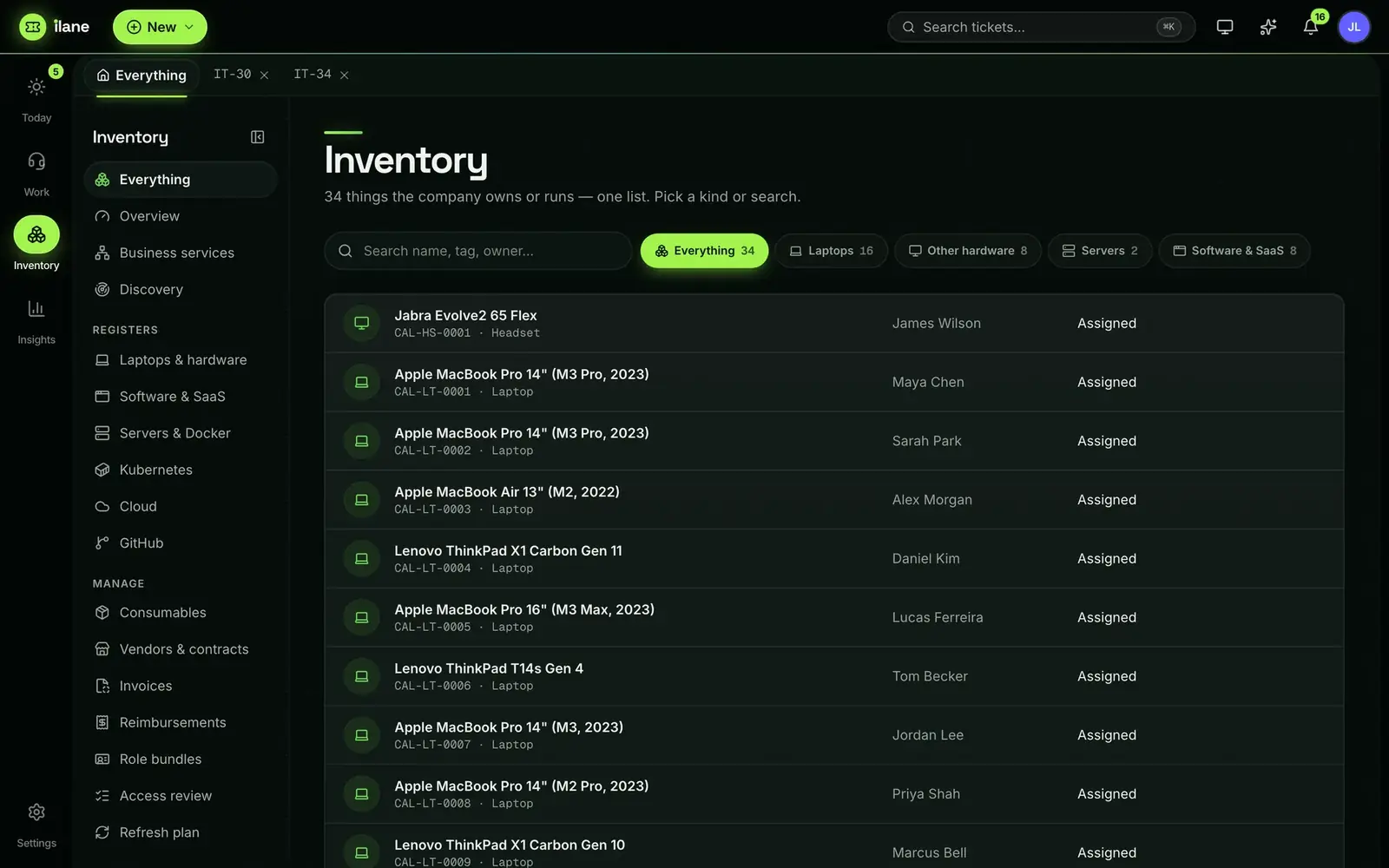
- Hardware: one record per unit, with serial, model, warranty end and a linked invoice. Each one is either assigned to a named person or marked “in stock”.
- No duplicate serial numbers, and no invoice number imported twice.
- Software: one pool per product and plan, with quantity, holders, term end and notice date.
- Consumables: stock counts, not individual records. In ilane, a ticket opens when stock runs low.
- Pending items: units still waiting for a serial number, each with a named person responsible and a date.
Then compare the register with what is actually running:
- Devices the agent sees that no invoice explains are gaps in your purchase records.
- Invoiced devices that never report in are either still in a drawer or missing.
Conclusion
Use invoices to start the register, not to finish it:
- Split each line by type, one record per hardware unit.
- Check each line against your keys so nothing is added twice.
- Have one person approve every line.
- Attach the invoice to every record it creates.
- Complete each record with the serial number the device reports and an owner the employee has accepted.
If you’d like to see an invoice turned into reviewed asset records on your own data, book a demo.
Frequently asked questions
Can I build an asset register from invoices without serial numbers?
Yes, but treat those records as incomplete. Create one record per unit, mark each as waiting for a serial number, and fill it in when the device arrives or reports in through a device agent. Matching by serial later is also how you avoid duplicates.
Should monitors and docks be assets or consumables?
Either works, as long as you decide once and apply the rule to every invoice. Many teams track monitors as hardware because they are assigned to people and come back when someone leaves, and count hubs, adapters and cables as stock.
What do I do with old invoices from before the register existed?
Import them the same way, but only the final invoices, and run the duplicate checks against devices you already know about. Where a device is already in the register, add the purchase details to its existing record rather than creating a new one.
Does AI extraction from invoices replace manual review?
No. Extraction saves typing, but a person should still confirm the type, quantity, cost and owner of every line before it is added. In ilane, invoice upload proposes devices and software, and nothing is added until a person reviews and applies it.
How often should I reconcile the register against what’s actually in use?
Continuously if a device agent feeds the register, and at least on the schedule your framework sets. CIS Safeguard 2.1, for example, asks for a software inventory review at least twice a year. Check for devices that report in without an invoice and invoiced devices that never report in.