To find shadow AI on employee laptops, take the inventory from the laptops themselves. Put an agent on every machine that lists AI apps, browser extensions, coding agents, MCP server configs and local models. Then sort each tool into approved, tolerated or blocked. When a blocked tool turns up, it goes to a named owner as a ticket, so you don’t have to ban AI outright.
Updated
What counts as shadow AI at a growing company?
Shadow AI is any AI tool, model or agent that people use for work without IT knowing about it or approving it.
At a 50–1,000 person company it usually comes in five forms:
- Chat apps and desktop clients used through personal accounts, such as ChatGPT or Claude on a free plan.
- Browser extensions that read the page you’re on to summarise, rewrite or autofill it.
- Coding agents such as Claude Code, which run in a developer’s terminal and can edit files and run commands.
- MCP servers, small connectors that give an AI client access to files, databases, SaaS accounts or a shell.
- Local models downloaded onto laptops, sometimes many gigabytes in size.
Most companies have this already. A WalkMe survey published by SAP found that 78% of workers who use AI use unapproved tools, and only 7.5% had received extensive training. In IBM’s 2025 Cost of a Data Breach research, 63% of the 600 organisations studied had no AI governance policies. A high level of shadow AI added USD 670,000 to the global average breach cost.
Why are MCP servers and coding agents a bigger risk than chat apps?
A chat app gives answers. Coding agents and MCP servers take actions: they run commands, read files and call other systems with the user’s own permissions.
The MCP specification itself says this. It states that tools “represent arbitrary code execution” and must be treated with caution. It also says the protocol can’t enforce its security principles on its own, so the safeguards depend on how each client is set up. The OWASP MCP Security Cheat Sheet explains why that matters. With MCP, the model decides which tools to call and with what parameters, and that leads to new attacks:
- Tool poisoning: hidden instructions in a tool’s description or output steer the model.
- Rug pulls: a server changes its tool definitions after the user has approved it.
Coding agents do have controls. In Claude Code, every tool and bash command can be set to allow, block or ask for approval, and organisations can set policies for all users. Those controls only help if someone sets them, and on a laptop IT doesn’t know about, nobody has.
| Tool type | What it can reach | Main risk | Where to look |
|---|---|---|---|
| Chat app (personal account) | Whatever people paste in | Data leaving under consumer terms | Installed apps, OAuth grants |
| Browser extension | Pages the user views | Silent reading of internal apps | Browser profiles |
| Coding agent | Repo, terminal, secrets in env | Commands run without review | CLI tools, config files |
| MCP server | Files, APIs, databases, shell | Tool poisoning, over-broad access | AI client config files |
| Local model | Local files | Unknown model provenance, no logging | Model runtimes, disk |
How do you find every AI tool already installed on laptops?
Look at the devices, not at a survey. A survey only shows what people remember and are willing to admit.
- Put a light agent on every laptop, covering macOS, Windows and Linux, since developers often use Linux.
- Check the places AI tools live: installed applications, browser extensions, command-line tools, each AI client’s MCP configuration, local model runtimes and model files.
- Add the identity view. Tools that only run in the browser never install anything. Check the third-party apps people have connected to Google Workspace or Microsoft 365.
- Record context for each finding: the device, the person, when it was first seen, and what an MCP server points at.
- Keep it running. New tools appear every week, so a one-off scan is out of date within a month.
- Tell employees what you collect. People are more open about their tools when they can see exactly what the agent reads.
This is the job ilane’s AI governance product does. The same light agent that checks laptop posture lists every AI app, coding agent, MCP server and local model on every Mac, Windows and Linux laptop. Recent releases added signed-in AI accounts, coding-agent guard rails, local models, GPUs and AI spend. The Google Workspace integration shows the third-party apps people have connected. Every employee can read the full list of what the device agent collects, and each company can switch whole areas of collection off.
How should you decide what is approved, tolerated or blocked?
Judge each tool on four questions: is the source known, can it take actions, does it touch sensitive data, and does the company have a plan or contract covering it?
- Source and vendor known? An MCP server copied from an unknown repository fails here, however useful it is.
- Can it act? Anything that runs commands or writes to systems needs scoped permissions before it’s allowed.
- Sensitive data involved? Customer data, source code, credentials and financials raise the bar.
- Company plan or contract? A business plan with reviewed data terms and SSO is what moves a tool to approved.
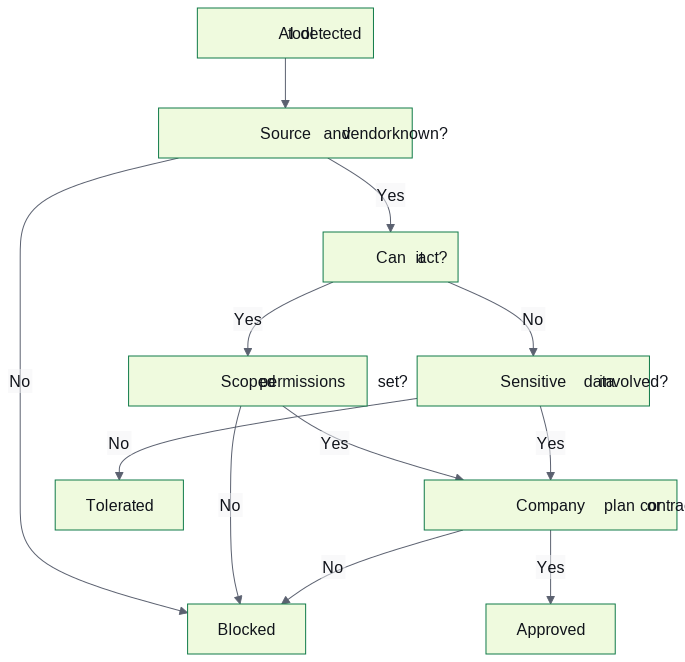
The three labels mean different things in practice:
- Approved: paid for, signed in through SSO, supported by IT, and recommended to staff.
- Tolerated: low risk and allowed. It stays in the inventory and gets reviewed on a date you set.
- Blocked: not allowed on company devices. Each blocked entry should name the approved alternative.
Keep the tolerated list generous. If you ban everything, usage moves to personal phones where you can’t see it. A Cloud Security Alliance research note makes the same point: the goal is to steer the demand into monitored alternatives, not to eliminate it.
In ilane, each AI tool, MCP server and model gets one of these three labels, and the label holds across the whole fleet.
What should happen when someone installs a blocked AI tool?
A ticket should go to a named owner. The tool then gets removed or a review is requested, and the ticket closes only after a fresh check shows the tool is gone.
- Detection opens a ticket with the device and person attached. Nobody has to notice it by hand.
- The owner talks to the user about what they were trying to do. Usually there’s a real need behind it.
- There are two ways forward: remove the tool, or ask for an exception that goes through the same review as any new tool.
- Verify. The next check confirms the tool is gone. If it’s still there, the ticket stays open.
- Update the lists when an exception is granted, so the next person doesn’t hit the same block.

In ilane, a blocked tool opens a ticket. Device checks send one ticket to one owner and close it when the next report is clean, the same verified resolution model used for every check-raised problem. ilane has a built-in “Install or remove an app” fix. Like every fix, it starts switched off for every company, and anything that changes a system shows a confirm card before it runs.
How does an AI tool inventory support ISO 42001 and NIST AI RMF?
Both frameworks assume you know which AI systems your organisation uses. A live inventory with decisions attached is the evidence that shows it.
ISO/IEC 42001 is the international standard for AI management systems. It applies to organisations that develop, provide or use AI systems, so a company that only uses AI tools is in scope. The NIST AI RMF is voluntary and organised into four functions: Govern, Map, Measure and Manage. An inventory supports Govern, where inventorying AI systems is an expected outcome. It supports Map, because you can’t assess third-party risk in tools you don’t know about. And it supports Manage, because unreviewed tools become a list of work to do.
ilane’s compliance view measures these controls from live data:
- ISO 42001: an AI system register built from what ilane finds, the approved/tolerated/blocked policy, and AI vendor access removed as part of offboarding.
- NIST AI RMF: Map (AI systems known through the register and discovery), Measure (runs, tools and access used by the agents your teams build), and Manage (shadow AI still unreviewed).
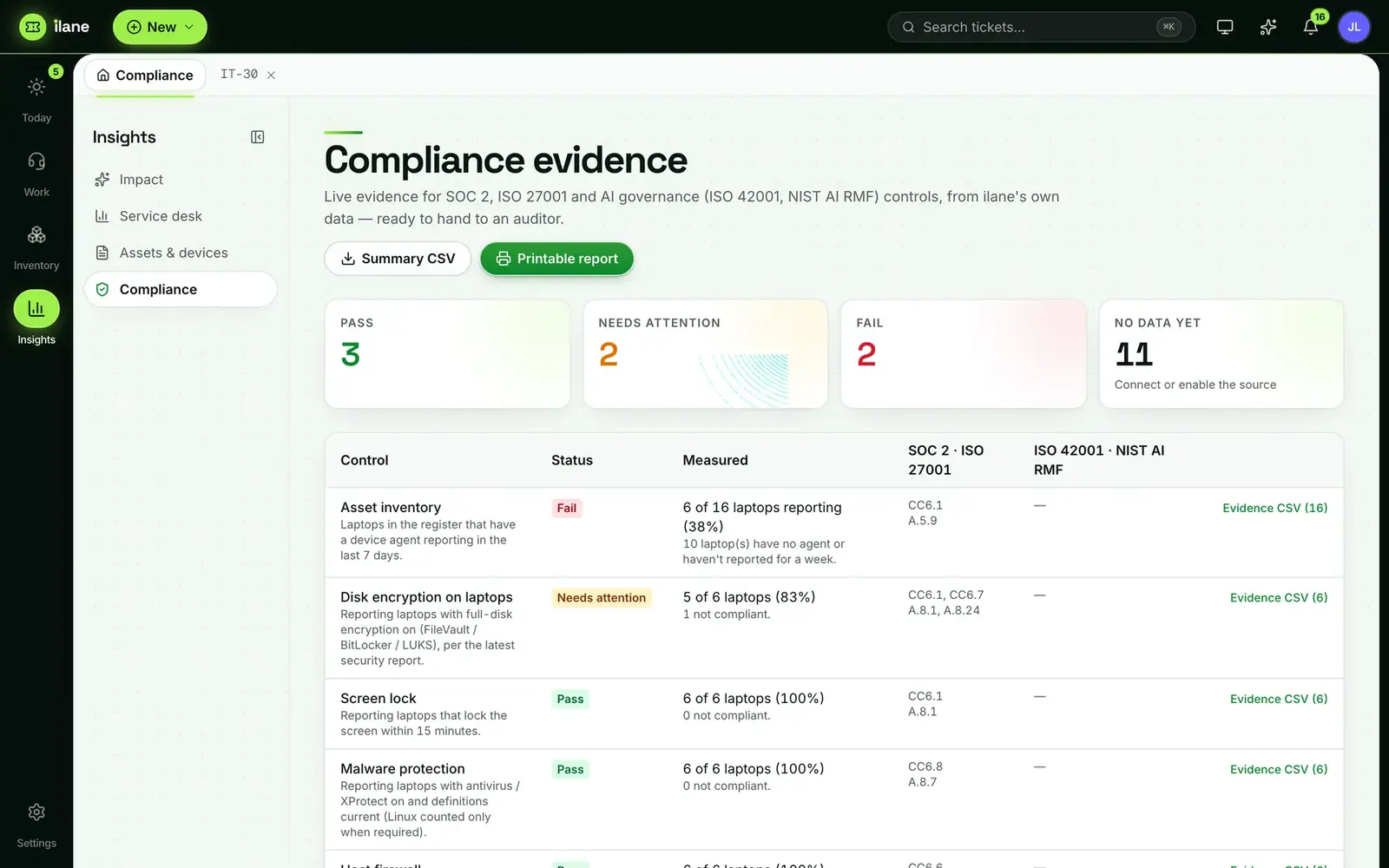
An inventory is evidence. It is not a certification. You still need an AI policy, a risk assessment and an audit, but the inventory is the part auditors will want to test against reality.
What should a first AI usage policy include?
Keep it to one page that people will actually read. It should cover what’s allowed, what data stays out of AI tools, and how to ask for something new.
- Scope: every AI tool, extension, coding agent, MCP server and local model used for company work, on any device.
- The three lists: where to find approved, tolerated and blocked tools, and who owns them.
- Data rules: what never goes into an AI tool that isn’t approved, such as customer data, credentials, unreleased financials and private source code.
- Coding agent rules: permission prompts stay on, no blanket auto-approval of shell commands, and only MCP servers from the approved list.
- Accounts: company accounts through SSO for approved tools, and no work data in personal accounts.
- Requests: a short form for proposing a new tool, with an expected turnaround.
- Monitoring: what the device agent checks and what it never collects, in plain language.
- Leavers: AI tool access is removed during offboarding, like any other SaaS.
- Review cadence: the lists are reviewed every quarter.
Policies only work if people know about them. The CSA note cites a survey of more than 12,000 white-collar employees: 60.2% had used AI tools at work, but only 18.5% knew of any official company AI policy. Announce the policy, link it from the service desk, and point to it in every blocked-tool ticket.
Conclusion
Shadow AI on company laptops is already there, and it’s growing. The answer is visibility and clear decisions, not a ban.
- Take the inventory from the laptops.
- Sort every tool with four plain questions.
- Send blocked tools to a named owner and close the ticket only when a check confirms the tool is gone.
- Keep the inventory as live evidence for ISO 42001 and the NIST AI RMF.
To see what ilane finds on your own laptops, book a demo. It’s a 30-minute call, no slides, and we can run it on one of your laptops.
Frequently asked questions
Can you detect shadow AI that only runs in a web browser?
Not from the installed-software list alone, because nothing gets installed. Check the identity side as well: the third-party apps people have connected through Google Workspace or Microsoft 365 sign-in, plus any AI accounts signed in on the device. Putting the two views together catches most of what a device scan misses.
Should we just block ChatGPT and similar tools?
Blanket bans tend to push usage to personal phones and home laptops, where you can’t see it at all. A better default is to approve one company-managed option, tolerate low-risk tools while they’re reviewed, and block only the tools that fail on source, permissions or data handling. Each blocked entry should name the approved alternative.
Do we need to tell employees that AI tools are being inventoried?
Yes. In many places the law requires notice for device monitoring, and openness also makes people more honest about the tools they use. Publish what the agent checks and what it never collects, and mention it in your AI usage policy.
How often should the approved, tolerated and blocked lists be reviewed?
Review them every quarter, and also whenever an exception request comes in or a vendor changes its terms. Give tolerated tools a review date so they don’t stay in limbo. Running the inventory continuously means each review starts from current data, not last quarter’s snapshot.
What does ilane’s AI governance cost?
AI governance is included in ilane’s single price: $1 per device per month at the introductory price, with every feature and add-on included. A device is any laptop, desktop or server running the ilane agent. You can also start with a pilot on one team.