AI governance is how a company decides which AI tools, agents and models people may use, who owns each one, and how it proves the rules are followed. For an IT team that means four things: a live inventory, an approved, tolerated or blocked decision for each tool, one owner per finding, and evidence an auditor will accept.
Updated
What is AI governance, in one sentence?
AI governance is the set of policies, owners and controls that keeps your company’s use of AI known, permitted and accountable.
ISO describes an AI management system as a structured set of policies, processes and controls that govern how AI systems are designed, developed, deployed and used. That definition is correct, but a 200-person company needs something it can act on. In practice, AI governance answers four questions:
- What AI is running? Every app, extension, coding agent, MCP server and local model, on every laptop and server.
- Is it allowed? Each tool is approved, tolerated or blocked.
- Who owns it? Each finding has one person responsible for it.
- Can you prove it? Your records show the rules held over time, not only on audit day.
Why does AI governance matter for a 50–1,000 person company?
Your people already use AI tools that nobody has reviewed. A smaller company has the same data exposure as a large one, with fewer people watching.
- Unapproved use is common. A 1Password report found that over a quarter of employees use AI tools their company hasn’t authorised. It also ranked unauthorised AI as the second most common form of shadow IT, behind only email.
- Ungoverned AI makes breaches cost more. In IBM’s 2025 Cost of a Data Breach research, shadow AI incidents added an average of $200,000 to the cost of a breach, probably because they take longer to detect and contain. IBM’s own conclusion is that the real risk is AI without governance, not AI itself.
- Regulation keeps moving. The EU’s Digital Omnibus on AI entered into force on 27 July 2026. It sets fixed dates for high-risk rules: 2 December 2027 for stand-alone high-risk AI systems and 2 August 2028 for AI embedded in products. A later deadline is not a repeal. Customers will still ask what AI you use.
The risks you’ll actually run into are specific. A coding agent can read your repositories and run commands. An MCP server can give a chatbot access to the file system. A note-taker may be signed in with someone’s personal account. A policy document won’t show you any of this. You only see it by looking at the machines.
What does AI governance actually cover: tools, agents, MCP servers and models?
It covers anything that sends company data to a model or lets a model act on your systems. For most companies that falls into five categories:
- AI apps and browser extensions. Chat assistants, writing aids and meeting note-takers. The account matters as well: company sign-in or a personal one.
- Coding agents. Command-line and IDE agents that read code, edit files and run commands.
- MCP servers. Model Context Protocol servers connect an AI app to tools and data such as files, databases and SaaS APIs. Researchers warn that untrusted MCP servers introduce software supply chain risk, and that agents reading untrusted content are exposed to injection.
- Local models. Models that run on a laptop or a GPU server. The data may never leave the machine, but you still need to know where the model came from and who runs it.
- AI agents your teams build. Internal agents have their own access to systems. The key question is whether the access they were granted matches the access they actually use.
Finding all of this across a fleet is a topic of its own. We cover it step by step in how to detect shadow AI tools on employee laptops.
What are AI governance tools and what should they do?
AI governance tools find AI use on the devices and accounts themselves, apply your policy, send each finding to an owner and keep the record. Judge any tool against these criteria:
- It discovers from the endpoint, not from a survey. People forget what they installed, and surveys are out of date within a week.
- It covers more than web apps. Coding agents, MCP servers and local models are usually where the risky access is.
- Every tool gets a policy state. Approved, tolerated or blocked, not just “seen”.
- Findings become owned work. A dashboard that nobody acts on is not governance.
- It verifies fixes. It should confirm that a blocked tool is actually gone, not just that someone said so.
- Its evidence maps to frameworks. Records should tie to ISO 42001 or NIST AI RMF without being rebuilt by hand.
- It is open with employees. People should be able to see what is collected about them.
ilane AI governance runs on the same light agent ilane already installs on Mac, Windows and Linux laptops and on servers. It finds:
- AI apps and coding agents
- MCP servers and local models
- signed-in AI accounts, GPUs and AI spend
It also adds guard rails for coding agents and keeps an AI system register for ISO 42001 and NIST AI RMF.
For agents your own teams build, ilane shows traces, an agent map, run comparisons and the access each agent was granted compared with what it used. Developers don’t add any code, and personal data is masked first. Every employee can read the published list of what the agent checks.
How do approved, tolerated and blocked policies work without a blanket ban?
Each AI tool gets one of three states. You approve good tools quickly, watch the grey areas, and stop only what is actually risky.
| State | What it means | Typical example | What happens next |
|---|---|---|---|
| Approved | Reviewed and supported for work | A company-licensed assistant used with company sign-in | Added to onboarding; access removed at offboarding |
| Tolerated | Allowed for now, with limits | A free tool used for non-sensitive drafting | Watched, with a date to approve or block it |
| Blocked | Not allowed on company devices | An unvetted MCP server with wide file access | A ticket goes to an owner until the tool is removed |
Decide the state by asking four questions:
- What data can the tool see?
- Does it train on what you send it?
- Can people sign in with a company account?
- What can it do on its own: only read, or also write and run commands?
A blanket ban is easy to announce and hard to enforce. In practice it pushes AI use out of sight rather than stopping it. With three states, people get a quick “yes” for tools that pass review, so they stay on tools you can see.
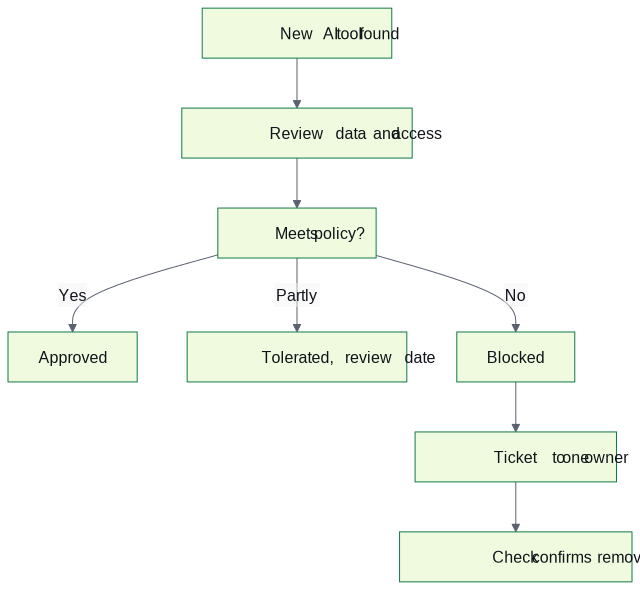
In ilane, a blocked AI tool opens a ticket with the device and the person attached. Like every check-raised ticket, it closes only when ilane’s next reading is clean.
How do ISO 42001 and NIST AI RMF fit into AI governance?
ISO 42001 is a certifiable management system for AI, and NIST AI RMF is voluntary guidance for managing AI risk. Both start with knowing what AI you run.
- ISO/IEC 42001:2023 was published in December 2023. It is the first global standard for setting up and running an AI management system, and it applies to organisations that develop, provide or use AI. Independent certification bodies can certify you if stakeholders want that assurance. ISO notes that adopting the standard is valuable even without certification.
- NIST AI RMF 1.0 is voluntary guidance, published in January 2023, and it is not a certification. Its core is built on four functions: Govern, Map, Measure and Manage.
For an IT team, the NIST functions translate into concrete work:
- Govern: name owners, write the three-state policy and run reviews.
- Map: keep a register of every AI system and what it touches.
- Measure: track how much AI use is under policy and what agents actually do.
- Manage: act on findings, starting with tools nobody has reviewed.
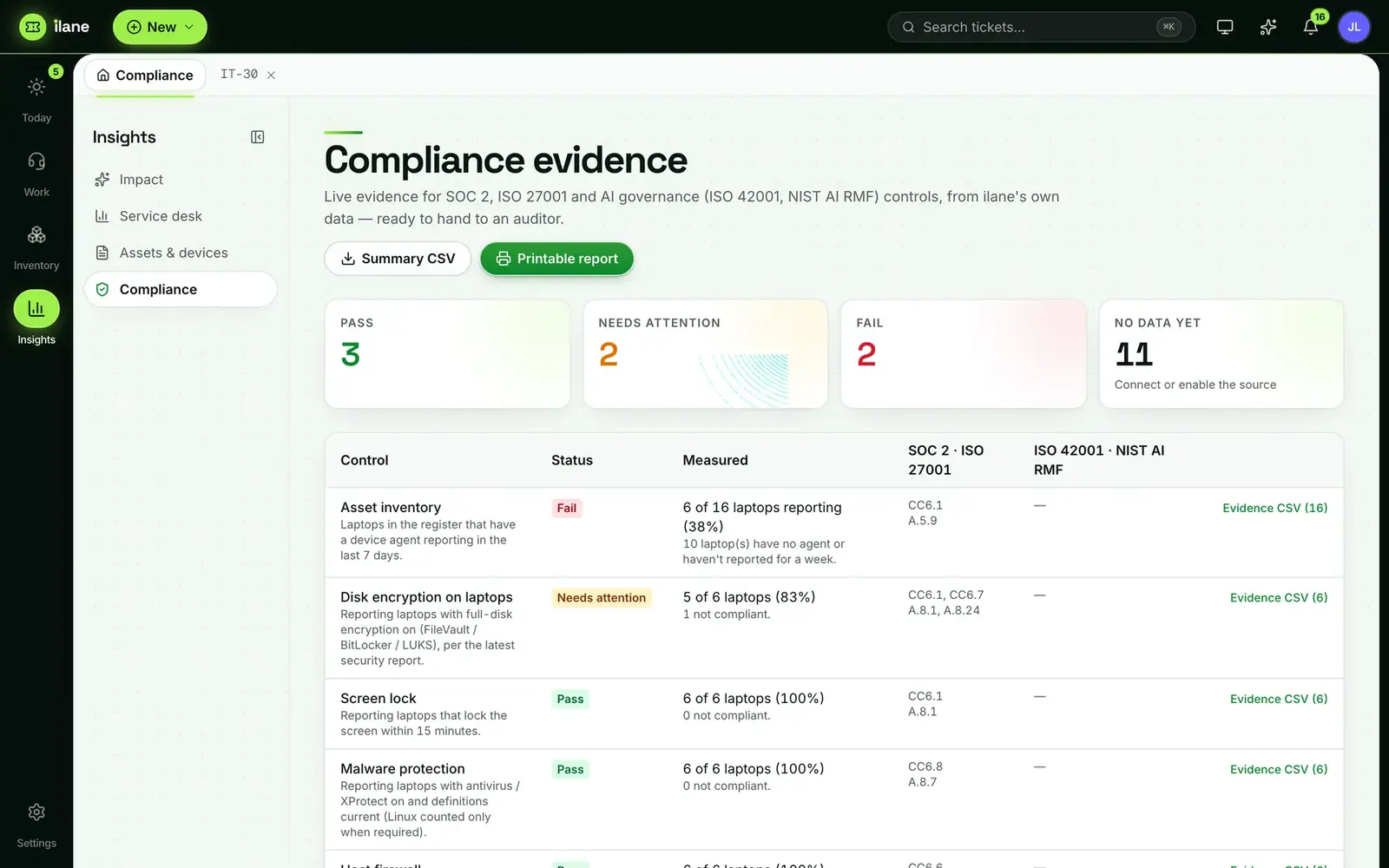
ilane Compliance & insights measures these controls from live data:
- ISO 42001: an AI system register built from what ilane finds, the AI tool policy (approved, tolerated or blocked), and removal of AI vendor access as part of offboarding.
- NIST AI RMF: Map from the register and discovery, Measure from agent behaviour (runs, tools and access used), and Manage from unreviewed shadow AI tools.
What evidence proves your AI governance is working?
The proof is the record your controls produce over time. A policy PDF on its own proves nothing. Auditors and customers usually ask for:
- The register: every AI tool with its state, its owner, and who approved it and when.
- Coverage: which devices report in, so you know the register is complete.
- Policy status: the share of AI use that is under policy, and the number of tools still unreviewed.
- Closed findings: tickets for blocked tools that show what was done and how removal was confirmed.
- Leavers: proof that AI vendor access was removed when someone left.
- Agent access: for internal agents, access granted compared with access used.
- An audit log that nobody can quietly edit.

This is where verified resolution matters. Every check-raised ticket in ilane carries a contract that says what “fixed” means. ilane saves before and after readings, records every step and who approved it, and reopens the same ticket if the check fails.
Every entry goes into a hash-chained audit log that is verified every night. Entries are kept for at least a year and can’t be updated or deleted through the app or the database.
How do you start AI governance with a small IT team?
Start with an inventory, write a one-page policy and let tickets handle the follow-up. You don’t need a big programme.
- Name one owner. One person is accountable for the register and the policy, even if only part-time.
- Inventory from the devices. Find out what is actually installed and signed in before you write rules.
- Sort the riskiest tools first. Start with the most-used tools and anything with write access, such as coding agents and MCP servers. Mark everything else “unreviewed” for now.
- Write a one-page policy. Cover what data never goes into AI tools, how to request a new tool and what “tolerated” means.
- Send findings to owners. Every blocked or unreviewed tool becomes a ticket, and it closes only when a check confirms the fix.
- Add AI to joiner and leaver steps. Put approved tools into onboarding and remove AI vendor access at offboarding. Our IT offboarding checklist covers the rest of the leaver process.
- Review every quarter. Decide again on tolerated tools, and map your records to ISO 42001 or NIST AI RMF when customers or auditors ask.
To try this small first, ilane offers a pilot for one team on your own laptops and servers, with the full platform. Everything you set up stays in place when you move to full use.
Conclusion
AI governance doesn’t begin with an ethics committee. It begins with knowing every AI tool, agent, MCP server and model in use, deciding whether each is approved, tolerated or blocked, giving every finding an owner, and keeping evidence that holds up for ISO 42001 or NIST AI RMF. If you do those four things continuously, your policy describes what is actually happening.
To see what ilane finds on your own laptops, book a demo. It’s a 30-minute call. We’ll fix one thing together and watch ilane check that it’s really fixed.
Frequently asked questions
Is AI governance the same as an AI policy?
No. A policy is one part of AI governance. Governance also includes a live inventory of the AI in use, an owner for each finding, and records that show the policy was followed. A policy nobody checks against real devices describes what you hope is happening, not what is.
Do we need ISO 42001 certification to do AI governance?
No. ISO 42001 certification is optional, and NIST AI RMF is voluntary guidance. Most growing companies start with an inventory, a three-state policy and owned findings. They map those records to a framework later, when customers or auditors ask.
What is an MCP server and why does it need governing?
An MCP (Model Context Protocol) server connects an AI app to tools and data such as files, databases or SaaS APIs. Because it lets a model read or act on your systems, an untrusted one adds supply-chain and data-access risk. Each one should be in your register with an approved, tolerated or blocked state.
Should we just ban AI tools until we have a policy?
A blanket ban is hard to enforce and tends to push AI use out of sight. A better approach is to approve a few reviewed tools quickly, mark the rest as tolerated or unreviewed, and block only what is clearly risky. People stay on tools you can see, and you keep the evidence.
How often should AI tools be reviewed?
Review tolerated and unreviewed tools at least once a quarter, and review any new tool when it first appears on a device. Add AI vendor access to every leaver’s offboarding so access doesn’t outlast employment.