AI governance tools help a company see which AI systems it uses, decide which ones are allowed, watch how they behave and prove all of this to auditors. There are five main types: policy and risk registers, model and data governance, device-level AI inventory, agent monitoring and compliance mapping. Most companies with 50–1,000 people should start with inventory and policy.
Updated
What do AI governance tools actually do?
They turn an AI policy document into controls you can check: a list of the AI in use, a decision on each item, ongoing monitoring and evidence.
In practice that work has four parts:
- Discover. Find every AI app, browser extension, coding agent, connector and model in use, including the ones nobody asked IT about.
- Decide. Record whether each one is approved, tolerated or blocked, and who owns that decision.
- Watch. Pick up drift, such as a newly installed tool or an agent using more access than it was given.
- Prove. Keep records an auditor or customer security reviewer will accept.
Discovery comes first because a policy alone doesn’t control anything. In a BlackFog survey reported by CIO.com, 49% of workers at companies with more than 500 employees said they had adopted AI tools without employer approval. Most senior leaders in the same survey seemed fine with that. A policy that only covers tools you already know about leaves those uses out.
What types of AI governance tools are there, with examples of each?
There are roughly six types. They differ mainly in what they look at (documents, models, data, devices, agents or controls) and in who inside the company buys them.
| Type | What it does | Example output | Usual owner |
|---|---|---|---|
| Policy and risk register | Records AI systems, purposes, owners, risk ratings and impact assessments | A register entry: “Support chatbot, owner Head of CX, risk medium, reviewed Q3” | Legal, risk, compliance |
| Model governance | Tracks models you train or fine-tune: versions, evaluations, approvals | A model card and sign-off before a new version ships | Data science / ML |
| Data governance | Catalogues data, its lineage, classification and access rights | “This table contains customer PII; only these roles can read it” | Data team |
| Device-level AI inventory | Finds AI apps, extensions, coding agents, MCP servers and local models on laptops and servers | “14 laptops run an unreviewed coding agent” | IT, security |
| Agent monitoring | Traces what AI agents do: tool calls, data touched, access used | “This agent was granted write access but only ever reads” | Engineering, platform |
| Compliance mapping | Maps controls to frameworks and collects evidence | “AI tool policy control: 87% of tools under policy, evidence attached” | Compliance, IT |
Some platforms cover several rows. When you evaluate one, ask which rows it fills from live data and which ones it expects someone to type in.
How is an AI governance tool different from a data governance tool?
Data governance controls the data itself. AI governance controls the systems that use that data, including tools you never built or bought.
A data governance tool tells you where sensitive data lives, how it’s classified and who can access it. An AI governance tool tells you which AI systems exist, who approved them, what they can reach and how they behave. The two overlap in a few places: where training data came from, what employees paste into chat tools, and which AI connectors can read which data stores.
If your company doesn’t train models, a data catalogue will rarely show the main AI risk. For example, it won’t tell you that a developer has connected a coding agent to a production database. You’ll only find that out by looking at the developer’s laptop or at what the agent did.
Which AI governance capabilities does a 50–1,000 person company need first?
Start with inventory and a three-state policy. Add agent monitoring once your teams build agents, and add framework mapping once a customer, auditor or regulator asks for it.
A practical order:
- Inventory from real sources. Devices, signed-in accounts and connectors, rather than a survey.
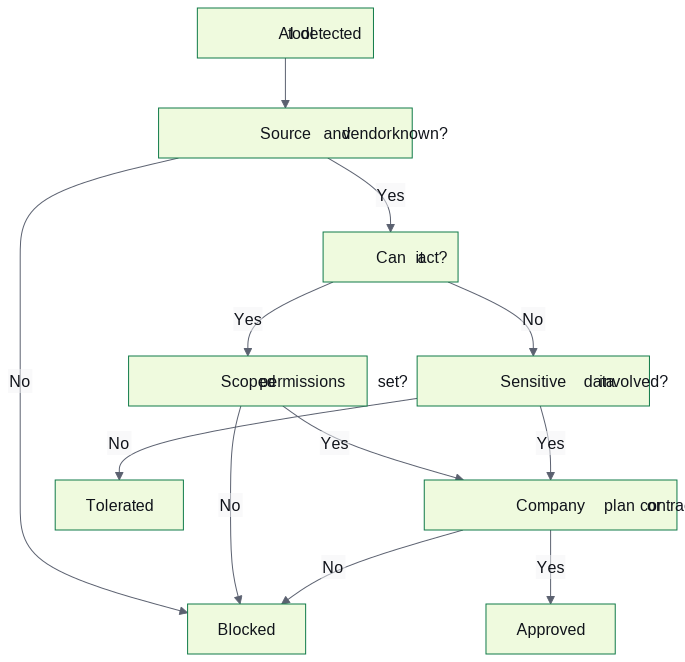
- A three-state policy. Approved, tolerated or blocked. A blanket ban mostly pushes AI use out of sight.
- An owner for each exception. Every blocked or unreviewed tool becomes a ticket with one person responsible.
- Agent monitoring. Only once you run agents of your own.
- Evidence mapping. ISO/IEC 42001, NIST AI RMF or customer questionnaires.

What can usually wait: a dedicated model governance platform (unless you train models) and a standalone GRC suite (unless you already need one for other frameworks).
If you sell into the EU, check the dates. Most of the AI Act’s prohibitions have applied since 2 February 2025. On 7 May 2026, EU negotiators reached a provisional agreement to postpone obligations for Annex III high-risk systems from 2 August 2026 to 2 December 2027. An accurate inventory is what lets you tell whether any of your systems fall into those categories.
Can you find AI tools, coding agents and MCP servers from the devices themselves?
Yes. A lightweight agent on each laptop and server can see AI software that network-level and sign-in-based discovery miss: local models, coding agents and MCP servers.
MCP matters here. Anthropic introduced the Model Context Protocol as an open standard for connecting AI assistants to the systems that hold data. Under the specification, MCP servers expose tools and context to AI applications. Each MCP server is therefore a route from an AI model into your systems, and many of them run locally on a developer’s machine, where a cloud dashboard can’t see them.
When you assess a device-level inventory, check that it:
- Covers macOS, Windows and Linux, plus servers
- Finds AI apps, browser extensions, coding agents, MCP servers and local models, not only web traffic to known AI domains
- Supports approved, tolerated and blocked states, not just allow or deny
- Turns a policy breach into a ticket with an owner
- Publishes what the agent collects, so employees know what is checked and what isn’t
ilane’s device agent finds AI apps, coding agents, MCP servers and local models on every laptop and classes each one as approved, tolerated or blocked. A blocked tool opens a ticket. The AI governance product adds signed-in AI accounts, guard rails for coding agents, local models, GPUs and AI spend. For the step-by-step version, see our guide to detecting shadow AI tools on employee laptops.
How do you govern the AI agents your own teams build?
Treat each agent like a service account with a job: register it, give it an owner, limit its access and record what it actually does.
Steps that work at any company size:
- Register the agent. Record its name, purpose, owner, model, the tools it can call and the data it can reach.
- Grant the least access that works. Start read-only, and widen access only when there’s a reason.
- Trace runs. Keep a record of every tool call, the data it touched and the result.
- Compare granted access with used access. Access an agent never uses should be removed.
- Compare runs after changes. When a prompt, model or tool changes, check whether behaviour changed.
- Mask personal data before traces are stored.
Avoid any approach that requires developers to add instrumentation to every agent, because coverage will be uneven. ilane’s agent monitoring provides traces, an agent map, run comparison and granted-versus-used access without developers adding any code. Personal data is masked first.
How do AI governance tools map to ISO 42001 and NIST AI RMF evidence?
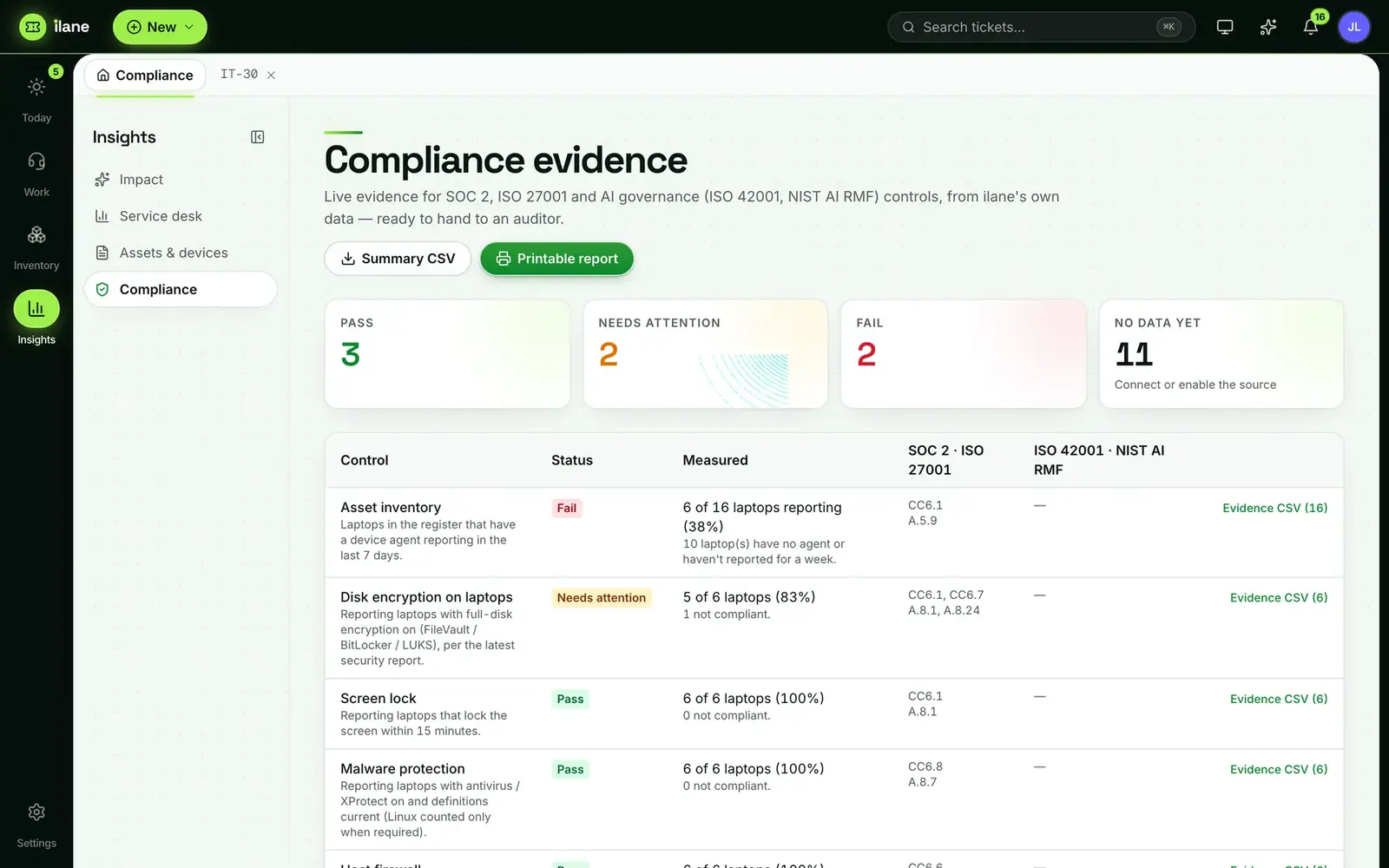
The best tools calculate each control from live data and keep the record behind every number. Screenshots taken the week before an audit don’t show that a control held across the whole period.
The two frameworks work differently. ISO/IEC 42001, published in December 2023, sets requirements for setting up, running and improving an AI management system. Independent certification bodies certify against it. The NIST AI RMF is built around four functions: Govern, Map, Measure and Manage. It’s guidance, not a certification standard.
| What the auditor asks | Evidence a tool can produce |
|---|---|
| Which AI systems do you run? (ISO 42001 register; NIST Map) | A register kept up to date by discovery, not by hand |
| Is AI use under policy? | Share of tools approved, tolerated or blocked, with exceptions on tickets |
| Do you watch agent behaviour? (NIST Measure) | Runs, tools called and access used |
| Do you handle unreviewed AI? (NIST Manage) | Open shadow-AI findings and their resolution history |
| Is AI vendor access removed when people leave? | Offboarding records showing AI accounts revoked |
ilane’s compliance view measures these controls continuously. It also saves evidence records backed by an append-only, tamper-evident audit log, and exports evidence CSVs on demand. The Govern function still depends on people: someone has to write the policy, assign the roles and run the reviews.
Open source, enterprise suite or built into your IT platform: how should you choose?
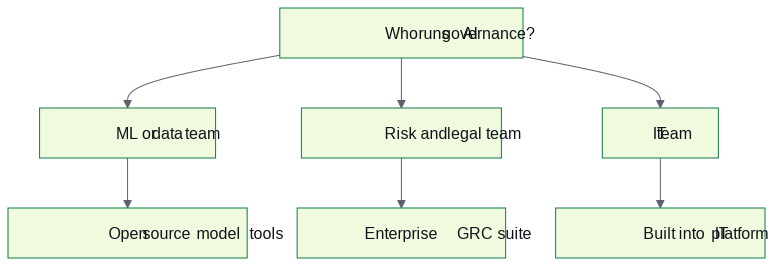
Choose based on who will run AI governance day to day and what you need to prove. Feature lists matter less.
- Open-source tools suit ML teams that train models and want evaluation and tracking in their own pipeline. They rarely see laptops or shadow AI.
- Enterprise GRC suites suit risk and legal teams that handle many frameworks. They are usually strong on registers and questionnaires, but someone often has to type in what’s actually deployed.
- Governance built into your IT platform suits teams where IT owns the laptops, servers and tickets. Discovery, policy, tickets and evidence then sit together.
Questions to ask any vendor: Where does the inventory come from? Can a policy breach become a ticket with an owner? Can it run without AI switched on? Can you host it yourself?
ilane takes the third approach. AI governance shares one database with the service desk, devices and assets. You can run it on your own server, bring your own AI key or switch AI off. It’s included in the $1 per device per month introductory price. If you train models in a regulated field, you may still need a model governance tool alongside it.
Conclusion
The best first AI governance tool shows you what’s actually running. Next, add a simple approved/tolerated/blocked policy, a named owner for every exception, monitoring for the agents you build, and evidence that collects itself. Registers and suites are more useful once that foundation exists.
Book a demo to see ilane find the AI tools on a real laptop and sort them by policy.
Frequently asked questions
Do small companies really need an AI governance tool, or is a policy enough?
A policy sets the rules, but it can’t show you whether people follow them. Even a 50-person company usually has AI apps, browser extensions and coding agents that nobody approved. A tool that builds the inventory from devices and accounts turns the policy into something you can check and enforce.
What is the difference between a “tolerated” and a “blocked” AI tool?
An approved tool is sanctioned and supported. A tolerated tool is allowed for now but not endorsed, and is often kept under review or limited to non-sensitive work. A blocked tool breaks policy, so finding it should open a ticket with an owner who removes it or replaces it with an approved option.
Is ISO 42001 certification required to sell AI products?
No law requires it in general. ISO/IEC 42001 is a voluntary, certifiable standard for AI management systems. Some customers ask for it, or for evidence aligned with it, in security reviews. Keeping a live AI system register and policy records makes certification easier if you decide to pursue it.
Why are MCP servers a governance concern?
MCP servers connect AI assistants and agents to tools and data, such as code repositories, databases and business apps. Each one opens a route for an AI model to read or act on your systems. Many run locally on developer laptops, so they need to be in your inventory with an owner and a policy status.
Can AI governance work with AI features switched off?
It should. Discovery, policy states, tickets and evidence don’t need a language model; they depend on rules and data. In ilane, rules decide what runs, and you can bring your own AI key or switch AI off completely.