An IT offboarding checklist covers four jobs. Collect every laptop and accessory against your asset register. Remove every software seat the person held. Revoke their accounts and access on the last day. Keep a record that proves each step happened. The checklist only works when one person owns it and the offboarding ticket can’t close until every item is done.
Most growing companies already know the steps. The trouble is that they skip some of them. In a Beyond Identity survey of 1,121 employees and employers in Ireland, the UK and the US, 83% said they still had access to digital accounts at a previous employer. Unused seats cost money too: Zylo’s 2026 SaaS Management Index found that the average organisation uses only 54% of the licences it pays for. The checklist below is for companies with 50 to 1,000 people, where offboarding is often handled by someone who also has another job.
What should an IT offboarding checklist include?
It should list every device, seat and account the person holds, split into what happens before, on and after the last day.
NIST SP 800-53 control PS-4 is a useful baseline. It asks you to disable system access within a set time, revoke the person’s credentials, hold an exit interview and recover all organisational property. Turned into tasks, that looks like this.
As soon as HR confirms the date
- Pull the person’s record: laptops, monitors, phones, docks, hardware keys, software seats, admin rights and shared accounts.
- Agree how the kit comes back (handed in at the office or sent by courier) and by which date.
- Ask their manager which files, mailboxes, repositories and documents need a new owner.
On the last day
- Disable the identity provider (SSO) account and end active sessions.
- Revoke API keys, SSH keys and personal access tokens. Remove the person from code repositories, cloud consoles and any admin roles.
- Rotate shared passwords they knew, and remove them from shared vaults.
- Remove seats in apps that don’t sign in through SSO.
- Collect the laptop, charger, accessories and badges.
In the week after
- Wipe and reimage the laptop, then set its status to “in stock” in the register.
- Reassign or drop each freed seat before the next renewal.
- Save the completed record where an auditor can find it.
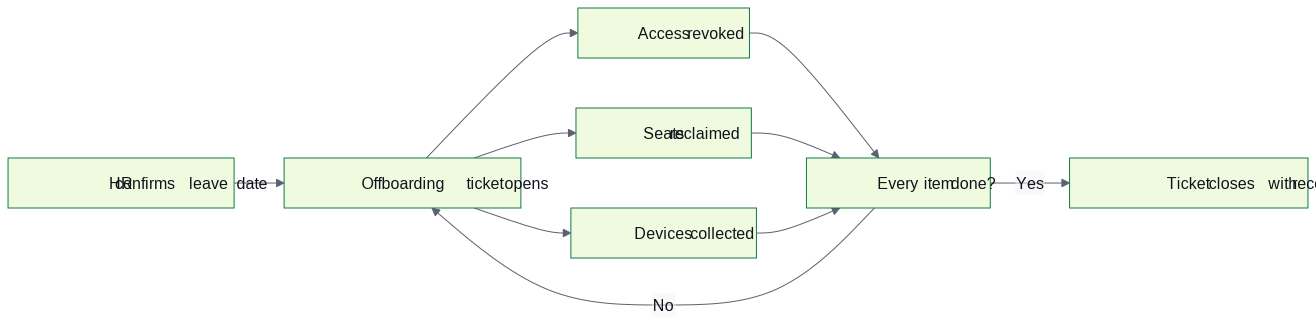
Who owns each step when an employee leaves?
One named person owns the whole offboarding ticket, and each task under it has a clear owner and deadline.
In a company without an IT team, the “IT” owner is often the founder, an ops lead or an office manager. That’s fine, as long as the ticket belongs to one named person and not to “whoever has time”.
| Step | Owner | When |
|---|---|---|
| Confirm leave date and trigger offboarding | HR | As soon as it’s agreed |
| Decide who inherits files, mailboxes and repos | Line manager | Before the last day |
| Revoke SSO, admin rights, keys and tokens | IT owner | Last day, end of shift |
| Reclaim software seats | IT owner | Last day |
| Return laptop and accessories | Employee, checked by IT | Last day or courier date |
| Adjust renewals and seat counts | Finance with IT | Before next renewal |
| Wipe device and update register | IT owner | Within a week |
| File the evidence record | IT owner | When the ticket closes |
How do you make sure every laptop and accessory comes back?
Your asset register needs to show who holds what long before anyone resigns, and the person should have confirmed it themselves.
Most lost laptops are lost on paper first: a spreadsheet that never recorded the swap, the second monitor or the dock someone took home. To stop that:
- Record serial numbers and owners when you issue kit, including monitors, docks and phones, not just laptops.
- Get a handover confirmation. When the employee accepts a device in writing or in a tool, ownership is no longer a guess.
- Label assets so returned items can be scanned and matched straight away.
- For remote leavers, send a prepaid courier box with a list of what should be inside.
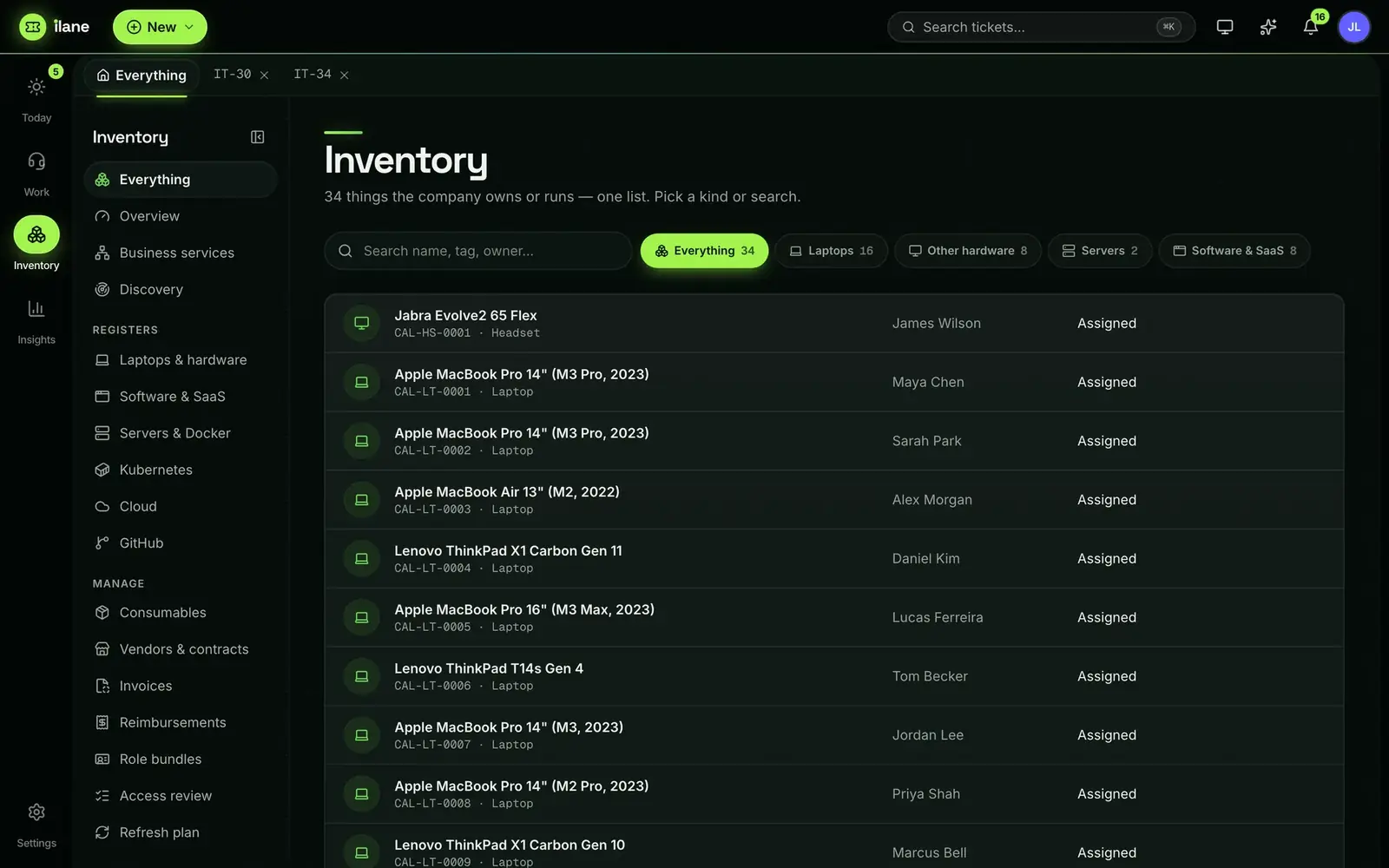
In ilane’s assets and licences register, people accept their own devices when IT hands them over. Each handover is recorded on the asset’s history. Monitors plugged into laptops are found automatically by the device agent and added to the register. Printed QR labels open the asset in ilane when scanned. When someone leaves, the offboarding ticket can’t close until every device is collected and every seat is reclaimed.
How do you remove software seats and access on the last day?
Disable the identity account first. Then work through every app that doesn’t use SSO. Finally, reclaim each seat so it’s reassigned or dropped at renewal.
Turning off SSO covers most access, but rarely all of it. Leftover access usually sits in:
- Apps with their own username and password, which are common among design, finance and marketing tools.
- Personal access tokens and SSH keys for code repositories and servers.
- Cloud console users and API keys created outside your identity provider.
- AI tools the person signed up for with a work email.
- Shared accounts whose password they knew.
Revoking access and reclaiming seats are different jobs. A disabled account can still hold a paid seat until someone removes it, so tie each seat to its holder and its renewal date. For more on this, see our guide to finding and reclaiming unused SaaS licences.
In ilane, the register shows who holds each shared or per-person seat and when it renews. Seats can be taken back in one step, and renewals come with a reminder ticket. ilane also flags paid apps installed on a laptop without a matching seat. Its ISO 42001 controls include removing AI vendor access as part of offboarding.
What should happen to a laptop that isn’t returned?
Treat it as lost. Lock it remotely after a short grace period, erase it if it still hasn’t come back, and record what happened.
The cost of an unreturned laptop is mostly the data on it. In the Ponemon Institute’s The Cost of a Lost Laptop study, a lost laptop cost an average of $49,246, and the data breach made up most of that. The study is from 2009, but the point still holds: disk encryption and remote lock reduce the risk far more than chasing the hardware does.
Here is a timeline you can adapt:
- Day 0: the last day passes with no return. Send a reminder and a courier box.
- Day 3: still not back. Lock the device remotely, and ask HR to follow up under the employment contract.
- Day 14: still not back. Erase the device, mark it lost in the register and close the asset record.
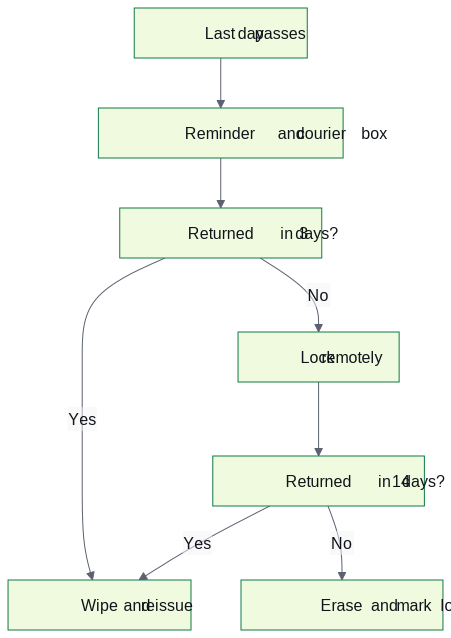
In ilane, locking a laptop takes one approval. Erasing it needs a second person, so one admin can’t wipe a device alone. The agent also checks that disk encryption is on, which is what you want to be sure of before a device goes missing.
How can role-based bundles make onboarding the mirror of offboarding?
When a role bundle defines what someone gets on day one, the same list tells you what has to come back on their last day.
A bundle is a fixed set of kit and seats per role. For example:
- Software engineer: laptop, monitor, dock, code repository seat, cloud console access, design tool viewer seat.
- Designer: laptop, two monitors, design tool editor seat, stock asset library.
- Account executive: laptop, CRM seat, e-signature seat, headset.
Bundles also help with movers. When someone changes role, swap their old bundle for the new one so seats from the old role don’t build up. ISO 27001 Annex A 5.11 covers the return of assets when employment ends and also when it changes.
In ilane, bundles by job role decide which seats a new joiner gets. Onboarding runs from one form, and devices can be issued straight from the request. When the new joiner accepts their laptop, the onboarding task ticks itself off. That same record is what the offboarding ticket checks against later.
How do you prove offboarding was completed for an audit?
Keep a dated record for each leaver. It should link their termination date to the moment each account, seat and device was dealt with, so an auditor can check a sample.
SOC 2 criterion CC6.2 covers removing user access. Linford & Co gives an example of how auditors test it. The auditor takes a sample of 25 leavers and compares each HR termination date with the date their account was deactivated. In the example, two leavers kept production access for 9 and 16 days after leaving. Your evidence for each leaver should show:
- The termination date from HR.
- When SSO and every non-SSO account were disabled, and by whom.
- Which seats were reclaimed.
- Which devices came back, and when they were wiped.
- Any exceptions, such as a lost device, and how they were resolved.
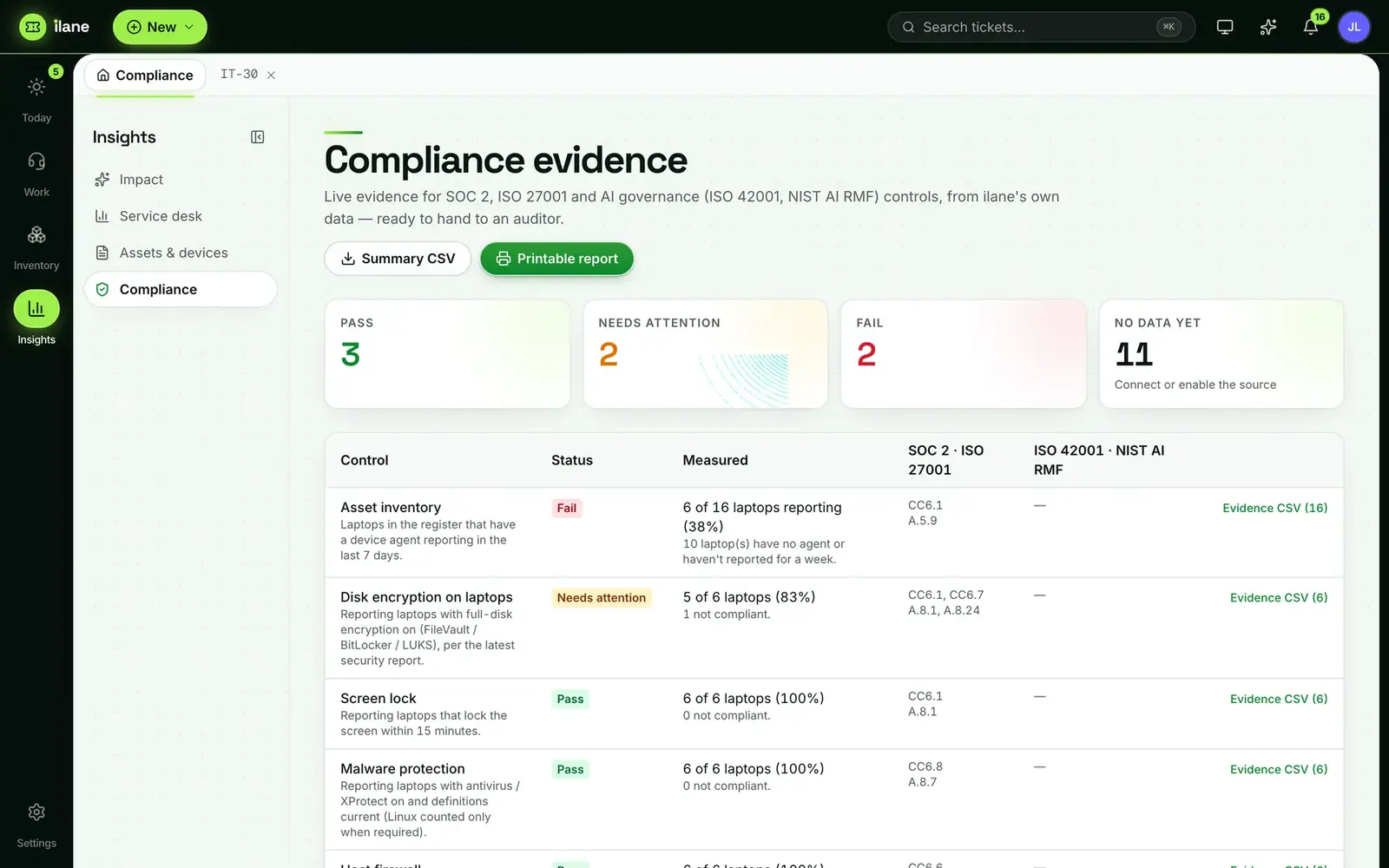
ilane’s compliance and insights module measures an “offboarding completed” control live from tickets and the register. It maps that control to SOC 2 logical access and ISO 27001. Evidence CSVs are available on demand. Every step is written to a tamper-evident audit log, and quarterly access reviews arrive as tickets with the list already filled in.
Conclusion
Most offboarding failures happen because a ticket was closed while one laptop, seat or token was still outstanding. Write the checklist down, give it one owner, base it on a register people have confirmed, and only close the ticket when everything is back. You’ll stop paying for seats of people who left, and you’ll have the record ready when an auditor asks for it.
To see an offboarding ticket that won’t close until every device and seat is back, book a 30-minute ilane demo.
Frequently asked questions
How quickly should a leaver’s access be removed?
Do it on the last day, ideally at the end of their final shift. Auditors check how long access stayed open after the termination date, and many companies commit to one business day. Whatever deadline you pick, write it down and apply it to every leaver so a sampled audit can’t turn up exceptions.
Does disabling the SSO account remove all of someone’s access?
Usually not. Apps with their own logins, personal access tokens, SSH keys, cloud API keys and shared passwords stay valid after SSO is turned off. List them for each person while they’re still employed, and rotate any shared credentials they knew.
Should we reassign a freed seat or cancel it?
Reassign it if you have a hire starting soon or a waiting list. If not, cut the seat count at the next renewal. A seat that’s reclaimed but never cancelled still costs money, so pair reclaiming seats with renewal reminders.
What should we do with a departing employee’s data?
Before the last day, the line manager should decide who takes over their files, mailboxes and repositories. Transfer ownership before you delete the account. Keep a record of what moved where, so the work isn’t lost and the account can be closed safely.
How is offboarding a contractor different from offboarding an employee?
The checklist is the same, but contractors more often use their own devices and hold access through separate accounts. Track their seats and access in the same register as employees, with an end date set when they start, so their offboarding runs on time.