To govern MCP servers in the enterprise, first list every MCP server your people have connected on laptops, servers and AI accounts. Then mark each one approved, tolerated or blocked against written criteria, and give every finding an owner. Re-check that blocked servers are really gone, and keep the inventory, decisions and fix records as evidence.
What is an MCP server, and why does it need governing?
An MCP server is a small program that gives an AI assistant or coding agent access to a tool or data source, and it needs governing because it acts with your people’s access.
Anthropic released the Model Context Protocol as an open standard in November 2024. Developers expose data or actions through MCP servers, and AI applications connect to them as MCP clients. One config entry can let a coding agent read a repo, query a database or post to chat.
The MCP specification says tools “represent arbitrary code execution and must be treated with appropriate caution”. It also says MCP cannot enforce its own security principles at the protocol level. That job falls to client builders and to the IT team deciding what runs on company machines.
What risks do MCP servers introduce on laptops and servers?
MCP servers add the same risks as any third-party code with credentials, plus one new one: the AI model trusts what the server tells it.
The beta OWASP MCP Top 10 names the main categories. The ones that matter most to IT:
| Risk (OWASP MCP Top 10) | What it looks like in practice |
|---|---|
| Token mismanagement and secret exposure | API keys sitting in plain-text config files on a laptop |
| Privilege escalation via scope creep | A “read docs” server that can also write to production |
| Tool poisoning | Hidden instructions in a tool description steer the agent |
| Supply chain attacks | A popular open-source server is changed after you install it |
| Command injection | Untrusted input reaches a shell the server runs |
| Lack of audit and telemetry | Nobody can say which agent called which tool |
The numbers back this up. A study of 1,899 open-source MCP servers found that 7.2% had general security vulnerabilities and 5.5% showed MCP-specific attack vectors, as summarised in this threat-modelling paper. The MCPTox benchmark built poisoned versions of 353 real tools from 45 live MCP servers and tested 20 models. On average, 36.5% of attacks worked, and the highest rate was 72.8%.
Tool poisoning is the risk most teams haven’t planned for. An attacker hides instructions in a tool’s description, and the agent follows them as if they were part of the tool, for example by sending data out:
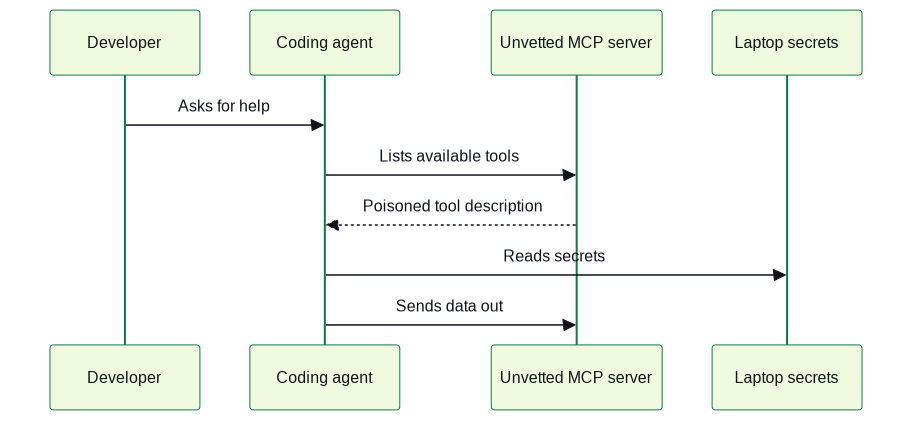
Config files are a target too. The Cloud Security Alliance describes an attack chain where a Slack message, read through an approved Slack MCP server, got Cursor to add a new server entry to its global ~/.cursor/mcp.json. That entry pointed at attacker code, and because Cursor was set to run new entries without asking, it ran straight away. Approving a server once isn’t enough; you have to keep checking the list.
How do you find every MCP server your people have connected?
You find them by reading the places MCP clients store their configuration, on every machine, again and again, and not by sending out a survey.
Look in four places:
- Developer laptops. IDEs, coding agents and desktop assistants keep their MCP server lists in local config files, like the Cursor file above. Record the server name, the command or URL it points to, the client that loads it and the person who owns the laptop.
- Servers and CI runners. Agents running in pipelines or on shared boxes often load MCP servers with service credentials, which carry more risk than a laptop’s.
- Code repositories. Project-level MCP configs and the secrets they need sometimes get committed. Scan repos for both.
- AI vendor admin consoles. Organisation accounts with AI providers show who is signed in and what is in use.
This is the problem ilane’s AI governance product is built for. The same light agent that checks laptop posture finds AI tools, coding agents, MCP servers and local models on Mac, Windows and Linux laptops and on servers. ilane also connects read-only to OpenAI or Anthropic admin keys and to GitHub, where it already flags leaked secrets. Every employee can read what the agent checks, and it never collects keystrokes, screenshots, browsing history or file contents.
How should you decide which MCP servers are approved, tolerated or blocked?
Sort each server by two things: how much it can reach, and how far you trust whoever publishes it and keeps it up to date.
Check each server against these criteria:
- Publisher: the vendor of the system it connects to, your own team, a known open-source project or an unknown individual.
- Access: read-only, write, or able to run commands.
- Data: public docs, internal code, customer data or production systems.
- Credentials: scoped, short-lived tokens, or long-lived keys in a config file.
- Version control: pinned to a reviewed version, or pulling the latest on every start.
Then place it. A vendor’s own docs-lookup server is narrow and trusted, so approve it. An official repo server from your code host is trusted but broad, so approve it with limited scopes. An internal database server your team wrote is also broad, so approve it only with read-only credentials. A hobbyist’s browser tool might be tolerated for a set period while you review it. An unknown server that can run shell commands is blocked.
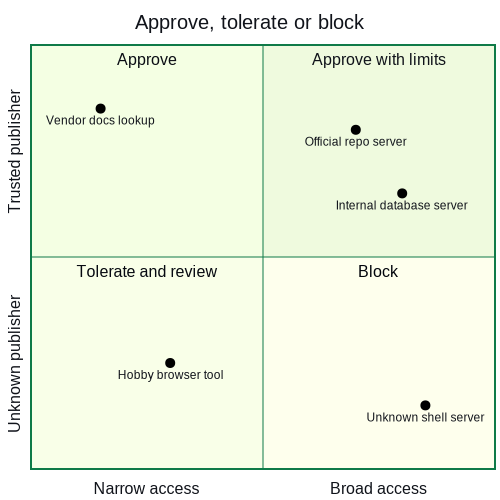
“Tolerated” is the tier that keeps this workable. It means: allowed for now, logged, with an owner and a review date. Without it, unreviewed servers are either blocked, slowing people down, or ignored.
What should an MCP server policy include?
A usable MCP policy fits on one page and answers what is allowed, who decides and what happens when something breaks the rules.
Include:
- Scope: which clients are covered (IDEs, coding agents, desktop assistants, agents in CI) and which machines (company laptops, servers, runners).
- The three tiers and the criteria above, with the current approved list linked.
- A request path: where to ask for a new server, who approves it and how fast you aim to answer.
- Credential rules: no long-lived keys in config files. For remote servers, follow the MCP authorisation guidance. The spec’s security considerations require servers to accept only tokens issued for them, forbid passing tokens through and recommend short-lived access tokens.
- Client settings: new servers need a person’s approval before they run, with no auto-run.
- Owners: every approved server has a named owner who reviews it on a schedule.
- Response: what happens when a blocked server turns up, and how long the owner has to remove it.
How do you enforce the policy without blocking developer productivity?
Make the approved route faster than going around it, and enforce with tickets that are checked, not with blanket blocks.
In practice:
- Publish the approved list where developers already look, next to the request form.
- Answer requests quickly. A request form with a manager or security approval step turns “can I use this?” into a tracked decision rather than a Slack thread. ilane’s request catalog supports forms with up to three approval steps.
- Default unknown servers to tolerated, not blocked, unless they can run commands or reach production.
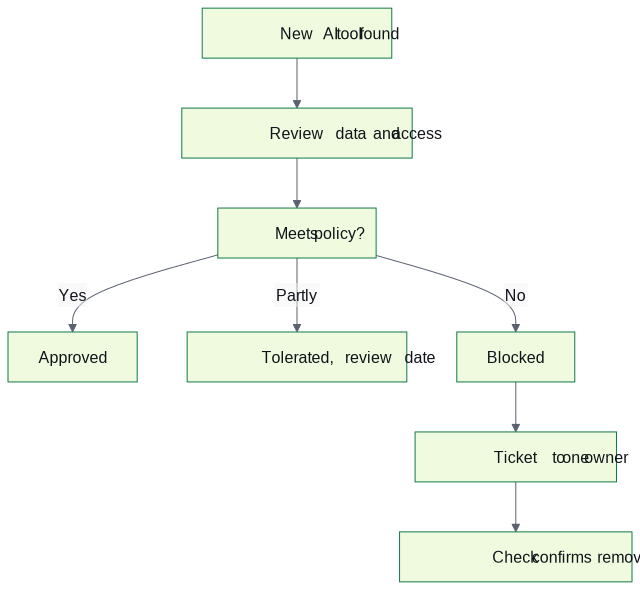
- Give each blocked finding one owner and a ticket. In ilane, a blocked AI tool opens a ticket automatically.
- Close only on proof. The ticket closes when the next check shows the server is gone, not when someone says it’s done. If the re-check fails, the ticket reopens instead of closing. ilane calls this verified resolution.
How do you prove MCP governance for ISO 42001 and NIST AI RMF?
You prove it with records your systems produce as the work happens: the inventory, the decisions, the tickets and the checks that closed them.
ISO/IEC 42001 is the international standard for AI management systems, and it covers organisations that use AI systems as well as those that build them. The NIST AI RMF 1.0 is voluntary and organised around four functions: Govern, Map, Measure and Manage. Neither one names MCP. Both expect you to know which AI systems you run, who approved them and how you handle their risks.
| Evidence | What it shows | NIST AI RMF function |
|---|---|---|
| Written MCP policy with owners | Roles and rules exist | Govern |
| Live inventory of servers, clients and machines | You know what runs where | Map |
| Tier decisions with approver and date | Risks were assessed | Map / Measure |
| Share of machines with only approved or tolerated servers | Policy is measured | Measure |
| Tickets for blocked servers, closed on a re-check | Risks were dealt with | Manage |
| Audit log of approvals and changes | Records weren’t edited afterwards | Govern / Manage |
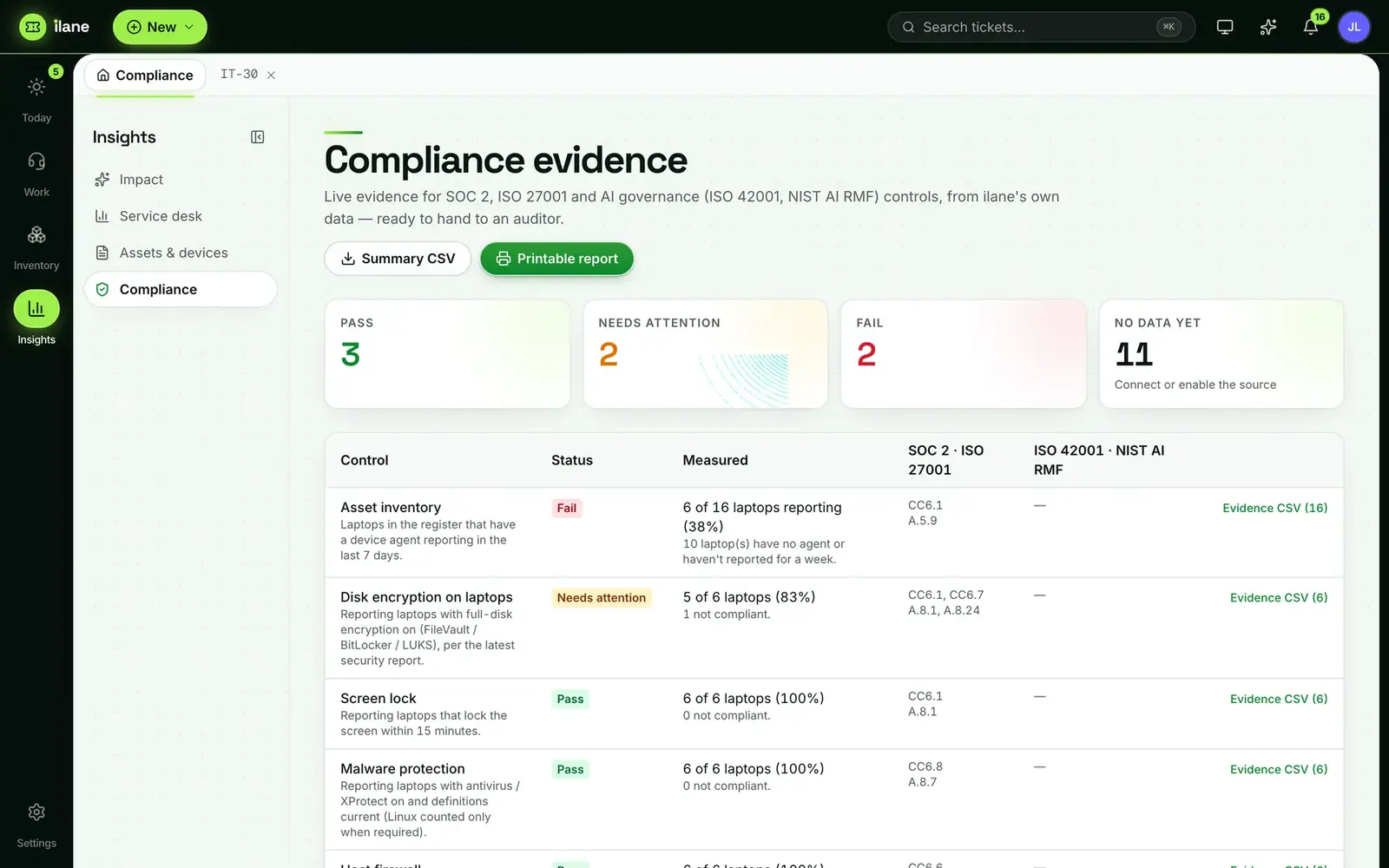
ilane’s compliance product measures SOC 2, ISO 27001, ISO 42001 and NIST AI RMF controls live from devices, tickets and fixes. Recent releases added an AI system register for ISO 42001 and NIST AI RMF. Every approval and fix step goes into a tamper-evident audit log that is kept for at least a year.
What does a 30-day MCP governance rollout look like?
Thirty days is enough to go from not knowing what’s installed to tracked, evidenced control, as long as you discover before you write the rules.
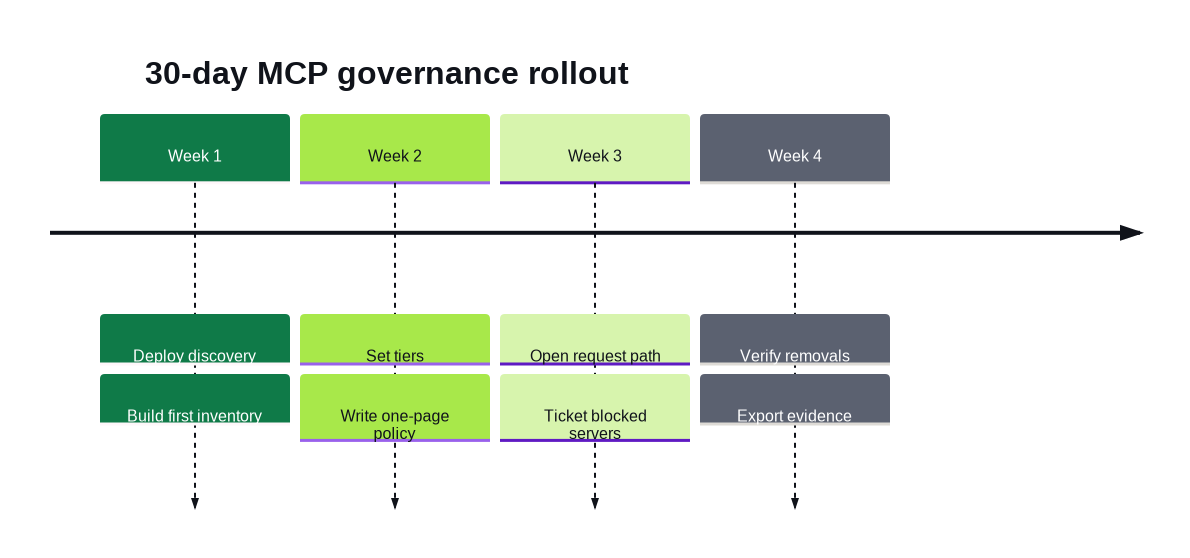
Two habits make the plan work. Block nothing in week 1: you are learning what’s in use and who uses it. And bring two or three developers into the week 2 tiering, so the policy is written around real servers, not hypothetical ones. After day 30, keep discovery running, look at new findings each week and review the approved list every quarter.
Conclusion
MCP servers give AI agents real access to code, data and systems, and the protocol leaves control to you. At 50 to 1,000 people the approach is simple: find every server, sort each into a tier, give each finding an owner and close it only when a re-check proves the fix. For more on the wider discipline, read what AI governance means for IT teams.
To see ilane find AI tools and MCP servers on a demo company or one of your own laptops, and watch it check a fix, book a demo.
Frequently asked questions
Is the Model Context Protocol itself insecure?
Not exactly. MCP is a way to connect AI clients to tools, and the specification itself says it can’t enforce security at the protocol level. The risk comes from what each server can do and how much the client trusts it, so governance looks at individual servers and their settings.
Should we just block all MCP servers?
Usually not. A blanket block pushes developers to personal machines or workarounds you can’t see, and you lose the inventory. A tolerated tier with owners and review dates keeps work moving. Firm blocks are for servers that can run commands, reach production or come from publishers you can’t identify.
Do local and remote MCP servers need different controls?
Yes. Local servers run on the laptop with that person’s files and credentials, so device discovery and credential hygiene matter most. Remote servers are reached over the network, so authorisation matters most: tokens issued for that server only, no token passthrough and short-lived access tokens.
Does MCP discovery mean monitoring what developers do?
It shouldn’t. Discovery needs to know which servers are configured, which client loads them and on which machine. It doesn’t need keystrokes or file contents. The ilane agent publishes its list of checks to every employee and never collects keystrokes, screenshots, browsing history or file contents.
How often should we review approved MCP servers?
Review the full approved list at least every quarter and look at new findings every week. Re-review a server sooner if its publisher, version or requested permissions change, because a server you approved can change after you install it.