To monitor the AI agents your company builds, record every run as a trace: who started it, which model it called, which tools and MCP servers it used, what data it touched, and which access it holds but never uses. Compare runs against a baseline, send each anomaly to one named owner, and keep the records as audit evidence.
What does it mean to monitor an AI agent after it goes live?
Monitoring a live agent means watching what it actually does in production (its model calls, tool use, access and cost), not just checking that the service is up.
Uptime monitoring tells you the endpoint answers. Agent monitoring tells you whether the agent did the right thing, with the right permissions, for the right person. For every agent you run, you should be able to answer three questions:
- What did it do? Every run, every model call, every tool call, and the result of each.
- Was it allowed to? The access it used compared with the access it was granted.
- Has it changed? This week’s behaviour compared with last week’s, after a model, prompt or tool change.
Risk rises with tool access. In the 2026 OWASP Top 10 for LLM Applications, Excessive Agency moved from sixth to third place. The OWASP Top 10 for Agentic Applications names tool misuse and identity and privilege abuse among its main threats. Both are things you can only catch if you are recording what the agent does.
How is monitoring company-built agents different from finding shadow AI?
Finding shadow AI means discovering AI tools nobody approved. Monitoring agents means watching AI you approved, built and are responsible for.
| Shadow AI discovery | Monitoring your own agents | |
|---|---|---|
| What you look at | AI apps, browser extensions, coding agents, local models on laptops | Agents running in your products and internal workflows |
| Main data source | Devices, sign-ins, spending | Run traces, tool calls, granted permissions |
| Typical finding | An unreviewed AI tool holding company data | An agent using a tool or scope it shouldn’t, or acting differently |
| Usual response | Approve, tolerate or block | Cut access, change the prompt or tools, re-check |
You need both. The coding agents and MCP servers your developers run on their laptops are often how company-built agents get started. ilane’s AI governance product covers both sides. The device agent finds AI apps, coding agents, MCP servers and local models on laptops and servers, and sorts each one as approved, tolerated or blocked. For the agents you build, ilane records traces, draws an agent map, compares runs and shows access granted against access used, without developers adding any code. Personal data is masked first.
Which agent actions and connections should be logged?
Log every run, model call, tool call and permission decision. Each record needs enough context to rebuild what the agent decided, without storing more personal data than you need.
The OpenTelemetry project publishes semantic conventions for generative AI, including agent spans. In that model, an agent run is a trace, each tool call and model call is a span, and token usage is a metric. Use those names even if you never send the data to an OpenTelemetry backend. That way your records keep the same shape when you change tools.
| Record | What to capture | Why it matters |
|---|---|---|
| Run | Agent name and version, who or what triggered it, start, end, outcome | Ties each action to a person or system |
| Model call | Provider, model version, token counts, errors | Explains drift and cost spikes |
| Tool call | Tool name, MCP server, parameters (masked), result status | Shows what the agent actually touched |
| Permission | Scope used against scope granted, any denials | Catches agents working past their brief |
| Approval | Who approved a high-impact action, and when | Proves a person made the call |
| Change | New prompt, model, tool or data source | Shows why behaviour shifted |
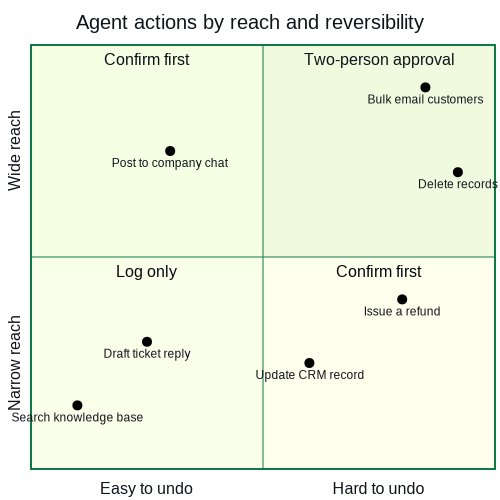
Not every action needs the same handling. Sort each tool by two questions: can the action be undone, and how far does it reach? Reading a knowledge base needs only a log entry. Anything that changes a record, sends a message or moves money should wait for a person to confirm. Actions that are both hard to undo and wide in reach, such as bulk changes or deletes, should need two people. ilane uses the same tiers for its own fixes: safe actions run directly, changes need a confirmation, and serious actions need a second approver.
How do MCP servers and tool access fit into agent monitoring?
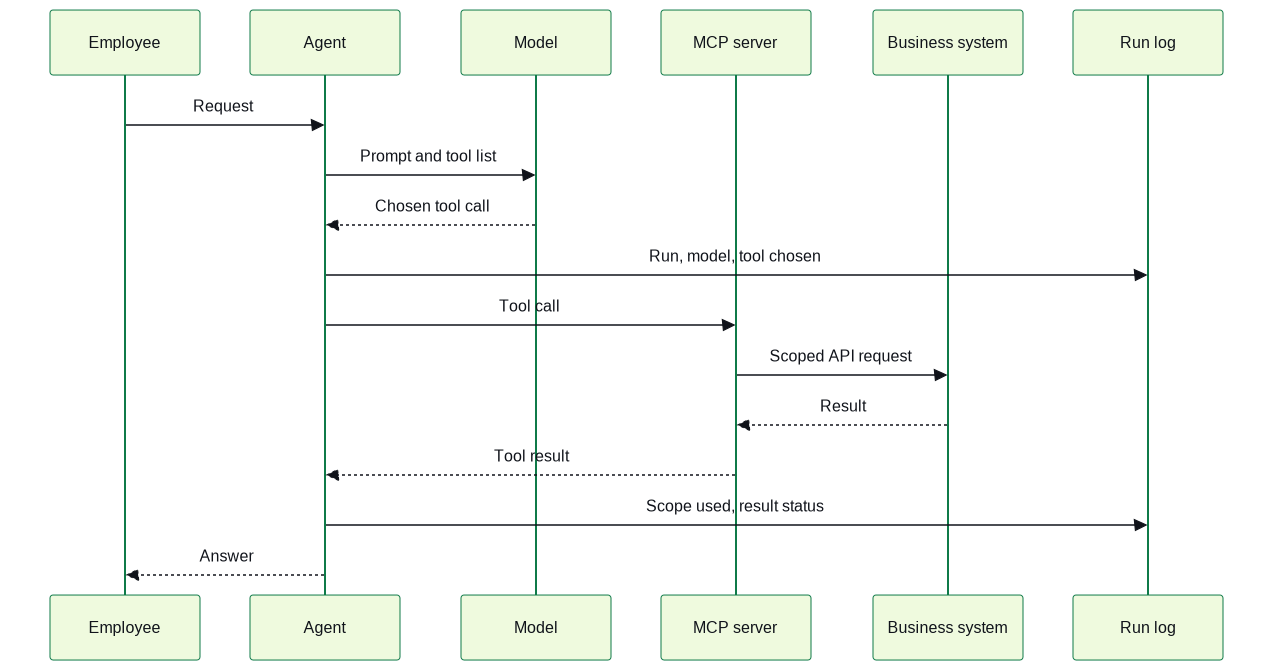
MCP servers are how the agent acts on other systems. Treat each one like a service account: list it, limit its scope and watch how it’s used.
The Model Context Protocol specification says plainly that “tools represent arbitrary code execution”. It says hosts must get explicit user consent before invoking a tool, and tool descriptions should be treated as untrusted unless they come from a trusted server. The specification also says the protocol cannot enforce these principles itself. Whatever enforcement and monitoring you want has to sit around it.
For each agent:
- List every MCP server it can reach, including the ones on developers’ laptops that the agent was built and tested with.
- Record the scopes each server holds: which systems, read or write, which data.
- Compare granted access with used access every week. Scopes that are never used should be removed.
- Flag changes: a new tool, a changed tool description or a new server should open a review, not just appear.
Our guide to governing MCP servers in the enterprise covers sorting them into approved, tolerated and blocked tiers.
Who owns an alert when an agent misbehaves or exceeds its permissions?
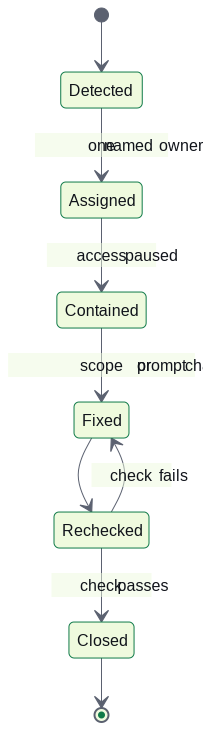
Every alert gets exactly one named owner. By default that’s the team that built and runs the agent. When the alert involves permissions or data, the owner contains it first and investigates second.
Agree on these rules before launch, not during an incident:
- Behaviour alerts (wrong answers, loops, cost spikes, drift after a change) go to the agent’s product or engineering owner.
- Permission alerts (a scope used for the first time, a denied call, a new MCP server) go to the same owner. IT or security can pause the agent’s access without waiting.
- Data impact (the agent touched records it shouldn’t have) brings in the owner of that system. The ticket keeps one owner, though, not three.
- Rules decide what’s automatic. An AI model can explain and suggest, but a written rule decides whether access is cut automatically.
An alert closes only when a fresh check shows the problem is gone. “Someone changed the prompt” isn’t enough. This is how ilane’s verified resolution works: each problem gets one owner, ilane checks the fix with its own reading, and the ticket either closes with evidence or reopens.
What evidence should I keep for ISO 42001 or NIST AI RMF reviews?
Keep a register of every agent, with its owner, permissions and monitoring records, plus a record of how each finding was handled. Together these show you watch your agents all the time, not once a year.
ISO/IEC 42001 sets requirements for establishing, implementing, maintaining and continually improving an AI management system, so auditors look for an ongoing process. The NIST AI RMF groups its outcomes into four functions: Govern, Map, Measure and Manage. Agent monitoring mostly feeds Measure and Manage.
For each agent, keep:
- Register entry: purpose, owner, model, MCP servers, granted scopes, approval date.
- Monitoring records: runs, tool calls and access used against access granted, over time.
- Change history: what changed, who approved it, and how behaviour compared before and after.
- Finding records: each alert, its owner, what was done, and the check that confirmed it.
- Access reviews: periodic sign-off that the agent’s scopes are still needed.
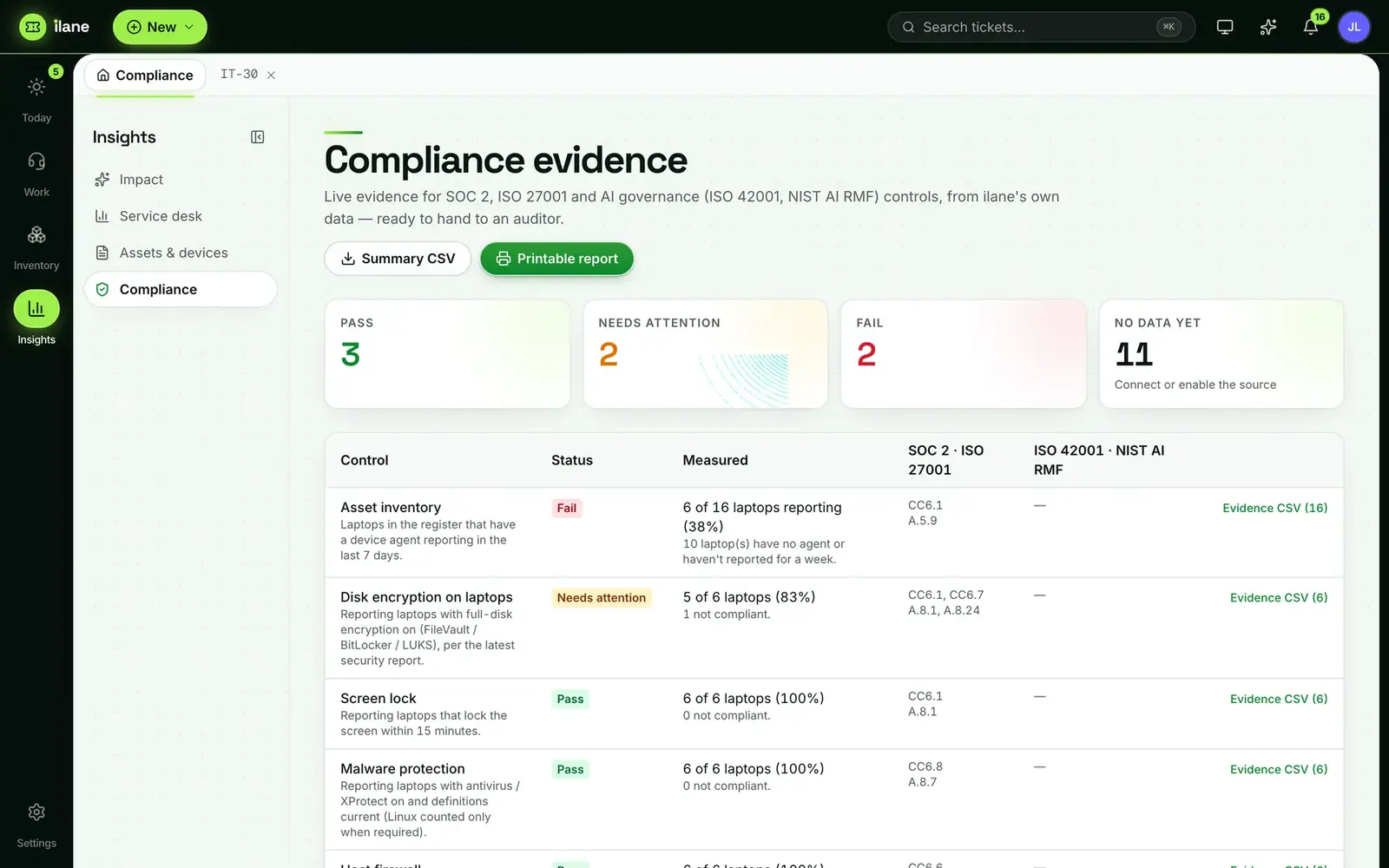
Make the log hard to edit. ilane keeps an append-only, tamper-evident audit log with entries kept for at least a year. Its compliance view maps live controls to ISO 42001 (including an AI system register built from what ilane finds) and NIST AI RMF, where Measure covers agent runs, tools and access used.
How do I start with one agent without building a large program?
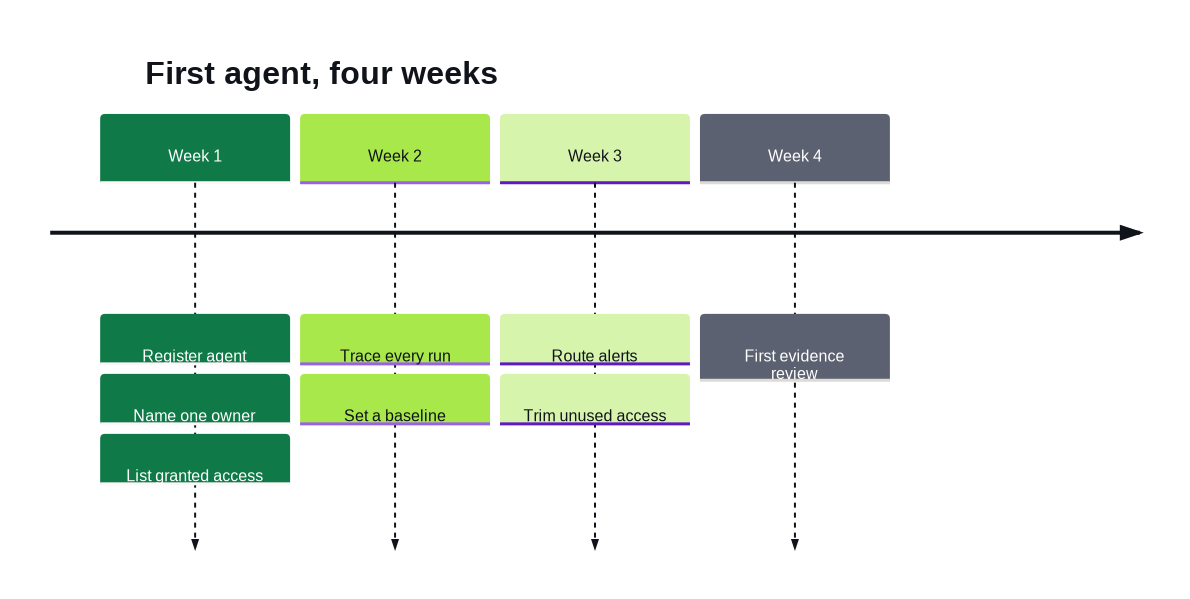
Pick the agent with the most access, not the most users, and bring it under monitoring over four weeks.
- Week 1: Add the agent to a register, name one owner, and list every scope and MCP server it holds.
- Week 2: Trace every run and record a normal week as your baseline.
- Week 3: Turn on alerts for new scopes, denied calls and cost spikes, with an owner on each. Remove access that hasn’t been used.
- Week 4: Hold your first evidence review. Could you show an auditor what the agent did last Tuesday?
When one agent runs well, the template covers the next one.
Conclusion
Monitoring a company-built agent comes down to four habits: record every run and tool call, compare used access with granted access, give every alert one owner, and close alerts only after a fresh check. Start with your most powerful agent. The records you keep along the way become your ISO 42001 and NIST AI RMF evidence.
To see agent traces, access granted against access used, and verified closing on real data, book a demo.
Frequently asked questions
Do developers need to change an agent’s code to monitor it?
Usually some code changes are needed, because standard tracing such as OpenTelemetry is added to the agent itself. Some platforms collect agent activity from outside the code instead. ilane’s monitoring of the agents you build records traces, run comparisons and access granted against access used without developers adding any code.
Should we store full prompts and responses in agent logs?
Store metadata by default: who started the run, which model and tools it used, scopes and outcomes. Keep full content only where you need it for debugging, mask personal data before you store it, and set a short retention period. ilane masks personal data before it records agent activity.
How often should we review what access an agent has?
Compare access granted with access used every week while an agent is new, then formally review its scopes at least once a quarter. Also review whenever the agent gets a new tool, MCP server or data source. Remove any scope the agent hasn’t used since the last review.
Do AI agents we buy from a vendor need the same monitoring?
Yes. Your company is still responsible for what the agent does with your systems and data. At a minimum, register it, name an owner, record the systems and MCP servers it connects to, and check its permissions. Vendor logs may be limited, so ask before you sign what run and tool-call records you can export.
What should happen when an agent uses a permission for the first time?
Treat it as a permission alert with one named owner. If the action is high-impact, pause the agent’s access first and investigate after. Close the alert only when a fresh check shows the scope has been removed, or has been approved and recorded in the agent’s register.