To use help desk software well, make six setup decisions: how people send requests, which common requests become catalog forms (and who approves them), SLAs that count only business hours, written answers for repeat questions, workflows for routine work like onboarding, and a rule that a ticket closes only once the fix is confirmed. Get these right and most tools will do the job.
What does help desk software actually do for a growing company?
It gives every request one place to land, one owner, one clock and a record of what happened.
Somewhere between 50 and 1,000 people, requests stop fitting in direct messages and hallway chats. The same password question gets answered five times. A new hire’s laptop shows up on day three. Nobody can say how long access requests take. A help desk fixes this by:
- Capturing every request, whatever channel it came from
- Routing it to the right team and person
- Timing it against an agreed response and resolution target
- Storing answers so repeat questions get answered without a ticket
- Automating routine steps that are the same every time
- Reporting volumes, response times and where work gets stuck
Many companies also use it for more than IT. The ilane service desk handles requests for IT, HR, Finance and Ops in one place, and every request arrives with the requester’s device already attached. The agent doesn’t have to ask “which laptop are you on?”
How should people send requests: portal, catalog, email, chat assistant or API?
Offer several ways in, send them all to one queue, and make the catalog the default for anything you handle more than once.
Each channel suits a different kind of request:
- Portal: where people go to check status, browse answers and see their open tickets.
- Catalog: structured forms for repeatable requests (“new software seat”, “access to the finance system”). The form collects everything up front, so nobody has to chase details by email.
- Email: for people who won’t change habits, and for outside senders. Email-to-ticket turns the message into a ticket.
- Chat assistant: for quick questions. It can answer from the knowledge base or open a ticket for the person.
- API: for monitors, scripts and internal tools that need to raise tickets without a person.
ilane supports all five: portal, catalog, assistant, email and API. Whichever tool you use, the rule is the same. Five ways in, one queue. If requests from different channels end up in different places, you’ve rebuilt the problem you were trying to fix.
How do you set up categories, a request catalog and approvals?
Start with 10–15 catalog items for your most frequent requests, keep categories to two levels at most, and require approval only where money or access is involved.
A practical first week:
- Pull 90 days of requests. Use whatever exists: shared inboxes, chat channels, a spreadsheet.
- Group them. You’ll usually find a handful of types make up most of the volume.
- Build one catalog form per common type. Ask only for what the fulfiller needs: system name, access level, start date, cost centre.
- Set approval rules by risk. Manager approval for access to sensitive systems. Budget-owner approval for spending above a threshold you choose. No approval for low-risk items like a replacement charger.
- Assign a fulfilling team to each item so it never sits unassigned.
Keep categories shallow. If agents have to choose from 40 subcategories, they’ll pick “Other”, and your reports will mean nothing.

How do you set SLAs that respect business hours?
Give each team a working calendar, count response and resolution time only inside those hours, and pause the clock while you wait on the requester.
A 24-hour SLA that counts weekends turns a Friday-evening request into a breach by Saturday night. That punishes the team and teaches everyone to ignore the numbers. Business-hour SLAs fix this. To set them up:
- Define hours per team. IT might work 8:00–18:00. Finance might keep shorter hours. If your teams span time zones, give each one its own calendar.
- Add public holidays for every location you support.
- Pause on “waiting for requester” so a missing answer doesn’t count against the agent.
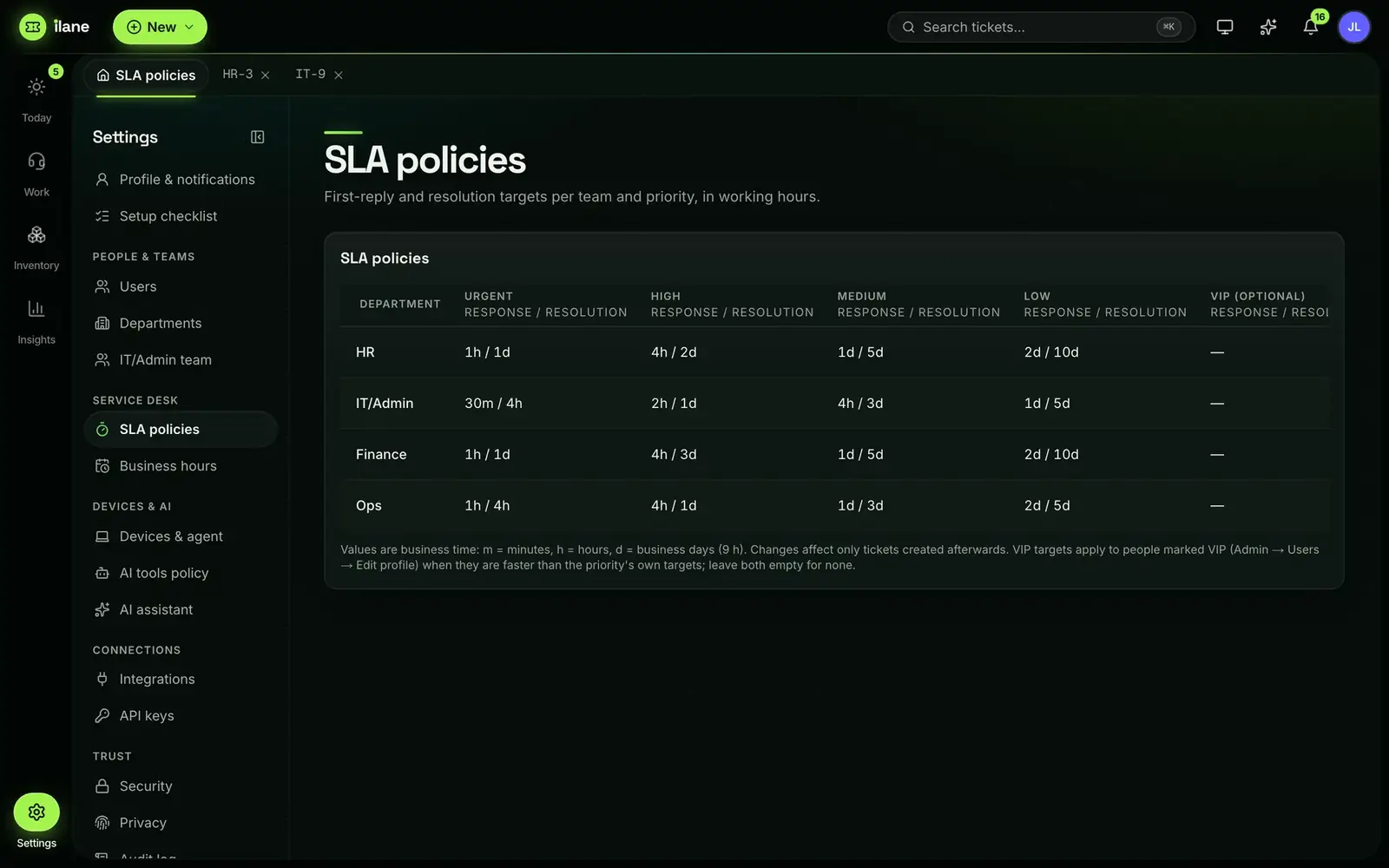
- Set targets per priority. Some suggested starting points to adjust after a month of real data:
| Priority | Example | First response | Resolution |
|---|---|---|---|
| Urgent | Whole team can’t work, outage | 30 business minutes | 4 business hours |
| High | One person blocked | 2 business hours | 1 business day |
| Normal | Standard catalog request | 4 business hours | 3 business days |
| Low | Question, nice-to-have | 1 business day | 5 business days |
Business-hour SLAs come built into ilane, with policies set per team and priority.
What are examples of requests a help desk should handle for IT, HR, Finance and Ops?
A help desk should handle any repeatable request where someone needs something from a team, not just “my laptop is broken.”
| Team | Example request | What the form asks | Approver |
|---|---|---|---|
| IT | New software seat | App, reason, cost centre | Budget owner |
| IT | Access to a production system | System, access level, duration | Manager + system owner |
| IT | Laptop not working | Symptom (device attached automatically) | None |
| HR | New joiner onboarding | Name, role, start date, manager | HR lead |
| HR | Employment letter | Purpose, addressee | None |
| Finance | Expense or reimbursement query | Claim reference, amount | None |
| Finance | New vendor setup | Vendor details, contract, owner | Finance lead |
| Ops | Office access card | Location, start date | Office manager |
| Ops | Equipment or supplies | Item, quantity, location | None below threshold |
Putting HR, Finance and Ops in the same desk means a new-joiner request can create IT, HR and Ops tasks from a single form. It doesn’t depend on three emails reaching the right people.
How do knowledge base answers cut tickets before they’re raised?
Show the right article while someone is typing their request, and write articles that actually solve the problem, not just describe it.
Self-service only helps if it finishes the job. A Gartner survey of 5,728 customers found that only 14% of customer service issues were fully resolved in self-service, and only 36% even for issues customers called “very simple.” That research covers customer service, not internal IT. The lesson still carries over: an article people read and then raise a ticket anyway has saved nothing.
How to write articles that resolve:
- Start from your top 10 repeat requests, not a blank wiki.
- Write numbered steps with the exact names of buttons and settings, for each operating system you support.
- Suggest articles inside the request form, based on what the person types.
- Review monthly: find articles that still lead to tickets on the same topic, and rewrite or remove them.
ilane offers answers before tickets in the service desk. Its employee self-service also lets people check their own laptop and run safe fixes before they raise a ticket at all.
Which routine work should you automate with workflows, such as onboarding and offboarding?
Automate any request whose steps are the same every time. Onboarding, offboarding, access requests and device swaps are the obvious first four.
Onboarding should start from one form filled in by HR or the hiring manager. That form then creates every task: accounts, a laptop, software seats and building access. In ilane, onboarding happens in one form. Bundles by job role decide which seats a new joiner gets, a device can be issued straight from the request, and when the person accepts their laptop in ilane, the onboarding task ticks itself off.
Offboarding carries more risk, because access left open after someone leaves is a security gap. As one public example, the US Department of Education’s IT personnel security standard requires system access to be disabled no later than one business day after the help desk is notified. NIST’s SP 800-53 control PS-4(2) goes further and describes using automated mechanisms to notify the right people and disable access when someone leaves. In ilane, the offboarding ticket can’t close until every device is collected and every seat is reclaimed. Our IT offboarding checklist covers the full list.
Other good candidates for automation:
- Software requests that grant a seat once approved
- Temporary admin rights that are taken back automatically
- Renewal reminders that arrive as tickets early enough to decide
How do you know a ticket is really fixed before you close it?
Write down what “fixed” means when the ticket opens, then confirm it with a fresh check or the requester’s confirmation. An agent’s “should be fixed now” doesn’t count.
In most help desks, a ticket closes when someone clicks a button. If the problem comes back, it arrives as a new ticket and the history is lost. Your closure numbers look healthy while the same issues keep returning. Two habits help:
- Track reopen rate next to first contact resolution. HDI and MetricNet define first contact resolution as the share of contacts resolved on the first contact. A high resolution rate with a high reopen rate means tickets are being closed, not fixed.
- Reopen the same ticket when a fix fails, so the history stays together.
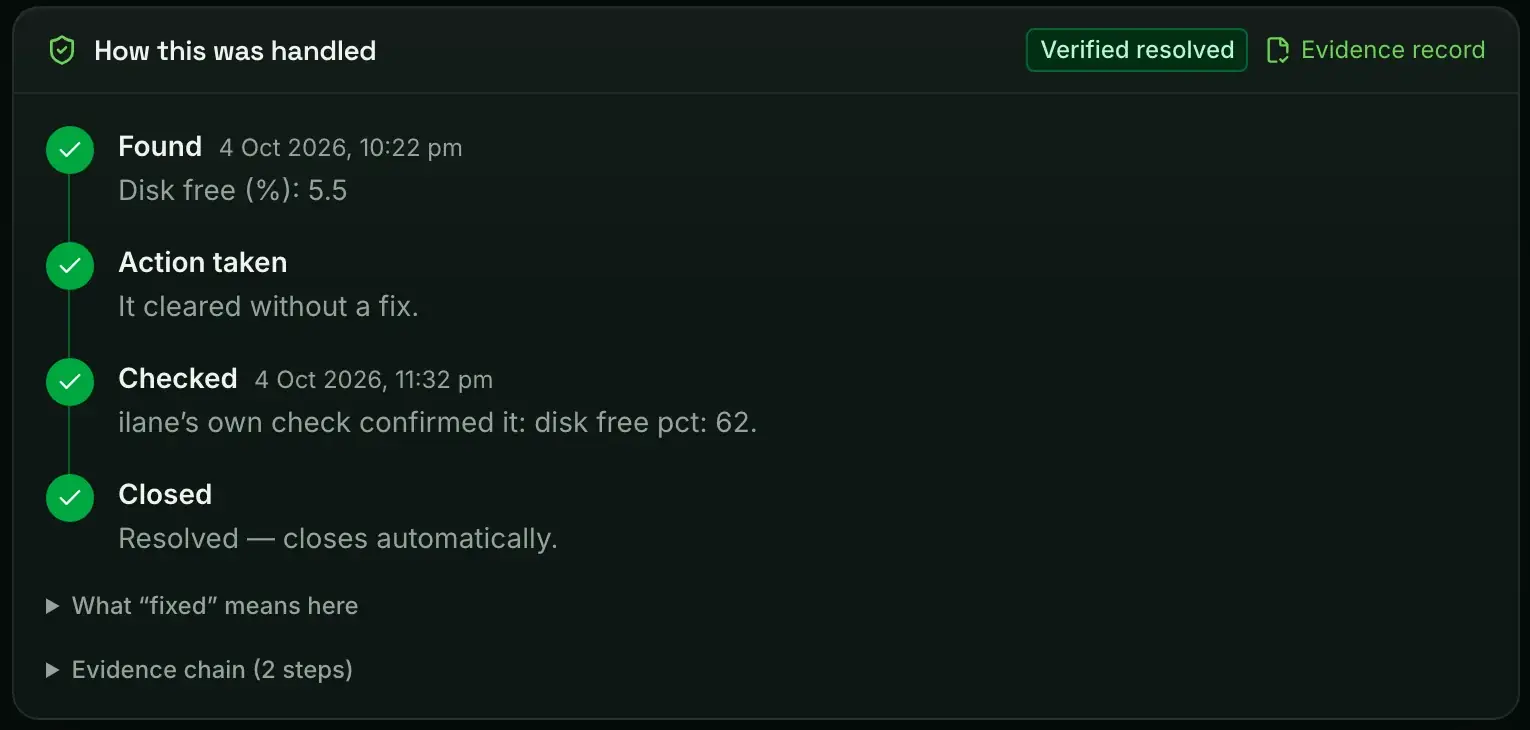
ilane takes this further with verified resolution. Every ticket raised by a check (a laptop with its firewall off, a full disk on a server) carries a contract that says what “fixed” means and how ilane will verify it. A fix reporting success doesn’t count, and neither does a person clicking resolve. Only ilane’s own next reading does. If the check passes, the ticket closes with an evidence record: the before and after readings, every step taken and who approved it. If the check fails, the same ticket reopens. For requests that no check can see, such as an employment letter, the person handling it still closes it.

Conclusion
Running a help desk well comes down to a few decisions made early:
- one queue for every channel
- a short catalog with approvals only where money or access is involved
- SLAs that count only working hours
- knowledge base articles that actually resolve
- workflows for joiners and leavers
- a closure rule based on proof rather than clicks
Start with your top requests from the last 90 days. Then review the numbers after a month and adjust the targets.
If you’d like to see this running on real tickets and devices, book a demo. In 30 minutes, we’ll fix one thing together and watch ilane check that it’s really fixed.
Frequently asked questions
What’s the difference between a help desk and a service desk?
“Help desk” usually means fixing things that are broken. “Service desk” usually also covers planned requests like access, equipment and onboarding, often for teams beyond IT. In practice the two words overlap, and the setup steps in this guide apply to either. What matters is that every request gets one queue, one owner and one clock.
How many catalog items should we start with?
Start with 10–15 items that cover your most frequent requests from the last 90 days. A short catalog people actually use beats a long one they skip in favour of email. Add items when you see the same free-text request turning up again and again.
Should the SLA clock stop when we’re waiting on the requester?
Yes. Pause the clock while a ticket is waiting for the requester, so missing information doesn’t count against the agent. Set a rule to follow up or close tickets that wait too long, so paused tickets don’t pile up.
Can HR and Finance use the same help desk as IT?
Yes, and it often works better that way, because requests like onboarding involve several teams at once. Give each team its own queue, working hours and SLA targets inside the same desk. ilane’s service desk is built for IT, HR, Finance and Ops requests in one place.
How long does it take to set up a help desk properly?
The basics fit into a first week: channels, your top catalog items, approval rules, business-hour SLAs and a first set of articles. Expect to adjust SLA targets and articles after a month of real data. Workflows like onboarding and offboarding are worth building early, because they cut the most repeated work.