IT asset management software for a small or growing business should keep one register of every laptop, server and software seat, and update it automatically instead of by hand. Look for agent-based discovery, hardware and software in the same place, QR labels, handovers the employee confirms, renewal reminders and links to tickets. The checklist below shows how to test each one.
What does IT asset management software actually do?
It records what you own, who has it, what state it’s in and when it next needs money or attention. Then it keeps that record correct as people join, move and leave.
NIST explains the difference well. A physical asset list can tell you where a computer is, but it can’t tell you which operating systems your laptops run or which devices are exposed to the latest threat. An ITAM system ties together physical and virtual assets so you can see what you have, where it is and how it’s used.
Security frameworks set the same baseline:
- CIS Controls v8.1, Safeguard 1.1 asks for an accurate, detailed and up-to-date inventory of end-user devices, network devices and servers. Each entry should record details such as hardware address, machine name, asset owner and department (CIS Controls Navigator).
- CIS Control 2 extends this to software: a detailed inventory of all licensed software installed on company assets (CIS).
- ISO 27001:2022 Annex A 5.9 expects a list of information and associated assets, with their owners, that is created and kept up to date.
- ISO/IEC 19770-1:2017 sets out requirements for a full IT asset management system. It’s useful as a reference, but most 50–1,000 person companies don’t need certification against it.
In practice, the software has to answer five questions on demand: what do we have, who has it, is it healthy, what does it cost, and when does it renew.
Which features matter most for a 50–1,000 person company?
The features that matter most are the ones that keep the register correct without someone updating it by hand. Most “best ITAM” lists rank tools by how many features they have. A team of one to five IT people needs a short list that works every day.
| Feature | Why it matters | What to ask in a demo |
|---|---|---|
| Automatic discovery | The register updates when devices change, not when someone remembers | “Show me a laptop that reported in today, and its last check-in time.” |
| Hardware and software in one register | Seats, laptops and monitors share the same owners and offboarding steps | “Can I see one person’s devices and paid seats on one page?” |
| QR or barcode labels | Covers items an agent can’t see: docks, phones, stock | “What opens when I scan a label?” |
| Handovers the employee accepts | Ownership is confirmed by the person, not assumed by IT | “What does the employee see when they receive a laptop?” |
| Renewal and contract reminders | Notice periods don’t pass unnoticed | “How far ahead am I told, and where does the reminder land?” |
| Unused-seat detection | Shows idle licences before they renew | “Which seats haven’t been opened in 60 days?” |
| Links to tickets and offboarding | The leaver process can’t skip a laptop or a seat | “Can an offboarding ticket close with a device still out?” |
| Import and export | Gets you started quickly and lets you leave later | “Can I import a CSV and export everything at any time?” |
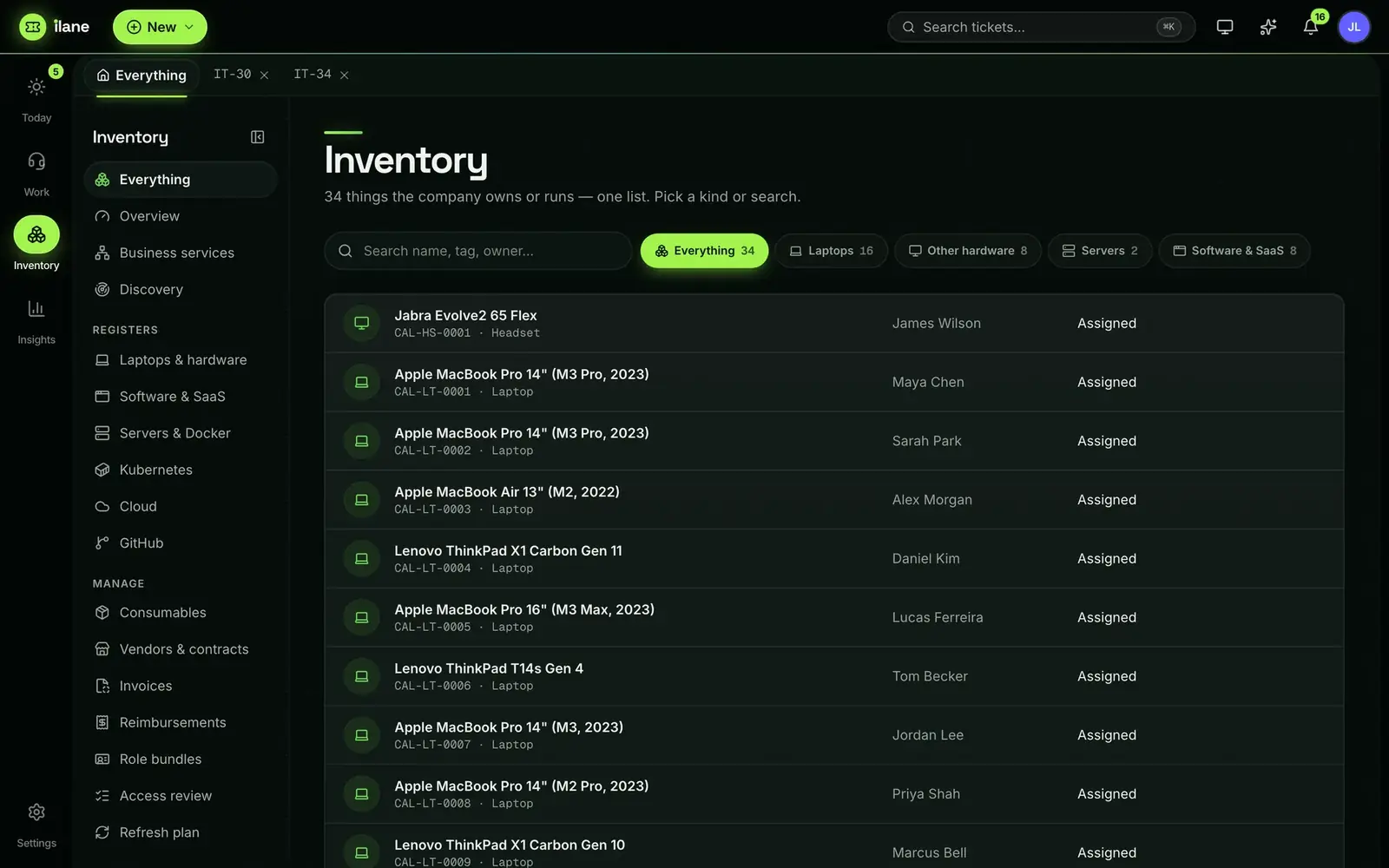
ilane’s Assets & licences product covers each of these rows from one register. Hardware is listed with owners, serial numbers and warranty dates. Software is tracked as shared seat pools and per-person subscriptions. Servers and cloud resources are linked to the services that depend on them, contracts carry notice dates, and consumables open a ticket when stock runs low.
Why do spreadsheet asset registers drift, and how does agent discovery fix it?
Spreadsheets drift because every update depends on a person remembering it. Laptops get swapped, monitors move desks and contractors leave, and none of these changes reach the sheet unless someone types them in.
Even CIS asks for more than an annual tidy-up. It wants the asset inventory reviewed and updated at least twice a year. For larger setups, it adds an active discovery tool, with logs reviewed weekly or more often. A spreadsheet checked before each audit can’t keep up with that.
An agent fixes this by having each device report in on its own schedule. The register is built from those reports rather than typed in by hand. Every change then follows one of two paths: either it updates the record, or it opens a ticket when something doesn’t match.
In ilane, one light agent runs on Mac, Windows and Linux laptops, with Docker and Kubernetes options for servers. On top of the basic inventory, it picks up several things a spreadsheet never would:
- Connected displays. HDMI, DisplayPort and USB-C screens are found every 15 minutes and added as Monitor assets.
- Hardware drift. If a laptop’s parts no longer match the register, ilane opens a ticket.
- Battery and disk health. Worn batteries and failing disks are flagged before they leave someone without a working laptop.
- Paid apps without a seat. If someone installs a paid app nobody bought a licence for, ilane flags it on a ticket.

You can read every check the agent runs on the Devices & laptops page, along with what it never collects.
Do you need barcode or QR scanning to track IT assets?
Yes, for anything that doesn’t run an agent. Laptops and servers can report on themselves, but docks, headsets, phones, spare keyboards and items in a stock cupboard can’t.
QR labels connect those physical items to the register. Use them for:
- Stock counts. Scan items on the shelf instead of reading serial numbers aloud.
- Desk audits. Check that the monitor on a desk is the one the register says is there.
- Returns. Scan a returned laptop at the IT desk and open its record straight away.
In ilane you print the labels yourself, and scanning one opens that asset’s record. Monitors attached to laptops are also found automatically, so you only need to scan the things nothing else can see. Dedicated barcode hardware is optional for most teams, because a phone camera that opens a link is usually enough.
Is free or open-source IT asset management software good enough?
It can be, if what you need is a register and someone on the team has time to host and maintain it. Free tools often cover hardware records, check-in and check-out, and labels well. The licence fee is zero, but running the tool still costs staff time.
Score any free or open-source option against these questions:
- Who hosts it, patches it and backs it up? That person’s hours are part of the real cost.
- Does it discover devices, or only store what you type? Without an agent or discovery feed, it drifts like a spreadsheet.
- Does it handle SaaS seats and renewals, or only physical hardware?
- Is it connected to your service desk, or will you copy details between two tools?
- What support do you get when an upgrade breaks something during an audit?
Many teams choose open-source tools because they want control of their data, not to save money. If that’s your reason, you can also self-host commercial tools. ilane, for example, runs on your own server with Docker Compose, and nothing leaves your network unless you connect it.
Should asset management live in the same tool as your service desk?
Yes, if you want tickets to arrive with the device attached and offboarding to be enforced rather than remembered. When the asset tracker and the help desk are separate products, the person working a ticket has to look the device up in another tab. A leaver’s laptop can also slip through the gap between the two.
Keeping both in one place changes three things:
- Context on arrival. A ticket already shows the person’s laptop, its health and their seats.
- Onboarding from a request. In ilane, a device is issued directly from a request. The new joiner accepts it in ilane, and the onboarding task completes itself.
- Enforced offboarding. The offboarding ticket can’t close until every device is collected and every seat is reclaimed.
There’s a difference between tools that are integrated and tools that share one database. With integrations, two systems copy data back and forth, and the copies can drift apart. In ilane, the ticket, the laptop and the service are records in the same database that point at each other, so nothing needs syncing. Our IT offboarding checklist shows the leaver process step by step.
How much does IT asset management software cost?
Licence prices vary widely, so compare total cost: licence, hosting, setup time and the idle seats the tool helps you find.
Pricing usually follows one of these models:
| Model | How it’s counted | Watch for |
|---|---|---|
| Per asset | Every record in the register | Costs rise when you add monitors and accessories |
| Per technician or agent seat | IT staff who log in | Cheap for one admin, expensive as the team grows |
| Per device | Machines running an agent | Check whether other modules are extra |
| Free or open source | No licence fee | Hosting, upgrades and your own time |
Finding idle seats often pays for the tool. Data from one licence-management platform found that 52.7% of purchased SaaS licences went unused. Results vary by company, but most growing companies have some seats nobody has opened in months. ilane lists those seats, lets you take them back in one step, and opens a reminder ticket before each renewal so there’s time to decide.
Pricing is quoted for each team, based on how many laptops, desktops and servers run the ilane agent. Book a demo to get a quote.
How do you test an ITAM tool in a pilot before you buy?
Run it on one real team’s devices and check it against the register you already have. A demo shows sample data. A pilot shows whether the tool finds what your spreadsheet missed.
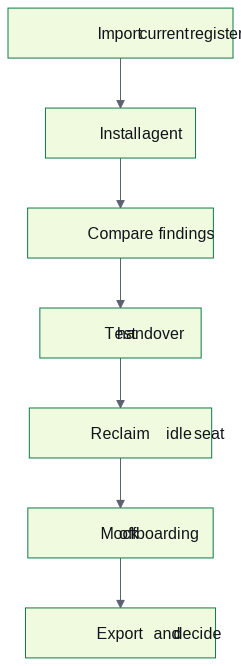
- Pick one team of 10–30 people, plus one or two servers.
- Import your current register by CSV so you have a baseline.
- Install the agent and compare what it finds with the baseline. Count missing devices, wrong owners and unknown monitors.
- Label and scan a shelf of stock and a few desks.
- Do a real handover: issue a laptop and check that the employee can accept it.
- Reclaim one idle seat and confirm the register updates.
- Run a mock offboarding and try to close the ticket with a device still outstanding. It should refuse.
- Export everything to prove you can leave.
ilane offers a pilot of the full platform on one team’s own laptops and servers. If you move to full use, everything you set up during the pilot stays in place.
Conclusion
The right IT asset management software doesn’t depend on someone remembering to update it. Agents keep the register current, QR labels cover the items agents can’t see, employees confirm what they receive, and renewals and offboarding run as tickets. Choose the tool that keeps your register correct with the least manual effort, then test that claim in a pilot on your own devices.
See it on your own laptop: Book a demo →
Frequently asked questions
What’s the difference between IT asset management and software asset management?
IT asset management covers everything: laptops, monitors, servers, cloud resources and software. Software asset management is the part that deals with licences, seats, usage and renewals. Growing companies are usually better off with one register for both, because the same person holds the laptop and the seats.
Can an Excel or Google Sheets register pass a SOC 2 or ISO 27001 audit?
It can, but only if it’s accurate, has owners for every asset and is kept up to date. Auditors increasingly want evidence that controls worked throughout the audit period, not on a single day. That’s hard to show from a sheet that’s updated by hand before each audit.
How long does it take to set up IT asset management software?
Most of the time goes into installing the agent and importing your current list, not into configuring the tool. A pilot on one team shows quickly how much your existing register has drifted. You can then roll out to the rest of the company in batches.
What should I track for each laptop?
At minimum, track the owner, department, serial number, model, operating system, warranty date and last check-in. CIS also suggests recording the hardware address and machine name. Add the handover history so you can see who held the laptop and when.
When should a SaaS seat count as unused?
A common threshold is 60 days without the seat being opened. That’s long enough to cover holidays and short project gaps. Check idle seats again before each renewal, and always at offboarding.