Remote desktop support with user consent means IT can only see or control an employee’s screen after that person approves each session, and every session is recorded against the ticket that justified it. Employees stay in control of their own device, IT gets the access it needs, and auditors get a record of who accessed what, when and why.
This guide covers how consent should work and what to log for each session. It also covers when unattended access is acceptable and how session records hold up in a SOC 2 or ISO 27001 audit.
Why should remote support require user consent every time?
Asking for consent on every session protects privacy, makes misuse of remote tools visible and keeps the trust that IT depends on.
A screen shows much more than the broken setting. It can show private messages, a banking tab, health records or a half-written resignation letter. Regulators expect employers to be open about this kind of access. The UK Information Commissioner’s Office published guidance on monitoring workers in October 2023, saying monitoring at work should not be excessive or undermine employees’ privacy. A survey the ICO commissioned alongside it found that 70% of respondents would find workplace monitoring intrusive.
Remote access is also a common attack route. In a joint advisory, CISA, the NSA and MS-ISAC warned about attackers misusing legitimate remote monitoring and management software. They described a campaign in which phishing led federal employees to download remote-access tools. If a tool can connect silently, an attacker using it looks the same as IT doing routine work. A prompt the person must answer makes any unexpected session obvious.
Practical rules:
- Ask on every session. Agreeing once during onboarding is not ongoing consent.
- Name the requester and the reason in the prompt, so the person knows who is asking and why.
- Treat Decline as a normal answer. Declining should share nothing and should not escalate on its own.
- Never allow a silent mode on laptops, even for admins.
In ilane Remote help, the person taps Allow on their own screen every time. The prompt says who is asking and why. If they decline, nothing is shared.
What should be logged for each remote session?
Each session record should answer six questions: who connected, to which device, for which ticket, with whose approval, from when to when, and what changed.
| Field | Why it matters |
|---|---|
| Ticket ID and summary | Shows the business reason for the session |
| Requester (IT staff member) | Shows which person had access, not just a shared account |
| Device and its owner | Links the session to a specific machine and person |
| Consent decision and timestamp | Proves the person said yes, or records that they declined |
| Start and end time | Shows how long access lasted and that it ended |
| Actions taken or outcome | Links the session to the fix, so it isn’t just a screen view |
Log declined and timed-out requests as well. A run of declines on one device, or requests that never match a ticket, is the kind of pattern a security review should catch.
Also keep two things apart: the session log and surveillance. A session log records that access happened and why. It should not become a reason to collect keystrokes or browsing history.
In ilane, each session is logged on its ticket, and the access link stops working when the session ends. The published agent privacy list says the agent never collects keystrokes, screenshots, browsing history or clipboard contents.
How does consent-based remote help differ from unattended access?
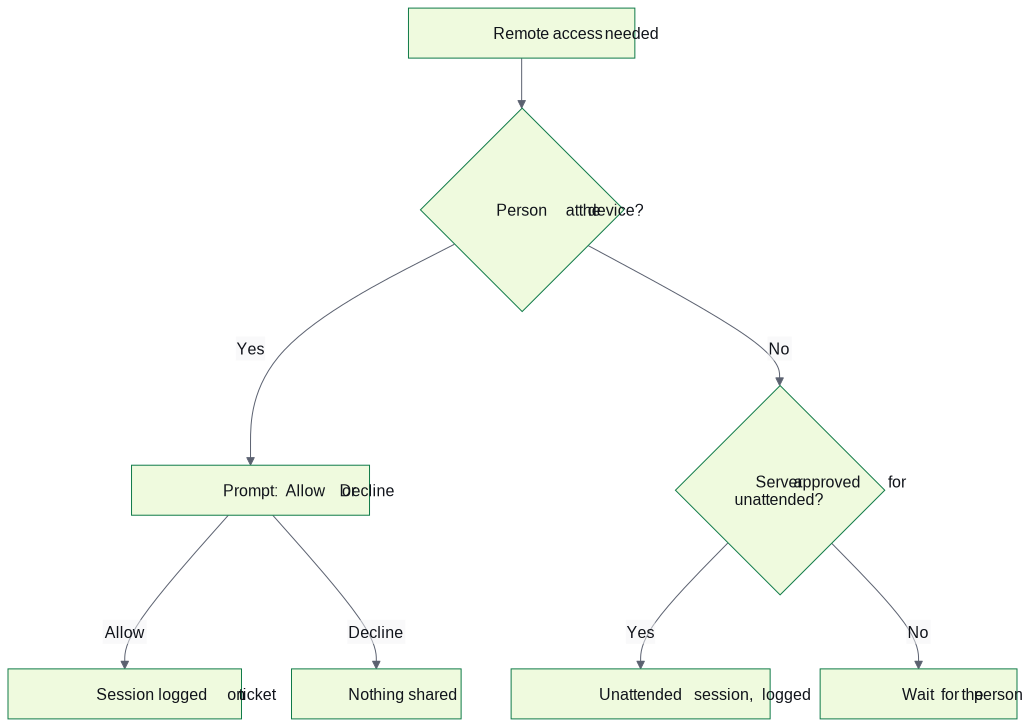
With attended help, a person sits at the machine and says yes. Unattended access lets IT connect when nobody is present, so it belongs only on machines no one sits at, such as servers.
The two models carry different risks:
- Attended (consent-based): the person sees the session start and can refuse it. This suits laptops and desktops, where personal data is on screen.
- Unattended (always-on): IT can connect at any time with no prompt. This suits servers and kiosks. On an employee’s laptop, it effectively means someone can watch them without their knowledge.
The mistake is turning on unattended access across a whole fleet because it’s convenient. Decide machine by machine instead:
ILANE_PLACEHOLDER_1
Why start remote sessions from a ticket?
Starting from a ticket supplies the reason, the device and the paper trail. Every session is justified before it begins and documented when it ends.
Tools that rely on session codes have a weakness: anyone who can persuade an employee to read out a code or install an app can get in. When the session starts from the ticket, the tool already knows which device and which person are involved. Nobody reads out IDs over the phone, and the employee learns one simple rule: real IT sessions come from their own ticket.
It also fixes record-keeping. If sessions start outside the service desk, someone has to copy notes back into the ticket, and in practice that rarely happens. A session started from the ticket is logged there without extra work.
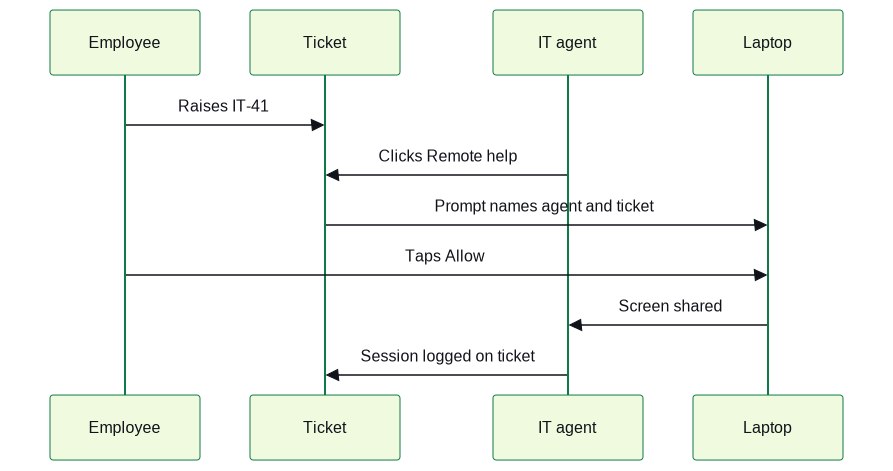
In ilane, IT clicks Remote help on the ticket and ilane already knows the laptop. The link works on that one device and only for the person who asked. Sessions run on Mac, Windows and Linux through the agent that’s already installed.
How should IT handle remote access to servers and containers?
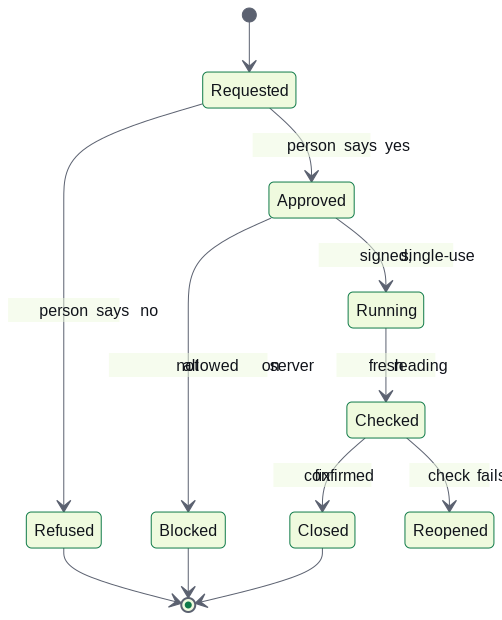
Servers can allow unattended access, but only on machines you’ve named, with narrow, pre-approved actions and every step recorded.
- Name the servers. Keep a list of which machines allow unattended access, and keep every other machine attended-only.
- Prefer named actions to open shells. “Clean up Docker images” or “restart this service” is easier to approve, audit and repeat than a free-form command line.
- Match approval to risk. Low-risk actions can run on their own. Changes need a confirmation, and destructive actions need two people.
- Keep credentials short-lived. Admin rights should expire automatically, and requests shouldn’t be reusable.
- Check the result. Record what ran, then confirm with a fresh reading that the problem is actually gone.
ilane’s security model works this way:
- Each server keeps its own list of fixes it allows.
- Requests are signed, short-lived and single-use.
- ilane runs built-in fixes rather than sending shell commands.
- Serious actions need a second approver.
- Temporary admin rights are withdrawn after 15 minutes.
- Every step is recorded, followed by ilane’s own reading of the result.
How do session logs support SOC 2 and ISO 27001 audits?
Session logs turn “we control remote access” from a policy statement into records the system generated and an auditor can sample.
SOC 2 uses the AICPA’s Trust Services Criteria, 61 criteria across five categories. Remote access falls mainly under CC6, the logical access group, and CC7, system operations. CC6.1 expects the organisation to put logical access security in place over protected information assets.
In ISO 27001:2022, Annex A control 8.15 (Logging) requires organisations to produce, store, protect and analyse logs of activities, exceptions, faults and relevant events.
In practice, an auditor picks a session and follows it: ticket, requester, device, consent, duration, outcome. The test fails when any link is missing, such as a session with no ticket or a ticket that just says “remoted in, fixed”. It also fails when the log can be edited.
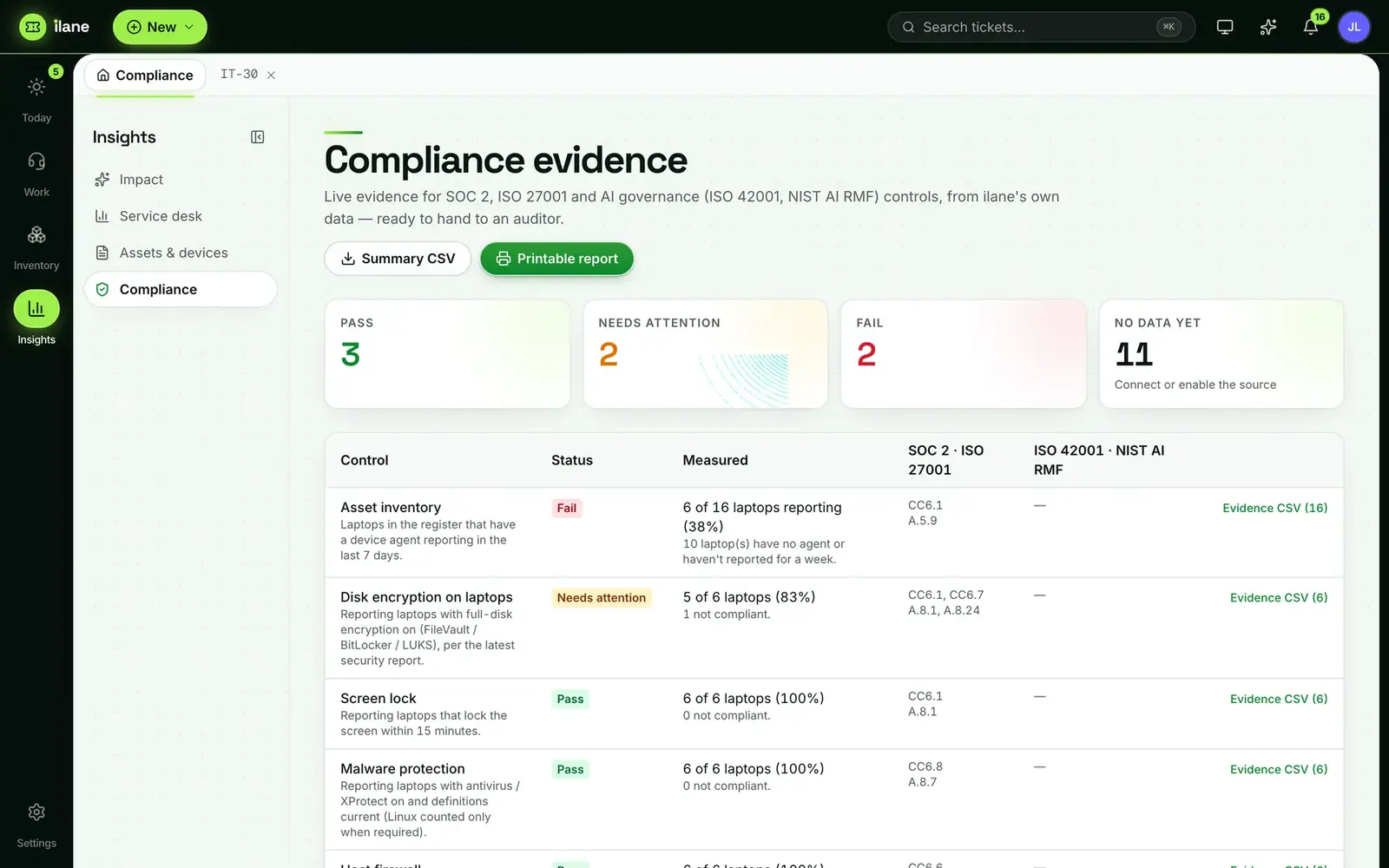
ilane’s compliance view maps controls to SOC 2 and ISO 27001 from live data and exports evidence CSVs on demand. Its audit log is tamper-evident. Each entry carries a fingerprint of the one before it, entries are kept for at least a year, and they can’t be updated or deleted through the app or the database.
What should you look for in a remote support tool?
Look for a tool that requires consent by default, starts from the ticket, logs automatically and keeps unattended access limited to machines you name.
- Per-session consent on laptops, with no admin override that turns on silent mode.
- Sessions that start from the ticket, with no codes to read out.
- An automatic log on the ticket covering requester, device, consent and timing.
- Unattended access limited to servers you choose.
- Mac, Windows and Linux coverage from one agent.
- A tamper-evident audit log with retention that covers your audit period.
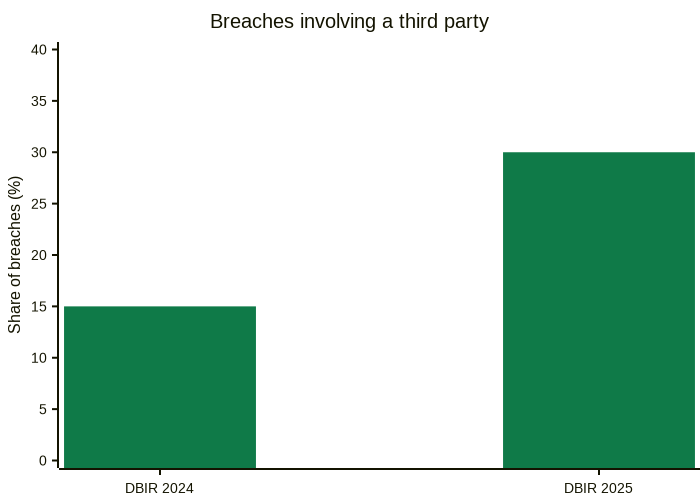
- Clarity on where sessions are routed. A remote support vendor is a third party with a route to every machine. Verizon’s 2025 DBIR found that breaches involving a third party doubled from 15% to 30%.
ilane’s remote service is open source and runs next to your own ilane instance, so sessions don’t pass through a third party. ilane itself can be self-hosted. For a full list of criteria and a pilot plan, see how to choose a remote support tool for IT teams.
Conclusion
Consent-based remote support comes down to three rules: the person says yes every time, every session belongs to a ticket, and unattended access is limited to machines nobody sits at. Follow them and the log can answer an auditor’s questions without anyone rebuilding the history afterwards.
To see a session start from a ticket, wait for Allow and land on the record, book a demo.
Frequently asked questions
Is user consent legally required for remote desktop support?
It depends on where you operate and on your employment contracts, so check with your legal team. Data protection regulators such as the UK ICO expect any monitoring of workers to be lawful, fair and transparent. Asking for consent on every session is a simple way to meet that expectation for screen access.
Should we record video of remote support sessions?
Usually not by default. A log of who connected, why, when and with whose approval meets most audit needs. Full video captures personal data that has nothing to do with the fix. If you do record video for specific cases, say so in the consent prompt and set a retention period.
What if the employee isn’t at their laptop when IT needs access?
Wait, or arrange a time through the ticket. Unattended access on employee laptops removes the person’s ability to refuse, so keep it for servers and other machines nobody sits at.
How long should remote session logs be kept?
Keep them at least as long as your audit period, plus enough time to investigate incidents after the fact. ilane keeps audit log entries for at least a year.
Can ilane provide remote access to servers without a person present?
Yes, but only on the servers you choose. Server actions go through built-in fixes, not open commands, and each one needs approval that matches its risk. Each step is recorded and then checked with a fresh reading.