Updated
RMM and MDM are different jobs. MDM is mainly about laptop policy and posture. RMM is mainly about server health and working on machines remotely.
 Watch the film · 3:28
MDM (mobile device management) keeps company laptops and phones configured, encrypted and on policy, and can lock or erase them when they’re lost. RMM (remote monitoring and management) watches the health of servers and endpoints, patches them and lets IT work on them remotely. Most 50–1,000 person companies need both jobs, ideally from one agent and one queue.
What is the difference between RMM and MDM?
MDM controls how a device is set up. RMM watches how a device is running and lets you act on it from a distance.
The names come from different places. MDM started with phones and is now the standard way to manage laptops. Apple devices have a built-in framework for device management. Microsoft describes MDM as a model where the organisation controls all aspects of the device and can remotely wipe it. RMM grew up with managed service providers. CISA defines it as software installed on an endpoint to continuously monitor a machine’s health and status, along with remote unattended administration.
| MDM | RMM | |
|---|---|---|
| The question it answers | Is this device set up the way we require? | Is this machine healthy right now, and can I fix it from here? |
| Typical devices | Company laptops, phones, tablets | Servers, workstations, network gear |
| Core jobs | Enrolment, security settings, app control, lock and wipe | Health monitoring, alerts, patching, scripts, remote sessions |
| Built on | Operating-system management frameworks | An installed agent that reports in |
| Main risk | Pushing a setting without knowing whether it took effect | Powerful remote access that attackers can misuse |
What does MDM do for company laptops?
MDM enrols a laptop, applies a security baseline and gives IT a way to lock or erase it.
In practice, an MDM covers four things:
- Enrolment. Company-owned Macs can enrol on their own during first setup through Apple’s Automated Device Enrollment in Apple Business or Apple School Manager.
- Configuration. Disk encryption (FileVault, BitLocker), firewall, screen lock, update rules and blocked apps are pushed as profiles or policies.
- Apps. Install required software and block software you don’t allow.
- Lost devices. Lock or wipe a laptop that has gone missing.
MDM is weak in three places. It confirms that a setting was sent, but that’s not the same as showing the laptop is healthy today. Linux laptops are usually poorly covered. And it doesn’t look at servers at all. Our guide What is Mac MDM? explains how Apple enrolment and profiles work, and what MDM can’t tell you.
What does RMM do for servers and endpoints?
RMM puts an agent on each machine so IT can watch its health all the time and patch, run scripts or connect without being there.
The NSA describes RMM as software that is commonly used by managed service providers and help desks for network management, endpoint monitoring and remote work on hosts. A typical RMM tool covers:
- Disk, CPU, memory and service monitoring, with alerts
- Operating-system and third-party patching
- Scripts run across many machines at once
- Remote sessions, including unattended access to machines nobody sits at
The power is also the risk. A joint CISA, NSA and MS-ISAC advisory warns that attackers use legitimate RMM software as a backdoor for persistence and command and control, and that RMM software generally does not set off antivirus. The agencies recommend auditing installed remote access tools and using application controls to block RMM software you haven’t approved. When you evaluate a tool, look hardest at unattended access and free-form script execution.
Where do RMM and MDM overlap, and where do they leave gaps?
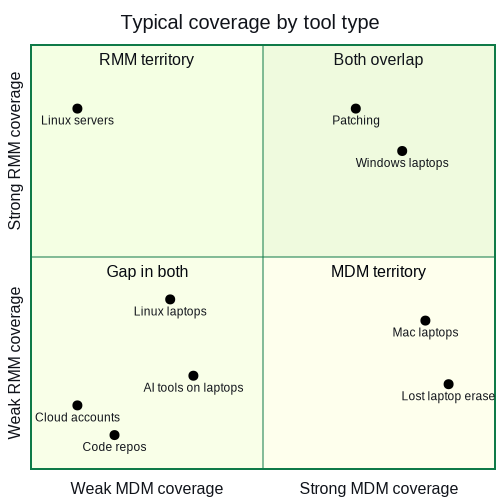
Both put something on your endpoints, and both can patch and report. The gaps fall between them: servers versus laptops, a setting sent versus the device’s actual state, and alerts versus tickets.
Where they overlap: Windows laptops are often covered by both. Patching and basic inventory show up in both kinds of product.
Where coverage is strongest for one side: Mac laptops and lost-laptop erase are MDM work. Linux servers are RMM work. How well a given RMM handles Macs varies by product, so test it on your own machines.
Where both usually leave gaps:
- Linux laptops. They often fall between the two tools.
- Cloud accounts, Kubernetes and code repositories. These aren’t endpoints, so neither tool looks at them.
- AI tools on laptops. Coding agents, MCP servers and local models are software on laptops, but neither category was built to sort them into approved and blocked.
- Proof. Neither tool decides when a help desk ticket is really fixed.
Do growing companies need RMM, MDM or both?
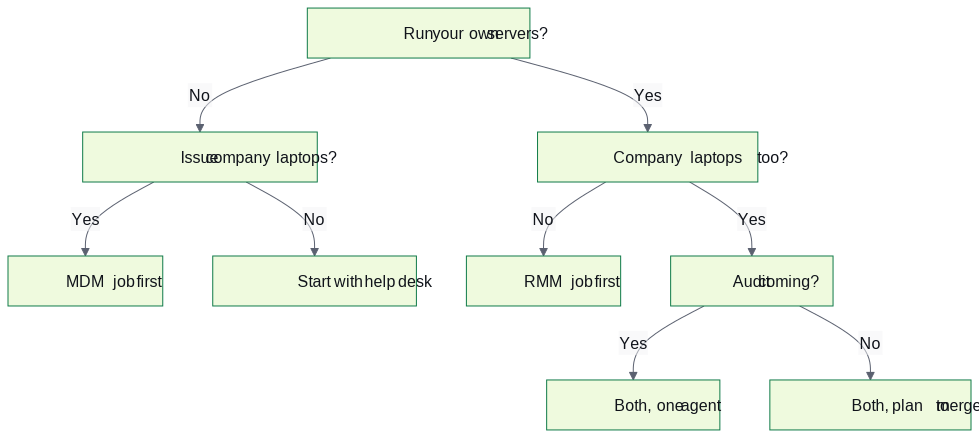
Most companies need both jobs once they run their own servers and have more than a handful of company laptops. The real question is whether you buy them as two tools or one.
Answer two questions: do you run servers, and do you issue laptops?
- Company laptops, no servers of your own. Start with MDM-style laptop management and a help desk.
- Servers, but people mostly use their own devices. Start with server monitoring, and control access to internal apps by checking the device instead of trusting the network.
- Both. You need both jobs. If an audit such as SOC 2 or ISO 27001 is coming, auditors will ask for evidence from laptops and servers alike. Two consoles means two exports to reconcile, so one agent covering both is the simpler route. Without audit pressure, two tools can work for a while, but plan to merge them.
ilane was built for the “both” case. One light agent runs on Mac, Windows and Linux laptops, checking encryption, firewall, updates and screen lock all day. The same agent runs on Linux servers, installed as a system service or a Docker container, where it watches disk, patches and containers.
What happens to tickets when RMM and MDM live in separate tools?
Tickets lose context and get closed because someone said so, since the help desk can’t see what either console sees.
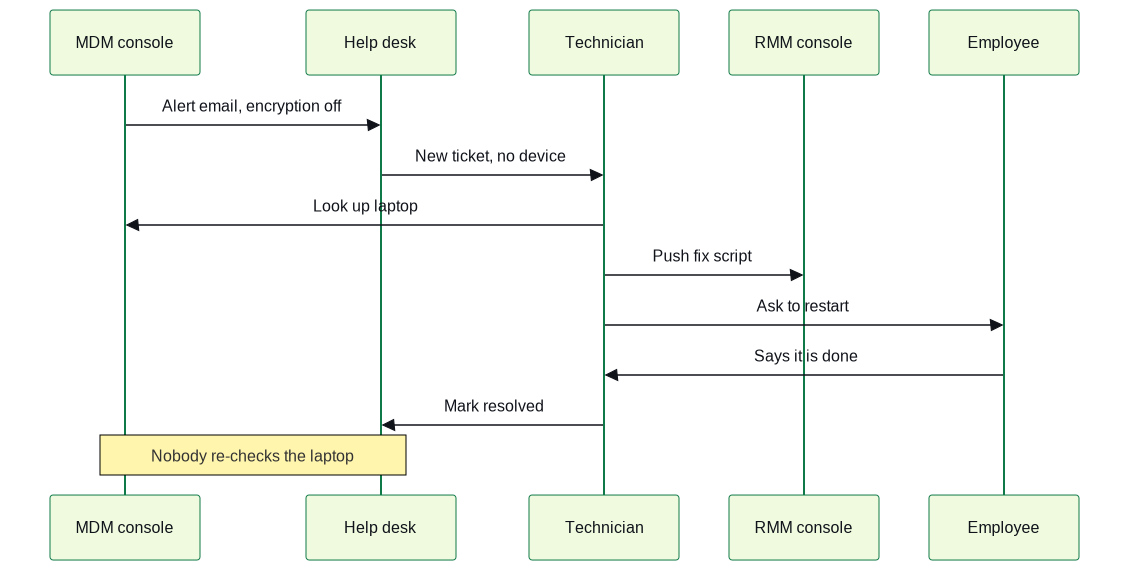
Here is a common example. The MDM console finds a laptop with encryption off and sends an alert email. The help desk opens a ticket that doesn’t know which device or person it’s about. A technician looks the laptop up in one console, maybe pushes a script from the other, and asks the employee to restart. The employee says it’s done, and the ticket is marked resolved. Nobody checks the laptop again.
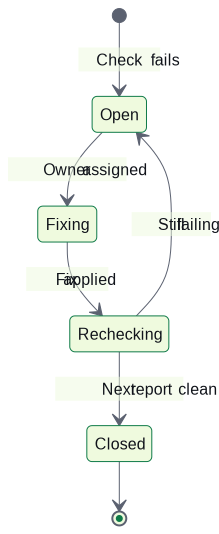
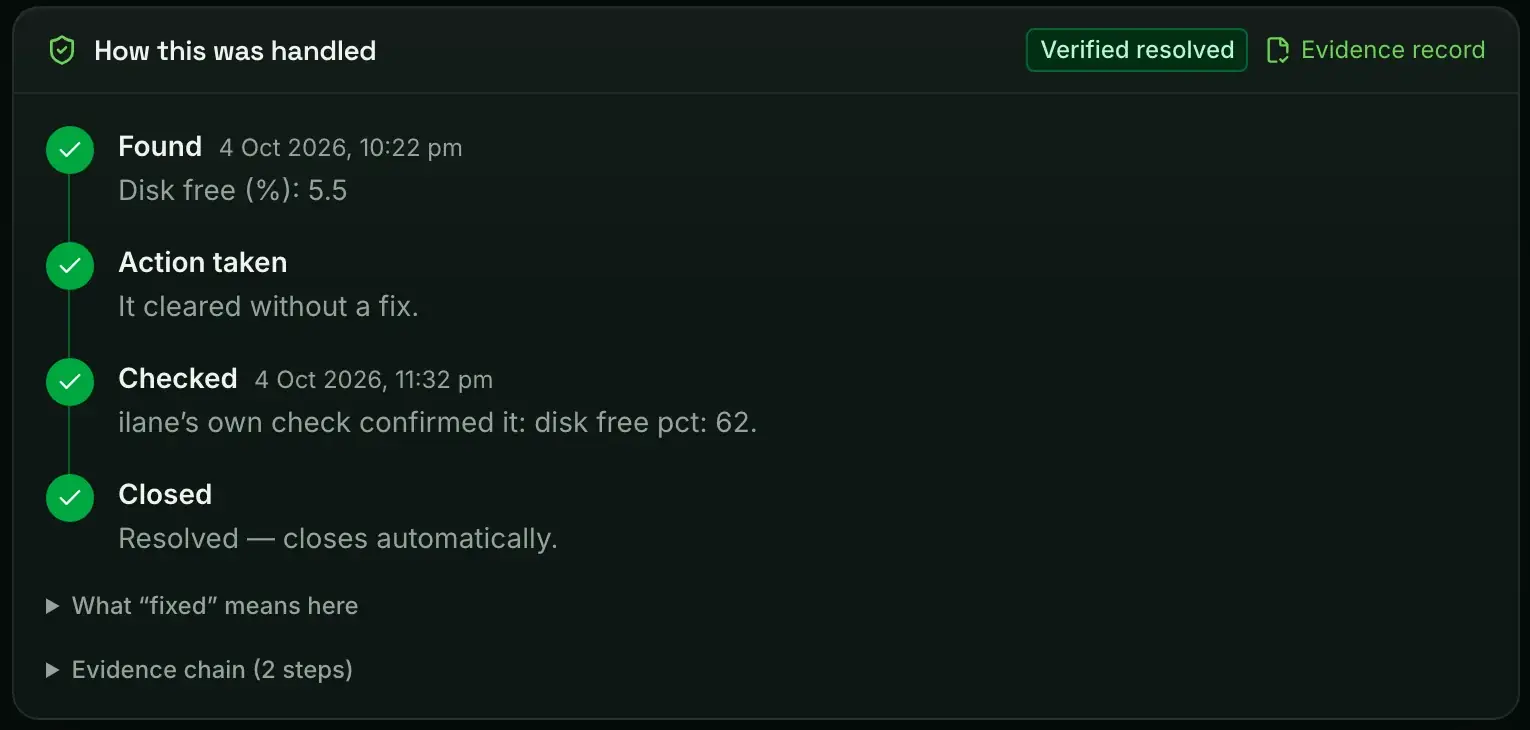
When the help desk, the laptops and the servers share one database, the ticket arrives with the device and the person already attached. In ilane, each failing check opens one ticket for one owner. The ticket closes only when the next report from that device is clean. If the problem is still there, the same ticket reopens. How verified resolution works covers the full loop.
What should you check before choosing an RMM or MDM tool?
Test any tool on your own mixed fleet against criteria you can verify, not against a feature list.
- Coverage. Does it cover every operating system you run, including Linux laptops and servers?
- State, not settings. Does it report whether encryption is actually on today, or only that a profile was sent?
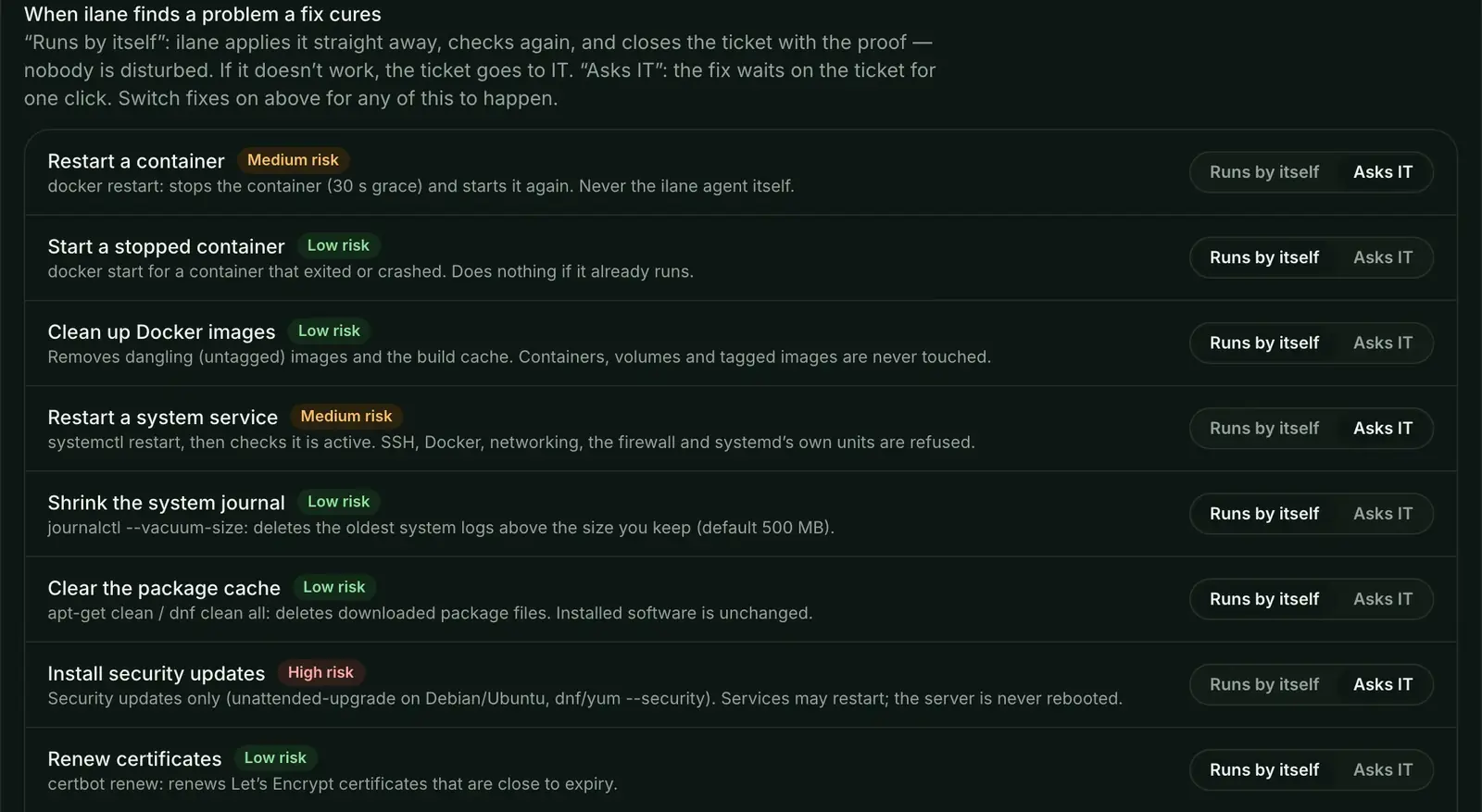
- Control over fixes. Are automatic fixes off until you switch them on, and can you choose which ones run by themselves and which ask IT first? ilane works this way.
- Approvals for destructive actions. In ilane, locking a lost laptop takes one approval and erasing it needs a second person. Ask every vendor how they guard a wipe.
- Remote access rules. Given CISA’s warning about RMM abuse, look for a prompt the person must accept, a log for every session, and unattended access only where you allow it. In ilane, the person taps Allow every time, and unattended access exists only on servers you choose.
- Tickets in the same place. Does a finding become a ticket with the device and owner attached, or an email someone has to copy across?
- Verification. Does the ticket close only after the tool re-checks the device?
- Privacy. Can employees read what the agent collects? ilane publishes its list, and the agent never collects keystrokes, screenshots, browsing history or file contents.
- Network. Does it need inbound firewall ports? ilane’s agent connects out over HTTPS.
- Pricing model. Per technician or per device? ilane quotes per laptop, desktop and server running the agent.
Conclusion
MDM keeps laptops on policy. RMM keeps servers healthy and reachable. Growing companies usually need both jobs. The cost of running them as separate tools shows up in the help desk: tickets with no context, and tickets closed with nobody checking. Pick a tool that covers your whole fleet, makes risky actions require approval, and only closes a ticket after a clean re-check.
To see one agent handle laptops and servers on real data, book a demo.
Frequently asked questions
Can MDM monitor servers?
Not really. MDM is built around configuring and securing end-user devices, while server health monitoring is what RMM tools do. If you run your own servers, you need something that watches disk, services and patches all the time and alerts on problems.
Do we need MDM if we already have an RMM tool?
Probably yes, if you issue company laptops. RMM tools monitor and patch, but enrolment, security baselines and lock or wipe for lost devices are MDM jobs. On Macs in particular, those rely on Apple’s device management framework.
Is RMM software a security risk?
It can be. CISA, NSA and MS-ISAC have warned that attackers use legitimate RMM software to stay inside networks, and that it usually doesn’t trigger antivirus. Approve one remote tool, block the rest with application controls, require user consent for sessions on laptops, and log every session.
Can one tool replace both RMM and MDM?
For many 50–1,000 person companies, yes, if one agent covers every operating system you run and the servers too. ilane’s agent runs on Mac, Windows and Linux laptops and on Linux servers. Test any tool on a pilot group of your own devices before committing.