Updated
Mac MDM (mobile device management) is the management framework Apple builds into macOS. It lets a company configure, secure, lock and erase its Macs remotely. A management service sends configuration profiles and commands, and the Mac applies them. If you add Apple Business Manager, company Macs enrol themselves during first setup, so encryption, screen lock and update rules are in place from day one.
What is Mac MDM, in plain terms?
Mac MDM is Apple’s built-in way for an organisation to manage its Macs remotely. You need a management service to send instructions, and macOS is already designed to accept them.
Apple builds a management framework into macOS. IT teams use it to configure settings, deploy apps, monitor compliance, query devices and remotely erase them. The “MDM” you buy is the service on the other end. It does three jobs:
- Configure. It sends configuration profiles that set up settings, accounts, restrictions and credentials.
- Command. It tells a Mac to lock, erase, install an app or update.
- Query. It asks the Mac for facts. Apple lists the serial number, MAC address, OS version, installed apps and, on Macs, FileVault encryption status.
Apple also sets limits on purpose. Whatever deployment model you use, Apple says the framework “can never access personal information, including email, messages, and browser history.”
How does MDM work on a Mac: enrolment, profiles and Apple’s framework?
A Mac enrols with your management service. After that, the service sends it profiles and commands, and the Mac reports back.
- Register the Mac. Company-owned Macs are listed by serial number in Apple Business Manager. Newer Apple documentation calls it “Apple Business”. Each Mac is assigned to your management service there.
- Enrol. An enrolment profile, or Apple’s account-driven enrolment, makes the Mac trust your service. Users can also enrol their own devices.
- Apply profiles. Policies arrive as profiles: FileVault, firewall, screen lock, restrictions, Wi‑Fi and certificates.
- Send commands and queries. The service can lock, erase or install, and it can ask the Mac for its current state.
- Keep state with declarative management. With declarative device management, the Mac applies configurations on its own and keeps them in place. Apple’s update tooling also lets the service subscribe to status reports that the Mac sends when key values change, such as its OS version or a failed update.

What is the difference between user-approved enrolment and automated enrolment via Apple Business Manager?
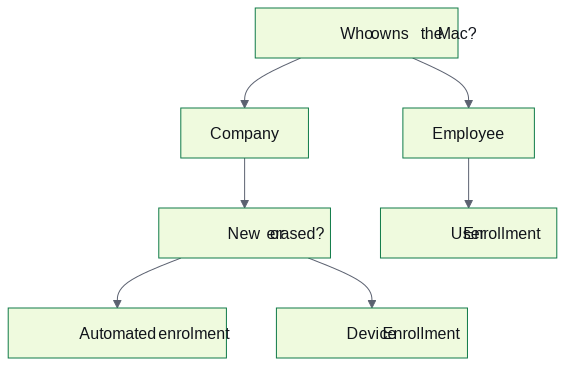
With automated enrolment, the Mac enrols itself at first boot and is supervised. With user-approved enrolment, a person installs and approves the management profile on a Mac that is already in use.
Apple added User Approved MDM in macOS 10.13.2. It gives the management service more privileges than an enrolment nobody approved. This matters in practice. For example, Apple’s FileVault payload requires user approval.
Automated Device Enrollment (ADE) works through Apple Business Manager. It supervises Macs running macOS 10.14.4 or later. It can also hold the Mac in Setup Assistant until critical configurations and apps are installed. On a supervised Mac, you can stop the user from unenrolling, whether through System Settings or the profiles command-line tool.
Device Enrollment is for organisation-owned Macs that are already deployed. On macOS 11 or later, this also supervises the Mac. Some Macs run macOS 14 or later and are already listed in Apple Business Manager. On those, macOS can show a full-screen enrolment prompt. The user can choose “Not now” once, which hides it for eight hours. After that, they have to enrol or erase the Mac.
Apple’s recommended enrolment methods for Macs:
| Scenario | Method | Supervised on Mac? | Minimum macOS |
|---|---|---|---|
| New or erased company Mac | Automated Device Enrollment | Yes | 12.0.1 |
| Company Mac that also needs personal apps | Account-driven Device Enrollment | Yes | 14 |
| Personally owned Mac (BYOD) | Account-driven User Enrollment | No | 14 |
What can Mac MDM enforce: FileVault, firewall, screen lock, updates, lock and erase?
MDM can enforce the main security baseline on a Mac and act on a lost one. Each control has a detail you should know about.
| Control | What MDM does | Watch for |
|---|---|---|
| FileVault | It can require FileVault during Setup Assistant and escrow the recovery key to your service. | The enrolment must be user-approved. On Apple silicon, institutional recovery keys provide no functional value, so escrow personal recovery keys. |
| Firewall | A configuration profile turns the built-in firewall on and keeps it on. | A profile only states the setting you want. Check that it reports as on. |
| Screen lock and password | Apple lists password and policy enforcement as built-in features. | If several sources set it, macOS merges policies and enforces the strictest. |
| Updates | Declarative management sets enforcement deadlines. In the 24 hours before a deadline, notifications ignore Do Not Disturb. At the deadline, macOS force-quits apps and restarts if necessary. | Legacy update commands stop working in macOS 27, which leaves declarative management as the only way to enforce updates. |
| Lock | It remotely locks a missing Mac. | The Mac has to receive the command. |
| Erase | It sends EraseDevice, which runs Erase All Content and Settings on macOS 12.0.1 or later. |
Apple silicon Macs need a bootstrap token held by your management service. |
What can’t MDM alone tell you about a Mac’s real health?
MDM tells you what you sent to a Mac and what the Mac reports when asked. It isn’t built to tell you, all day, whether each Mac is actually healthy or whether a fix worked.
Apple’s device information and security queries cover identity, capacity, OS, battery level and security switches such as FileVault and Find My. That leaves gaps:
- Silent Macs. A Mac that has stopped checking in can’t answer queries or receive a lock command. You only notice if something watches for the silence.
- Things outside the query list. Apple’s lists don’t include risky browser extensions, worn batteries, failing disks, outdated apps with known vulnerabilities, paid apps installed without a licence, or AI tools and MCP servers.
- Unenrolment. Users can remove a non-supervised enrolment. A Mac you think is managed may not be.
- Ownership. MDM has no idea which person, ticket or deadline belongs to a drifted setting.
- Proof. When the Mac acknowledges a command, that doesn’t confirm the problem is gone, and an auditor will want to see the second fact.
These gaps aren’t flaws. MDM is a configuration channel with privacy limits, not a monitoring and accountability system.
Does a growing company actually need MDM for its Macs?
Yes, if the company owns Macs that hold customer or company data. You need to show that every Mac is encrypted and that you can lock or erase a lost one.
The CIS Critical Security Controls say MDM-type tools can support asset inventory for mobile end-user devices. Safeguard 4.1 asks you to maintain a documented secure configuration process for end-user devices. MDM is the usual way to apply that process on Macs.
Make it a priority if:
- New hires get Macs shipped to them, and IT never touches the machine.
- You’re preparing for SOC 2 or ISO 27001. Auditors will ask how you know every laptop is encrypted and locks automatically. Our guide to collecting SOC 2 and ISO 27001 laptop evidence covers what they look for.
- You’ve lost a laptop, or someone left and their laptop stayed in a drawer.
- Customers send security questionnaires that ask about endpoint controls.
It can wait if every device is personal and nothing sensitive lives on it. Even then, User Enrollment keeps company data separate without managing the whole Mac.
How do you check that a Mac stays on policy after it’s enrolled?
Measure each Mac continuously from the device itself. Turn every drift into a ticket with one owner, and close it only when a fresh reading confirms the fix.
A workable routine:
- Write down the desired state. For example: FileVault on, firewall on, screen lock at five minutes or less, no updates overdue, device management enrolled.
- Check all day, not at audit time. Monthly exports miss the week a firewall was off.
- Give each drift one owner. One problem, one ticket and one clock.
- Fix safe things automatically and ask for risky ones. Turning encryption back on is routine. Erasing a laptop is not.
- Re-check before closing. If the next reading still fails, reopen the same ticket instead of opening a new one.
- Keep the record. Save before and after readings and the approvals, because they become your audit evidence.
This is how ilane’s Devices & MDM works. A light agent on every Mac checks posture all day: disk encryption, firewall, screen lock, overdue updates, browser extensions and whether the Mac is enrolled in device management. When a Mac drifts, ilane opens a ticket with the device and the person attached. Fixes you switch on run by themselves, such as turning on encryption or the firewall, setting screen lock or installing updates. Everything else waits for IT. Locking a lost laptop takes one approval, and erasing it needs a second person, as described on our security page. Every employee can read exactly what the agent checks.
A ticket closes only when ilane’s own next reading says the problem is gone. A fix that merely reports success doesn’t count. That approach is verified resolution.

Conclusion
Mac MDM is Apple’s framework for configuring and controlling company Macs. Apple Business Manager gets them enrolled from first boot, and profiles and commands enforce FileVault, firewall, screen lock, updates, lock and erase. MDM doesn’t tell you which Macs have quietly drifted, who owns each problem, or whether a fix held. For that you need continuous checks from the device and proof before anything closes.
If you want to see what this looks like on your own Macs, book a demo. We’ll enrol a laptop, fix one thing together and watch ilane confirm the fix.
Frequently asked questions
Is Apple Business Manager the same as MDM?
No. Apple Business Manager is Apple’s portal where your company’s devices are listed by serial number and assigned to a management service. The MDM service is what actually sends profiles and commands to the Mac. You use them together: Apple Business Manager sends a new Mac to your MDM service, and the service manages it.
Can MDM see employees’ personal data on a Mac?
No. Apple states that the MDM framework can never access personal information such as email, messages or browser history. MDM sees management data: device identifiers, OS version, installed apps and security settings like FileVault status.
Can a user remove MDM from their Mac?
It depends on supervision. Macs enrolled through Automated Device Enrollment, and Macs on macOS 11 or later enrolled through Device Enrollment, are supervised. On a supervised Mac, your service can stop the user from unenrolling. Users can remove a non-supervised enrolment themselves, so watch enrolment status continuously.
Do existing Macs need to be wiped to get under management?
No. Device Enrollment exists for company-owned Macs that are already in use, and on macOS 11 or later it also supervises the Mac. Automated Device Enrollment’s zero-touch setup applies to new or erased Macs, so many teams move existing Macs over when they’re next reissued.
What’s the difference between MDM and a device agent?
MDM uses Apple’s built-in framework to push settings and send commands. An agent is software on the Mac that reads the device’s actual state on a schedule and reports it, including things outside MDM’s query list, such as browser extensions or disk health. Many teams use both: MDM to enforce settings, and an agent to show whether the Mac really stays on policy.
What should I look for in Mac MDM software?
Zero-touch enrolment through Apple Business Manager, FileVault encryption with escrowed recovery keys, firewall and update policies, remote lock and wipe, and reports that show which Macs are out of policy. If you also manage Windows or Linux, check that one tool covers all of them, so you don’t run a separate system for each.
Is there a free MDM for Mac?
Yes. Open-source servers such as NanoMDM and MicroMDM, and the free tiers of some commercial tools, can enrol Macs and push basic settings. They usually cap the number of devices or need you to run and secure the server yourself. See our guide to free MDM software for small business for where free options stop.