Shadow AI detection tools find the AI apps, browser extensions, accounts, coding agents, MCP servers and local models people use without approval. No single data source sees all of them: network logs see web traffic, identity data sees sign-ins, and a device agent sees what is installed and running. Buy for coverage, ownership and evidence, not dashboards.
The problem is already common. A Cloud Security Alliance research note cites a Gartner survey in which 69% of organisations suspected, or had evidence, that employees use prohibited public generative AI. In IBM’s 2025 breach research, one in five organisations reported a cyberattack linked to shadow AI, and those breaches cost an average of $670,000 more than at firms with little or no shadow AI. This guide covers what to look for before you buy.
What should a shadow AI detection tool actually find?
It should find every AI tool in use, who uses it, what it can reach, and whether it’s allowed.
“AI tools” now covers far more than a chat website. Your inventory should include:
- Web AI apps: chat assistants and AI writing tools used in a browser.
- Desktop AI apps: native clients installed on Mac, Windows or Linux.
- Browser extensions with AI features that read page content.
- Work-account sign-ins and OAuth grants to AI vendors.
- Coding agents and IDE assistants, including ones that run in a terminal.
- MCP servers, the connectors that give AI clients access to files, databases and other tools.
- Local models and runtimes, plus the GPUs they run on.
- AI agents your own teams build and run on your servers.
For each finding, a useful tool records the device, the person, when it was first seen and its policy status. A list of domain names with traffic counts is a starting point, not an inventory.
How do network, browser, identity and endpoint detection differ?
They look at different evidence, so each method sees a different slice of AI use.
| Method | What it sees | What it misses | Best for |
|---|---|---|---|
| Network, proxy and DNS logs | Traffic to known AI domains, volumes, users on the network | Laptops off the corporate network, local models, tools not in the vendor’s catalogue | Spotting popular web AI apps |
| Browser extension | Sites visited, AI extensions, sometimes pasted content | Desktop apps, terminals, IDEs, other browsers | Web use inside one managed browser |
| Sign-in and OAuth discovery | AI apps reached with a work account, and the permissions granted | Personal accounts, tools with no login, anything local | Finding AI apps connected to company data |
| Device agent | Installed apps, extensions, running processes, agent and MCP config, local models | Personal, unmanaged devices; prompt content (by design) | Complete coverage of company laptops and servers |
Most mature programmes combine at least two. If you can only start with one, pick the method that covers where your sensitive work actually happens. For many 50–1,000 person companies with remote staff and engineers, that is the laptop.
Which shadow AI do network-only tools miss: coding agents, MCP servers and local models?
Network tools miss anything that runs on the laptop itself or whose traffic looks like ordinary developer activity.
- Coding agents run in terminals and editors and call model APIs over the same connections a developer uses all day. A proxy may log the request but rarely knows which agent made it, which repository it touched or what permissions it has.
- MCP servers are often local. The Model Context Protocol security guidance describes local MCP servers as running on the user’s own machine, where they may have direct access to the system. A config file that gives an AI client access to a home directory produces no new domain in your logs.
- Local models are downloaded once and then run offline. After the download there is nothing on the wire to see.
- Off-network laptops: unless all traffic is forced through your proxy, a laptop on home Wi-Fi is invisible.
The cost of these blind spots is time. The same CSA note cites research putting the median at 403 days before an unauthorised AI tool is detected.
What criteria matter when comparing shadow AI detection software?
Compare tools on coverage, attribution, what happens after detection, privacy and evidence, in that order.
- Category coverage. Ask the vendor to detect a coding agent, an MCP server and a local model live on a test laptop, not on slides.
- Off-network coverage. Does detection work on a laptop at home with no VPN?
- Attribution. Every finding should name a device and a person, not just an IP address.
- Policy states beyond allow/block. You need a middle ground for tools you accept with conditions.
- Workflow. A blocked tool should become a ticket with one owner. Ask how the tool confirms removal, not just whether someone clicked “resolved”.
- Privacy controls. Is the list of what is collected published to employees? Can you switch whole areas off?
- Evidence. Can you export the register and the history of decisions, mapped to the frameworks you report against?
- Deployment and data location. Cloud only, or can you run it on your own server?
- Catalogue freshness. How are new AI tools recognised, and how fast?
How do you run a shadow AI detection assessment in a two-week pilot?
Pick a representative group, plant a known set of AI tools, and score each candidate tool on what it finds and what it does next.
- Days 1–2: scope. Choose 20–40 devices across engineering, sales, finance and leadership, mixing operating systems and remote staff. On a few test laptops, plant a known set: a desktop AI app, an AI browser extension, a terminal coding agent, an MCP server configuration and a local model runtime.
- Days 3–7: observe. Collect data without acting on it. Note how long until first findings appear.
- Days 8–10: triage. Sort findings into approved, tolerated or blocked. Push one blocked tool through the full workflow: ticket, owner, removal, re-check.
- Days 11–14: score. Measure detection of the planted set, unknown tools found, false positives, time from detection to a named owner, and how usable the evidence export is.

The planted set matters most. Without it you can’t tell “nothing found” from “nothing seen”.
What should happen after a tool is found: approve, tolerate or block?
Every finding should get a status and an owner, and a blocked tool should only count as dealt with once a fresh check confirms it is gone.
Decide using a short set of criteria: what data the tool touches, whether it uses an enterprise or personal account, what the vendor’s terms say about training on your data, what permissions it has (an MCP server with shell or file access is a different risk from a grammar checker), and whether there’s a real business need.
- Approved: on the register, provisioned with company accounts, part of onboarding.
- Tolerated: allowed with conditions, such as no customer data, with a date to review it again.
- Blocked: a ticket goes to an owner, the person is offered an approved alternative, and the tool is removed.
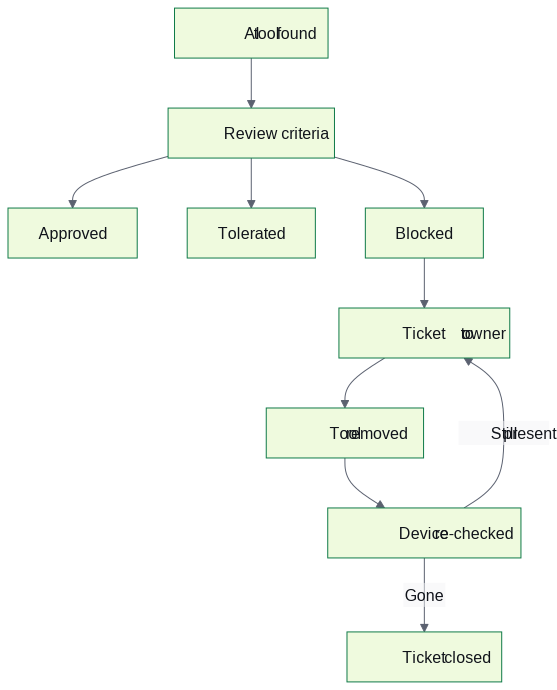
This is how ilane AI governance works. The same light agent that checks laptop posture lists AI apps, coding agents, MCP servers and local models on laptops and servers, and each one is approved, tolerated or blocked. A blocked tool opens a ticket to one owner, and the ticket closes when the next report from the device is clean. Recent releases added signed-in AI accounts, coding-agent guard rails, GPUs and AI spend. For the hands-on version of this process, see our guide on how to detect shadow AI tools on employee laptops.
How do you detect shadow AI without spying on employees?
Inventory software and configuration, not people’s prompts or screens, and tell employees exactly what is collected.
- Collect presence, not content. Knowing an AI app is installed is enough to govern it. Prompt capture is a separate, much more intrusive decision.
- Publish the list. Employees should be able to read what the agent checks and what it never collects. ilane publishes the full list of what its device agent collects, taken from the file the agent runs.
- Let admins switch areas off. Each company can turn whole areas of collection off in ilane.
- Give notice before rollout. Check what your local law requires when monitoring company devices, and announce the programme before the agent arrives.
- Offer an alternative with every block. People turn to shadow AI because it helps them. An approved option keeps the work visible.
How does detection feed ISO 42001 and NIST AI RMF evidence?
Both frameworks expect you to know which AI systems you use, so a live, owned inventory with decisions and closed tickets becomes your evidence.
ISO/IEC 42001 sets requirements for an AI management system, and ISO notes that it applies to organisations that develop, provide or use AI systems, so buying AI tools is in scope. The NIST AI RMF includes GOVERN 1.6, which calls for mechanisms to inventory AI systems, and most users start with the MAP function once governance is in place.
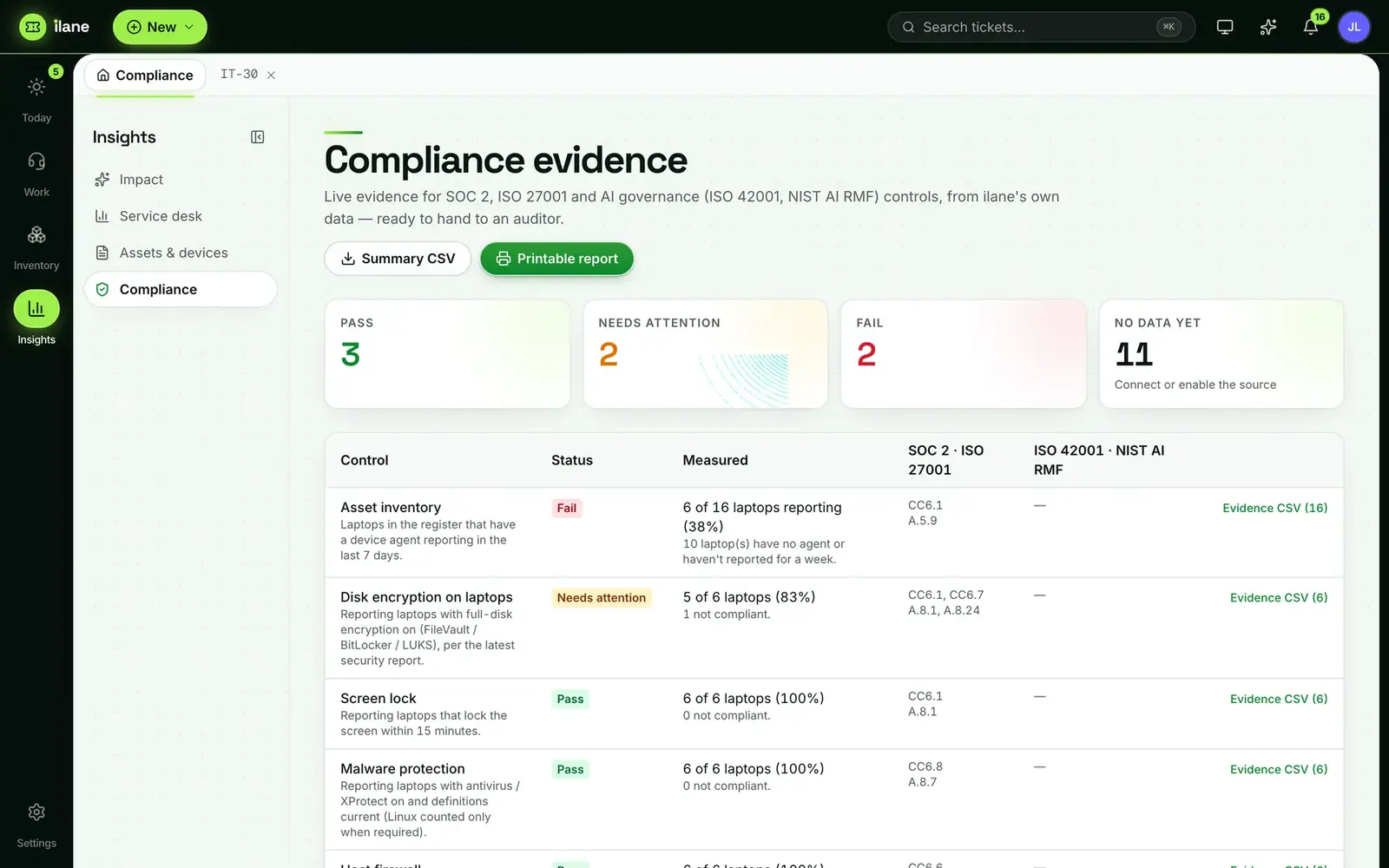
A survey run once a year can’t show either framework that the inventory is current. Continuous detection can. On ilane’s compliance page, ISO 42001 controls cover an AI system register kept from what ilane finds, the share of AI tools under policy, and removal of AI vendor access at offboarding. NIST AI RMF evidence covers Map (which AI systems are known), Measure (the behaviour of agents you build) and Manage (unreviewed shadow AI tools).
Conclusion
Network logs, browser extensions and identity data each show part of your AI use. On company laptops and servers, the device itself is where coding agents, MCP servers and local models show up. Choose a tool that covers every category, gives each finding an owner, confirms blocked tools are really gone, and is open with employees about what it collects. Then test it with a planted set in a two-week pilot before you sign.
To see what ilane finds on one of your own laptops, book a demo.
Frequently asked questions
Can a CASB or secure web gateway replace a dedicated shadow AI detection tool?
Partly. A gateway sees web traffic to AI services it recognises, but only when the laptop’s traffic goes through it. It usually can’t see local models, MCP server configurations or which coding agent made a request. Many teams keep the gateway and add device-level detection for the gaps.
Should we block all public AI tools until we have a policy?
A blanket ban tends to push use somewhere you can’t see it, like personal devices and accounts. A better first step is to take an inventory, approve one or two tools for common tasks, and block only the tools that touch sensitive data or have risky permissions. That way people have an option you can see and govern.
Does shadow AI detection cover personal devices?
Device-agent detection only covers machines with the agent installed, which usually means company-managed laptops and servers. Sign-in and OAuth discovery can show when a work account is used with an AI app from any device. For unmanaged devices, access controls on company apps matter more than detection.
How often should the AI tool inventory be updated?
Continuously, if you can. New AI apps, extensions and MCP servers appear every week, and a yearly survey is out of date within days. A device agent that reports throughout the day keeps the register current, so it can serve as evidence for ISO 42001 and the NIST AI RMF.
What’s the difference between tolerated and approved AI tools?
Approved tools are provisioned with company accounts and included in onboarding. Tolerated tools are allowed with conditions, such as no customer data, and have a review date. That middle status lets you record a decision without forcing a yes-or-no call on every tool.