Choose one IT platform when your help desk, device console, asset tracker and remote tool need sync jobs to agree, when tickets arrive without the laptop or person attached, or when you pay for more tools than you have IT staff. Keep a separate tool only where a specialist product does something your team needs and nothing else can.
The rest of this guide gives you a way to decide. It looks at four things: how many tools you run, how many sync jobs hold them together, how much context a ticket carries when it arrives, and what the stack really costs.
What does a typical IT tool stack look like at a 50–300 person company?
It usually starts as a help desk, a device (MDM) console, an asset spreadsheet and a remote support tool, and then picks up a tail of security and compliance tabs over time.
Each tool was a sensible buy when it was added. The trouble is how many there end up being. The checklist on our comparison page lists twelve that IT teams commonly pay for:
- Help desk
- Asset spreadsheet or tracker
- Endpoint or device console
- Patch management
- Remote support tool
- Cloud security dashboard
- Code-repo security tab
- Licence tracking
- Uptime monitoring
- Compliance or GRC tool
- Shadow-AI survey
- Status page
At 50 people, one person can keep all of this in their head. At 300, nobody can. Licences get lost along the way too: Zylo’s 2026 SaaS Management Index found that organisations leave an average of 36% of their SaaS licences unused, measured against recommended utilisation levels.
What breaks when the help desk doesn’t know the laptop?
Every ticket starts with questions, and nobody can prove the fix worked.
Say someone files “my laptop is slow.” The help desk has their name and email, but not the device, its disk health, its patch level or the software seats it holds. So the agent opens the device console, looks up the serial in the asset sheet, then reads a session code out over chat to start remote help. Each switch takes time. In a Harvard Business Review study, office workers toggled between apps and websites nearly 1,200 times a day. That added up to just under four hours a week spent reorienting, or about 9% of their working year.
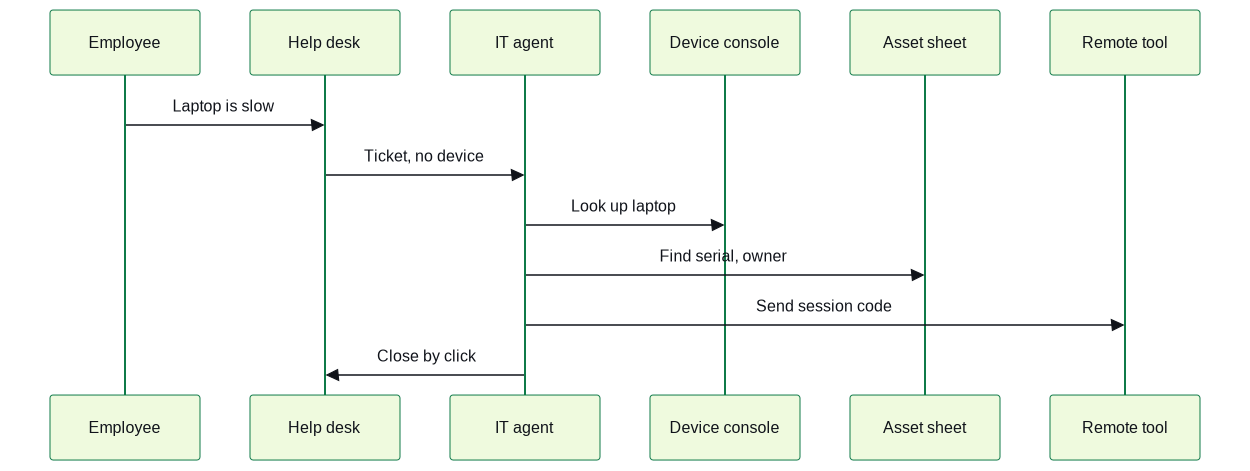
The slow tickets are the visible cost. The bigger costs are harder to see:
- Tickets close without the problem being fixed. Someone clicks “resolved,” nobody checks the device, and the same issue comes back next week as a new ticket.
- Offboarding leaks. The HR ticket closes, but a laptop or a paid seat is still sitting with someone who has left.
- Audit evidence is assembled by hand. Screenshots from four consoles, stitched together the week before the audit.
Is an integrated suite the same as a unified platform?
No. An integrated suite links separate products with connectors. A unified platform keeps tickets, devices, people and services in one database.
The difference shows up when something drifts. Connectors run on a schedule, break when a vendor changes an API, and leave records that disagree. As our compare page puts it, “integrated is not the same as one”: in a single database, the ticket, the laptop and the service are rows that point at each other, so there is nothing to sync.
| Question | Integrated suite | Unified platform |
|---|---|---|
| Where does device data live? | In a separate product, copied across | In the same database as tickets |
| What keeps records in step? | Sync jobs and connectors | Nothing is needed; it’s one record |
| What does a new ticket know? | What the last sync copied | The device, its health, the person and their seats |
| When does a ticket close? | When someone clicks resolve | Can close only after the platform re-checks the device |
| What happens when an integration fails? | Records drift quietly | There is no integration to fail |
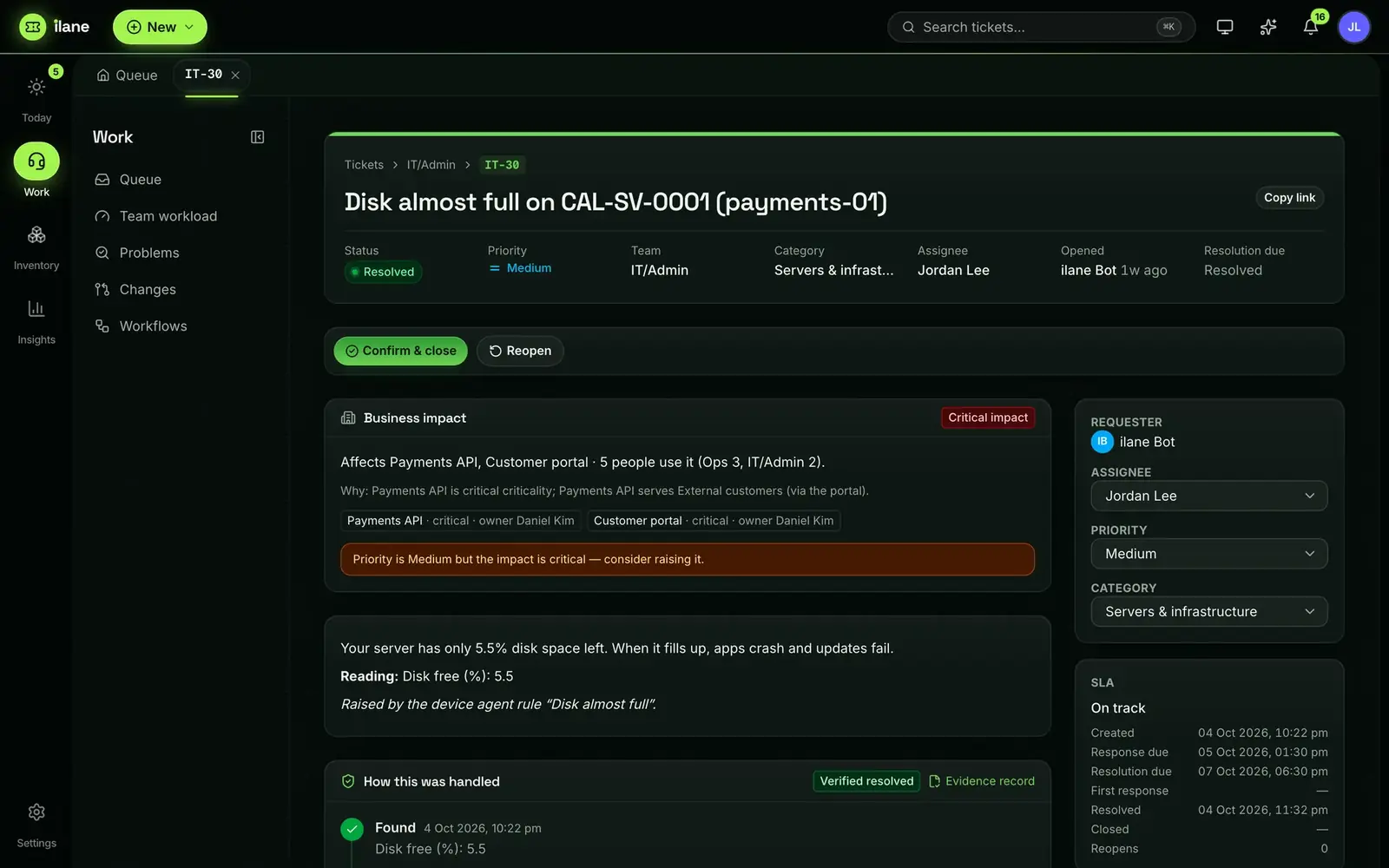
A unified data model also makes verified resolution possible. Because the platform can see the device itself, it can check whether a fix actually worked before it closes the ticket. In ilane, every ticket raised by a check carries a written definition of “fixed.” It closes only when ilane’s own next reading confirms it, and reopens if it doesn’t. You can see the full flow on how ilane works.
When do separate best-of-breed tools still make sense?
When a specialist tool does a job central to your business that a platform only covers lightly, and someone on your team owns the integration.
Keep a separate tool if most of these apply:
- Depth matters more than context. A dedicated security or engineering team uses features that a general IT platform doesn’t offer.
- A contract or regulation requires it. A customer or regulator names a specific product.
- Someone owns the connector. A named person maintains the sync and notices when it breaks.
- You’re early in a multi-year contract. Switching now costs more than waiting for the renewal date.
Large organisations make this trade-off too. In a Gartner survey reported by CSO, 46% of organisations kept SASE and XDR as distinct products that interoperate, to keep the freedom to pick best-of-breed features. The test is whether you’re choosing a tool for its depth, or keeping it out of habit.
How do you count the real cost of tool sprawl?
Add licence fees, the staff time spent keeping tools in step, and the waste the gaps hide. Looking at licence prices alone will undercount.
Work through it line by line:
- Licences. List every IT tool, its pricing basis (per agent, per device, per module) and its renewal date.
- Tier creep. Note which features you can only get on a higher tier or as an add-on.
- Integration upkeep. Count the connectors and scripts, and the hours a month spent fixing them.
- Triage time. Estimate how many minutes each ticket loses to gathering context across consoles.
- Hidden waste. Idle seats, unreturned laptops and renewals that roll over unnoticed. Our guide to reclaiming unused SaaS licences shows how to measure these.
- Audit preparation. Count the days spent collecting evidence before each SOC 2 or ISO 27001 review.
Be honest about what consolidation saves. When Gartner surveyed security leaders, 75% were pursuing vendor consolidation, but only 29% expected lower licensing spend. Most expected a better risk posture instead. For smaller IT teams, the bigger win is often fewer gaps rather than a smaller invoice.
What should a unified IT platform include on day one?
On day one it should cover the four jobs you already do, on one data model: requests, devices, assets and remote help. It should also be able to prove its fixes.
Use this as a checklist when you evaluate a platform:
- Service desk with SLAs, approvals and a catalog, where every request arrives with the device attached.
- Device agent for Mac, Windows and Linux that checks posture (encryption, firewall, patches) and turns problems into tickets.
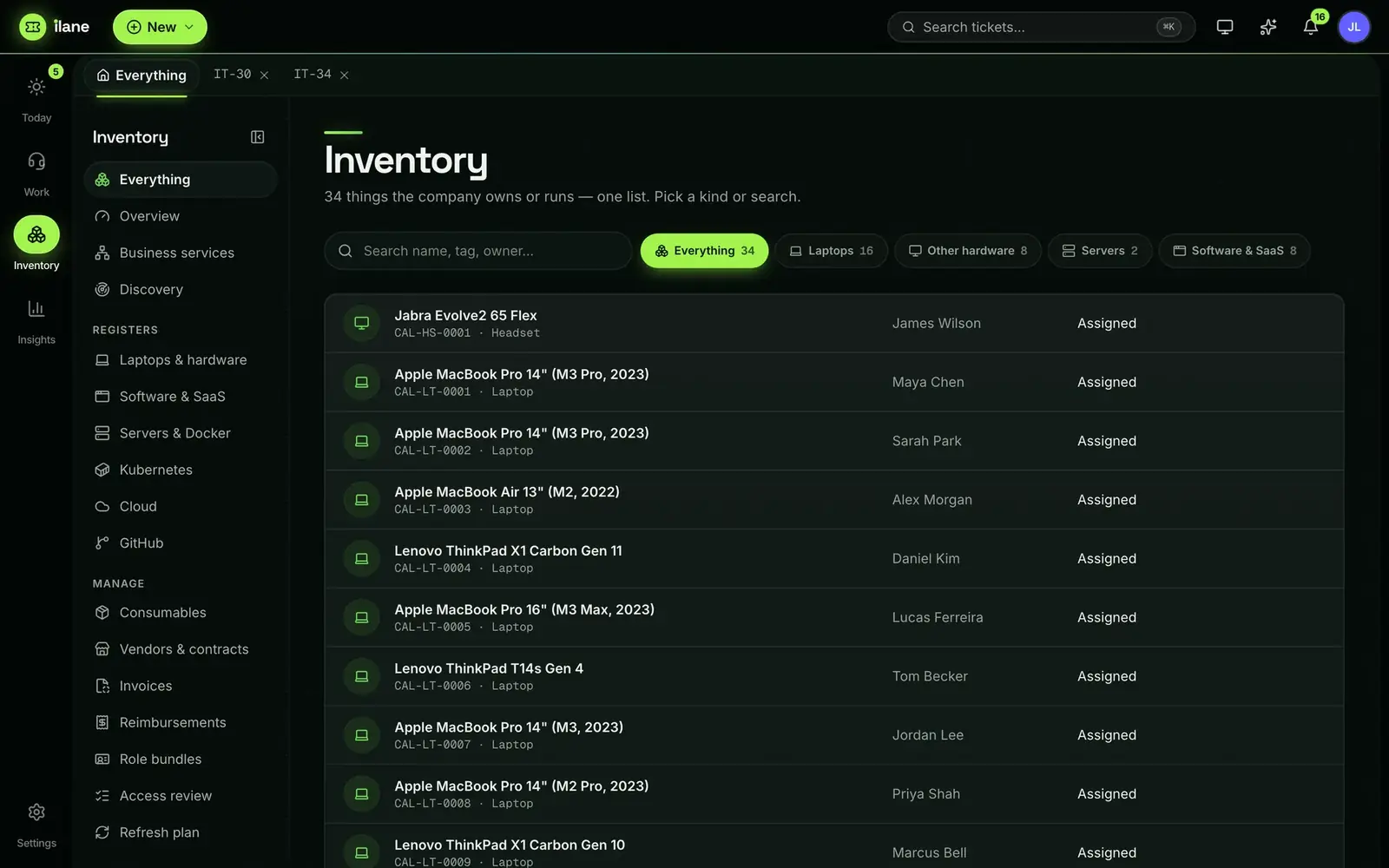
- Asset and licence register that updates itself from the agent and from handovers, and flags idle seats.
- Remote help started from the ticket, with no session codes and with the user’s consent.
- Joiner and leaver flows where offboarding can’t close until every device and seat is back.
- Verified closure with before-and-after evidence you can give an auditor.
- Deployment choice, such as hosted or self-hosted, and the ability to export your data.
How do you migrate from separate tools without a big-bang switch?
Pilot on one team, move one function at a time, and retire each old tool when its contract comes up for renewal.
- Pick a pilot team. Choose one group with real tickets and a mix of Mac and Windows laptops.
- Deploy the agent first. Device data is what gives every later step its context.
- Move the service desk. Route that team’s requests to the new desk and compare triage time.
- Import assets and seats. Load your spreadsheet, then let the agent and handovers correct it.
- Switch remote help. Start sessions from tickets and stop paying for the separate tool.
- Retire tools at renewal. Give notice in line with each contract’s notice date.
- Expand team by team. Keep the setup you built during the pilot.

Contracts usually set the pace more than the technology does. In the same Gartner research, 34% of organisations cited rigid vendor deals as an obstacle, and Gartner advised planning at least two years for consolidation. A 200-person company can move faster, but tying each step to a renewal date still avoids paying for two tools at once. ilane’s pilot covers the full platform for one team, and moving to a full plan keeps everything you set up.
The short version
Count your tools, your sync jobs and the context your tickets are missing. If tickets arrive blind, connectors need regular repair and “closed” doesn’t mean fixed, one platform on one database will serve you better than another integration. Keep specialist tools where their depth earns their place, and plan the move around renewal dates.
Bring your current quote and we’ll compare it line by line. If the suite wins, we’ll say so. Book a demo →
Frequently asked questions
How many IT tools is too many for a 200-person company?
There’s no fixed number. The warning signs are more useful: tickets that arrive without the device attached, connectors someone has to repair every month, and seats or laptops nobody can account for. If you see two or more of these, the number of tools is costing you more than it saves.
Will moving to one platform lock us in?
Ask any vendor how you get your data back out before you sign. ilane’s dedicated hosted plan lets you export everything at any time. There’s also a self-hosted option that runs on your own server, with your own database and storage.
Can we keep our identity provider and other existing services?
Yes. A unified IT platform should connect to your identity provider rather than replace it. ilane connects to services you choose, such as your identity provider, email, chat, cloud and code accounts, and it supports sign-in with Google or Microsoft.
Is a unified IT platform always cheaper than separate tools?
Not always. Gartner’s research found that most organisations consolidating vendors expected a better risk posture rather than lower licence spend. Compare the full cost, including integration upkeep, triage time and idle seats, rather than licence prices alone.
How long does a migration from separate tools take?
It depends mostly on your contracts. A pilot with one team can start quickly, and ilane’s self-hosted version sets up with Docker Compose in an afternoon. Retiring each old tool at its renewal date usually spreads the full move over several months.