ilane is an IT operations platform for companies of 50 to 1,000 people, built by Calidad Infotech in Ahmedabad, India. It puts service desk, laptop and server management, asset and licence tracking, AI governance, private access, remote help and compliance evidence in one product on one database. It closes a ticket only when its own check confirms the fix worked.
Updated
What is ilane, and who makes it?
ilane is a single IT operations product made by Calidad Infotech Pvt. Ltd., a software company based in Ahmedabad, India.
The team built it to solve a problem in their own IT. They were running seven tools, and no single place gave a problem an owner. Tickets were also being closed when the problem wasn’t really fixed. The help desk didn’t know which laptop was involved, the laptop console didn’t know who used it, and nobody knew which service was affected.
ilane works like this:
- Find problems on every laptop, server, cloud account and AI tool.
- Own: give each problem one owner.
- Fix what is safe to fix automatically.
- Prove: close the ticket only when ilane’s own check says the fix is real.
People step in only when ilane can’t finish the job. ilane is built for IT managers and founders at growing companies who would rather run one product than a help desk, an asset spreadsheet, an endpoint console and a compliance tool side by side.
What does the name mean: “every i, one lane”?
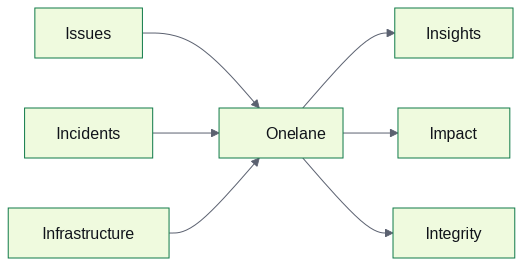
The name describes how ilane is designed: every IT problem travels one lane to one owner, wherever it started.
IT problems come from three places, the “i"s that come in:
- Issues: what people raise.
- Incidents: what monitors find.
- Infrastructure: what you run.
In most companies these end up in separate tools. In ilane they share one lane, so every problem gets one owner, one clock and one proof that it’s fixed. Three things come out the other end:
- Insights: what you learn.
- Impact: what it affects.
- Integrity: what you can prove.
What does ilane include: service desk, devices, servers, assets, AI governance and more?
ilane includes nine products that usually come from as many vendors, all built on one database.
| Product | What it covers |
|---|---|
| Service desk | One desk for IT, HR, Finance and Ops. Five ways in (portal, catalog, assistant, email, API), business-hour SLAs, approvals and onboarding in one form. |
| Devices & laptops | A light agent on Mac, Windows and Linux laptops runs 42 checks (encryption, firewall, patches, browser extensions and more) and can put a drifted laptop back on policy. |
| Servers & cloud | The same agent on servers in the cloud, on a VPS or on-prem, plus read-only connections to cloud accounts, Kubernetes and code repositories, and uptime checks. |
| Service discovery | A live map of what talks to what, tied to the business service each part keeps running. Every source stays off until you switch it on. |
| Private access | Internal apps without a VPN. People reach them only from their own laptop, signed in as themselves, while that laptop passes your checks. |
| Assets & licences | One register for hardware, software seats, servers, contracts and consumables. Includes handovers that employees confirm, and flags seats unused for 60+ days. |
| AI governance | Finds AI apps, coding agents, MCP servers and local models, sorts them as approved, tolerated or blocked, and monitors the AI agents your teams build. |
| Remote help | Start a screen-sharing session from a ticket. The person taps Allow every time. |
| Compliance & insights | Controls measured live and mapped to SOC 2, ISO 27001, ISO 42001 and NIST AI RMF, with evidence on demand. |
A few details matter in day-to-day use:
- Lost laptops: locking one takes one approval, but erasing it needs a second person.
- Servers: findings group into incidents with the likely cause first.
- Licences: renewals arrive as reminder tickets early enough to make a decision.
On the compliance side:
- SOC 2 is the AICPA’s report on a service organisation’s controls for security, availability, processing integrity, confidentiality or privacy.
- ISO/IEC 27001 sets the requirements for an information security management system.
- ISO/IEC 42001 is the international standard for AI management systems.
- The NIST AI Risk Management Framework is voluntary guidance for managing AI risk.
How is ilane different from running separate IT tools on one database?
With separate tools, data has to be synced between products. In ilane the ticket, the laptop, the person and the service are records in one database that point directly at each other.
ilane’s comparison with typical IT suites puts it this way: integrated is not the same as one. In practice, that has three effects:
- No sync jobs. There is nothing to sync between tools, so records can’t fall out of step.
- Context on arrival. Every ticket already knows the device, the device’s health, the person’s software seats and the services it affects.
- Proof, not promises. Because ilane sees the device, it can check the fix itself. A suite stitched together from separate parts can’t do that.
Some concrete examples:
- An offboarding ticket can’t close until every device is collected and every seat is reclaimed.
- An alert shows which business service it hurts.
- A request reaches the service desk with the employee’s laptop already attached.
What does “verified resolution” mean for how tickets close?
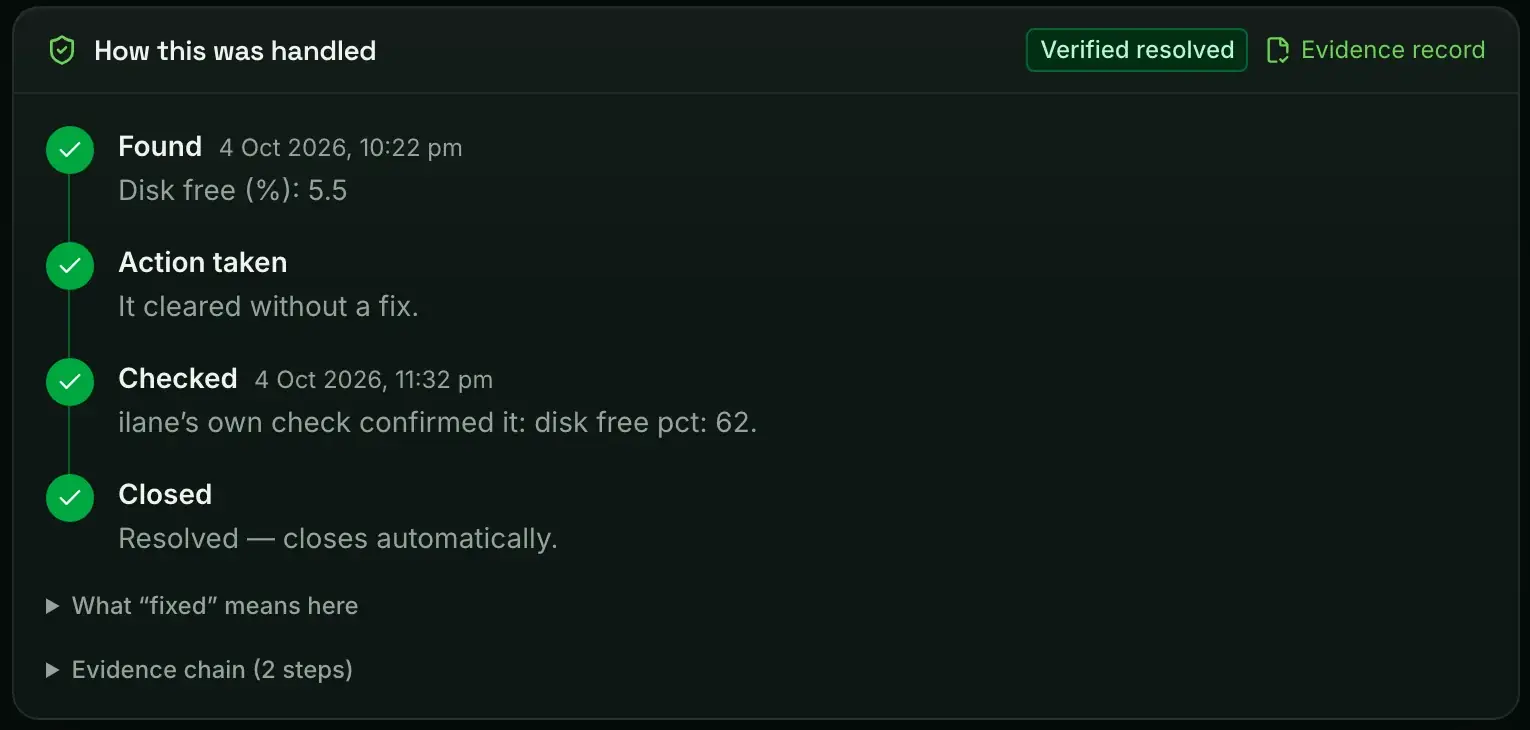
Verified resolution means a ticket closes only when ilane’s own next check confirms the problem is gone. A person clicking “resolved” doesn’t close it, and neither does a fix that reports success.
Every problem goes through five stages, described on how ilane works:
- Found. A check spots the problem first, such as a full disk, a crashed container, a laptop with its firewall off or a leaked secret, and ilane opens the ticket itself.
- Grouped and owned. Related alerts become one incident, with the likely cause called out and business impact worked out from the service map. This step is rule-based, so it doesn’t need AI.
- Fixed. Low-risk built-in fixes can run by themselves. Riskier ones wait for one click from IT. You decide which is which, one fix at a time.
- Checked. Each ticket raised by a check carries a “contract” stating what fixed means. ilane takes a new reading and compares it with that contract.
- Proven. The ticket closes with an evidence record: the contract, before-and-after readings, every step taken and the matching audit-log entries. If the check fails, the same ticket reopens.

The security model sets limits on what ilane can do:
- Every fix starts switched off.
- ilane runs only named, built-in fixes, never arbitrary shell commands.
- Each server keeps its own list of allowed fixes.
- Serious actions need two people to approve them.
- Every step goes into a tamper-evident audit log that is checked nightly and kept for at least a year.
- AI can explain and suggest, but rules decide what runs, and those rules work with AI switched off.
How do you run ilane: dedicated hosted, self-hosted or a pilot?
You can run ilane in three ways, and the platform is the same in each.
| Option | Who runs it | What’s included |
|---|---|---|
| Pilot | Set up with you in a call | One team, your own laptops and servers, the full platform; move to a full plan without starting over |
| Dedicated hosted | Calidad Infotech runs your own instance | Your data kept apart from other customers, updates and backups handled, sign-in with Google or Microsoft, export everything at any time |
| Self-hosted | You, on your own server | Docker Compose setup in an afternoon, nightly database backups built in; nothing leaves your network unless you connect it |
Self-hosting reflects one of the rules the company says it builds by: your data, your box. You can also bring your own AI key, or switch AI off entirely.
How much does ilane cost, and what counts as a device?
ilane costs $1 per device per month, with every feature and add-on included. This is an introductory price for early customers.
According to the pricing page:
- What counts as a device: any laptop, desktop or server running the ilane agent.
- No modules or tiers: there are no modules to buy and no seat tiers.
- Example: 200 laptops and 20 servers come to $220 a month.
- Included add-ons: Private Access, remote help, recorded browser shells to servers, AI agent monitoring, hardware health and employee self-service. Each company chooses which to switch on.
- AI assistant: no extra charge from ilane. It uses your own AI key, so you pay your AI provider directly for what you use.
The price is the same whether ilane is dedicated hosted or self-hosted.
How do you get started with ilane on your own laptops and servers?
Most teams start with a demo, then run a pilot with one team on their own devices.
- Book a 30-minute demo. The ilane team asks what you run today, then shows ilane live on a demo company or one of your laptops. Together you fix one problem and watch ilane check that it’s really fixed.
- Start a pilot. Choose one team and a few laptops and servers. Setup happens with you in a call, using your real tickets and devices.
- Install the agent. There are installers for Mac, Windows and Linux, plus Docker and Kubernetes for servers. The agent updates itself, so new checks arrive without anyone touching a laptop.
- Tell your people what the agent checks. The full list is published to every employee inside ilane, and you can switch off whole areas of collection.
- Connect services and switch on fixes. Integrations are read-only by default, and fixes start off. Turn on the ones you trust, one at a time.
- Expand. Moving from the pilot to full use keeps everything you set up.
Conclusion
ilane combines service desk, devices, servers, assets, AI governance, private access, remote help and compliance evidence in one product built on one database. Every problem gets one owner, and a ticket closes only when ilane’s own check proves the fix. It costs $1 per device per month at the introductory price, with everything included, either hosted for you or on your own server.
The quickest way to judge whether it fits is to see it working on one of your own laptops. Book a demo →
Frequently asked questions
Does ilane need AI to work?
No. The rules that decide what runs work with AI switched off, and alerts are grouped into incidents by rules rather than AI. The AI assistant uses your own AI key, or you can switch AI off completely.
Will employees notice the ilane agent, and what does it collect?
The agent is designed to be light: no slowdowns, no pop-ups and nothing for people to manage. The full list of checks is published to every employee inside ilane, and each company can switch whole areas of collection off. The device agent privacy page lists exactly what it reads and what it never collects.
Can ilane replace our VPN?
For internal apps, yes. That’s the job of ilane Private Access. People open internal apps only from their own laptop, signed in as themselves, while that laptop passes your checks, and nothing joins your network. Private Access is included in the per-device price, and you can move apps over one at a time.
Can IT see an employee’s screen without them knowing?
Not on laptops. Every remote help session needs the person to tap Allow on their own screen, and the session is logged on the ticket. Unattended access exists only for servers whose owner has allowed it.
Can we get our data out of ilane?
Yes. On the dedicated hosted plan you can export everything at any time, and with self-hosting the database sits on your own server. Under ilane’s terms, you own the data you and your users put into the product.