SOC 2 compliance evidence is the dated, system-generated record that shows a control was designed properly and, for a Type II report, actually worked throughout the audit period. Auditors ask for complete lists of events, such as every leaver, change and alert, and then test samples from them. Records from the systems that ran the control hold up best. Screenshots taken the week before the audit hold up worst.
What counts as SOC 2 compliance evidence, and what do auditors look for in it?
Evidence is any record that shows a control operated as you described it. Auditors check four things: it’s dated, it comes from a known source, it’s complete, and it covers the whole period.
SOC 2 is measured against the AICPA Trust Services Criteria. Security is required, and the other four categories are optional. The Security criteria themselves are written broadly. For example, CC6.1 asks you to implement “logical access security software, infrastructure, and architectures” over protected information. The criteria never say how. So your controls, and the evidence behind them, are what turn those broad statements into something an auditor can test.
When an auditor reviews a piece of evidence, they usually ask:
- When? A timestamp inside the audit period.
- From where? The system that ran the control, not a copy someone typed up.
- Everything? A complete list of events to sample from.
- Who? A named owner or approver.
- Did it work? Proof of the result, not just proof that someone tried.
How does evidence differ between a SOC 2 Type I and a Type II audit?
A Type I checks whether your controls are well designed on one date. A Type II checks that they worked over a whole period, so you need evidence from every month of it.
Audit firm KirkPatrickPrice describes a Type I as a point-in-time assessment and a Type II as covering a minimum period of six months. Many Type II reports cover six to 12 months.
| Type I | Type II | |
|---|---|---|
| Question answered | Is the control designed well? | Did it work all period? |
| Typical evidence | Policies, configurations, one current snapshot | Complete event lists, then samples across the period |
| Example: laptop encryption | Today’s encryption report | Encryption status, failures and fix dates across the period |
| Where it usually fails | Missing or vague policy | Gaps in the middle months |
For a Type II, the hard part is completeness. As CPA firm Keiter explains, auditors need a complete population before they sample. If your period runs to 31 December and your export stops at 31 October, a whole quarter is missing.
What IT evidence supports each common control area: assets, endpoints, access, change, incidents and vendors?
Each area needs one record of the current state and one record of what happened when something went wrong. Auditors want both.
| Control area | Related criteria | Evidence auditors typically ask for | What makes it strong |
|---|---|---|---|
| Asset inventory | CC6.1 (inventory point of focus) | A register of laptops, servers and software with owners | Updated by agents and handovers, not by hand |
| Endpoint security | CC6.1, CC6.8 | Encryption, firewall, screen lock, anti-malware status per device | Checked continuously; failures have tickets and fix dates |
| Access and offboarding | CC6.1–CC6.3 | Approvals for new access, leaver lists, removal timestamps, access reviews | Removal time can be compared with the termination date |
| Change management | CC8.1 | Change tickets, approvals, testing notes, pull requests | Approval recorded before the change was made |
| Vulnerabilities and incidents | CC7.1, CC7.2 | Scan results, patch status, alert-to-incident records | Each finding has an owner and a confirmed fix |
| Vendors | CC9.2 | Vendor list, reviews, contracts with notice dates | Reviewed on a schedule, linked to who uses each vendor |
For the laptop side of this table, including which device checks map to which controls, see our guide to collecting SOC 2 and ISO 27001 laptop evidence.
What evidence do auditors expect from servers, cloud accounts and code repositories?
Expect the same questions you get for laptops, asked about your production systems: is it patched, is it exposed, who changed it, and who approved that?
CC7.1 expects you to detect configuration changes that introduce new vulnerabilities and to watch for newly discovered ones. In practice, auditors look for:
- Servers and containers: patch status, open ports, and backup status over time.
- Cloud accounts: posture findings such as a security group open to the world, plus expiring certificates, each with a ticket and a resolution date.
- Code repositories: two-factor authentication for every member, branch protection on production branches, and how a leaked secret was handled.
- Changes: under CC8.1, a link from each production change back to an approval.
Production findings often live in a cloud console, a repo settings page or a monitoring tool, and none of these connects to the service desk. The finding gets fixed, but the record of who owned it and when it closed is spread across three tabs. Auditors notice that gap.
How do you prove access was removed on time when someone leaves?
Compare two timestamps for every leaver in the period: the termination date from HR, and the moment access was removed from each system. Then show that the gap fits your policy.
CC6.2 requires that “user system credentials are removed when user access is no longer authorized.” CPA firm Linford & Co. gives a typical test: the control says access is removed within one business day, and the auditor starts by getting the full list of employees terminated during the period. One compliance knowledge base gives a three-business-day example. Either way, set your own timeframe in policy and then meet it.
For each sampled leaver, have ready:
- The termination date from your HR system.
- The offboarding ticket, opened on or before the last day.
- Removal timestamps for identity, email, SaaS apps, cloud accounts and code repos.
- Proof that the laptop was returned and that licences were reclaimed.
- The next quarterly access review, showing the person no longer appears.
The usual failure is a ticket marked done while one app still has an active account. Our IT offboarding checklist covers this step by step.
Why do screenshots and spreadsheets fail as evidence, and what makes evidence trustworthy?
Screenshots show one moment. Spreadsheets can be edited by anyone. Neither proves that a control worked all period, or that the record hasn’t changed since.
Common problems:
- No completeness. A screenshot of 40 encrypted laptops says nothing about the 41st.
- No history. A spreadsheet shows today’s owners, not who had the laptop in March.
- No proof of the fix. “Closed” in most help desks means someone clicked a button, not that the problem went away.
- Editable. If a record can be quietly changed, the auditor has to take your word for it.
Trustworthy evidence comes from the system that ran the control. It keeps before-and-after readings, names the person who approved each step, and sits in a log that can’t be changed without anyone noticing.
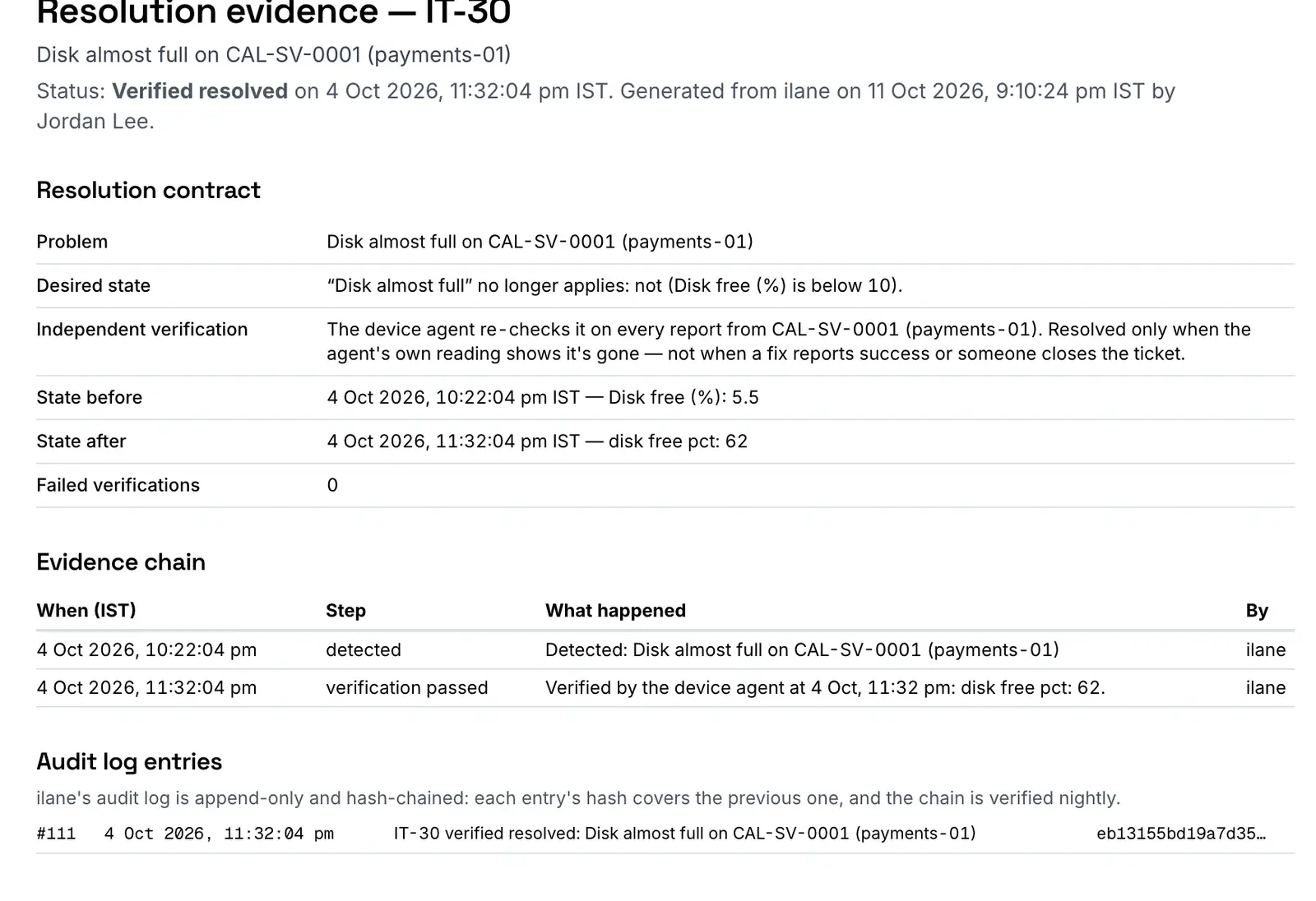
That’s how ilane handles fixes. Every ticket raised by a check carries a written definition of what “fixed” means. The ticket closes only when ilane’s own next reading confirms the fix. If it doesn’t, the same ticket reopens. The evidence record keeps that definition, the before and after readings, every step, and who approved it. Each entry in the audit log carries a fingerprint of the previous entry, and a nightly check confirms the chain is intact. Entries are kept for at least a year and can’t be updated or deleted through the app or the database.
How do you collect SOC 2 evidence continuously instead of scrambling before the audit?
Have checks run all the time. Turn every failure into an owned ticket, and keep the confirmed fix as the evidence. The audit file then builds itself as part of normal IT work.
A working loop looks like this:
- Check continuously. An agent on laptops and servers, plus read-only connections to cloud accounts and code repos.
- Open one ticket per finding, with one owner and a deadline.
- Fix it. Safe fixes can run automatically; riskier ones wait for a person to approve.
- Check again. The next reading decides whether the fix worked.
- Keep the record in a log that shows any later change.

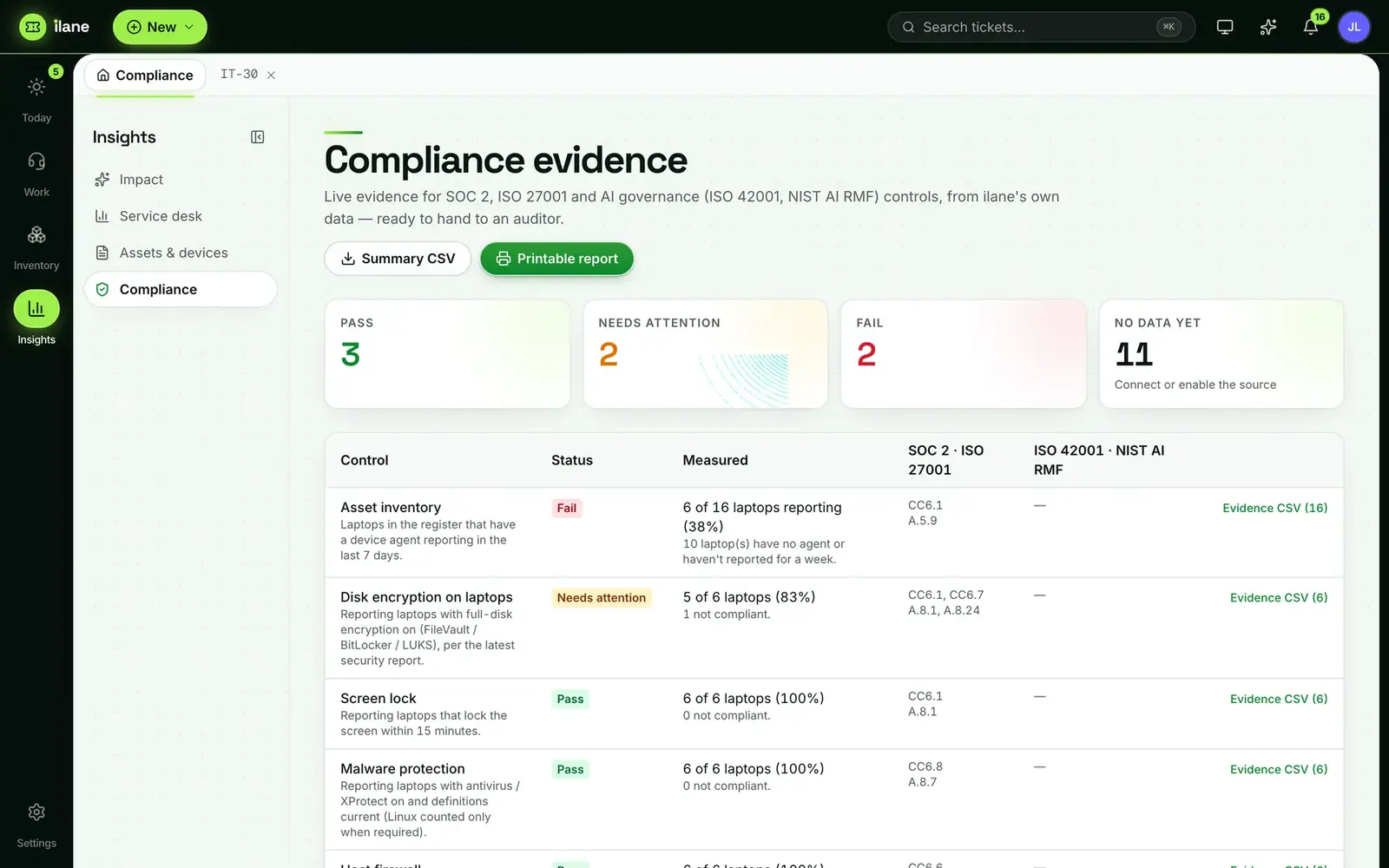
Because each step creates its own record, the list of events auditors sample from already exists. Scheduled reviews work the same way. In ilane, quarterly access reviews arrive as tickets with the list already filled in, and the compliance view calculates each SOC 2 control from live data: endpoint security, logical access, change management and vulnerability management. Evidence CSVs can be exported on demand.
What should you have ready before your auditor’s first evidence request?
Have a complete export for each control, covering the whole period, and know who owns each one. Most first requests are lists, not screenshots.
Pre-audit checklist:
- Agreed audit period and Trust Services Criteria in scope
- Current policies with approval dates (access, change, vendor, incident)
- Asset register with owners, including servers and cloud resources
- Endpoint posture history: encryption, firewall, screen lock, patches
- Lists of joiners and leavers, with access-removal timestamps
- Completed quarterly access reviews
- Change tickets or pull requests with approvals, for the full period
- Vulnerability and incident tickets, with owners and resolution dates
- Code repo settings: 2FA coverage and branch protection
- Vendor list with review dates and contract notice dates
- A note on how each export was generated, so the auditor can check it’s complete
Conclusion
SOC 2 evidence holds up when it comes from the system that ran the control, covers the whole period, and shows that each fix worked. If you collect it continuously, the audit becomes an export instead of a project.
See how ilane builds SOC 2 evidence from your own devices and tickets. Book a demo →
Frequently asked questions
How long does a SOC 2 Type II audit period need to be?
It depends on your auditor. KirkPatrickPrice, for example, describes a minimum of six months, and many reports cover six to 12 months. A shorter first period gets you a report sooner, but you still need evidence for every month of it. Agree the period with your auditor before you start collecting.
Can I use screenshots as SOC 2 evidence at all?
Yes, for some things, such as a configuration setting on a specific date, especially in a Type I. For a Type II, a screenshot can’t show that a control worked all period or that the list is complete. System exports with timestamps and a clear source are much stronger.
How quickly must access be removed after someone leaves?
SOC 2 doesn’t set a fixed deadline. You set one in your policy, often one to three business days, and the auditor tests against it. Missing your own deadline for sampled leavers is one of the most common access findings.
Does SOC 2 evidence also help with ISO 27001?
Much of it overlaps: asset inventory, access reviews, endpoint security and vulnerability management appear in both. If your controls are measured from live data and mapped to both frameworks, one set of records can support both audits. Check the mapping with each auditor.
What is population completeness in a SOC 2 audit?
Before testing, auditors need the full list of events in the period, such as every leaver or every production change, so they can pick samples from it. They also want to know how the list was produced, so they can trust it isn’t missing anything. Exports that cover only part of the period are a common reason for delays and findings.