To escrow FileVault and BitLocker recovery keys, have your device management service collect each key when encryption turns on. Macs send their personal recovery key to your MDM. Windows laptops back up their recovery password to Microsoft Entra ID or Active Directory. Before you rely on it, confirm that every encrypted laptop has a key you can retrieve.
What is recovery key escrow, and why does IT need it before turning on encryption?
Recovery key escrow means a copy of each laptop’s disk recovery key is stored somewhere IT controls. That way a forgotten password or a failed startup check doesn’t mean lost data.
Once full-disk encryption is on, the recovery key may be the only way back into a laptop when normal unlock fails. If that key only ever lived on a sticky note or in the user’s head, the data is gone. So the order matters:
- Set up where keys will go.
- Make encryption depend on that step succeeding.
- Only then switch encryption on across the fleet.
Microsoft warns that backing up the BitLocker recovery password to Entra ID or AD DS may not happen automatically. You have to configure it. Apple’s tools work the same way: escrow is a setting you choose.
Where can FileVault recovery keys be escrowed on company Macs?
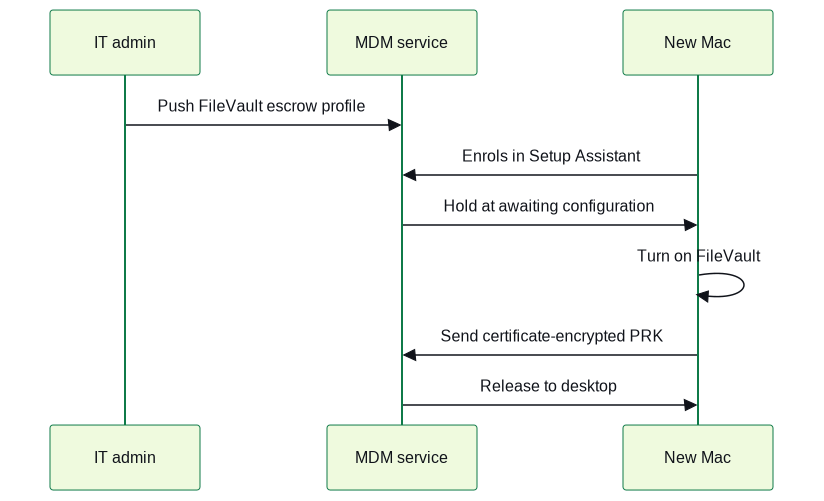
On company Macs, the supported place is your device management (MDM) service. Apple lets the MDM escrow each Mac’s personal recovery key (PRK), either during Setup Assistant or after enrolment.
According to Apple’s deployment guide, you can:
- Enforce FileVault in Setup Assistant. The MDM holds the Mac in an “awaiting configuration” state. It lets the Mac continue only after FileVault is on and, if you require it, the recovery key has been escrowed.
- Enable FileVault after enrolment. The settings cover how many times a user can defer, whether to prompt at logout, whether to show the key to the user, and which certificate encrypts the key before it is sent to the MDM.
On macOS 26.4 or later, FileVault turns on during Setup Assistant by default. Apple still suggests the management option, so the key is escrowed and users can’t turn FileVault off later.
Institutional recovery keys (IRKs) are the older approach. Apple’s platform security guide says IRKs give no practical benefit on Apple silicon Macs. They can’t open recoveryOS, and because target disk mode is gone, the volume can’t be unlocked from another Mac. For a modern fleet, plan around escrowed PRKs. Showing the key to the user is not escrow. For a refresher on enrolment, see what Mac MDM is and how it works.
Where can BitLocker recovery keys be stored for Windows laptops?
BitLocker keys go to Microsoft Entra ID for Entra-joined and hybrid-joined laptops, and to Active Directory (AD DS) for domain-joined ones. Intune shows the keys held in Entra ID.
Microsoft’s recovery overview lists where you can retrieve keys stored in Entra ID: the Entra admin center, the Intune admin center, PowerShell or Microsoft Graph. Points to know:
- Make backup a precondition. Group policy has settings such as “Do not enable BitLocker until recovery information is stored to AD DS”, as described in Configure BitLocker.
- The AD DS key package isn’t saved by default. If you want it alongside the recovery password, turn on “Backup recovery password and key package”.
- Entra ID has a limit. Intune’s documentation says Entra ID holds at most 200 recovery keys per device. Once a device hits that limit, silent encryption fails because the key backup fails first.
| FileVault (Mac) | BitLocker (Windows) | |
|---|---|---|
| Key to escrow | Personal recovery key | Numeric recovery password |
| Where it goes | Your MDM service | Entra ID or AD DS |
| Block encryption until escrowed | Setup Assistant awaiting configuration | “Do not enable until stored” policy |
| Rotation | MDM rotate-key command | Rotation upon use |
| Legacy option to avoid | Institutional recovery key | Unmanaged printed or saved keys |
How do you enforce encryption across a mixed fleet without losing a key?
Set up escrow first on both platforms, test a real recovery, roll out in waves, and keep checking encryption state after rollout.
- Configure escrow first. That means the FileVault escrow payload with its certificate on Macs, and required Entra ID or AD DS backup on Windows.
- Pilot on IT’s own laptops. Recover one Mac and one Windows laptop with the escrowed key before anyone else is enrolled.
- Roll out by team. Watch the encryption and escrow reports after each wave.
- Keep checking. Encryption can change after rollout: re-imaged machines, new hires, laptops that missed a policy.
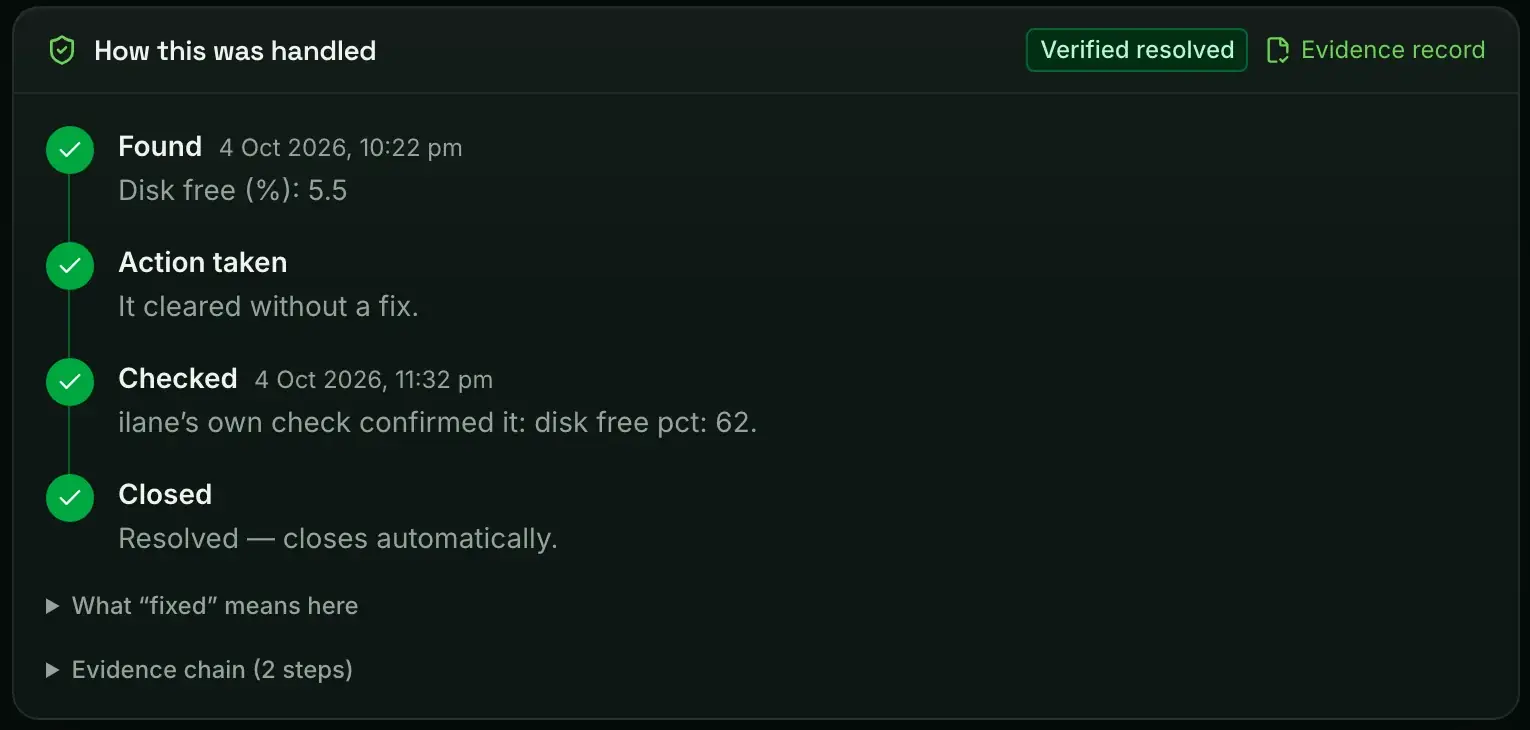
For step 4, ilane’s device agent runs on Mac, Windows and Linux laptops and checks disk encryption all day. When a laptop drifts, ilane opens a ticket with the device and the person attached. It has a “Turn on encryption” fix that IT can choose to switch on. The ticket closes only when the next report from that laptop is clean. Recovery keys stay with your MDM or directory, and ilane checks that the disk is actually encrypted.
Before you switch on any automatic encryption fix, from any tool, confirm where that laptop’s new recovery key will be escrowed.
How do you check that every encrypted laptop has a key you can actually retrieve?
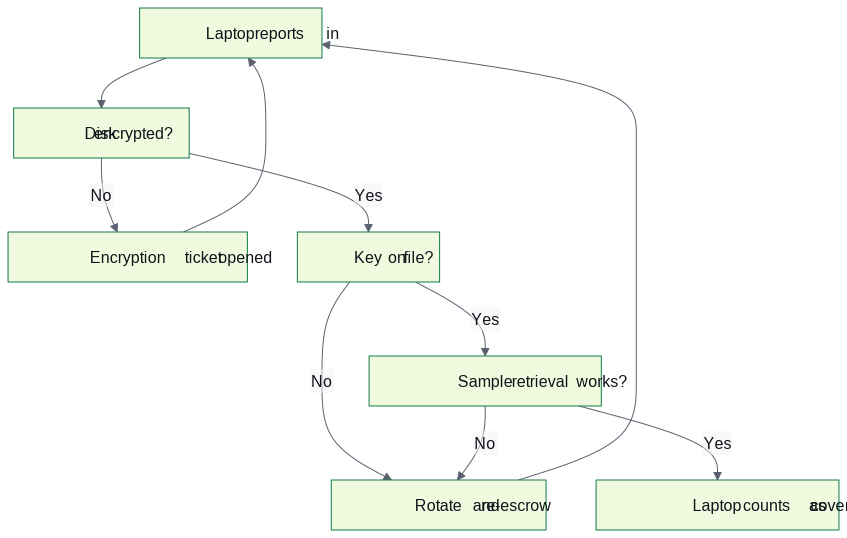
Compare two lists: laptops that report as encrypted, and laptops with a key on file. Then do a test retrieval on a sample.
- Windows: in Intune, a device with no key in Entra ID shows “No BitLocker key found for this device”. Every encrypted laptop showing that message is a lockout waiting to happen.
- Mac: check your MDM’s inventory for an escrowed PRK on every Mac that reports FileVault on. Macs encrypted before enrolment, or by the user, often have no escrowed key. Use your MDM’s rotate FileVault key command to create a new key and escrow it.
- Sample: each quarter, retrieve keys for a few devices on each platform and confirm they match the drive.
Every gap should become a ticket with an owner. Close it only when a fresh reading confirms the fix, not when someone clicks resolve.
Who should be allowed to view a recovery key, and how should access be logged?
Only a small, named support role should view keys. Each request should be tied to a ticket, and every view should be logged by the system holding the key.
On Windows, viewing a key needs the microsoft.directory/bitlockerKeys/key/read permission. According to Intune’s documentation, it comes with the Cloud Device Administrator, Helpdesk Administrator and Global Administrator roles. Selecting “Show Recovery Key” writes an audit entry under KeyManagement. By default, users can retrieve keys for their own devices from Entra ID unless you restrict it.
Rotate a key after anyone uses it. The BitLocker CSP turns rotation upon use on by default for Entra-joined devices but not hybrid-joined ones. It takes effect only when recovery password backup is set to required. On Macs, send the rotate command once a PRK has been read out.
Good practice:
- Check the caller’s identity before reading a key over the phone.
- Log the reason in a ticket, next to the directory’s own audit entry.
- Review who holds key-read roles every quarter.
What happens to recovery keys when a laptop is lost, reassigned or offboarded?
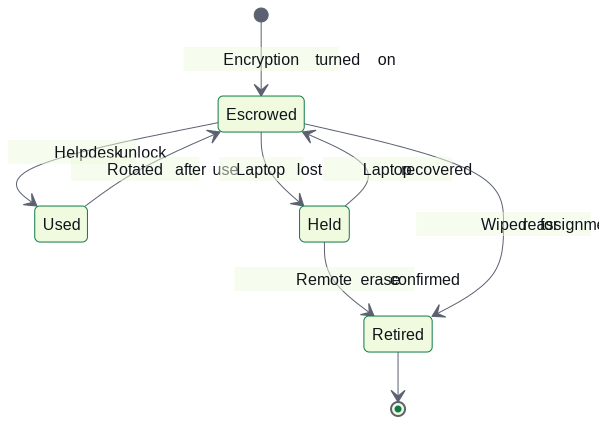
The key should follow the laptop. Rotate it after use, keep it while the device might come back, and retire it only once the disk has been erased.
- Lost: lock the laptop first. Keep the key in case the device turns up. In ilane, locking takes one approval and erasing needs a second person, so one admin can’t wipe a laptop alone.
- Reassigned: wipe and re-enrol, or at least rotate the key, so the previous user’s knowledge doesn’t carry over.
- Offboarded: get the hardware back and record it. ilane’s asset register records handovers that people accept, and offboarding collects the kit.
- Re-imaged often: clean up old Entra ID entries before a device reaches the 200-key limit.
What disk encryption evidence do SOC 2 and ISO 27001 auditors expect?
Auditors want to see four things: a policy requiring encryption, proof it was on across the fleet for the whole period, restricted access to keys, and records that exceptions were fixed.
For SOC 2, the AICPA Trust Services Criteria points of focus under CC6.1 cover encrypting data and protecting encryption keys. CC6.7 covers encryption for removable media. ISO/IEC 27001:2022 Annex A control 8.24 requires rules for using cryptography, including key management. Control 8.1 covers user endpoint devices.
A solid evidence pack:
- An encryption and key management policy, with an owner and a review date
- MDM and BitLocker policy exports showing that escrow is required
- Fleet encryption reports with dates covering the audit period, which matters for a Type II report
- An escrow report with no “no key found” gaps, or tickets for each gap
- The list of key-read roles, plus quarterly access review records
- Key-view audit logs, each tied to a ticket
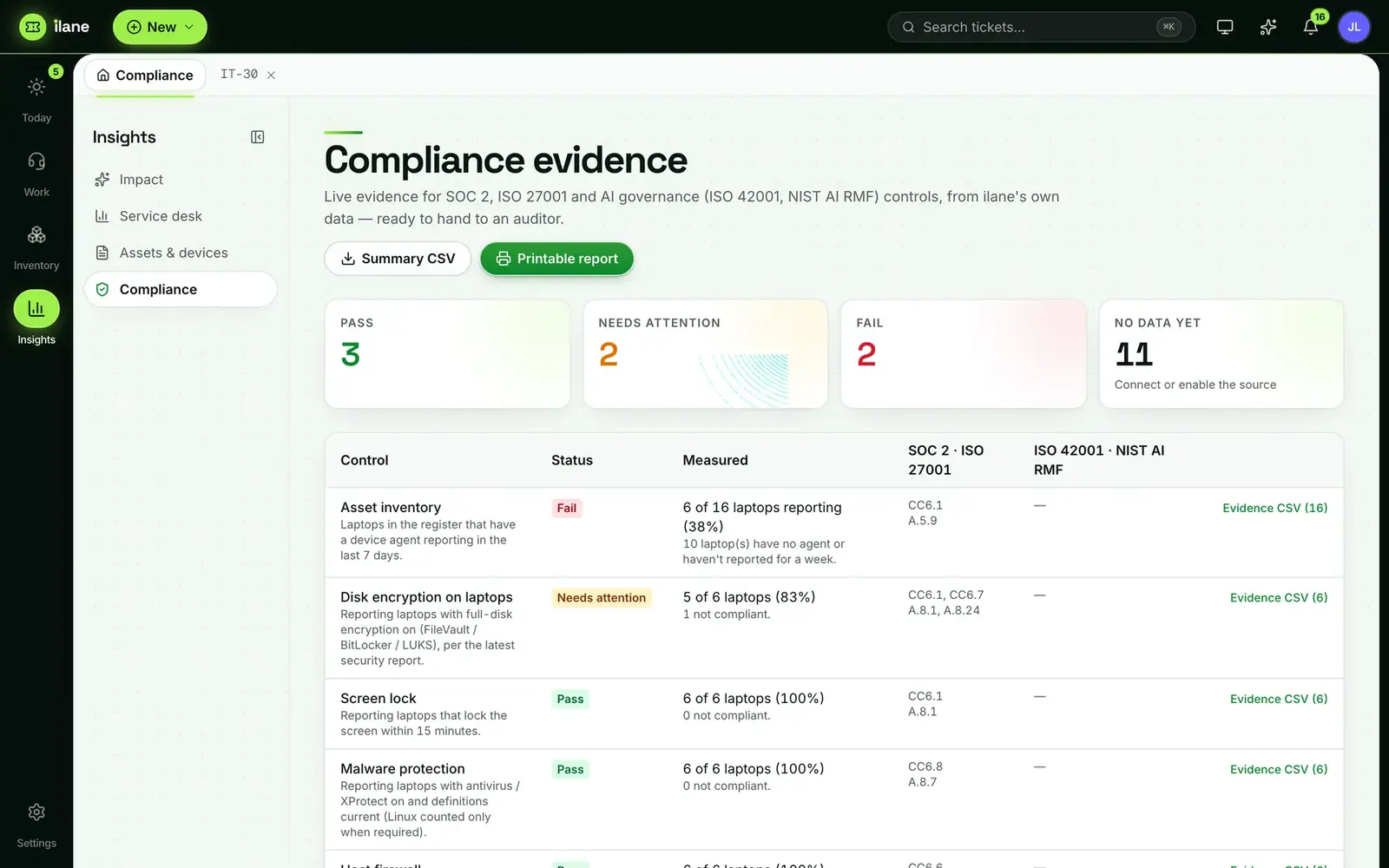
ilane’s compliance view measures device encryption continuously from live device data. It maps that to SOC 2 endpoint security and the ISO 27001 endpoint devices control, with the records behind each number. More detail on what auditors ask for is in the SOC 2 evidence guide.
Conclusion
Set up escrow before you encrypt anything. On Macs, escrow the PRK to your MDM. On Windows, require backup to Entra ID or AD DS. Then keep comparing encrypted devices against stored keys, limit and log who can read a key, and rotate after every use. That keeps people out of lockouts and gives auditors evidence you didn’t have to assemble the week before.
Want to see encryption drift caught, fixed and verified on a real laptop? Book a demo.
Frequently asked questions
Can users store their own FileVault or BitLocker recovery key instead?
They can, but it isn’t escrow, and IT can’t help them if they lose it. Apple’s MDM settings let you decide whether the user sees the key. On Windows, users can retrieve keys for their own Entra-joined devices by default unless you restrict it. Treat any copy the user holds as extra, never as the only copy.
Do I still need an institutional recovery key on Apple silicon Macs?
No. Apple’s platform security guide says IRKs give no practical benefit on Apple silicon because they can’t open recoveryOS and target disk mode isn’t supported. Escrow each Mac’s personal recovery key to your MDM instead.
What should I do with a laptop that’s encrypted but has no escrowed key?
Treat it as urgent. On a Mac, use your MDM’s rotate FileVault key command to create a new key and escrow it. On Windows, fix the backup policy and back the key up to Entra ID or AD DS again. Close the ticket only once the key appears in the console.
How often should recovery keys be rotated?
At minimum, rotate after every use and whenever a laptop changes hands. Windows can rotate the numeric recovery password automatically on use for Entra-joined devices, as long as backup is set to required. On Macs, send the MDM rotate command after a key has been read out.
Does ilane store FileVault or BitLocker recovery keys?
ilane’s pages don’t describe storing recovery keys, so keep escrow in your Apple MDM and in Entra ID or AD DS. What ilane does is check disk encryption on every laptop, open a ticket when one drifts, offer a “Turn on encryption” fix you can switch on, and close the ticket only when the next check confirms it.